A file can move through several security products before its processing is complete. It may enter through a MetaDefender™ Kiosk deployment, pass through MetaDefender™ MFT and be processed by MetaDefender™ Core.
When a security team investigates that file, knowing if it was allowed or blocked answers only part of the question. They still need the complete story:
- Where did the file enter the environment?
- Which OPSWAT products handled it?
- What happened at each stage?
- Did the file itself change along the way?
Until now, answering those questions meant pulling records from each product separately.
File Audit Trail in My OPSWAT™ Central Management gives security teams a connected view of a file’s path across their OPSWAT deployment.
Follow Every File’s Journey in One Place
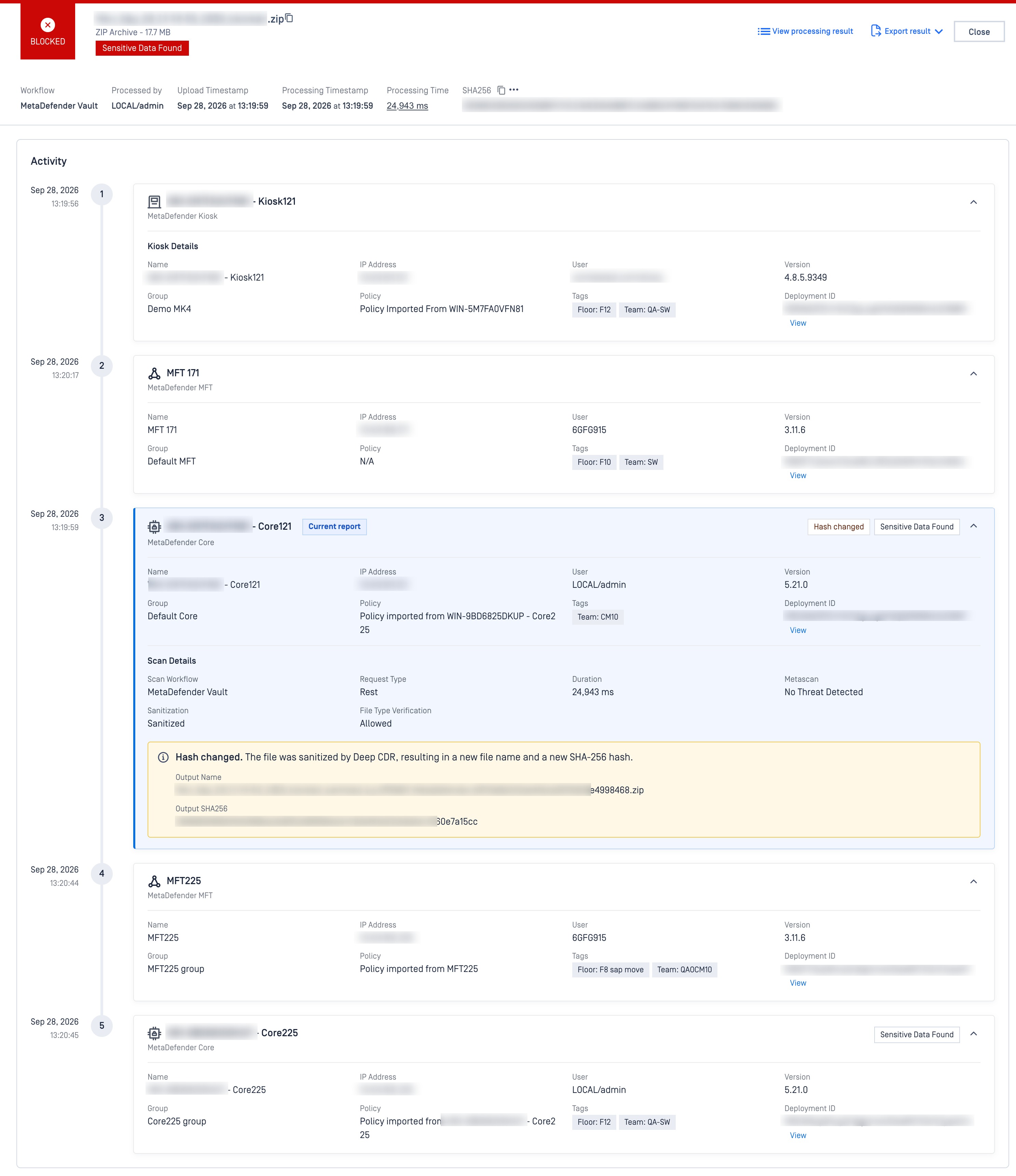
File Audit Trail is designed to provide end-to-end traceability for files moving through supported OPSWAT workflows. Instead of one isolated result from a single product, administrators can follow the broader processing story behind that file.
For any file, you can see:
- Where it entered, such as MetaDefender Kiosk, MetaDefender Endpoint, or MetaDefender Drive
- Each product that handled it next, in the order it happened, including transfer through MetaDefender Managed File Transfer and scanning by MetaDefender Core
- The scan outcome where the file was inspected, such as allowed or blocked
- The file's integrity status, flagged when sanitization changes its hash or name
- The full context at each step, including the instance name, user, version, policy, and timestamp
Instead of switching between consoles, your team reads the file’s path the way it actually happened.
The Workflows It Traces
File Audit Trail supports visibility across multiple workflows depending on your configuration, such as MetaDefender Kiosk → MetaDefender MFT → MetaDefender Core, or a longer flow like MetaDefender Endpoint → MetaDefender Core → MetaDefender MFT → MetaDefender Core
See Expected Transformations in Context
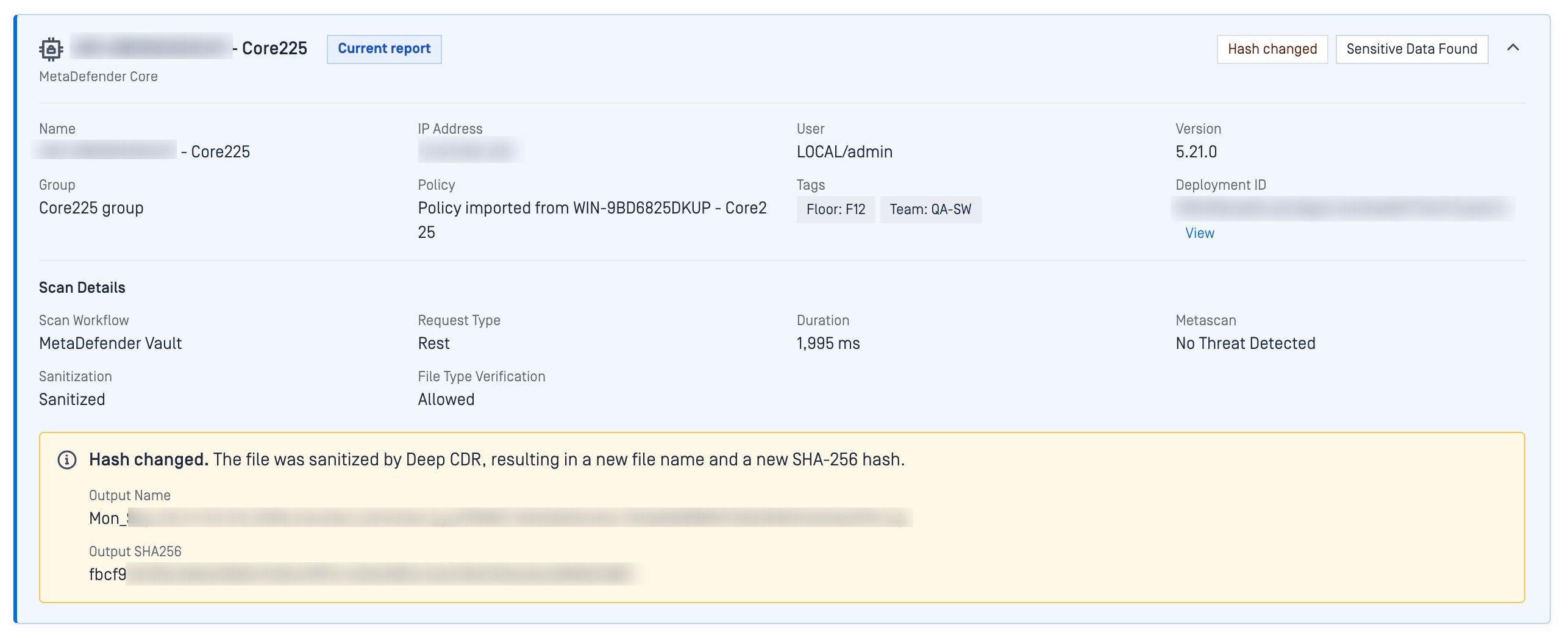
Some changes to a file are expected. For example, Deep CDR™ Technology may sanitize a file and create a safe version with a new name and SHA-256 hash.
File Audit Trail shows that transformation inside the file journey. The Expected hash changed indicator, and the output hash tell administrators that an approved security process rewrote the file, so the difference reads as expected rather than as an unexplained discrepancy.
See Where Time Was Spent: The Duration Timeline
Seeing the path answers where a file went. The Duration Timeline answers how long each stage took.
Every step appears as a bar showing how long that product spent handling the file, next to the total time for the whole journey. A slow or unusual stage stands out at a glance, so your team can spot a bottleneck without opening every record.

Why This Matters for Your Security Operations
Faster incident response
When a threat surfaces, the first job is reconstructing where the file has already been. Instead of manually tracing that path across products, you see the full journey at once: every product and instance that handled it, and the scan outcome where it was inspected.
Confident compliance and audit readiness
Regulatory frameworks increasingly require organizations to prove that files are scanned at every critical checkpoint. File Audit Trail gives you auditable, end-to-end evidence that your security policies were enforced across your OPSWAT deployment, without building custom reports.
Operational visibility you can trust
Security teams will ask: is this multi-product deployment running the way we designed it? File Audit Trail lets you check. You see the real path each file took and confirm it matches the workflow you intended, turning assumptions into evidence.
Cross-product intelligence & context
Most security tools show only what happened inside their own silo. File Audit Trail connects events across MetaDefender Core, MetaDefender Kiosk, MetaDefender Drive, MetaDefender Endpoint, and MetaDefender Managed File Transfer into a single story, giving you the cross-product context that separate logs cannot provide.
Ready to Strengthen Your Security Operations?
My OPSWAT™ Central Management is the central management and control layer for OPSWAT solutions, giving administrators one place to see, operate, and govern deployments across distributed IT and OT environments.
File Audit Trail extends that visibility down to the individual file. Your team stops chasing a file across consoles and reads its whole journey in one view, in the order it happened.
Chat to an OPSWAT expert or visit the My OPSWAT™ Central Management solution page to learn more.