Key takeaway
MetaDefender Core and MetaDefender Cloud run on the same OPSWAT file security technology, just deployed differently; one inside your own infrastructure, the other as a managed SaaS service. The right choice depends on your compliance obligations, scaling needs, and bandwidth for infrastructure management, not on which product is "better."
Gartner projects that worldwide end-user spending on public cloud services will exceed $1 trillion in 2027, while cloud computing is expected to become a business necessity for most organizations by 2028. Scalability and agility are usually the reasons why.
But when that logic gets applied to security specifically, plenty of teams are hesitant to migrate. Handing file security to someone else's infrastructure can either feel like handing over governance and control or opening new attack vectors. That hesitation is exactly why the case for cloud file security needs to be made on its own terms, not assumed just because everything else is moving to the cloud.
This article compares MetaDefender™ Core and MetaDefender™ Cloud so you can decide which one fits your organization.
What's the Difference Between MetaDefender Core and MetaDefender Cloud?
MetaDefender Core is an on-premises file security platform deployed and managed entirely inside your own infrastructure. For organizations already running a SaaS-first stack, SaaS file security through MetaDefender Cloud extends that same model; same file security technology delivered as a managed SaaS service, hosted and maintained by OPSWAT.
Consideration | MetaDefender Core | MetaDefender Cloud |
Deployment | Customer-managed | SaaS |
Infrastructure management | You | OPSWAT |
Infrastructure control | Full, direct control | Managed service |
Scaling | You plan it | Cloud-based, on demand |
Geographic reach | Wherever you deploy it | Multiple OPSWAT regions (US, Germany, Canada, Australia, Japan, India, Israel) |
API integration | Supported | Built for it |
Best for | Controlled, isolated, sovereignty-locked environments | SaaS, distributed, cloud-first operations |
Which Deployment Model Fits Your Operational Model?
The right deployment model comes down to how much direct control your organization needs over the infrastructure itself.
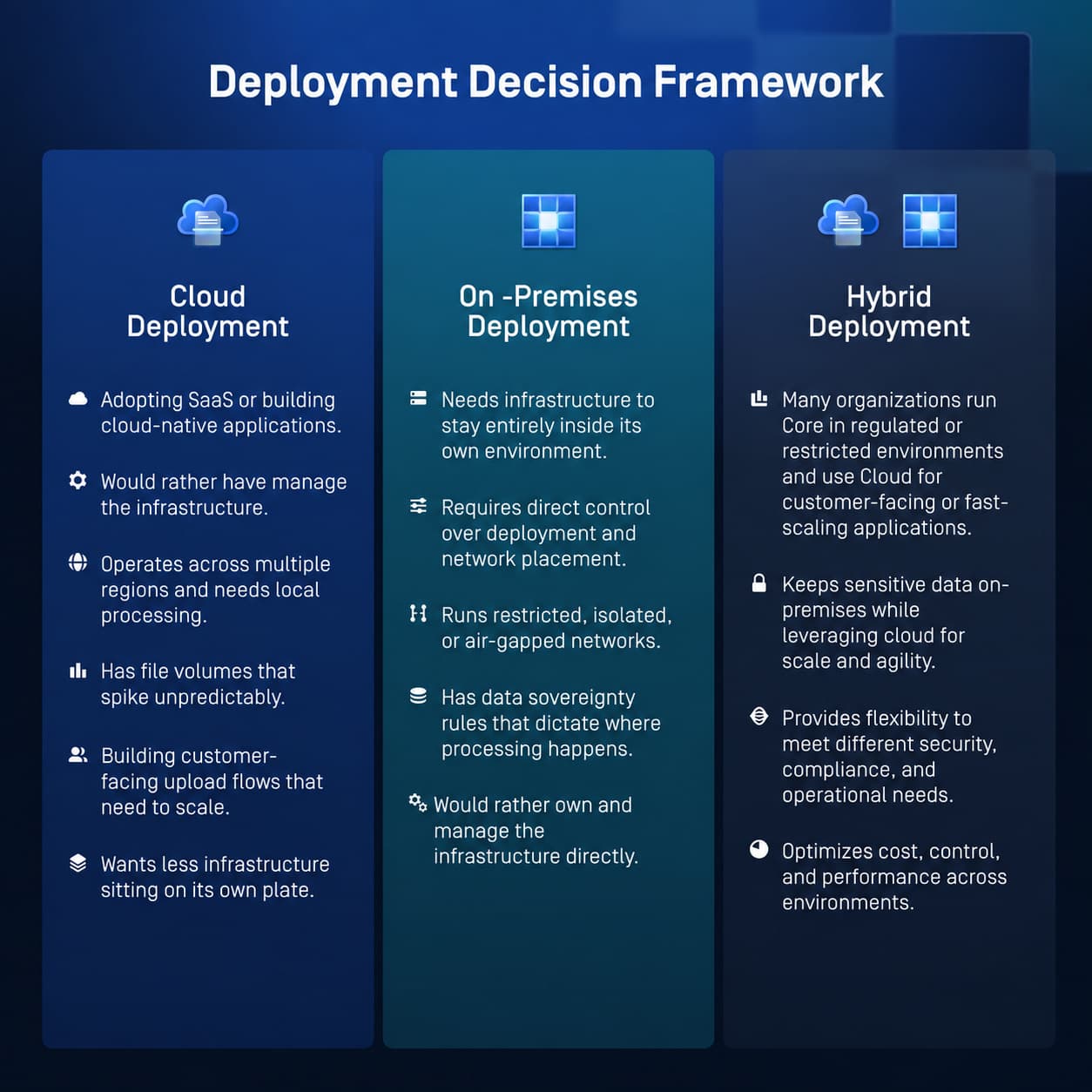
MetaDefender Core makes sense when you need:
- Infrastructure fully under your control; because some organizations can't depend on infrastructure they don't own.
- Deployment inside your own environment, including air-gapped or isolated networks; those networks can't reach an external service at all, by design.
- A network architecture dictated by strict internal policies; certain systems have to exist in specific locations to satisfy those policies.
- Owning the operational stack; some teams need that level of hands-on control to meet internal audit or operational requirements.
- To meet regulatory or sovereignty requirements that say "this stays on-prem, full stop.” In some industries and jurisdictions, that's a legal condition. Usually applies to critical infrastructure, or governmental entities, where this level of control is often non-negotiable.
MetaDefender Cloud, on the other hand, is suited for organizations that prefer to, and legally can, deploy file security as a managed service rather than operate it themselves. This means patching, updating, and infrastructure fall under OPSWAT's jurisdiction instead of yours.
- It runs across multiple regions, including US, Germany, Canada, Australia, Japan, India and Israel, so if you're operating globally, you have options for keeping data processing in-region and within specific borders.
- It fits naturally alongside a SaaS-first strategy. If your organization already relies on SaaS for most other operations, adding MetaDefender Cloud extends that same model.
How Does Infrastructure Management Change Between Core and Cloud?
With MetaDefender Core, your team owns infrastructure management: provisioning servers, applying updates, monitoring uptime, and planning capacity. With MetaDefender Cloud, OPSWAT manages the underlying SaaS infrastructure, maintenance, and service updates.
Does Infrastructure Management Affect Policies?
Your policies, integrations, workflows, incident response, data-protection decisions; all are still owned by your organization. In a nutshell, with MetaDefender Core, everything from policy decision to infrastructure management falls under your responsibility. With MetaDefender Cloud, OPSWAT maintains the infrastructure, but you’re the one who sets up the rules.
If your team would rather spend their workday designing better detection policies instead of patching and capacity planning, the shift to MetaDefender Cloud makes sense. If your team needs to keep everything in-house for compliance reasons, MetaDefender Core keeps that option open.
How Does MetaDefender Cloud Handle Scaling File-Processing Demand?
File-processing volume rarely stays flat, as you add customers, launch a new app, expand into a new region. You don’t want to find yourself in a situation where the upload portal that usually handles 1,000 files a day suddenly needs to handle 50,000.
With MetaDefender Core, scaling means your team forecasts and provisions ahead of demand. With MetaDefender Cloud, the consumption model scales with usage, so you're not buying infrastructure in advance of need.
This tends to matter most for:
- Fast-growing businesses with unpredictable trajectories
- Organizations with variable or spiky workloads
- Customer-facing upload portals with fluctuating traffic
- Distributed organizations adding regions or business units
- SaaS providers embedding file security into their own products
Does MetaDefender Cloud Use the Same Security Technology as MetaDefender Core?
Yes. Whether your organization deploys MetaDefender Core or MetaDefender Cloud, protection is built on the same technology stack.
- Metascan™ Multiscanning: No single anti-malware engine catches everything; each vendor's detection logic has blind spots the others don't share. Metascan runs files through multiple engines in parallel, so the odds of a threat slipping through every single one drop dramatically, and you get significantly higher detection rates than any standalone AV product can offer.
- Deep CDR™ Technology: Some threats mean malicious code embedded in an otherwise legitimate file, like a macro or an exploited PDF object. Deep CDR™ Technology sidesteps the detection problem entirely by deconstructing and rebuilding every file using only known-safe components. The file that reaches the user is clean by construction.
- Proactive DLP™: A clean file can still be a compliance incident if it contains info it shouldn’t, like a customer's SSN, a payment card number, protected health information. Proactive DLP scans file contents for sensitive data patterns and can redact or block them before they ever leave your environment, closing a leak point that malware scanning isn’t designed to catch.
- MetaDefender Aether: Combines Threat Reputation, Predictive AI, Adaptive Sandbox, Threat Scoring, and ML-powered Threat Hunting to detect known, unknown, and evasive malware. It centralizes results into a single verdict, helping SOC teams respond faster, reduce alert noise, and strengthen SIEM/SOAR, and threat-hunting workflows.
- Predictive ALIN AI: Unlike signature-based detection which only detects cataloged threats, Predictive ALIN AI is trained to recognize the behavior and structure of malicious files, so it predicts infection without the need to scan the file.
- AI Content Inspector: As AI-generated and AI-modified content becomes increasingly common across digital workflows, AI Content Inspector adds visibility into this emerging content category. It analyzes files, images, and documents to help identify AI-generated content, enabling organizations to better understand the origin and nature of the content moving through their environments.
Cloud also presents capabilities that only make sense in a shared infrastructure model:
- Custom security workflows: A hospital's file-intake requirements and a bank's aren't the same; forcing both through an identical workflow can either lead to over-securing or under-securing files. The custom workflows feature lets you configure exactly which technologies run, in what order, and under what conditions.
- private scanning and processing, so your file data isn't shared across tenants
- visibility into processed-object information to see exactly what happened to a file during inspection
- temporary access to sanitized files; clean outputs are retrievable without being stored indefinitely
- BYOK gives you control over the encryption keys used to protect your sanitized files, while the underlying infrastructure remains managed by OPSWAT.
What Should Enterprise and Distributed Organizations Consider Before Moving to the Cloud?
Adopting a SaaS security platform at enterprise scale still warrants additional considerations which don’t show up in a feature comparison table.
Centralized Governance across Teams and Business Units
When file security is deployed across departments, policies drift: one team strengthens its DLP rules after an incident, another never updates its scan configuration at all. Centralized governance means one policy framework applies everywhere, so a security decision made at the top trickles down wherever files enter the organization.
Alignment with Existing Organizational Structures
A security platform should work with the org structure; business unit, region, or product line. Role-based access or policy ownership needs to map to reporting lines and operational boundaries.
SIEM Integration
File-security events that stay siloed in a separate console are events your SOC never sees in context. File-borne threats should get correlated with the rest of your telemetry by feeding scan results, threat detections, and policy actions into your existing SIEM.
Regional Availability and Latency
To keep performance predictable as usage grows, orgs should process files in a region close to where they’re generated; otherwise, delays might appear, problem that compounds at scale, especially large enterprises.
Data Residency Rules
Some industries are legally bound by data residency laws, being required to keep certain data from crossing borders at all. Where a file is physically processed determines whether a deployment is compliant or not.
Consistent Controls
Security policies are strongest when they are consistently implemented and enforced across all business units, reducing gaps caused by outdated or uneven controls.
MetaDefender Cloud applies consistent file-security controls across multiple teams, applications, and regions, with processing available across US, Germany, Canada, Australia, Japan, India, and Israel. In practice, that consistency can be harder to achieve with on-prem infrastructure spread across many sites than with a single managed service enforcing the same rules everywhere.
On the compliance side, MetaDefender Cloud supports mandates like HIPAA, PCI DSS, and GDPR by identifying and controlling sensitive data across a wide range of file types before it leaves your environment. You can review MetaDefender Cloud’s compliance and certification here.
How Does API-Driven File Security Work?
API-driven file security works by scanning and sanitizing files at the moment they enter your systems, rather than as a separate step someone has to trigger.
MetaDefender Cloud's file scanning API lets you integrate malware scanning directly into your application. The file is scanned and sanitized when it reaches an application, a policy decision is applied, and the app keeps going. No one has to click anything for the file security API to trigger inspection.
In practice, that shows up in:
- Customer-facing upload portals, where every file a customer uploads needs to be checked before it touches your systems.
- SaaS applications, where file handling is often core to the product experience itself.
- Cloud storage workflows, catching files the moment they land in a bucket or drive, before agents or employees pick them up.
- Document-processing systems, where a scanned or submitted file feeds straight into a business process with no one reviewing it first.
- Collaboration platforms, where files move fast between people, teams, and outside partners.
If you're building a cloud-native product, this is the model you want. Security that happens inline, at the speed of your application, not security that happens when someone runs a check or at set time periods. Check out the latest API documentation on the technical page.
How Can Organizations Match Security Capacity to Actual Demand?
Organizations match capacity to demand by scaling cloud malware scanning resources up or down as usage changes, instead of provisioning a fixed maximum from day one.
What that buys you, in practice:
- cloud malware scanning capacity based on the resources you’re consuming.
- Clean separation between workloads, so one application's growth doesn't become another's reason for poor performance.
- Architecture that doesn't need a revamp every time you add a new use case.
- The ability to scale one workload without touching the others at all.
- Clear visibility into what process is consuming which resources.
File security usually isn't a standalone decision. It tends to be one part of a larger shift toward cloud-first infrastructure across the whole stack. Companies that move file security to MetaDefender Cloud, tend to make multiple changes in parallel. They:
- reduce the amount of infrastructure their team has to maintain directly.
- standardize consuming security as a service instead of running it themselves.
- simplify architecture and remove infrastructure that doesn't need to stay on-prem.
- support applications that are distributed across regions by design.
- move security operations toward automated, API-driven workflows.
- build and ship cloud-native applications faster.
If the rest of your stack is considering the shifts above, file security shouldn’t stay on-prem. Moving it to the Cloud is usually the logical step.
When MetaDefender Cloud Makes Sense, and When It Doesn't
Same Technology, Two Ways to Deploy It
This isn't a hard comparison between the two options, with the sole purpose of promoting one over the other. MetaDefender Core and MetaDefender Cloud run the same OPSWAT technologies, packaged for two different needs:
- MetaDefender Core for when you need the infrastructure in your own hands.
- MetaDefender Cloud for when you'd rather delegate infrastructure management and consume security through an API.
Assess your architecture, your compliance obligations, your growth trajectory, and your appetite for managing infrastructure, and the "which one" question mostly answers itself.
If it doesn't, that's what we're here for. Get in touch, and one of our experts will walk you through the decision based on your specific environment.
Frequently Asked Question: MetaDefender Core vs MetaDefender Cloud
What is the difference between MetaDefender Core and MetaDefender Cloud?
The core difference is deployment: MetaDefender Cloud is a managed SaaS service hosted by OPSWAT, while MetaDefender Core is deployed and operated entirely within your own infrastructure. Both run on the same underlying file-security technology stack, so the choice comes down to how much infrastructure control your organization needs, not which one offers stronger protection.
Is MetaDefender Cloud replacing MetaDefender Core?
No. MetaDefender Cloud is a different deployment model for organizations whose infrastructure needs have shifted toward SaaS and cloud-native operations. OPSWAT continues to support and develop MetaDefender Core for organizations that require on-premises or air-gapped deployment.
Should we move file scanning to the cloud?
Depends on your setup. If you're SaaS-first, multi-region, dealing with variable volume, or want API-driven integration, MetaDefender Cloud fits better. If you've got sovereignty rules or air-gapped networks, MetaDefender Core is likely your answer.
Is Cloud File Security suitable for enterprise use?
Yes. MetaDefender Cloud supports centralized governance, SIEM integration, multi-region availability, and consistent controls across teams and business units. Validate specific compliance needs against OPSWAT's documentation.
Can MetaDefender Cloud scan files upload to applications?
Yes. MetaDefender Cloud's API lets applications submit files for scanning at the point of upload, so a file is inspected and sanitized before it's accepted into the application or its storage. This works for customer-facing upload portals, SaaS applications, and cloud storage alike.
Does MetaDefender Cloud support Multiscanning and CDR?
Yes. MetaDefender Cloud provides the same Metascan™ Multiscanning and Deep CDR™ Technology technologies available in MetaDefender Core. Files are scanned across multiple anti-malware engines and sanitized through content disarm and reconstruction, regardless of which deployment model you use.
How do we scale file security in SaaS environments?
MetaDefender Cloud's consumption model scales with your application demand. Dedicated API pools also let you scale individual workloads independently.
How can file security be integrated through APIs?
MetaDefender Cloud exposes scanning, sanitization, and policy decisions through a REST API; submit a file, get results back, apply the decision, keep moving.
Works for upload portals, cloud storage, document systems, and CI/CD pipelines alike.
Can we use both MetaDefender Core and MetaDefender Cloud?
Absolutely. MetaDefender Core for locked-down, regulated environments, MetaDefender Cloud for customer-facing or fast-scaling applications.
Does MetaDefender Cloud use different security technology than MetaDefender Core?
No. It runs on the same OPSWAT technology stack (Metascan Multiscanning, Deep CDR™ Technology, Proactive DLP, Predictive AI) plus some SaaS-specific extras like private scanning and BYOK.
Why move file security to the cloud?
Organizations move file security to the cloud to scale protection alongside demand without provisioning matching infrastructure themselves, and to embed scanning directly into applications through APIs. It also tends to fit naturally for organizations already relying on SaaS across the rest of their stack.
When should an organization keep MetaDefender Core?
An organization should keep MetaDefender Core when it needs infrastructure to remain entirely within its own environment, such as air-gapped networks, strict data-sovereignty requirements, or regulatory obligations that don't allow processing outside its own systems. This tends to apply most to critical infrastructure, government entities, and other highly regulated environments where infrastructure control isn't optional.