Sending Logs, Alerts, and Telemetry Through a Data Diode

Find Out How
We utilize artificial intelligence for site translations, and while we strive for accuracy, they may not always be 100% precise. Your understanding is appreciated.

How to Secure SharePoint Server File Repositories

Protecting file repositories from the malware and ransomware that point-in-time, single-engine scanning leaves behind
By Bianca Bobirca, Product Marketing Manager
Share this Post

Securing a SharePoint Server file repository requires layering controls on top of its built-in antivirus, which scans each file only once at upload or download using a single engine. Multiscanning, CDR (Content Disarm and Reconstruction), DLP (Data Loss Prevention), and continuous rescanning close the gaps that leave malware and ransomware sitting at rest.

Key Takeaways

  • SharePoint Server's built-in antivirus (VSAPI or AMSI) scans each file with a single engine, only at upload or download. It never re-scans files already stored.
  • A file rated clean on day one keeps that verdict indefinitely, so malware and ransomware can sit at rest undetected as signatures and detection models improve around it.
  • Version history compounds the exposure: every retained copy carries the same unscanned, at-rest risk as the current file.
  • The July 2025 ToolShell/Warlock attacks showed attackers dropping web-shell files that a one-engine, point-in-time scan was never built to catch.
  • Closing the gap takes a layered control set. The set adds multiscanning, CDR (Content Disarm and Reconstruction), DLP (Data Loss Prevention), and continuous rescanning on top of native scanning.
  • MetaDefender Storage Security is OPSWAT's enterprise data protection platform, applying Metascan™ Multiscanning™, Deep CDR™ Technology, and Proactive DLP™ to inspect both new uploads and files already at rest.

When on-premises SharePoint users and admins upload a file, that file is scanned with either a third-party antivirus or AMSI-compatible engines (such as Microsoft Defender). If the file passes that initial scan, it’s considered handled. Clean once, clean forever. The assumption is exactly how malware and ransomware payloads get to sit inside the repository undetected;, sometimes for years.

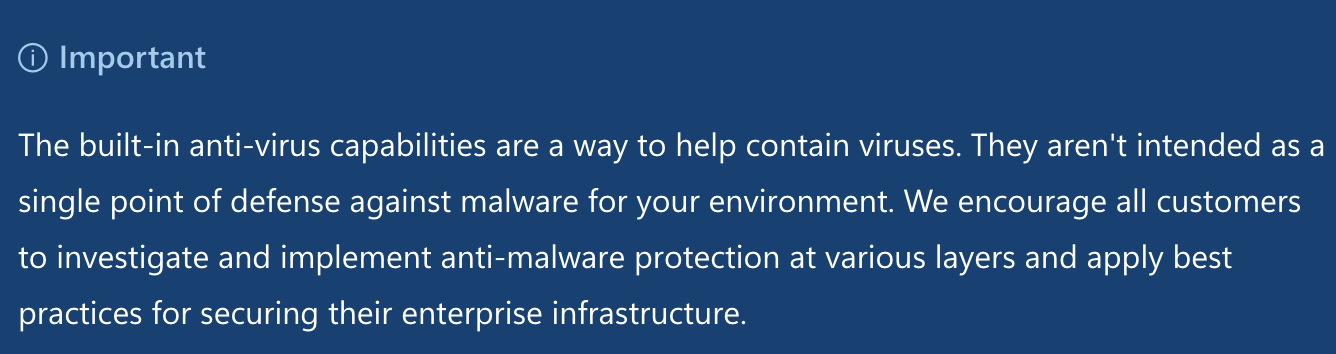
Microsoft says as much directly: SharePoint’s malware protection can limit damage, but doesn’t serve as a single point of defense.

For BFSI (Banking, Financial Services, and Insurance), healthcare, government, and OT (Operational Technology) or Critical Infrastructure environments, the data at risk means compliance filings, patient records, case files, and engineering documentation. All sitting in a library that keeps growing, year over year, while nothing goes back to re-examine what's already inside.

What follows comes down to three things: how SharePoint antivirus scanning actually works, what it doesn't cover, and what layered, effective SharePoint file repository security should look like.

Why SharePoint File Repositories Are a Bigger Attack Surface than Most Teams Assume

By design, SharePoint Server file repositories can accumulate malware and ransomware payloads that sit at rest, undetected, until they trigger. Here's why.

Assumed "Clean" Data Isn’t Clean

An infected file can be labeled clean on upload because the engine wasn't yet updated to detect it at the time of scanning. Signature databases update daily. Detection models improve with every release. None of it matters, though, once a file is already sitting in the library; without periodic rescans, those improvements apply only going forward, never retroactively. A file scanned once, on day one, never benefits from anything the engine learns afterward.

Moreover, there's a second path for files to get in: migration, restore, database upgrades, or third-party syncs. But there’s no documented SharePoint process, addressing mandatory malware scans for these pathways. Files coming in via these operations, bypass scanning entirely, so there is a risk of file-borne threats landing in SharePoint repositories.

Overreliance on Single-Engine Scanning

While an initial scan exists, it is still limited, since only single-engine is active. Detection coverage relies on signatures and heuristics coming from a single vendor, so the ability to recognize malware is limited to a single database. And to reiterate the core issue: there's no continuous re-scan of the existing repository to catch up as the database evolves.

Malware Spreads from SharePoint

SharePoint’s own sharing and sync features can turn that library into a distribution channel for infected files:

  • Files shared through “anyone with the link” permissions
  • External guest access
  • OneDrive syncs to endpoints

All the above are pathways for infected files to reach users and partners who never ran an upload scan themselves; they’re simply opening a file someone else already placed in the repository.

Attackers have also used compromised SharePoint sites directly as hosting infrastructure, or embedded phishing documents and malicious links inside otherwise-trusted SharePoint URLs, more likely to slip past email security filters and user suspicion.

Main takeaway: Three reasons let malware and ransomware accumulate in SharePoint Server repositories. Files that bypass scanning entirely for migration, restore, or syncs. Files scanned before the engine could recognize them as threats and never re-checked. And file-borne threats that a single engine simply can't identify.

Adoption Raised the Stakes

Enlyft's technology-adoption data tracks 256,295 companies currently running Microsoft SharePoint, spanning industries from IT services to banking, healthcare, oil and gas, and government. These companies typically range in the 50–200 employee, with $1M–$10M in revenue.

The scale is exactly why attackers pay attention and treat SharePoint repositories as high-value targets.

How SharePoint Server’s Built-In Scanning Actually Works

None of the above is to say that SharePoint doesn’t secure its servers or neglects file security. Per Microsoft’s documentation, SharePoint Server integrates with two possible scanning interfaces;:

  • VSAPI (Virus Scanning API), a SharePoint antivirus integration interface that allows compatible third-party antivirus software to scan documents during operations such as upload and download.
  • AMSI (Antimalware Scan Interface), a Microsoft antimalware integration framework that enables SharePoint Server to submit files to AMSI-compatible antivirus engines (such as Microsoft Defender) for malware scanning during supported content operations.

The SharePoint Server can be configured to use VSAPI, AMSI, or automatic mode. Regardless of which option is set, only one scanning engine evaluates a file at a time.

Scanning is event-based and triggered when users upload or download documents, not retroactively or periodically. Only one engine (the Microsoft Malware Protection Engine, commonly known as MpEngine.dll) evaluates the file.

Key takeaway: Files are scanned with a single engine, at upload or download, using that engine's current signatures and detection capabilities.

The approach isn’t designed to catch a file-borne threat purpose-built to evade that specific engine detection logic. Advanced persistent threats, in particular, often exploit precisely this limit, lying undetected for extended periods.

That persistence opens a door for attackers to weaponize trusted SharePoint content. There already are documented attacks where threat actors abused compromised SharePoint sites to host phishing documents and malicious links.

What SharePoint’s Native Scanning Doesn’t Cover

Microsoft is straightforward, warning users that SharePoint's built-in antivirus capabilities can contain viruses, but aren't intended as a single point of defense against malware. Three specific blind spots are worth discussing.
Microsoft's admonition

Data Already at Rest

Detection quickly becomes outdated. Because the detection engine isn't triggered on a recurring basis, a file verdict reflects only what a single engine could identify when the file was scanned.

Version History

SharePoint libraries, with enabled version history, retain each saved version as a separate copy of the file. Depending on an organization's versioning policies, a single file can accumulate hundreds of historical versions over time.

Microsoft's documentation on version history does not mention malware scans running against stored versions.

Every historical version sitting in a library therefore carries the same at-rest exposure as the current version. In libraries with frequent updates, the exposure compounds over time. Hundreds of unscanned versions of the same (infected) file can accumulate. Risks grow exponentially with version history depth.

Unknown or Zero-Day Threats

A zero-day will clear the scan the same way a clean file does, simply because there's no engine flagging it yet. And because SharePoint doesn't re-scan existing content later, a zero-day file that passes on day one doesn't get a second look on day two hundred, even after the vendor ships a signature update that would catch it.

Unknown threats follow the same logic. With no signature attached to it, static analysis (what antivirus engines do), can’t detect the threat.

Note: these are gaps in scope rather than defects. SharePoint Server's native antivirus was built for point-in-time checks at specific interaction points, not for continuously re-validating a growing, versioned repository against an evolving threat landscape.

The 2025 ToolShell/Warlock SharePoint Attacks

In July 2025, Microsoft disclosed active exploitation of an unauthenticated remote-code-execution chain affecting on-premises SharePoint Server: CVE-2025-49706, CVE-2025-49704, later joined by CVE-2025-53770 and CVE-2025-53771. The exploit didn’t need credentials or a login to work.

Microsoft then patched it, and the exploit chain got a name: ToolShell.

Per Eye Security's analysis, cited by Infosecurity Magazine, 396 compromised systems turned up across 145 organizations in 41 countries. Government took the hardest hit, accounting for 30% of confirmed infections, and the US alone made up 31% of the total. Separately, the Shadowserver Foundation reported that more than 10,700 SharePoint instances remained exposed, reachable by anyone running the same exploit chain, even after the vulnerability, which compromised hundreds of organizations, went public. Storm-2603, one of the groups behind the exploit, turned that exposure into a Warlock ransomware payload.

Once they were in, Storm-2603 used stolen credentials and legitimate admin tools to move laterally across systems. This movement didn’t raise any alarms, as it relied on tools which were supposed to be there. Storm-2603 installed web shells and exfiltrated important data. They maintained access even after the vulnerability was patched, because the attackers had already stolen the keys needed to fake valid authentication tokens.

ToolShell was built on four CVEs, chained together, with patch bypasses built in from the start. CVE-2025-53770 and -53771 exist specifically because the original fixes for CVE-2025-49704 and -49706 could be routed around.

What really matters is that an an attacker adapted faster than the patch cycle, twice, on the same target, within weeks.

Static controls like single AVs checking a file once, against one vendor's signatures were never designed to catch a server-side exploit chain in the first place. And they can’t defend against an attacker who returns after the patch with a bypass for the patch.

ToolShell demonstrates the level of sophistication now aimed at SharePoint servers specifically. There's no reason to assume it was the last time such an exploit happened. Is the data sitting on these servers protected by something built to keep up, or by a scan that checks once and calls it done?

To be fair, ToolShell wasn't a malicious document slipping past an upload scan. But the web shell (spinstall0.aspx and its renamed variants) attackers dropped? That's a file. It sat on the server and whether it got flagged came down to the same limits described earlier: one engine, checked once, at a single point in time.

That's the mechanism connecting this incident back to the broader argument. Patching closes the ToolShell exploit chain specifically. It does nothing for the next unscanned file already sitting in a repository.

What a Layered SharePoint File Security Control Set Looks Like

Everything covered so far points to the same conclusion: native scanning does its job well within a narrow scope, and that scope leaves possible entry points. To close them, organizations need to layer security controls on top of SharePoint's controls.

Multiple Engines Instead of One

The single biggest constraint in native scanning is that one engine makes the call, using whatever signatures it currently has. Running a file through several engines at once, rather than just one, closes a meaningful part of that constraint; a threat one vendor misses, will be identified by another.

Sanitization Complementing Detection

Detection-based scanning, however many engines it runs, still depends on recognizing something as malicious first.

Technologies like CDR (Content Disarm and Reconstruction) eliminate dependence. Instead of asking whether a file is dangerous, it rebuilds the file to a known-safe structure regardless of the answer.

It matters most where detection struggles: zero-days, unknown threats, or file-borne threats purpose-built to evade detection. Nothing needs to be recognized as malicious in order for CDR to neutralize it.

Adding Data Loss Prevention to the Process

Malware isn't the only thing that shouldn't be sitting unmonitored in a repository.

Sensitive data (PCI-regulated payment information, PHI (Protected Health Information), CUI (Controlled Unclassified Information), depending on the vertical) lives in the same libraries as everything else, and a security control set focused only on malware leaves that exposure untouched.

Scanning for sensitive data specifically (and redacting or blocking it) closes the compliance problem alongside the malware one.

Rescanning What's Already in the Repository

None of the above matters much for content sitting untouched since 2023 unless it actually gets scanned.

This is the layer native SharePoint antivirus can't support: revisiting stored content, including older versions retained through version history, on a recurring or continuous basis rather than only at upload or download. Real-time, scheduled, and on-demand rescanning addresses the gap, periodically inspecting files as databases update.

Individually, each of these controls closes one specific gap addressed earlier. Together, they form the kind of layered defense Microsoft's own documentation points toward when it says built-in antivirus isn't meant to be a single point of defense.

How MetaDefender™ Storage Security Meets These Requirements

The MetaDefender™ Storage Security platform is OPSWAT's enterprise data protection platform, designed to secure files across on-premises, hybrid, and cloud-native storage using Metascan™ Multiscanning, Deep CDR™ Technology, and Proactive DLP™, scanning both new uploads and content already sitting at rest.

For SharePoint users, the platform can solve both the problem of content sitting at rest, and the limitations derived from detection bounded by a single engine. Here’s how it happens:

  • Scanning with 30+ antimalware engines through the Metascan™ Multiscanning technology; a threat missed by one vendor has 29 other chances to get caught.
  • The Deep CDR™ Technology eliminates blind spots in detection; Deep CDR™ Technology deconstructs and rebuilds files into a safe structure, useful for zero-day and unknown threats hidden in productivity files. The file is deconstructed regardless of whether or not a threat was recognized.
  • The Proactive DLP™ technology mitigates the risks of data leaks by identifying, blocking, and redacting sensitive or confidential data in files. For BFSI, healthcare, and government environments regulated by PCI DSS, PHI, or CUI requirements, that's a compliance control sitting on top of malware protection and audit trails.

Multiple Scanning Options in MetaDefender Storage Security

A core departure from SharePoint's native model, MetaDefender Storage Security supports real-time, scheduled, and on-demand scanning of content already sitting in the repository. Real-time protection secures new uploads within seconds, while scheduled and on-demand scans ensure existing files and historical versions remain protected.

Deployment Stays where You Need It

MetaDefender Storage Security can be deployed through various models: physical Servers for direct hardware installations, Virtualization Platforms (compatible with VMware, Hyper-V, and XenServer), IaaS (Infrastructure as a Service) from major cloud providers, or through containerized deployments in Kubernetes clusters.

Assess Your Current SharePoint Repository Exposure; Practical Checklist

This checklist is based on CISA's guidance on the ToolShell exploit.

1. Confirm patch status.

All CVEs exploited have security updates available, but unpatched servers remain exposed to ToolShell. Apply Microsoft's security updates for all affected SharePoint Server versions.

2. Verify AMSI is configured.

Deployed but misconfigured AMSI leaves the same gap as no AMSI at all. Confirm AMSI integration is enabled and an antivirus solution is deployed on every SharePoint server.

3. Rotate ASP.NET machine keys

Stolen machine keys let attackers forge valid authentication tokens even after a server is patched. Patching alone doesn't invalidate keys already stolen. Rotate machine keys, apply the security update, then rotate machine keys again. Restart IIS using iisreset.exe after each rotation to remove malicious entries from applicationHost.config and web.config.

4. Manually look for signs of prior compromise.

CISA notes that .dll payloads used in this campaign can be used to obtain machine keys. Patching doesn't remove the payload already dropped on the server. Inspect systems and specific files for IOCs (Indicators of Compromise), not just for the vulnerability itself.

5. Check for end-of-life or end-of-service versions.

Some SharePoint instances are EOL and receive no further security updates, regardless of exploitation activity. Check if versions used by your company are still supported. If not, take the necessary steps.

6. Review logs for known indicators

CISA identifies specific request patterns and IPs tied to this campaign. Search logs for requests matching CISA references.

7. Audit admin and layout privileges.

To limit damage scope, review who holds layout and administrative permissions on SharePoint and remove access that isn't actively needed.

8. Assess what's already stored, not just what's currently exposed

Everything above addresses the exploit chain itself. None of it evaluates content already sitting in document libraries, including files that predate any of these patches.

Determine whether existing repository content has been rescanned since the relevant patches and signature updates, or whether it's still carrying its original, potentially outdated scan verdict.

Protecting SharePoint Storage from ToolShell-Type Attacks

ToolShell was fast, hard to contain, and caused real damage. That's worth respecting.

It will probably not be the last time we witness an attack chain like this; after all, running SharePoint Server means running an attack surface. The point is ensuring that the files sitting in your repository are protected when a new ToolShell appears.

That part is in your control.

MetaDefender Storage Security won't stop a server-side exploit from being discovered, but it will eliminate the possibility of file-borne threats sitting in your repository, missed by a single engine, undetected until they trigger.

To explore more, download the Securing Enterprise File Storage white paper, meant to explain how file-borne threats can be reduced, protect your clean restore capability, and secure your enterprise storage without slowing operations.

Frequently Asked Questions

1. Does SharePoint Server scan files for malware automatically?

Yes, but only at specific moments. SharePoint Server can scan documents on upload, download, and online editing using a single engine via VSAPI or the AMSI-based document antivirus feature. It does not automatically re-scan files already stored in libraries.

2. Can malware sit undetected in a SharePoint Server document library?

Yes. SharePoint Server’s native antivirus integrations (VSAPI or AMSI) scan a file at upload or download using a single engine’s signatures at that moment. Files are not rescanned afterward, so a file that was clean, or simply unrecognized, when the engine’s signatures were less current can remain in the library indefinitely.

3. Does SharePoint Server rescan files that are already stored?

No. Native scanning is event-based, triggered by upload or download activity. It does not run on a recurring schedule against existing content, including older file versions retained through version history.

4. How can attackers use SharePoint to distribute malware, not just store it?

Attackers can use SharePoint’s sharing and sync features - external or guest links, synced libraries, or compromised sites hosting phishing documents and malicious links - to move a file already staged in a repository out to other users and endpoints.

5. Is SharePoint Online (Microsoft 365) affected by the same gaps and by ToolShell?

No. The ToolShell exploit chain affected on-premises SharePoint Server only; SharePoint Online was not impacted. The at-rest and single-engine scanning limitations discussed here likewise apply to on-premises Server deployments.

6. What is ToolShell, and does patching fully fix it?

ToolShell is a chained exploit (CVE-2025-49704, CVE-2025-49706, CVE-2025-53770, CVE-2025-53771) enabling unauthenticated remote code execution on on-premises SharePoint Server. Patching closes the vulnerabilities, but because attackers stole machine keys, organizations must also rotate keys and hunt for already-dropped web shells.

7. Why do I need to rotate ASP.NET machine keys after patching?

Attackers who stole your machine keys can forge valid authentication tokens even after you patch. CISA's guidance is to rotate keys, apply the update, rotate keys again, and restart IIS with iisreset.exe so patching actually evicts the attacker.

8. Does enabling AMSI protect SharePoint from ToolShell?

The AMSI request-filtering integration (enabled by default since the September 2023 updates, ideally in Full Mode) inspects incoming requests and can block unauthenticated ToolShell exploitation. This is separate from the AMSI-based document antivirus feature that scans file content on upload and download.
Stay Up-to-Date With OPSWAT!

Sign up today to receive the latest company updates, stories, event info, and more.