Starting July 14, 2026, Microsoft will discontinue support for several versions of SharePoint.
This means that users will no longer receive technical assistance, bug fixes, or critical security updates. This includes protection against viruses, spyware, and other malicious threats.
Additionally, software updates will no longer be available through Microsoft Update, and most online support content will be retired, leaving users without phone, chat, or further help resources.
Out of the 400K global organizations relying on SharePoint for team sites and content management, those using the on-premise solution face a critical vulnerability risk, leaving them unprotected.
In this context, IT leaders need to decide how to host, migrate, and protect critical content in the years ahead.
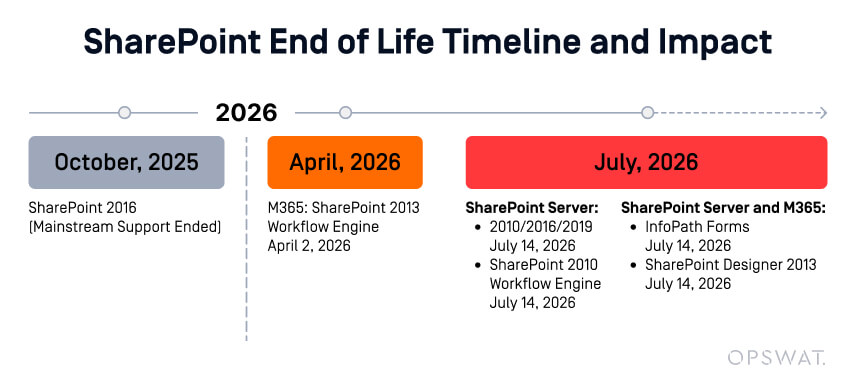
Beyond these dates, no new security updates or patches will be released, leaving any remaining on-premises deployments increasingly exposed.
In a span of a little over 6 months, organizations affected will need to:
- Asses impacted processes
- Research and vet alternate solutions
- Deploy new solution
- Rebuild core components and workflows
- Navigate change management, creating new policies, and training employees
IT leaders have two main options:
A. Continue using an unsupported solution, which exposes them to security risks and a lack of support.
B. Migrate to a new storage solution that ensures ongoing security, updates, and assistance.
Is It Safe to Use SharePoint After Its End of Life?
Since the on-premises version is soon-to-be retired, organizations are considering either a Cloud migration or another on-prem storage solution.
While some are ready for full cloud migration, others must maintain hybrid environments for operational or compliance reasons.
Some might even consider simply continuing to use SharePoint beyond its end-of-life, but this decision would bring a range of security and operational challenges.
Cybersecurity Risks
Once support ends, systems become vulnerable to unpatched exploits and advanced malware threats.
While Microsoft continues to address critical issues, the shrinking user base results in less community-driven cybersecurity.
In fact, as more users leave the platform, fewer vulnerabilities are likely to be discovered.
In the worst-case scenario, an unsupported SharePoint system could lead to a successful cyberattack.
Consequently, it puts companies at risk of data loss, ransomware, or breaches exposing sensitive corporate, customer, partner, and employee information.
Compliance Risks
Many organizations also face growing concerns around compliance and data governance.
File repositories often contain years of unmanaged data, outdated documents, embedded macros, and sensitive information that may no longer meet current regulatory standards.
Without proactive protection, these legacy systems can quickly become significant liabilities.
Choosing to do nothing wouldn’t be a smart move.
It might be easier in the short term, but in time it can expose organizations to attacks or compliance violations. Their impact will far outgrow the initial investment in a different storage solution.
Another option is upgrading to newer versions of SharePoint, which align with modern cloud content management and business collaboration strategies.
And yes, some organizations are ready for a full cloud migration.
However, others must maintain hybrid environments, be it for operational or compliance reasons.
While the path forward will not be the same for everyone, the need for a secure transition is universal.
Files need to be protected, no matter where they live, both during the transition and its aftermath.
The Middle Ground: Hybrid Migration
Complex integrations, data-sovereignty rules, and regulatory restrictions often make a hybrid SharePoint strategy the only practical path forward.
This approach allows teams to gradually adopt modern collaboration in Microsoft 365 while keeping business critical or regulated data within local infrastructure.
Hybrid Migration Advantages
Migrating to a different environment is a project in itself, without even considering all financial or legal implications.
A hybrid approach allows you to take things gradually and avoid venturing onto an overcomplicated endeavour, prone to human error. In this approach, sensitive data can be kept on-premises while gradually moving other processes to the cloud (such as document sharing).
The advantage is that you’ll have full control over your data, as you can store it locally.
The hybrid storage system can work almost as an insurance policy.
If anything happens to the local server, you can use the online one as a backup, or as an archive for older or less-used documents.
Hybrid Flexibility Comes with Hybrid Exposure
This staged approach makes sense for many enterprises, but it also introduces new risks.
Files are continuously moving between environments, users, and devices. Each transfer represents an opportunity for threats such as hidden malware, data exfiltration, or policy violations.
Without unified visibility and consistent file protection, security blind spots multiply.
That's where MetaDefender Storage Security Cloud delivers unique value.
It’s built to secure every file across hybrid ecosystems - from on-premises SharePoint servers to cloud-based collaboration tools.
Don’t wait until SharePoint 2016 & 2019 reach end-of-life. Protect your files now and simplify your transition with MetaDefender Storage Security.
MetaDefender Storage Security Cloud: Unified File Protection for Hybrid and Cloud
When operating in a hybrid environment, you create a wider attack surface, as you need to protect both on-premises and cloud infrastructures.
So, you need to be mindful of a doubled “real-estate" which faces threats of malware and data breaches, as well as compliance risks.
MetaDefender Storage Security Cloud addresses your challenge, offering advanced threat prevention powered by OPSWAT's leading technologies.
Built on OPSWAT’s Core Technologies
MetaDefender Storage Security Cloud uses the same multi-layered technologies trusted by critical infrastructure and enterprise organizations worldwide:
Utilizes 20+ AV engines in parallel to detect even the most evasive threats that a single engine might miss.
Proactively removes exploits, embedded scripts, and hidden malware by rebuilding files into safe, usable versions, eliminating the need to wait for signature updates.
Detects evasive malware by opening suspicious files in a safe environment; 100x more resource efficient than other sandboxes, it’s especially useful for zero-day threats.
Scans content for sensitive or regulated data (PII, financial, healthcare identifiers) and enforces redaction or quarantine policies.
ICAP, REST API, and native connectors
Allow seamless integration with SharePoint, Azure Blob Storage, Box and other content management systems for automated, policy-driven scanning.
Together, these technologies create a Zero-Trust file security layer that inspects and sanitizes every object before it’s stored, shared, or synced.
Deployment Flexibility for Any Environment
Protecting On-Premises Systems
For organizations that must continue using SharePoint 2016 or 2019 during the migration phase, MetaDefender Storage Security (on-prem) provides advanced file inspection and sanitization directly at the source.
It detects and removes malicious content, validates file integrity, and enforces compliance policies, extending the safe lifespan of your legacy environment.
Securing the Cloud
For enterprises shifting to SharePoint Online, OneDrive, or Azure Blob Storage, MetaDefender Storage Security Cloud provides the same capabilities as a cloud-native service.
It integrates directly through APIs and storage connectors, offering on-demand or scheduled scanning without affecting user performance.
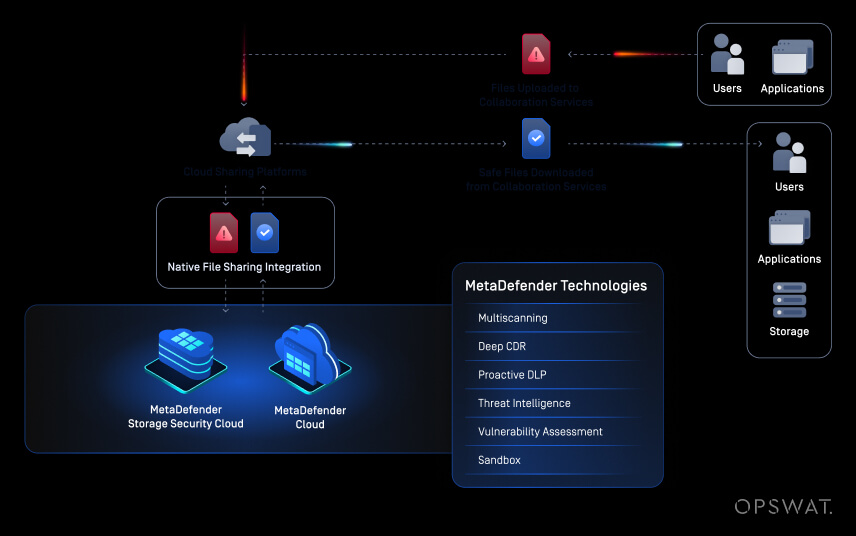
Hybrid Workflow
Most organizations will operate in both worlds for some time.
The MetaDefender Platform unifies visibility and enforcement across all repositories, on-prem, hybrid, or cloud. A single policy set ensures consistent security, reporting, and compliance validation across your entire SharePoint ecosystem.
How MetaDefender Secures the Hybrid Journey
- Scan at Ingress: Every uploaded file is inspected by multiple engines before entering your environment.
- Sanitize at Rest: Deep CDR™ Technology reconstructs files, stripping potential exploits while preserving usability.
- Observe Safely: With the Adaptive Sandbox, suspicious files can be opened in a safe environment, observing the behavior to detect evasive and/or zero-day malware.
- Control in Motion: DLP policies prevent sensitive or regulated information from leaving secure boundaries.
- Audit and Comply: Detailed logging and reporting support regulatory frameworks such as GDPR, HIPAA, NIST, and ISO 27001.
- Integrate Seamlessly: Native SharePoint connectors and ICAP endpoints ensure minimal operational disruption.
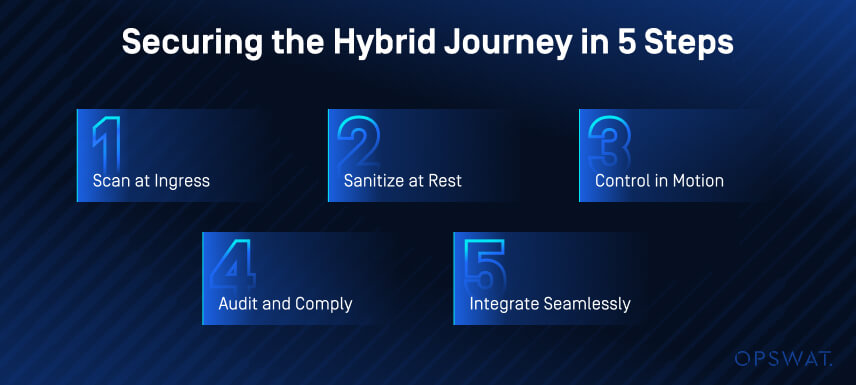
This layered approach means your security controls evolve with your infrastructure, protecting legacy repositories today, and securing cloud storage tomorrow.
Choosing the Right Path—and Protecting It
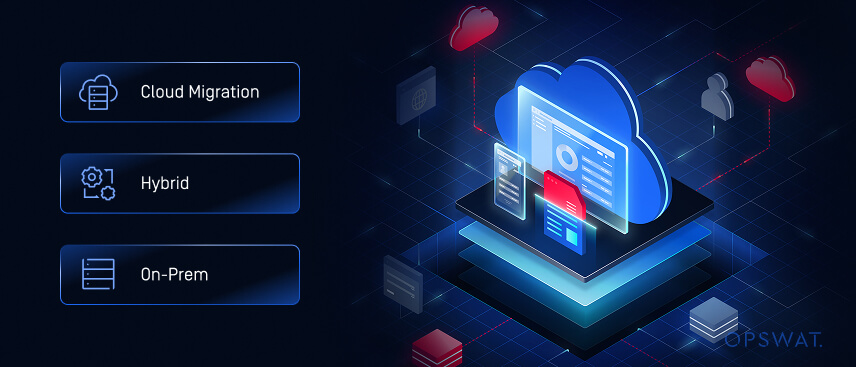
Every organization's roadmap looks different. Some will embrace the scalability and flexibility of the cloud immediately. Others will upgrade to SharePoint Server Subscription Edition to stay on-premises with modern capabilities.
Many will adopt a hybrid model, balancing compliance with collaboration.
Regardless of the route, one thing remains constant: your file security cannot lag your migration strategy.
The movement of data between systems, whether through manual uploads, automated syncs, or API connections, must be secured at every point.
MetaDefender Storage Security Cloud bridges this gap, acting as the trust layer that travels with your data. It keeps threats out, ensures regulatory alignment, and maintains file integrity across your entire hybrid infrastructure.