MetaDefender ICAP Server v5.15.0 is now available for operators and administrators managing file security at scale, with a scan workload heat map, configurable scan timeout handling, and mutual TLS support for MetaDefender Core connections.
Running file security at the network perimeter means balancing scan depth against the time an ICAP (Internet Content Adaptation Protocol) client will wait for an answer. This release focuses on what happens when that limit is reached, and on giving operators a clearer view of scan traffic.
What's new in 5.15.0
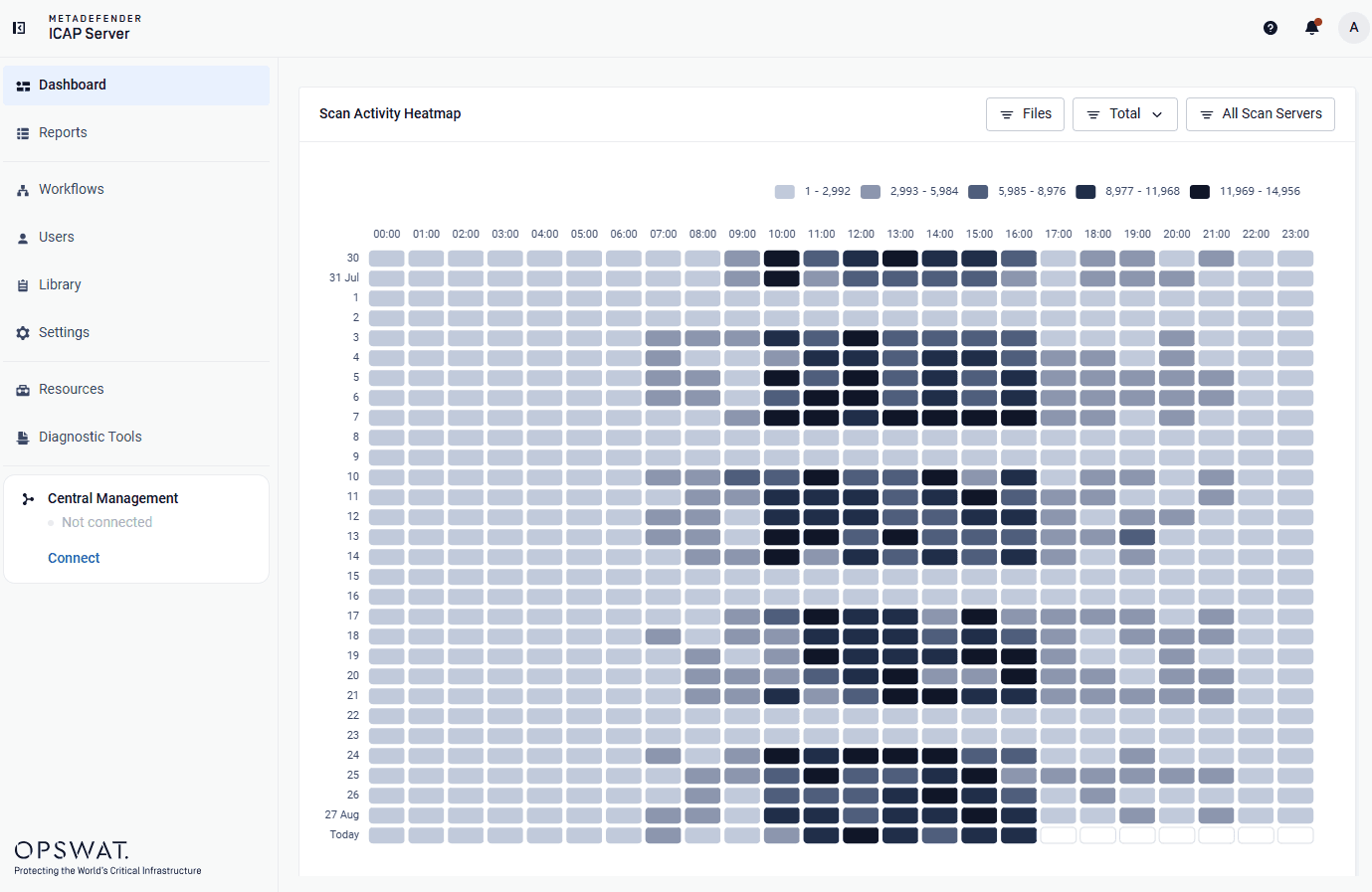
- Scan workload heat map showing peak hours, anomalies, and workload trends over the last 30 days.
- Scan timeout handling, with background scanning after timeout and configurable failover on scan timeout.
- mTLS support for MetaDefender Core, for Core instances that enforce mutual TLS.
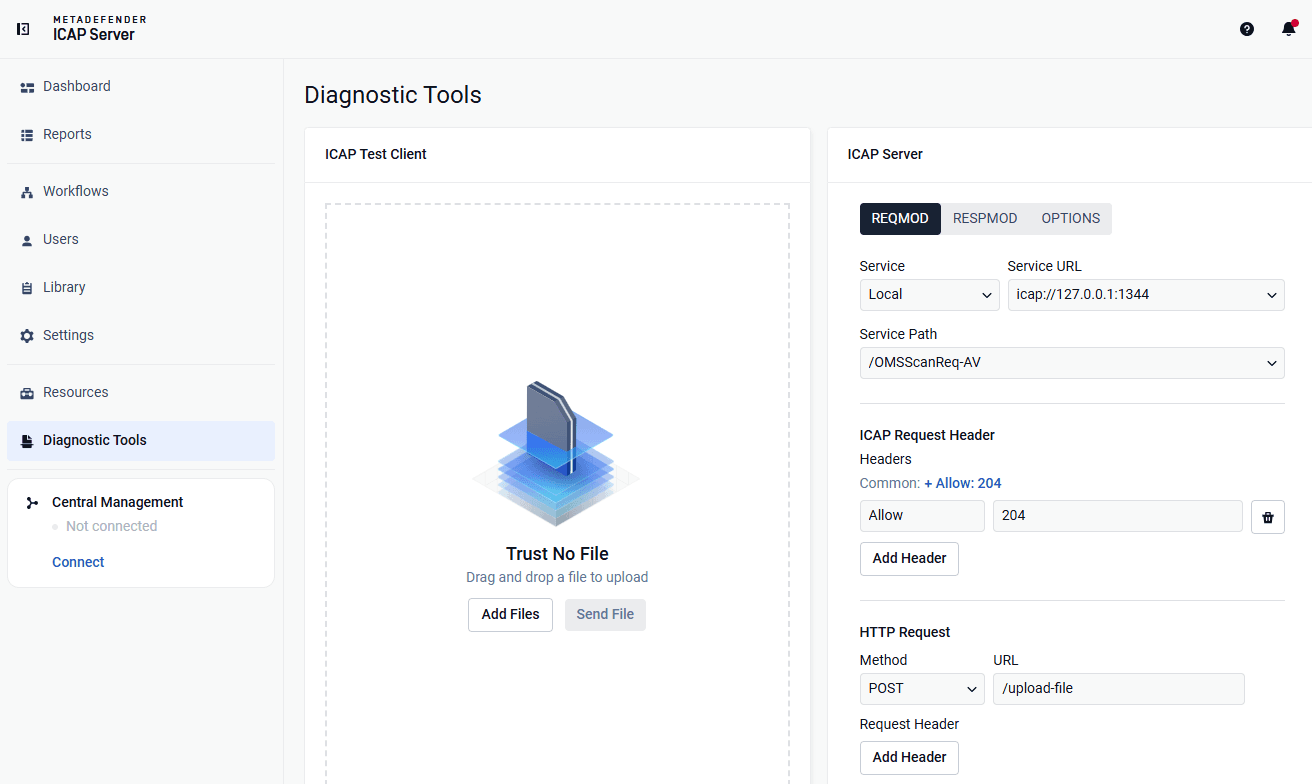
- Built-in scan pipeline test for validating the full scan path from the Web UI.
- Real-time server profile sync with My OPSWAT™ Central Management.
- Usability improvements across configuration search, unsaved-changes protection, and server profile defaults.
Use Cases
Organizations managing file security at scale, especially those that:
- Scan large files, deep archives, or content routed through sandbox analysis, where scans regularly approach the configured timeout.
- Connect to MetaDefender Core instances that enforce mutual TLS.
- Need visibility into when scan load concentrates throughout the day.
- Manage multiple ICAP Server deployments through My OPSWAT Central Management.
MetaDefender ICAP Server 5.15.0 focuses on scan reliability and workload visibility, while the file inspection pipeline itself remains unchanged.
Heat Map for Scan Workload Visibility
Scan traffic patterns are now visible inside the product. An interactive heat map shows request volume and load intensity across the last 30 days, supporting day-to-day monitoring and capacity planning. It builds on the file traffic distribution view introduced in 5.14.0, adding the time dimension.
- Scan Requests and Files Views — Switch between heat maps of ICAP scan requests and processed files to analyze traffic from both perspectives.
- Action Distribution — See how outcomes are distributed across various filters (Allowed, Blocked, Malformed Request, and others), with a per-verdict action breakdown in each cell.
Smart Scan Timeout
A scan timeout no longer means losing the scan result or waiting through every scan server.
- Background Scan on Timeout: Files that run past the timeout still produce a scan result. The ICAP client gets its timeout verdict immediately, and the scan continues in the background until it completes, with the recorded final verdict
- Failover on Scan Timeout: When a scan times out, ICAP Server can now stop there instead of retrying the file on every other scan server in the profile. For large or complex files that consistently time out, that removes the delay of working through the whole profile before a verdict is reached.
Benefits: Deployments where scans regularly approach the timeout, security teams that need a record of what a delivered file contained, and profiles running multiple MetaDefender Core instances.
Diagnostics Tool: Built-in Scan Pipeline Test
Confirm the full scan path works without external ICAP tooling. Send a test file from the Web UI and follow it from ICAP request handling to the MetaDefender Core verdict.
The feature is disabled by default. To enable it, set the flag in the diagnostic section of the configuration file and restart MetaDefender ICAP Server.
Benefits: Administrators verifying a new installation or a configuration change, and support teams isolating integration issues.
mTLS Support for MetaDefender Core
MetaDefender Core instances that enforce mutual TLS can now be reached. Client certificates are managed under Library > mTLS Certificate, and export and import alongside TLS configuration for migration and multi-node rollout.
Real-Time Server Profile Sync
Server profiles configure in one pass. The scan workflows of a MetaDefender Core instance appear for selection as soon as the profile is configured in My OPSWAT Central Management, instead of after the next sync cycle.
Usability Improvements
- Configuration search on the Workflow and Settings pages, for locating any configuration option.
- Unsaved-changes protection when switching tabs in the Workflow editor.
- Dynamic load balancing by default for new server profiles, routing files to the optimal resource. Learn more
- Updated verdict list, synchronized with current MetaDefender Core releases.
Next Steps
MetaDefender ICAP Server 5.15.0 is available now. Existing customers can download the latest release from My OPSWAT Portal. For full release notes and upgrade instructions, check out OPSWAT Documentation.
Interested in securing network traffic with ICAP-enabled solutions? Contact our team to learn how MetaDefender ICAP Server protects your file traffic at the perimeter.