RSA Conference 2015 is over and we enjoyed seeing many of our users visit us in San Francisco. The weather was great, the traffic was high, and the Giants swept the Dodgers. Overall it was a very successful conference and we got some great questions and ideas from the community. Check out our RSA wrap-up!
While the hubbub of RSAC was going on, our research and development team was hard at work releasing another update for Gears.
Code Name: "Louisiana"
In this release, we are very excited to announce that Gears has added AppRemover to its security arsenal, along with important infection detection, encryption, NAC for SaaS and API enhancements.

Check out all of the new improvements to Gears:
- Gears Adds AppRemover for Windows
- Running Status of PUAs
- New Critical Infection Status
- NAC for SaaS Improvements
- Advanced Encryption Settings
- Other Enhancements and Fixes
Gears Adds AppRemover for Windows
With the addition of AppRemover, IT Administrators and Windows users can quickly and easily uninstall expired or unwanted antivirus and anti-spyware applications, as well as potentially unwanted applications like peer-to-peer file sharing clients and toolbars. For instance, some firms use file sharing services as part of their normal operating procedures, while other organizations define them as risky applications and discourage (or entirely ban) their use. At home, a Gears user would be able to stop any type of public file sharing applications from being active on their network (do your kids like BitTorrent, UTorrent, or thepiratebay? — I would ask them just in case!).
Gears can provides enterprise-grade security in a way that is both easy-to-use and can drastically improve the security of devices in any network. The AppRemover feature in Gears is capable of removing over 1000 different applications automatically. So no matter how simple or complex your application policies need to be, Gears can get the job done quickly and effectively.
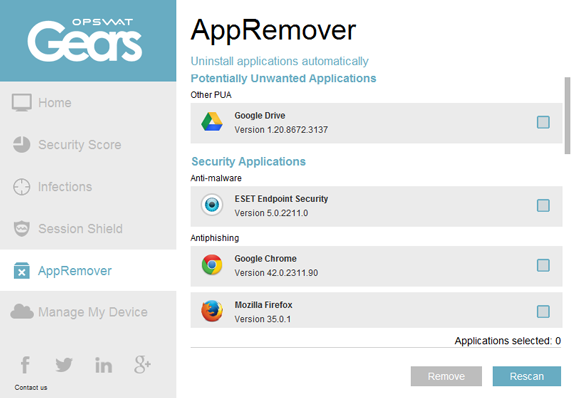
Find and quickly remove unwanted applications
With this release, AppRemover is only available for those using Gears on Windows. Stay tuned for our Gears for Mac release, which is scheduled to be ready this summer. In the meantime, Mac users can take advantage of the device security and anti-malware scanning features in Gears. Download Gears today to try it out for yourself. For users who wish to manage multiple devices, register for an account on the Gears management platform here to manage up to 25 devices for free.
Running Status of Potentially Unwanted Applications
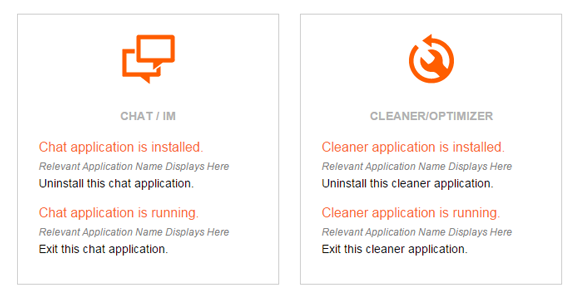
In our last release, code name Arkansas, we added many new categories for potentially unwanted applications, so that administrators can define which types of applications should be blocklisted in their device policies. This is a feature that we had been looking forward to releasing and are now excited to already be receiving great feedback from our users. Administrators can determine whether having the application installed is an issue, or if it only becomes an issue when the application is actively running. With the Gears remediation page that can be exposed to users, both the installed and running state of applications help users identify and remediate PUAs running on their computer. Contact us if you're interested in learning how Gears avoids false positives that plague solutions that depend on reading the uninstall hive or WMI. Stay tuned for more enhancements to this feature in the coming months!
New Critical Infection Status
Part of the core functionality of Gears is to improve NAC and SSL VPN for admins and users without requiring any hardware changes. This is accomplished in multiple ways, including faster and more accurate product detection, better user experience and messaging, and sophisticated detection of infected devices. On this third point, we are continually evolving our capabilities in conjunction with our antivirus multi-scanning solution, Metascan Online, and we are pleased to announce a new feature that provides more flexibility for network admins.
In 2014 we released the critical issues feature, and recently added it to the client-side APIs. Until now, the critical issue configuration options were only available for Protection, Unwanted Applications and System policies. With this latest release we have added the critical issue feature to Infections. To use the new setting, simply log in to the Gears console, go the Infections tab and enable the setting for either type of infection detection.
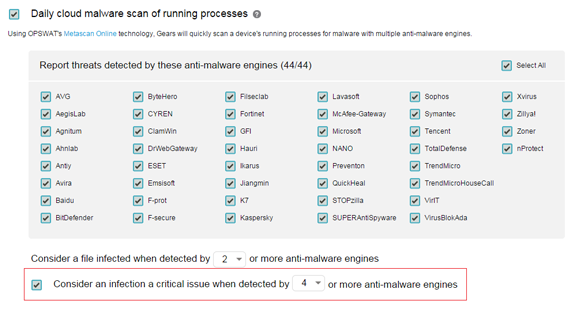
Critical threshold for daily process and DLL scanning
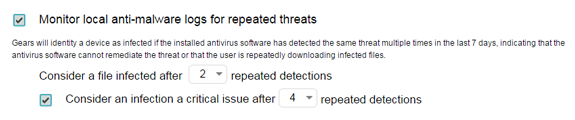
Critical threshold for repeated threats
By enabling the above settings, admins can prioritize the incident response tasks for infected devices. Additionally, if integrated into NAC or SSL VPN the admin can choose to block or quarantine devices with critical infections.
NAC for SaaS Improvements
Earlier this year, we released a method for using browser cookie APIs to integrate Gears' rich endpoint information and policies with any web application. Since then we've worked with multiple users to integrate the technology and have made some enhancements and adjustments based on our experiences.
- Gears admins can now configure their own list of domains for cookie injection in account settings
- Gears admins can enable or disable cookie injection in account settings
- Cookies are created with a far-future expiration date
- The policy_state cookie is no longer created
- Firefox cookie injection is more reliable
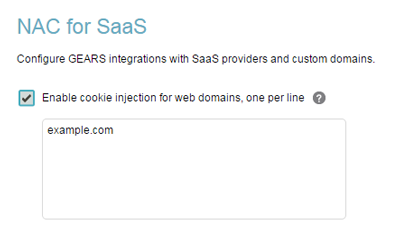
Account settings for cookie injection
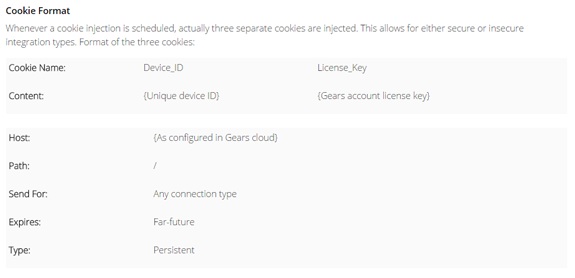
Updated table of cookies from online documentation
Look for an update coming very soon with an exciting new addition to NAC for SaaS!
Advanced Encryption Settings
Reliable detection of hard disk encryption is one of the key benefits of Gears. It is one thing to check if encryption software is installed, and it's quite another to actually interrogate the encryption software to check if the disk is truly encrypted. Gears makes creating a policy for this as simple as checking a box. And while this satisfies most Gears users, we've decided to expose a bit more of what Gears makes possible under the surface.
As part of checking the disk encryption state, you may know that Gears also differentiates the system volume from additional volumes, looks for partially encrypted drives, and detects drives with suspended encryption. In our Minnesota release, we even added the ability to specify exactly which encryption products are approved. In our latest release, we've added settings to set the required encryption algorithm and key length in your policy.
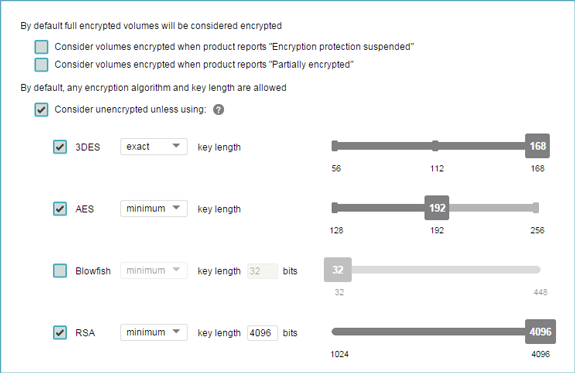
Advanced settings for hard disk encryption policies
Using these new advanced settings provides even more control for admins while enabling flexibility in their endpoint compliance policies. You can access these new settings by clicking the advanced button on the right-hand side of the encryption category in your device policy page.
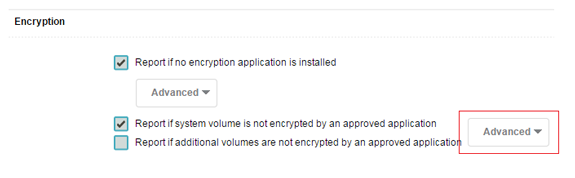
The new settings are easily accessed
Other Enhancements and Fixes
- To improve the usability of our exempt device feature, you can now filter by 'non-exempt' status in your device list
- The guest devices list view now includes additional filters
- We've enhanced the UI for device-type selection in policies. There are now informative icons and tool-tips instead of an array of checkboxes
- The nightly/weekly email has a new format and now includes information about critical issues and guest devices
- Gears client will now show a warning message if your cloud scanning rate limit is reached (it resets every hour automatically)