Another month and another Gears release with exciting new features.

- Survey feature enhancements
- Configurable length of AV & backup policies
- Status tray icon color changing
- PLIST and txt file with critical status
- Reorganized left navigation entries
In case you missed last month's release notes, Gears now publicizes our release code names. Last month was Minnesota; this month is Iowa. Interesting fact: Iowa is the only US state bordered by two navigable rivers.
Survey Feature Enhancements
Last August we introduced a feature that allows Gears cloud users to distribute surveys (or any other URLs) to managed Gears devices. In this month's release, we are adding the ability to launch surveys for any type of Gears agent.

Enhanced Survey Dashboard
The columns on the right control the types of Gears agents that will see your survey or other webpage. In this context, a managed device is one that has Gears installed, and a guest device is a computer using the on-demand version of Gears.
The survey settings are no longer found in Account Settings. Instead, they now have their own entry in the left navigation menu.
Configurable Antivirus and Backup Policy Durations
The defaults in Gears are sensible and make sense for most organizations; we recognize that some users may wish to have more strict or more lenient device policies. Over the last few months, we've been adding additional configuration options, and with our most recent release we are adding a few more.
Gears cloud device policies contain four different issues that have time durations associated with them.
- Require antivirus products to have definitions less than 3 days old
- Require full system scan from antivirus in the last 30 days
- Report if antivirus has detected any threats in the last 7 days
- Report if no backup activity in the last 7 days
Starting today, these issues can be customized from 1 to 30 days.
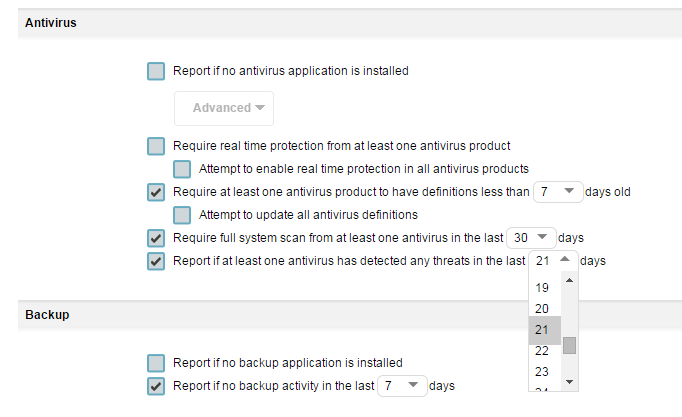
Added configuration options for antivirus and backup policy
Color Changing System Tray Icon
Sometimes small features can have a big impact. One such candidate is our system tray icon. In this release, we've enhanced the system tray icon to automatically change color as a device's compliance status changes. It's a subtle yet effective communication that contributes to an improved user experience.
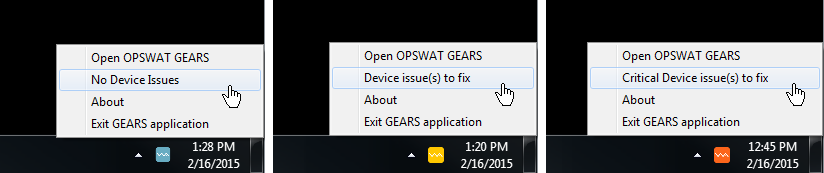
System tray with status color
When a device is fully compliant, the icon is blue. If the device goes into a noncompliant state with at least one issue (but no critical issues), the icon will change to yellow. Finally, if the device enters a critical noncompliance state, the icon will turn orange.
Rebranding: If you currently have custom rebranding enabled, this feature will not be enabled automatically. Gears will use your current tray.ico image for all three states. We will be adding support for rebranding the three icons very soon.
Registry API Enhancement For Critical Issue State
We set out some lofty internal goals when we added the critical issue feature last year. As we introduce new features (like the system tray icon colors), we include support for critical issues. We've also been going back through our existing features and enhancing them to support critical issue state. In this release, we're updating our registry and p-list client-side APIs.
Here's a summary of the new registry and p-list values available. Also, look for our integration guides and developer documents to be updated soon.
Windows, Installed (registry):
Name: Critical
Type: DWORD
Value: 1 if critical issues exist, 0 if no critical issues
Path: HKEY_LOCAL_MACHINE\SOFTWARE\(Wow6432Node\)OPSWAT\Gears Client\Status
Windows, On Demand (registry):
Name: Critical
Type: DWORD
Value: 1 if critical issues exist, 0 if no critical issues
Path: HKEY_CURRENT_USER\SOFTWARE\(Wow6432Node\)OPSWAT\Gears OnDemand\Config
Mac, Installed (p-list):
Location: /Library/Preferences/SystemConfiguration/
Name: com.opswat.gearsagent.plist
Key: Root > Status > Critical
Type: Integer
Value: 1 if critical issues exist, 0 if no critical issues
Mac, On Demand (text file):
Documents\OPSWAT\Gears OnDemand\Gears_{license key}_Critical_{0 or 1}.txt
Reorganized Left Navigation
While not as exciting as our other changes this release, it's important to note that we've organized a few items in the Gears cloud UI.
Under the Configure section of the left navigation, Client Feedback is now its own entry. Also under the Configure section, Rebranding has been updated to include Gears Application customization.
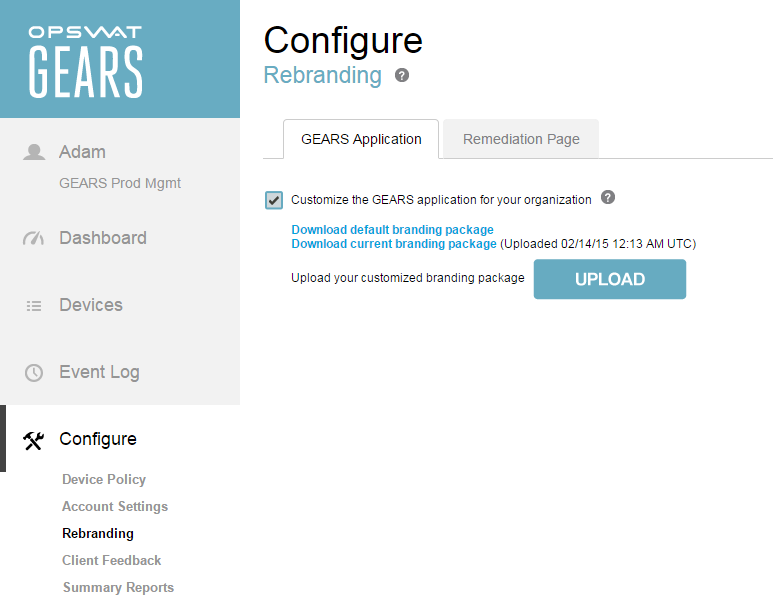
New cloud dashboard features
We are excited about Iowa, as it introduces enhancements that allow IT professionals to better survey, configure, and monitor devices in their network. Last week at the CTII conference, FBI director James Comey said, "there are two kinds of big companies in the United States. There are those who've been hacked... and those who don't know they've been hacked." So if you don't have an endpoint solution in place yet, or you are concerned about the vulnerabilities created by your BYOD users, guest users, etc, try out Gears today.

