Critical infrastructure, manufacturing, and government organizations face a common challenge: securing more distributed sites while meeting stricter compliance requirements and controlling operational costs.
For security administrators managing MetaDefender™ deployments across these locations, that challenge extends to everyday operations. Routine tasks such as troubleshooting, software maintenance, and security monitoring can require console switching, manual coordination, and on-site access.
My OPSWAT™ Central Management introduces centralized management capabilities that simplify these day-to-day challenges, allowing administrators to see, operate, and govern deployments across distributed IT and OT environments from a single console.
If your organization is planning to move from Central Management version 7 or 8, this article introduces five capabilities you'll gain with version 10, explains how they can simplify daily operations, and provides migration resources to help you prepare for the transition.
- Five Capabilities Built for Scale
- Retrieve Support Packages Without an On-Site Visit
- Upgrade Applications Remotely with Rollback Path
- Centralized Reports Across the Entire Deployment
- Trace Every File's Journey with File Audit Trail
- Identify and Remediate Missing Patches
- A Redesigned Interface for Easier Security Management
- Ready to Unify Your Security Operations with My OPSWAT Central Management?
Five Capabilities Built for Scale
My OPSWAT Central Management offers five capabilities to help teams manage deployments with less manual work:
- Remote support package collection without a site visit
- Remote application upgrades with maintenance windows and rollback
- Centralized reports across every connected product
- File Audit Trail across supported OPSWAT workflows
- Detection and remediation of missing patches across endpoints
Together, these capabilities give administrators a centralized security management of supported OPSWAT deployments across sites, reducing the need to switch between separate product consoles to monitor and manage operations.
Retrieve Support Packages Without an On-Site Visit
When a problem requires OPSWAT support, administrators first need to collect diagnostic files.
In distributed environments, this may involve traveling to individual sites and manually accessing each device. If multiple instances are affected, the process can increase travel and staffing costs, while delaying troubleshooting.
With My OPSWAT Central Management, support packages can now be collected remotely in both Cloud and On-Premises deployments.
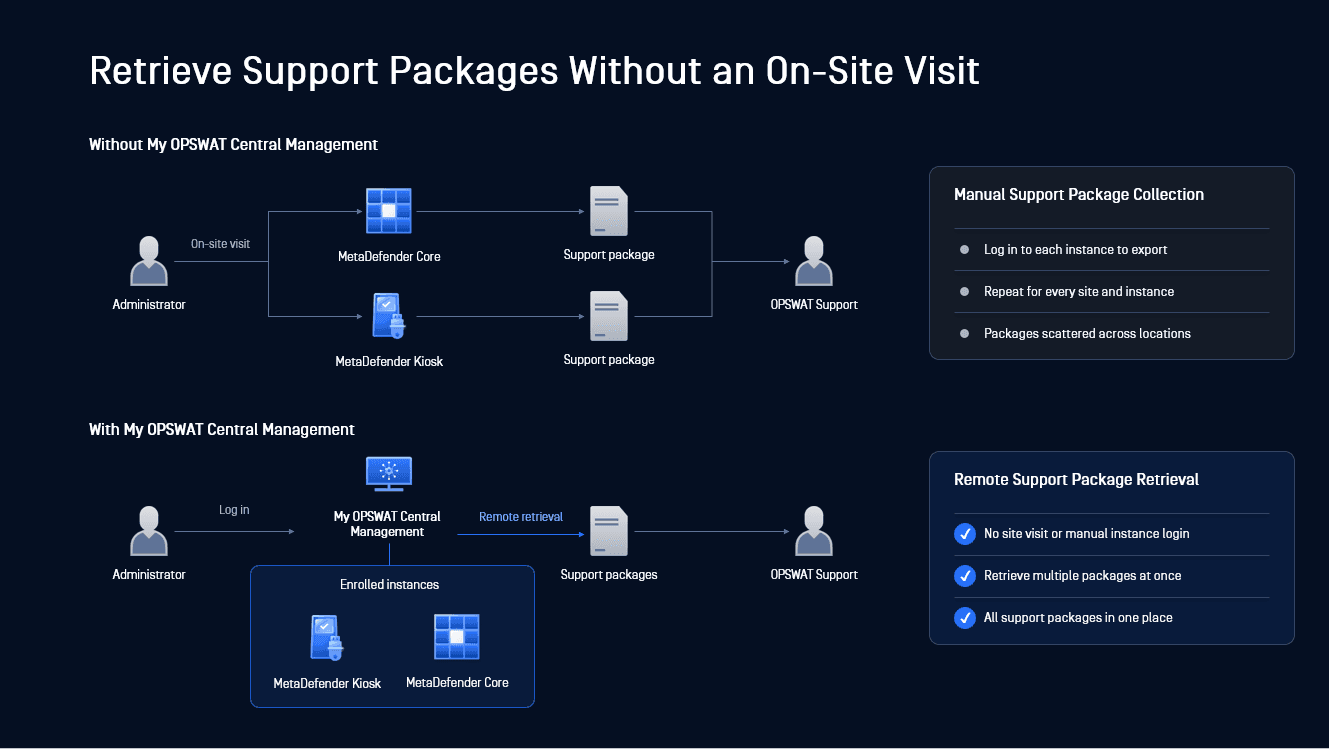
From one console, you can:
- Retrieve support packages for connected MetaDefender Core and MetaDefender Kiosk instances
- Generate support packages for one or multiple instances in one go
- Monitor generation status and download packages from one location
Teams can review diagnostic data without waiting for an on-site visit, and keeping every exported package in one place makes the files easier to locate and review during troubleshooting.
Upgrade Applications Remotely with Rollback Path
Upgrading software requires more than deploying the latest version. Administrators need to work around operational schedules, track which devices have been updated, and prepare for recovery options.
My OPSWAT Central Management allows administrators to manage software upgrades and monitor their progress across connected instances, all remotely from a single console.
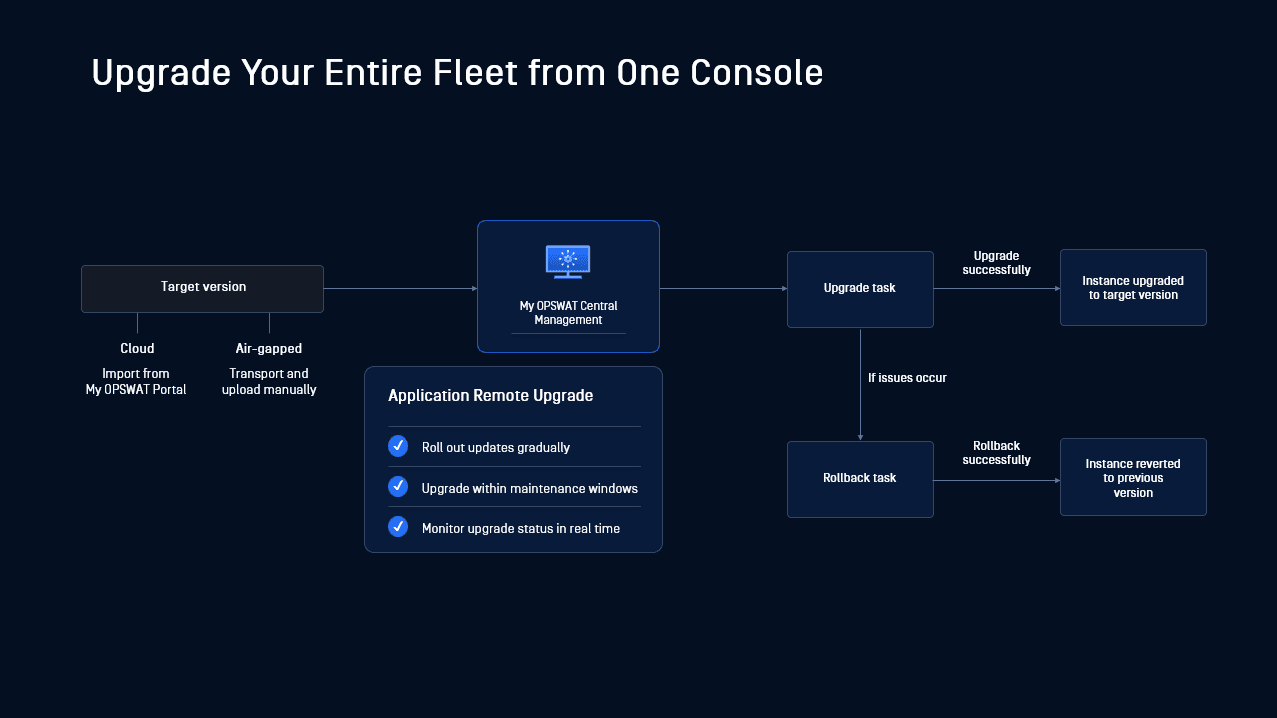
This enables administrators to:
- Schedule upgrades for selected devices during planned maintenance windows
- Roll back an instance to a previous version if an update causes issues
- Monitor upgrade and rollback progress in real-time, with clear job statuses, software version, and instance details
These controls ensure upgrades are centrally coordinated, eliminating the need for site-by-site coordination while providing clear visibility and governance throughout the process.
Learn more about centralized rollout of MetaDefender Kiosk updates in remote, regulated, or restricted environments.
Centralized Reports Across the Entire Deployment
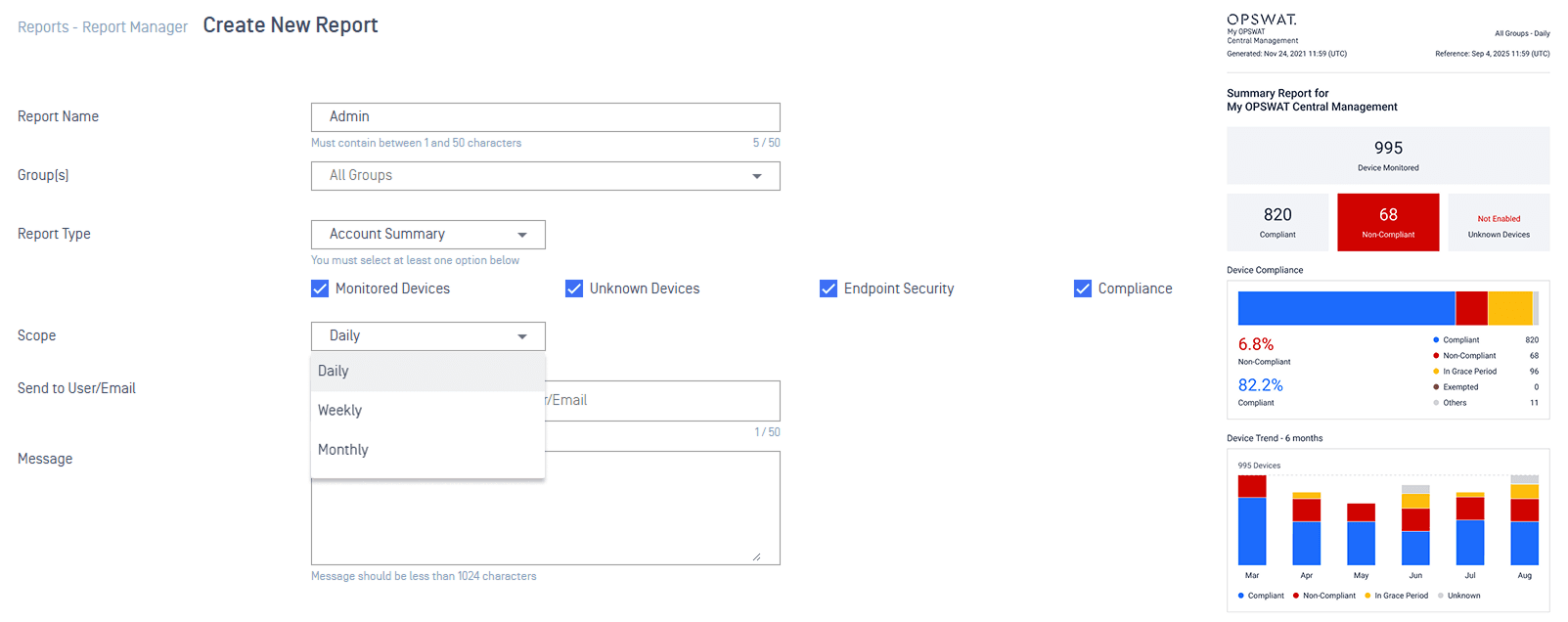
When security data is spread across multiple product interfaces, administrators spend time switching between consoles to understand what is happening across their environment. A centralized report
My OPSWAT Central Management brings security and operational data from connected products into unified dashboards, making it easier to review activity across deployments without checking products separately.
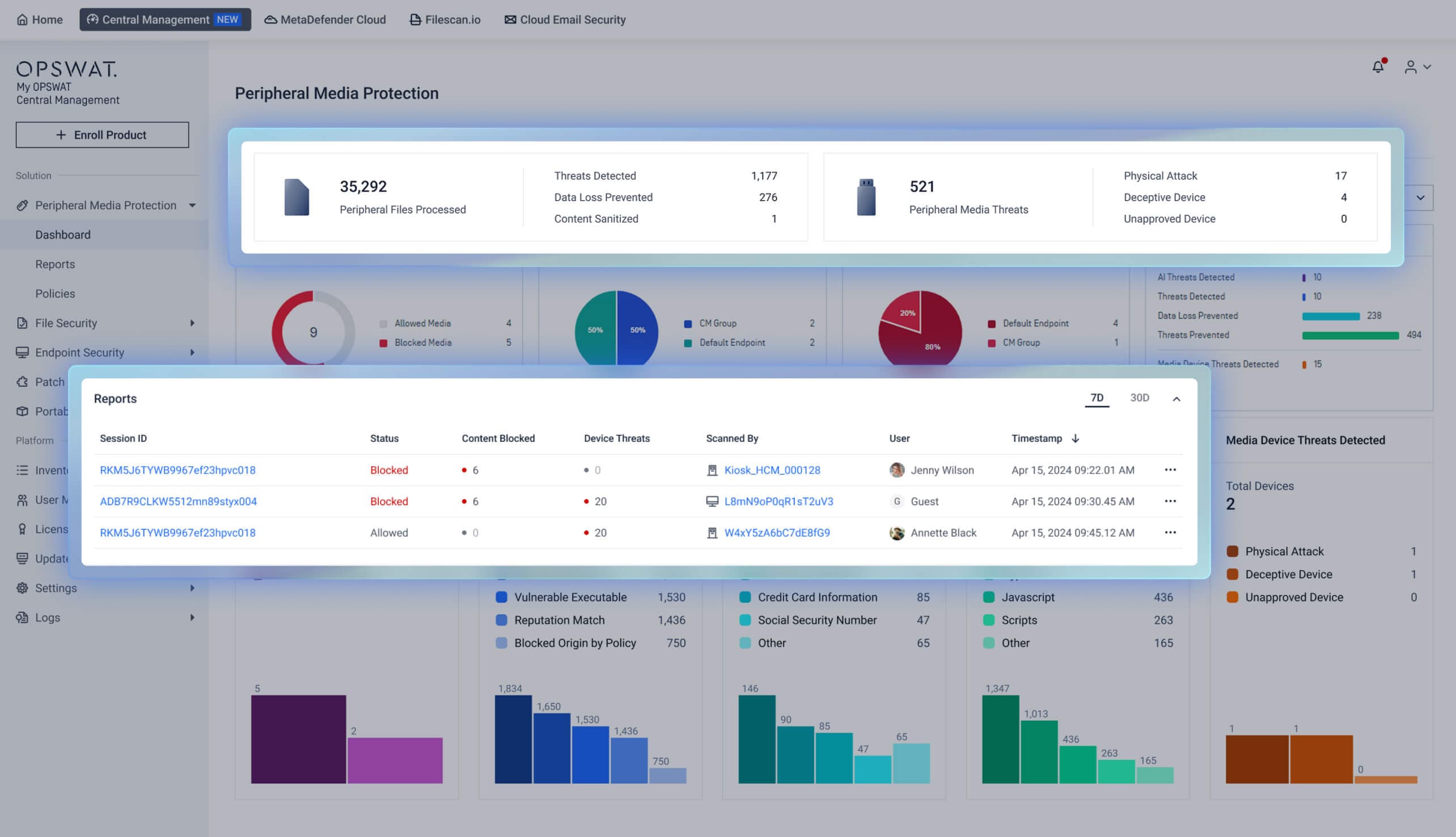
From one place, administrators can monitor system health, review security events, and identify potential risks across deployments. When further investigation is needed, they can drill down from enterprise-wide summaries to the exact incident details, such as blocked media sessions and their detailed scan reports, without switching between product consoles.
The platform also supports scheduled reports, reducing manual data collection, and providing consistent security and operational information for compliance reviews and audits.
Trace Every File's Journey with File Audit Trail
When a file passes through several security products, finding where it entered, which products handled it, and whether it was modified means checking separate records.
File Audit Trail in My OPSWAT Central Management brings this information together for supported OPSWAT workflows, such as a file moving from MetaDefender Kiosk → MetaDefender Managed File Transfer → MetaDefender Core.
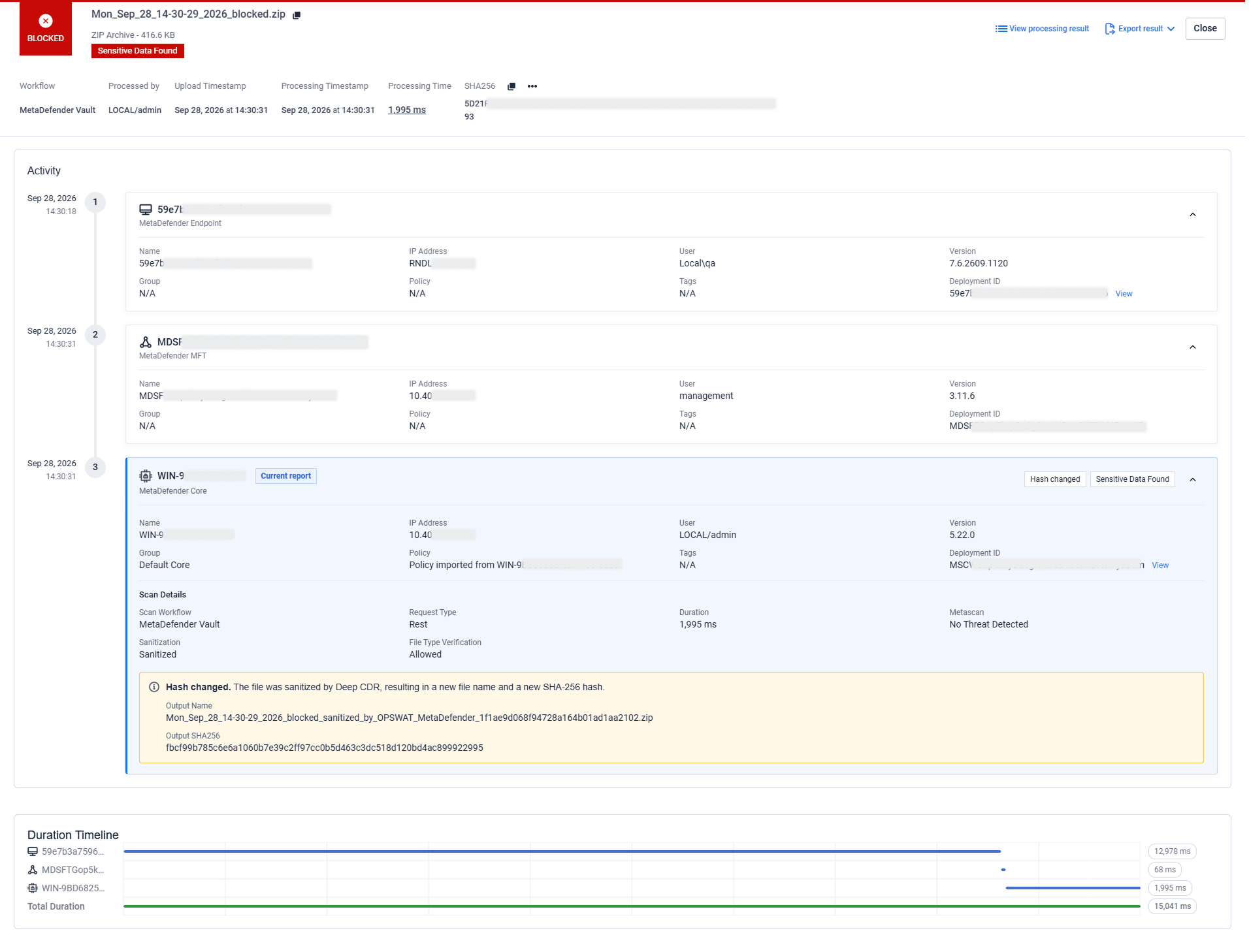
For each file, administrators can see where the file entered the environment, which products handled it and in what order, the scan outcome at each relevant stage, and whether the file changed during processing.
Instead of piecing together records from separate products, teams can follow the file journey in one view, in chronological order. This makes it easier to investigate file activity and understand how the file moved through the deployment.
Identify and Remediate Missing Patches
Unpatched systems may remain vulnerable to known threats. Security teams need to know which endpoints are missing updates, how severe the gaps are, and which patches should be prioritized.
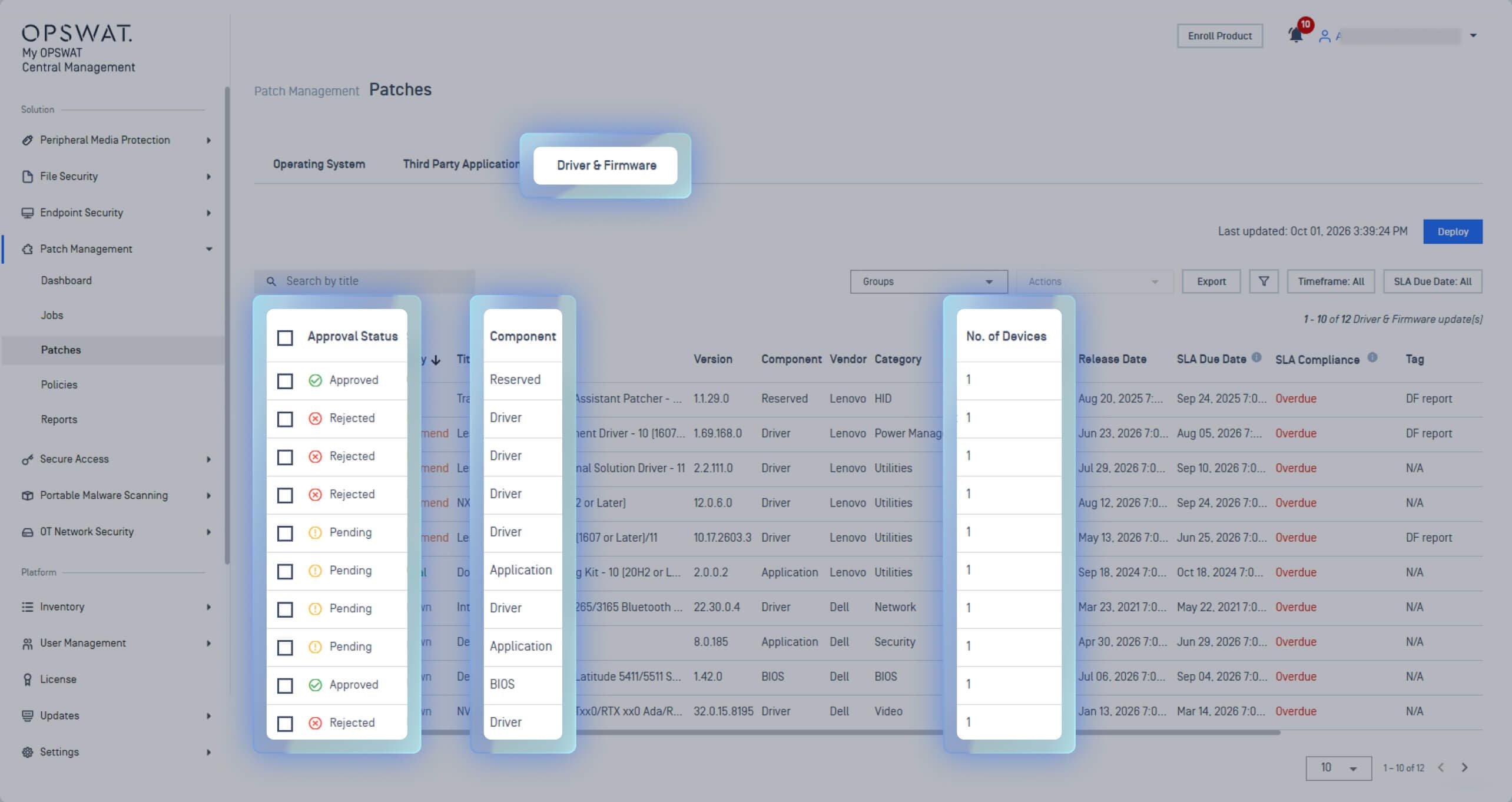
The Patch Management solution monitors endpoints for missing operating system and third-party application updates. For Dell and Lenovo Windows devices, coverage also includes driver, firmware, and BIOS updates.
Administrators can review patch severity, affected devices, compliance status, and deployment readiness from one interface.
Once missing patches are identified, teams can choose how to deploy them:
- On-demand deployment of approved updates when remediation is needed
- Scheduled deployment through policy-based schedules
- Deployment rings for staged rollout across selected device groups
- For air-gapped environments, administrators can implement offline patching: upload patches to a local repository and distribute them through cache nodes
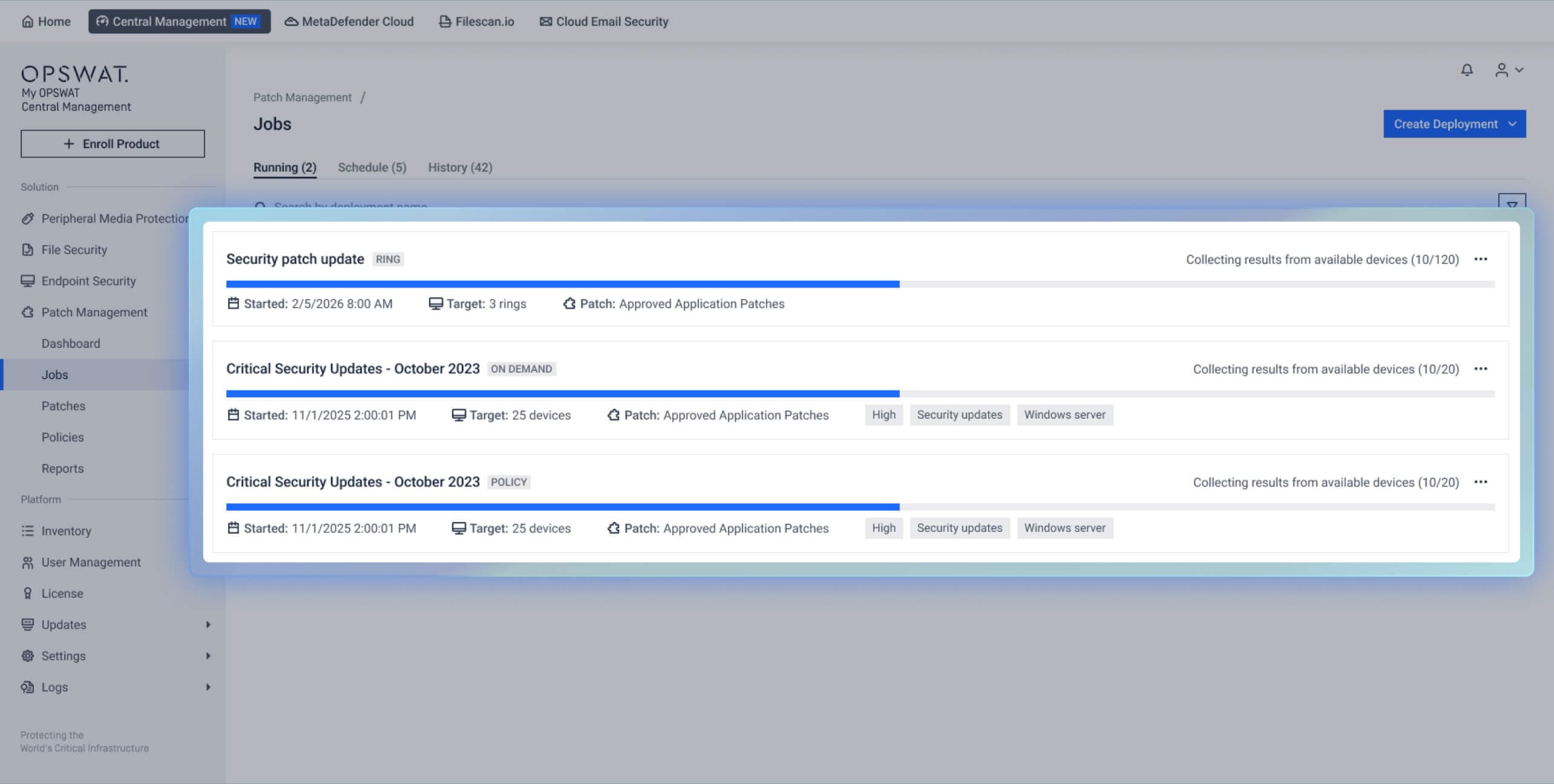
This gives teams an end-to-end workflow to find missing patches, prioritize updates, and deploy remediation across managed endpoints, including in restricted environments.
A Redesigned Interface for Easier Security Management
The new My OPSWAT Central Management introduces a redesigned user interface that makes managing security solutions simpler and more intuitive compared to previous versions.
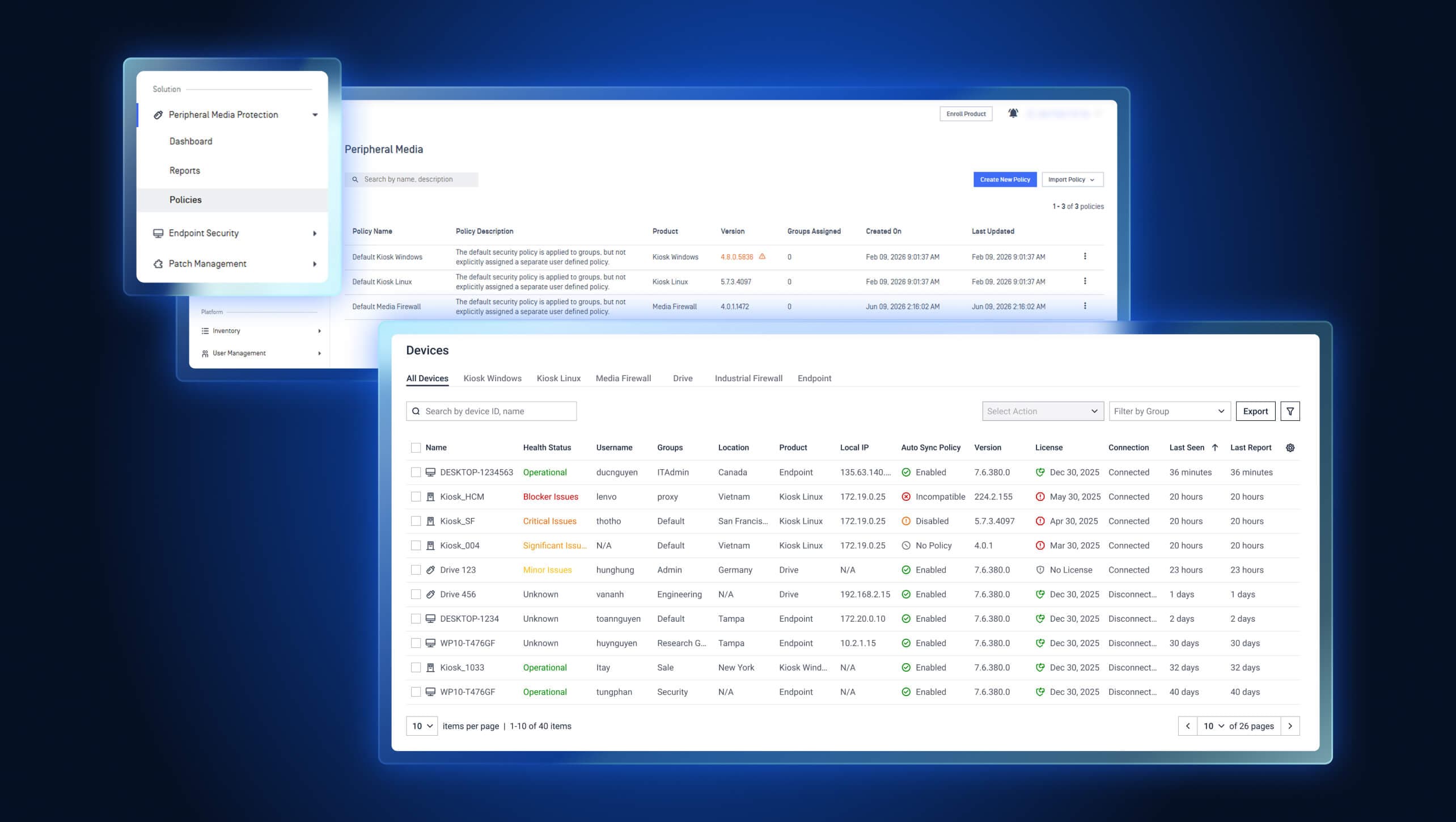
With the redesigned console, administrators can:
- Navigate by security solution, with related dashboards and controls grouped under Peripheral Media Protection, Endpoint Security, and other solutions.
- Manage devices and services from one inventory, with health status, software versions, tags, filters, and export options.
- Customize dashboards to focus on relevant security and operational metrics.
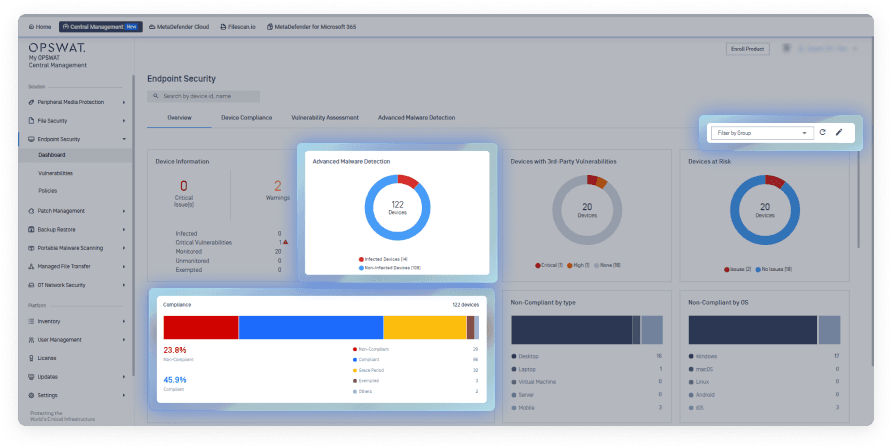
With enhanced navigation and interface, administrators can find the information they need more easily, move between tasks with less effort, and manage their security environment through a more streamlined experience.
Ready to Unify Your Security Operations with My OPSWAT Central Management?
My OPSWAT Central Management is built to be the single pane of glass for OPSWAT solutions, helping teams streamline security operations, reduce costs, and strengthen compliance across distributed IT and OT environments.
For organizations still using Central Management versions 7 or 8, the January 31, 2027 End-of-Life date makes migration planning a priority.
Use these resources to plan the migration:
- Migration Plan: Upgrading from Version 7 to Version 10
- Migration Plan: Upgrading from Version 8 to Version 10
Chat with an OPSWAT expert or visit the My OPSWAT Central Management solution page to learn more.