We've recently made enhancements to Metascan Online, as well as to Metascan Online's Chrome Extension in order to improve the experience for all of those that use our solution.
Scan Files for Malware Before Downloading
If you needed help with your housekeeping, would you grab just any stranger off the street and allow them into your house and wait to see what happens next? Because this is basically the same thing as downloading un-scanned files from the internet. We tend to download files from the web, that we expect to help us, but that may end up creating serious problems. What's worse, is that it may end up being too late before a user even notices the breach.
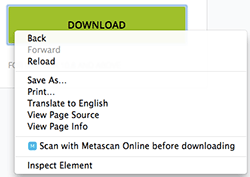
How many times have you thought: "But hey, this is just an email from an old friend!" or "my trusted partner sends me this monthly invoice for their services" or even "It's a nice website, everything looks quite professional, it definitely should be trustworthy!". The truth is, the people that design these online scams and threats usually have a huge amount of computer science knowledge. This means that those that have the skills to design the threats, must already have the ability to design a seemingly 'professional' website to go with it. Knowing this, our advice is to not trust any source, no matter how legitimate they may seem at first. You should be scanning all files coming through your web browser with Metascan Online's Chrome Extension. With the latest updates to the extension, all downloads can be scanned before they enter your computer, providing better protection against potential infection.
Private Scanning with Chrome
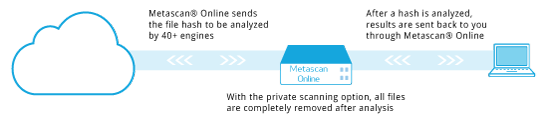
Private scanning is a premium feature intended for our clients with sensitive data that needs to remain private. Metascan Online protects the privacy of your data by deleting the files immediately after they have been scanned, and we have now added this feature to our Chrome Extension. This way all users of the premium feature will be able to access it directly through the Chrome Extension, without the need of any other tools or custom clients.
More Visibility to Metascan Online Statistics
Since the release of our statistics page on Metascan Online a few weeks back, we've been working on making this information more accessible, regardless of how you get to the most searched-for threat results. Now when you visit the scan results or history pages, if the detected threat is on the top threats list, you will see an indication of its status in the summary section. Next to the summary you will also find a link for a full list of the most searched threats within the Metascan Online database.
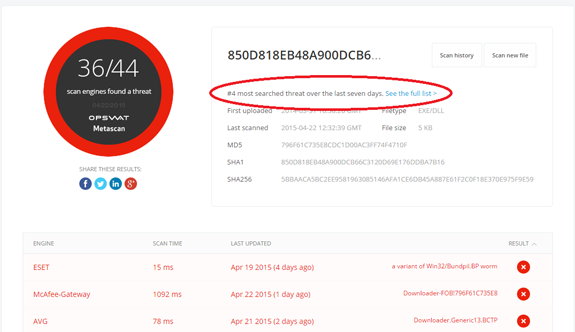
Threat Statistics with Scan Results
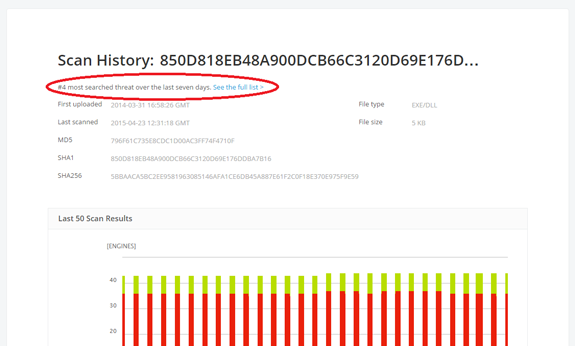
Threat Statistics with Scan History
We're excited about these improvements and look forward to your feedback! To obtain your free Metascan Online API key and start scanning files programmatically, create an account on OPSWAT Portal. Contact sales for interest in using high-volume file scans (or other Metascan Online services) for your business.