Amazon FSx for NetApp ONTAP has become a popular choice for organizations that need enterprise-grade SMB storage in AWS. Whether supporting cloud migrations, collaboration platforms, partner portals, M&A initiatives, engineering repositories, or business-critical applications, FSx for NetApp ONTAP enables teams to store and share files at scale.
A shared storage environment can quickly become a distribution point for malware, ransomware, weaponized documents, and sensitive data. Once a malicious or non-compliant file lands on a shared repository, it can be accessed by users, applications, automated workflows, and backup systems before traditional endpoint controls have an opportunity to intervene.
As organizations move more workloads to AWS, protecting the files stored within those repositories becomes just as important as securing the infrastructure itself.
MetaDefender Storage Security™ integrates with Amazon FSx for NetApp ONTAP through NetApp Vscan to inspect files for malware, active content, sensitive information, and advanced threats before they can impact downstream users and systems.
Why Built-in ONTAP Controls Are Not a Complete Security Layer
Vscan offloads file scanning to an external server. What ONTAP provides is the connection; the security value comes entirely from what the external server does with each file. Without a capable scanner behind it, the Vscan framework passes file events to whatever server is registered.
What built-in ONTAP controls do well:
- Block specific file extensions (.exe, .bat, known ransomware extensions)
- Enforce quota and access policies at the share level
- Provide audit logs of file operations
What built-in ONTAP controls do not do on their own:
- Inspect file content for embedded malware, macros, or obfuscated scripts
- Detect PII (Personally Identifiable Information), PHI (Protected Health Information), or PCI (Payment Card Industry) data written to a volume
- Execute unknown files in an isolated environment to assess behavior
- Rebuild malicious files into clean, usable versions
This gap matters most when files arrive from outside your control: partner uploads, vendor portals, cloud sync jobs, and acquired company data. A single weaponized document on a shared FSx volume is immediately accessible to every consumer of that share before any endpoint agent sees it.
How MetaDefender Storage Security Integrates with Amazon FSx for NetApp ONTAP
MetaDefender Storage Security integrates with Amazon FSx for NetApp ONTAP through NetApp Vscan. When newly created or modified files are written to protected SMB shares, Vscan forwards scan requests to MetaDefender Storage Security for inspection before users can interact with the content.
MetaDefender Storage Security analyzes files using multiple security technologies, including:
- Metascan™ Multiscanning: 30+ anti-malware engines, heuristics, and machine learning.
- Deep CDR™ Technology Technology: preemptively neutralizes active content in 200+ file types by inspecting, sanitizing and regenerating safe usable files without business disruption.
- Proactive DLP™ Technology: detects, redacts, and protects sensitive data across 125+ file types.
- Adaptive Sandbox: dynamic behavioral analysis with a 99.9% zero-day detection rate, providing rapid, in-depth inspection for suspicious files and unknown threats.
Based on policy and scan results, organizations can identify threats, sanitize files, detect sensitive data, and enforce security controls without changing how users access storage.
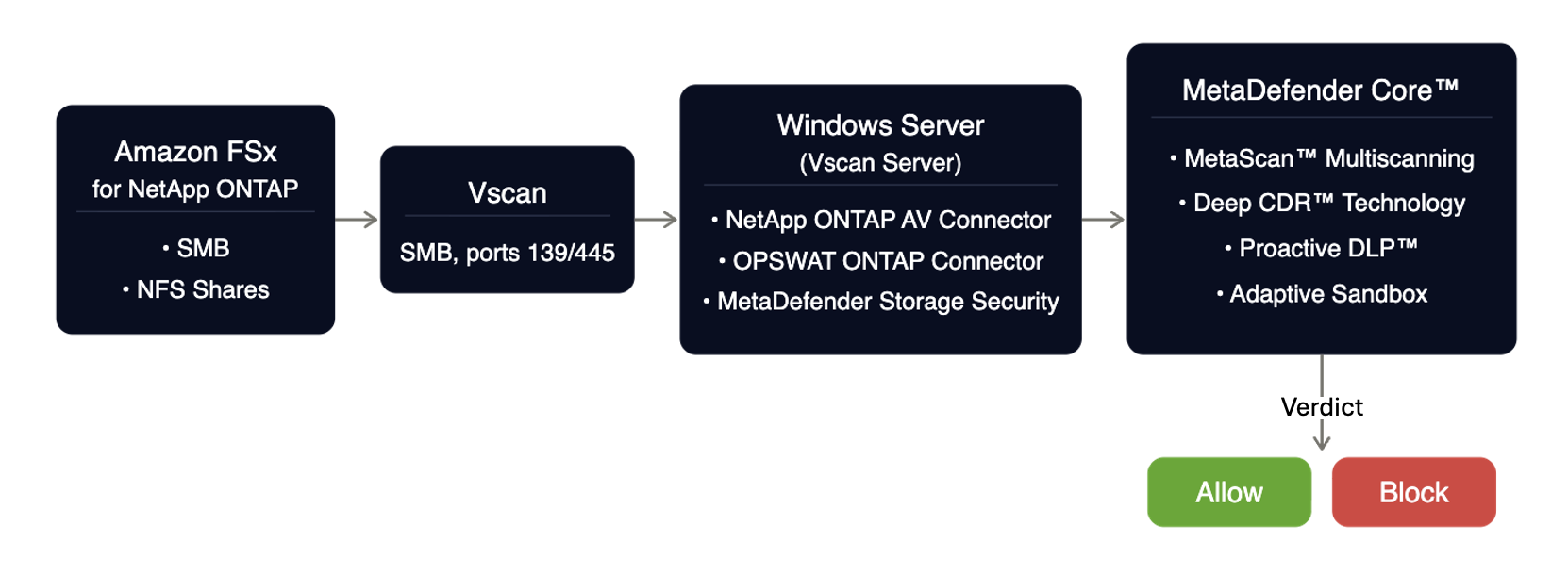
Integration Components
A typical deployment includes:
- Amazon FSx for NetApp ONTAP
- Amazon EC2 Windows Instance (same VPC/subnet as FSx)
- OPSWAT ONTAP Connector
- MetaDefender Storage Security
- MetaDefender Core™
The Windows Server hosting the connectors must be joined to the same Active Directory domain as the Storage Virtual Machine (SVM) to support Vscan communication and authentication.
Four Production Use Cases you can Deploy Today
1. Real-Time Malware Scanning for Amazon FSx
This is the default deployment and the highest-security-value pattern. Organizations can automatically inspect newly created and modified files as they are written to SMB shares.
This helps prevent:
- Malware distribution through shared folders
- Ransomware payload propagation
- Infected partner uploads
- Malicious email attachments stored on file shares
By inspecting files before users access them, organizations reduce the likelihood of threats spreading across storage environments.
2. Bulk Scanning for Cloud Migrations and M&A Projects
When onboarding newly acquired environments or migrating data to AWS, organizations often inherit millions of files with unknown security posture.
MetaDefender Storage Security connects to the FSx SVM as a NetApp ONTAP storage source via SMB, reads existing files on a one-time or recurring schedule, and quarantines threats to a separate path; preventing infected files from being accessed by applications or users going forward.
This on-demand task capability is configured directly from the MDSS interface and operates independently of Vscan on-access configuration.
MetaDefender Storage Security can perform scheduled or one-time scans of existing file repositories to identify:
- Malware
- Dormant ransomware
- Risky file types
- Sensitive information
This helps ensure historical content is inspected before becoming part of production workloads.
3. Secure File Collaboration with Deep CDR™ Technology
Many organizations receive documents from external sources, including suppliers, customers, legal firms, healthcare providers, and business partners.
Deep CDR™ Technology reconstructs files into clean, usable versions while removing active content such as macros, embedded objects, scripts, and other potentially dangerous elements.
This approach helps protect against zero-day document-based attacks that traditional signature-based security tools may miss.
Common use cases include:
- Legal document review
- Claims processing
- Vendor onboarding
- Financial document exchange
- External collaboration portals
4. Compliance and Data Protection with Proactive DLP™
For organizations subject to regulations such as GDPR, HIPAA, PCI DSS, and other privacy requirements, Proactive DLP™ Technology helps identify and control sensitive data stored within file repositories.
Administrators can configure policies to detect:
- Personally identifiable information (PII)
- Protected health information (PHI)
- Financial records
- Credentials and secrets
- Custom business-sensitive data patterns
Organizations can then apply actions such as notification, quarantine, redaction workflows, or policy enforcement based on business requirements.
What MetaDefender Storage Security Adds to Amazon FSx for NetApp ONTAP
MetaDefender Storage Security is purpose-built for securing storage infrastructure. Its integration with Amazon FSx for NetApp ONTAP through Vscan adds four capabilities that built-in ONTAP controls do not provide:
1. Metascan Multiscanning
Files are inspected using multiple anti-malware engines simultaneously, increasing detection coverage and reducing reliance on a single security vendor.
2. Deep CDR™ Technology
Potentially unsafe active content is removed from supported file types while preserving file usability.
3. Proactive DLP
Sensitive information can be detected and classified before it creates compliance risks.
4. Adaptive Sandbox
Unknown or suspicious files can undergo advanced behavioral analysis to identify evasive threats and previously unseen malware.
Deployment Requirements
To deploy MetaDefender Storage Security with Amazon FSx for NetApp ONTAP, organizations should ensure:
- Amazon FSx for NetApp ONTAP is operational
- SMB access is enabled
- Windows Server 2019 or later is available
- The Windows Server is joined to the same Active Directory domain as the SVM
- NetApp ONTAP Antivirus Connector is installed
- OPSWAT ONTAP Connector is installed
- MetaDefender Storage Security and MetaDefender Core are deployed and licensed
Why Organizations Choose MetaDefender Storage Security for Amazon FSx and AWS Storage Protection
Security teams increasingly recognize that storage repositories have become a critical attack surface.
Malware, ransomware, sensitive data exposure, and document-based threats often originate through file transfers rather than endpoint compromise.
When configured in Vscan Mandatory mode, MetaDefender Storage Security closes that gap at the point where it matters most: at write time, inspecting every new and modified file before it reaches any downstream consumer. Metascan™ Multiscanning, Deep CDR™ Technology, Proactive DLP™, and Adaptive Sandbox work together to address threats that signature-based detection alone cannot cover; including zero-day exploits, sensitive data exfiltration, and weaponized documents with no known malicious signature.
Rather than relying solely on endpoint controls after files have already been distributed, organizations can inspect, sanitize, classify, and enforce policy at the storage layer itself.
Protect every file that lands on your Amazon FSx for NetApp ONTAP volumes
FAQs
Does MetaDefender Storage Security™ support Amazon FSx for NetApp ONTAP natively?
Yes. MetaDefender Storage Security is fully compatible with AWS FSx for NetApp ONTAP, leveraging NetApp's Vscan framework for integration. The solution is validated by AWS and listed as a supported solution for protecting file storage environments running on Amazon FSx for NetApp ONTAP.
What ONTAP mechanism does MetaDefender Storage Security use - Vscan or FPolicy?
MetaDefender Storage Security uses Vscan; NetApp's antivirus scanning framework.
Does the Vscan integration support NFS shares?
On-access scanning through Vscan is supported for SMB/CIFS shares only. Organizations running NFS workloads on FSx for ONTAP can still protect their file repositories through MetaDefender Storage Security's on-demand bulk scanning capability. The OPSWAT documentation covers supported scan approaches for NFS environments in detail.
What happens if the MetaDefender Storage Security scanner becomes unavailable during a file write?
Behavior depends on your Vscan on-access policy mode. With mandatory mode, ONTAP blocks client access until the scanner responds; no uninspected file reaches users. With non-mandatory mode, ONTAP allows access if the scanner is unavailable. Choose the mode based on your security requirements and document the decision.
What is Deep CDR™ Technology and how is it different from antivirus scanning?
Deep CDR™ Technology rebuilds files into structurally clean versions by removing all active content; macros, embedded objects, scripts, hyperlinks, regardless of whether that content is flagged as malicious. Antivirus scanning identifies known threats by signature; Deep CDR™ Technology removes potential threats before they can execute, including zero-day exploits with no known signature. The two approaches are complementary.
Does deploying MetaDefender Storage Security require changes to how applications or users access the FSx volume?
No. MetaDefender Storage Security operates transparently through Vscan. Applications and users continue to access SMB shares as they normally would. The only user-visible change is an access-denied response when a file is blocked due to a threat detection or Proactive DLP™ Technology policy violation.