Storage security environments rarely stay simple. As data volumes grow and infrastructure expands across different storage platforms and scanning backends, teams need to decide not only what gets scanned, but where, when, and with which resources.
MetaDefender™ Storage Security 4.6.0 gives teams more control over those decisions while reducing the infrastructure required to support them.
With intelligent routing across MetaDefender™ Core, MetaDefender™ Cluster, and MetaDefender™ Cloud, configurable scan instance load targets, new file filtering capabilities, deeper usage visibility, and a more efficient storage integration architecture, version 4.6.0 helps organizations direct scanning capacity where it matters most.
Here is what changes for your team.
One Scan Pool, Multiple MetaDefender Backends
Organizations may use different MetaDefender deployment models to meet different security, performance, or infrastructure requirements. Supporting multiple backend types, however, can introduce additional complexity when managing scanning workloads.
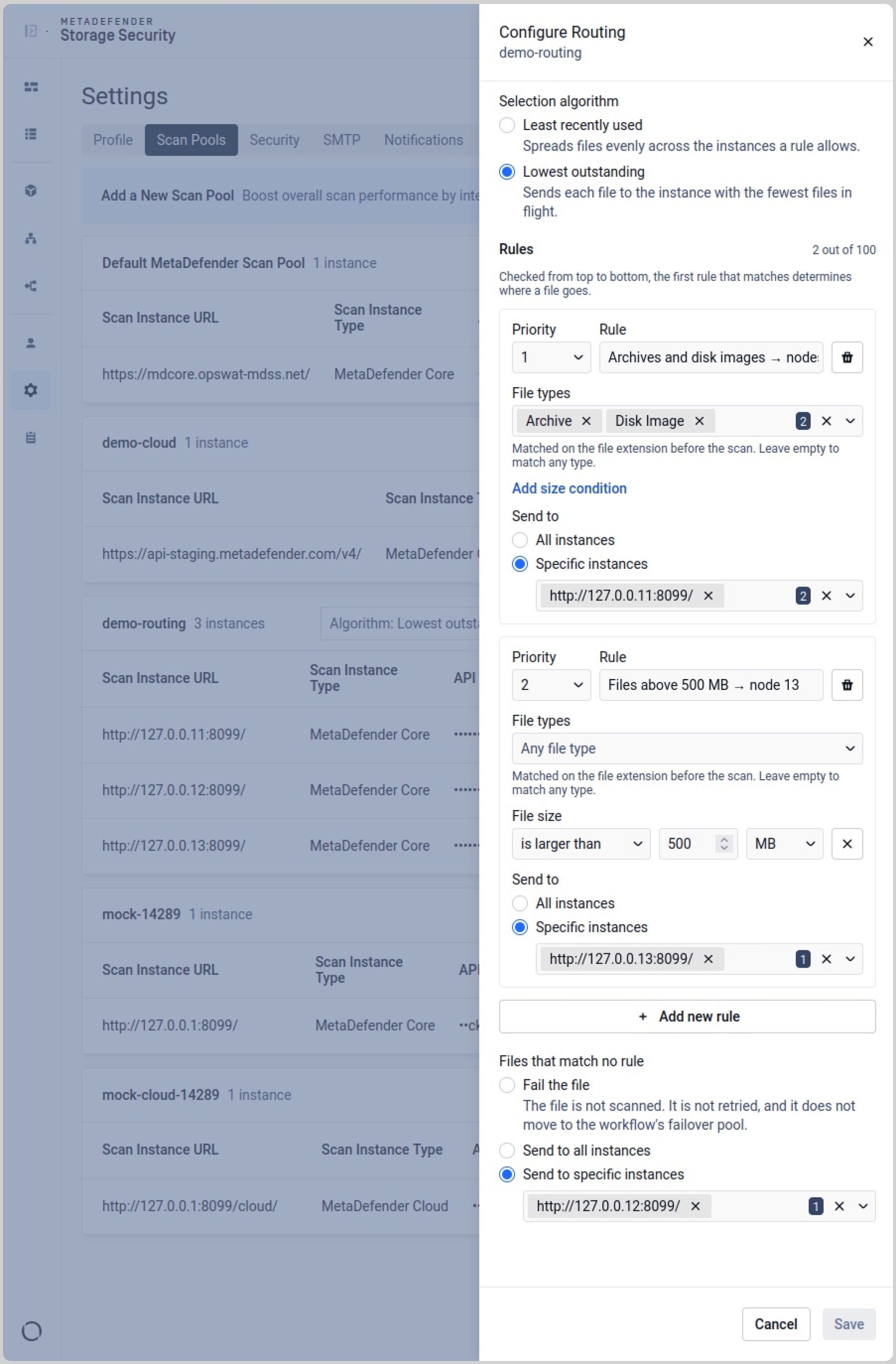
MetaDefender Storage Security 4.6.0 brings MetaDefender Core, MetaDefender Cluster, and MetaDefender Cloud instances together in a single scan pool. Routing rules determine which backend should process each file, allowing teams to distribute workloads across instance types based on their requirements. Administrators can also define what happens when a file does not match any routing rule.
Version 4.6.0 introduces additional control over scanning capacity. Administrators can configure a desired load target between 20% and 80% (40% by default), for each MetaDefender Core instance, with warnings when an instance approaches saturation. Scaling is also no longer restricted by the previous internal concurrency limit.
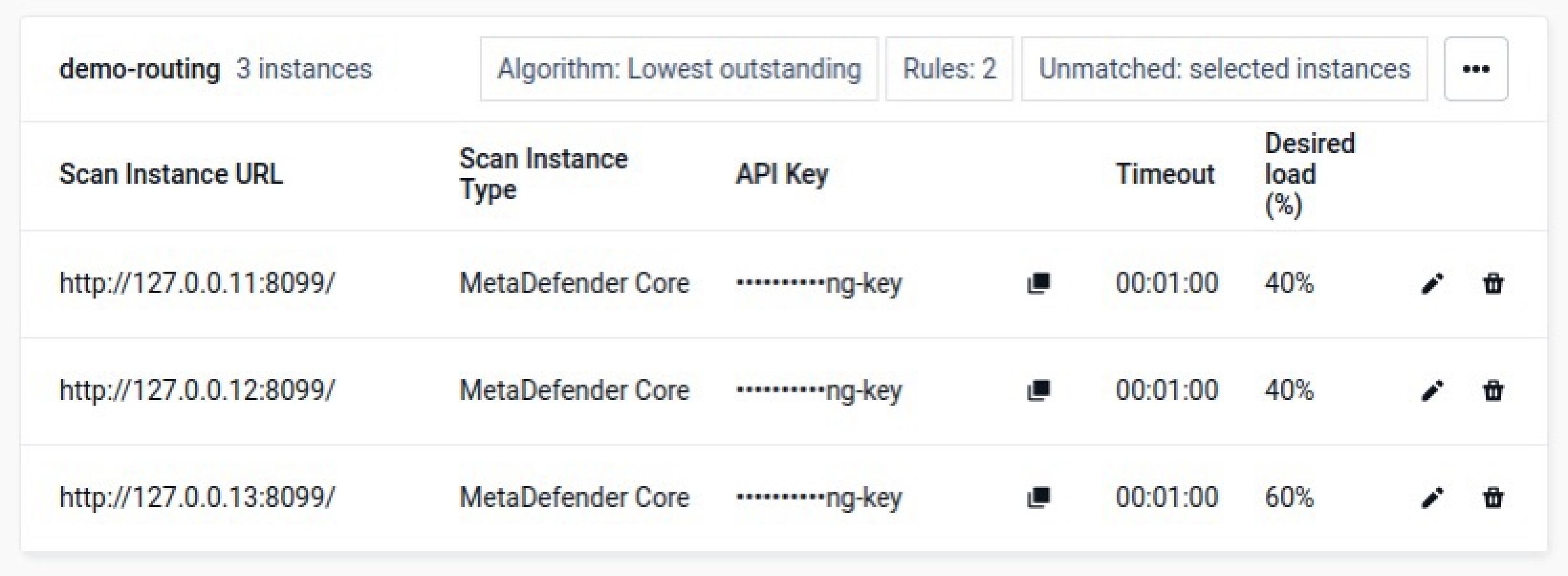
Together, these capabilities make it easier to balance scanning workloads, manage instance utilization, and scale scanning capacity as demand grows.
The result is a more flexible scanning architecture: one deployment can use multiple MetaDefender backends while maintaining centralized control over file processing and resource utilization.
Stop Spending Scan Capacity on Files You Do Not Need to Scan
Not every file discovered in enterprise storage needs the same level of inspection.
Scanning irrelevant content consumes processing capacity, increases scan volumes, and can make it harder for security teams to focus resources on the data that matters most.
Version 4.6.0 introduces configurable file filters that allow administrators to define which files should enter the scanning workflow, including criteria based on file type, size and last modified date. Files that do not meet those conditions can be excluded before they consume scan capacity.
Reporting has also been improved to distinguish files excluded by filtering from those excluded during discovery. Reports now provide the reason why individual files were skipped, giving administrators greater visibility into scanning decisions.
That distinction makes it easier to understand what happened during each scan and identify why certain files were not processed.
See Where Your Scan Capacity Is Going
Managing scanning capacity becomes difficult when teams cannot easily see how storage workloads compete for the same resources.
The new Usage dashboard in MetaDefender Storage Security 4.6.0 gives administrators a clearer view of how scanning activity is distributed across their environment.
A schedule timeline shows when scans are running and where schedules overlap, helping teams identify periods of concentrated activity and adjust workloads to reduce resource contention.
A volume heat map provides another view of consumption by storage unit, with the ability to break activity down by individual scans. Hourly scan statistics add further visibility into how scanning activity changes throughout the day.
Together, these views make it easier to answer practical operational questions: Which storage locations generate the most scanning activity? When are workloads overlapping? How does scan activity vary throughout the day? Where could schedules or capacity allocation be adjusted?
Instead of reacting to capacity problems after they occur, teams have more information to plan around them.
Faster Scanning With Less Infrastructure to Manage
Storage integrations that previously depended on separate vendor-specific services now run directly within the scanning service. This in-process architecture reduces communication overhead between storage integrations and scanning, helping lower scan latency.
Licensing and identity services have also been consolidated into the platform container, further reducing the number of services teams need to deploy, operate, and monitor.
To sustain throughput during large scans, the platform now stores in-flight and settled file states separately, improving how scanning workloads are managed as volumes increase.
Operational troubleshooting has also been improved. Support packages now run more reliably and include Garnet and ONTAP connector logs, providing additional diagnostic information when working with OPSWAT Support.
The goal is straightforward: fewer moving parts around the scanning process, lower operational overhead, and an architecture designed to sustain demanding scanning workloads.
Continue Hardening the Platform
A storage security platform also needs to protect its own management and runtime environment. MetaDefender Storage Security 4.6.0 introduces additional platform hardening across access control, deployment privileges, and third-party components.
Third-party components, including RabbitMQ, Garnet, and Redis, have been upgraded, alongside remediation of identified dependency vulnerabilities.
The release also introduces SSO role extensibility for attribute-based access control, providing additional flexibility in how organizations manage access.
More Predictable Upgrades and Day-to-Day Operations
Version 4.6.0 also resolves issues affecting upgrades, scanning, authentication, storage integrations, reporting, and everyday administration.
- Upgrade and installation: Important deployment settings are preserved during upgrades, including the NetApp ONTAP connector, service logon account, and existing installation path.
- Scanning and remediation: Reliability improvements address generic file errors, discarded workflow rules, cases where real-time protection skipped or incorrectly tracked files, and cases where reprocessed files were incorrectly marked as failed.
- Storage integrations: Fixes cover S3, Oracle native, MFT, SFTP, and SMB environments, with additional validation to prevent storage providers from accepting unvalidated credentials.
- Reporting and dashboard: File counts, dates, skip reasons, and Deep CDR™ Technology columns are corrected, while scanning and remediation statuses are clearer.
- Access and configuration: Fixes improve SSO configuration, prevent duplicate workflow names, and block changes to storage units while scans are running.
- Storage administration and integrations: Version 4.6.0 also introduces a modernized Box integration, real-time protection start date configuration from the UI, SMB fallback support for restricted Linux deployments, and programmatic SMB (CIFS) mounting.
- Inventory and diagnostics: The Inventory view can display the latest job details for each storage unit, messaging is clearer for external logger and SharePoint file issues, and MetaDefender Cloud failures now surface their underlying causes.
Together, these improvements reduce administrative friction and make day-to-day operations more predictable.
Get More From Your Existing Scan Capacity
MetaDefender Storage Security 4.6.0 is designed around a simple principle: storage security teams should be able to spend their resources protecting data, not managing unnecessary complexity around the scanning infrastructure.
By routing workloads across MetaDefender Core, Cluster, and Cloud from one scan pool, introducing configurable instance load targets, filtering unnecessary files before they consume capacity, and providing deeper visibility into resource utilization, version 4.6.0 gives teams more control over both security coverage and operational efficiency.
At the same time, automatic NetApp protection, a lighter storage integration architecture, additional platform hardening, and reliability improvements reduce the work required to keep that environment running.
Release Details
- Product: MetaDefender Storage Security
- Version: 4.6.0
- Release Notes:MetaDefender™ Storage Security Release Notes
- Release Date: 05 October 2026