DICOM is the international standard for transmitting, storing, retrieving, printing, and displaying medical imaging information: X-rays, CT scans, MRIs, and ultrasound. DICOM is not just an image format but also a container which the standard explicitly allows it to carry complete documents and arbitrary binary objects alongside the diagnostic image.
In this release, OPSWAT extends its DICOM coverage from the preamble to the entire container.
A Quick Recap: The Preamble Attack
A DICOM file begins with a 128-byte preamble, followed by the four-byte DICM prefix. The preamble exists as a compatibility feature, so that medical imagery can be processed by both DICOM and non-DICOM software. A DICOM viewer skips the preamble entirely, reads the DICM prefix, and renders the image.
That design leaves 128 bytes at the start of every DICOM file that no conformant DICOM reader ever validates. An attacker can place the header of another file format there, most notably a Windows executable header. This produces a file that is simultaneously a valid medical image and a valid program.
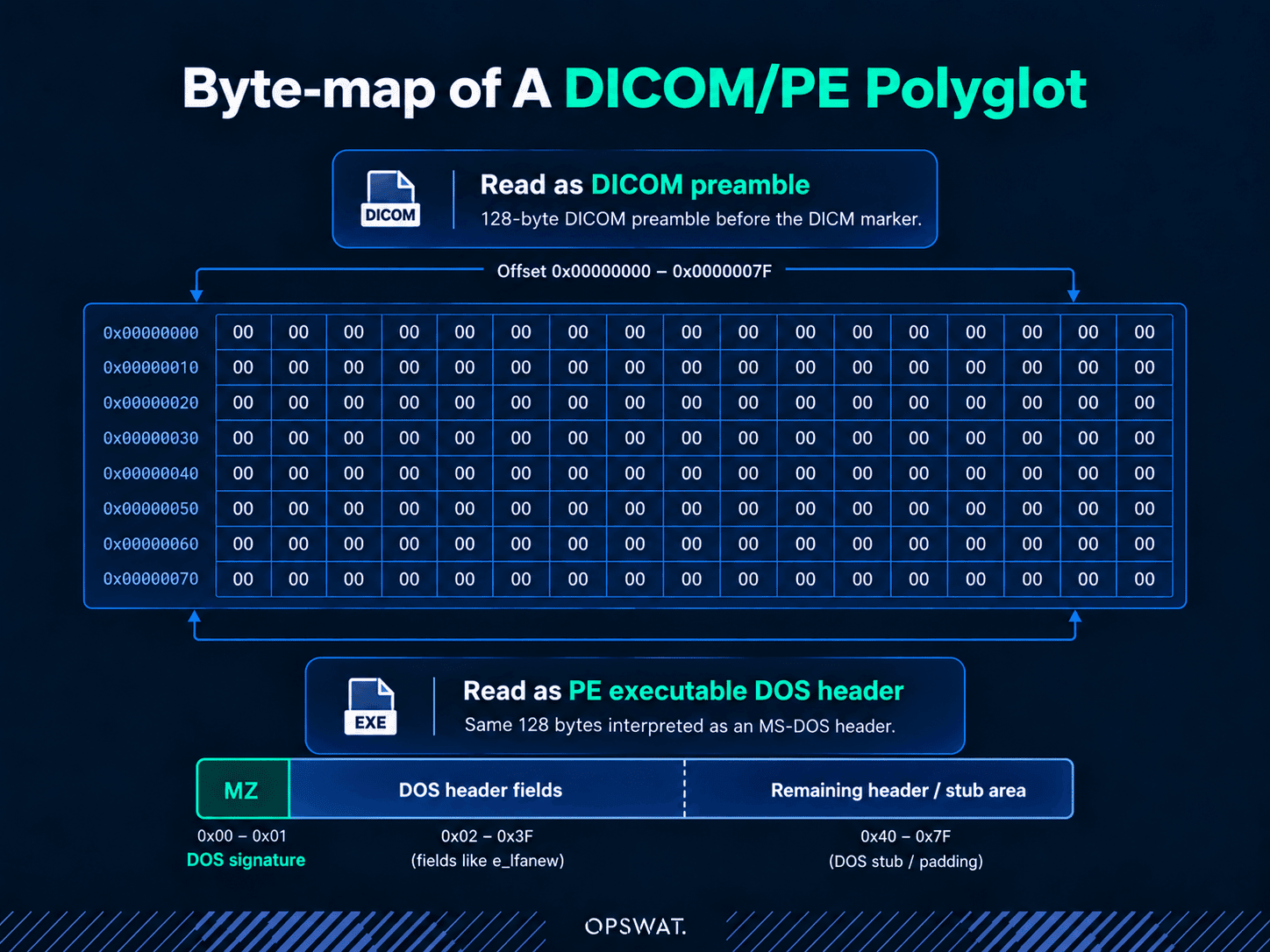
Six years ago, we wrote about how Deep CDR™ Technology neutralized the preamble attack in DICOM format: it removes the unapproved content and rebuilds the file from its legitimate data only, so the embedded code in the 128-byte preamble is no longer executable while the image remains fully usable. For the full walkthrough, including a demonstration against the original proof-of-concept sample, see OPSWAT Deep CDR™ Technology Now Supports DICOM File Format.
That threat has not gone away, but it is no longer the most interesting part of a DICOM file from an attacker's point of view.
The Bigger Attack Surface
Encapsulated Data
The preamble is 128 bytes. The rest of a DICOM file is a sequence of data elements, and several of them are designed to hold content that is not an image at all.
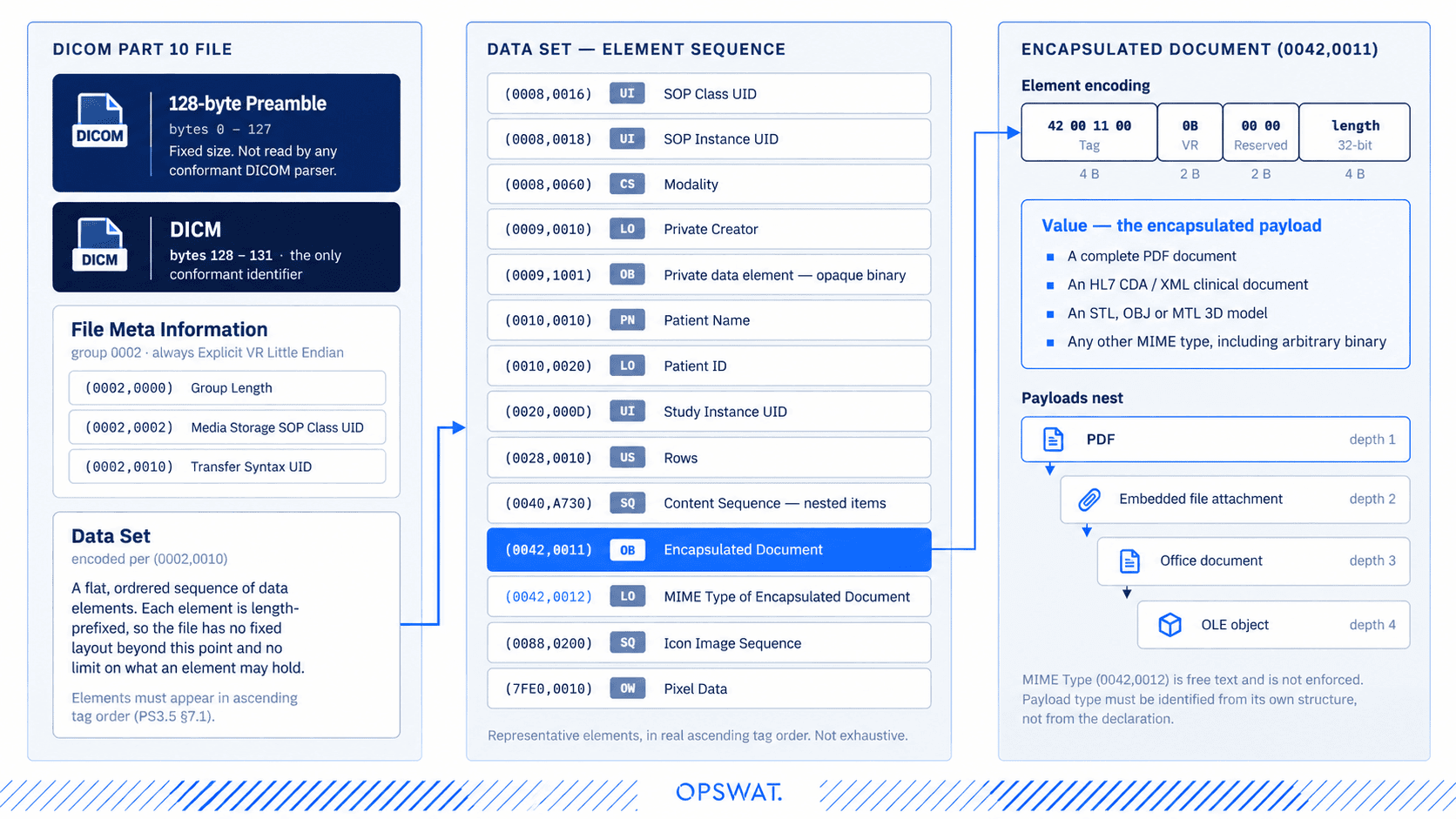
The DICOM standard defines Encapsulated Document SOP Classes whose entire payload is a foreign file: a complete PDF, an HL7 CDA clinical document, or a 3D model (STL, OBJ, MTL). The document bytes live in Encapsulated Document (0042,0011), and its declared type sits in MIME Type of Encapsulated Document (0042,0012). This is entirely legitimate and widely used. A signed radiology report delivered as a PDF inside a DICOM object is routine clinical traffic.
It is also a delivery channel. The diagram below shows where non-image content sits inside a DICOM file, and how deep it can nest.
Why A Single Pass Is Not Enough
A DICOM object can carry an encapsulated PDF; that PDF can carry an embedded file attachment; that attachment can be an Office document containing an OLE object. Every boundary in that chain is legal and specs-compliant.
A scanner that examines the outer DICOM file and stops reports it clean. Handling this correctly requires the security layer to open each object, identify what it actually is from its content, and repeat at every level.
What’s New In This Release
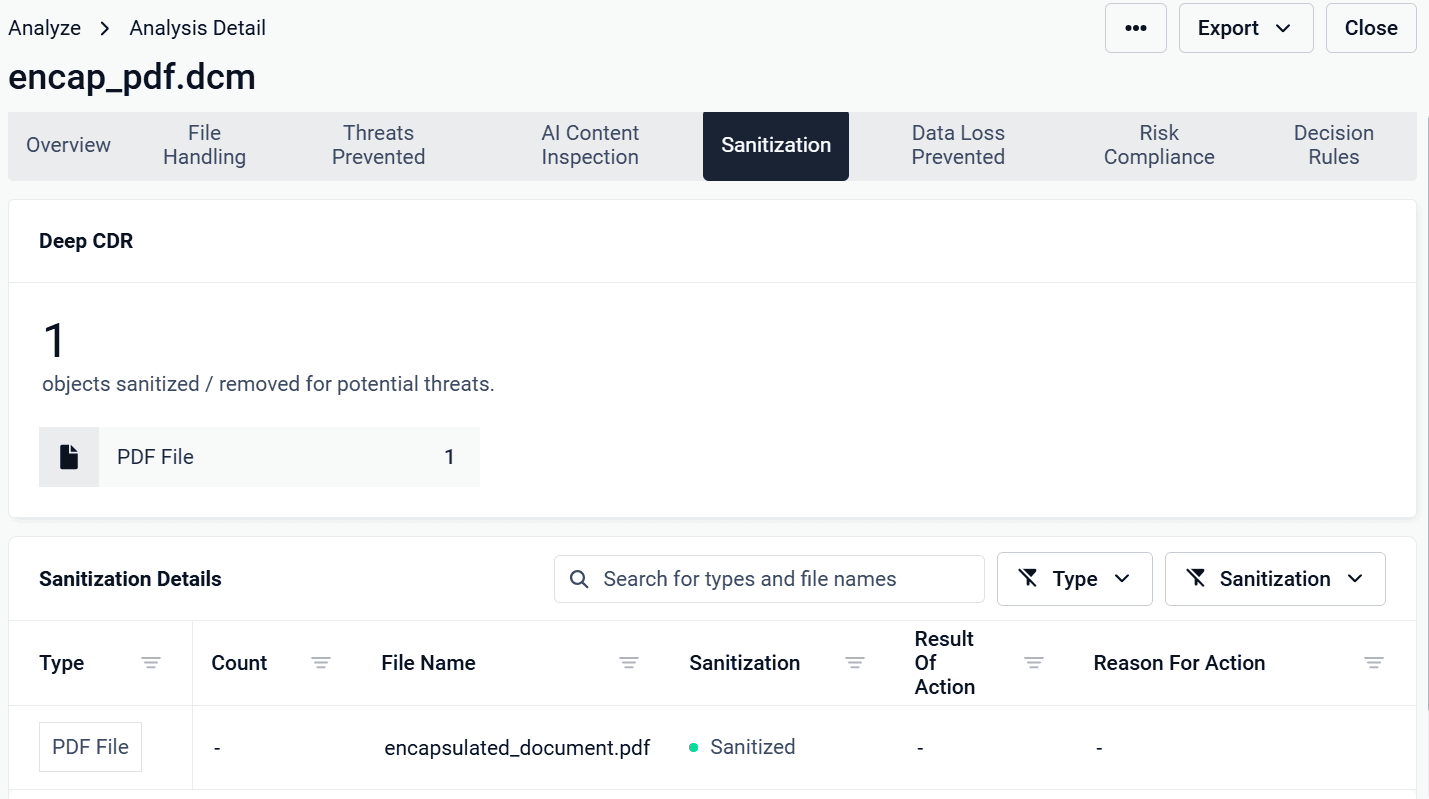
Deep CDR™ Technology (8.1.0): Recursive Sanitization Of Encapsulated Data
Deep CDR™ Technology now descends the full DICOM element tree, including nested sequences, and treats every embedded object as a file in its own right.
- Extracts and identifies payloads by content, not by the declared MIME type or SOP Class. A PDF declared as an octet stream is still handled as a PDF; a binary declared as a PDF is not.
- Sanitize with the matching engine. An extracted PDF goes through the same PDF sanitization Deep CDR™ Technology applies to a standalone PDF. The same is true for CDA/XML, Office documents, images, and archives: the full existing engine set, reused inside the DICOM container.
- Recurse to depth. If sanitizing an embedded object reveals another object inside it, that object is processed too, with a configurable depth limit.
- Rebuild a valid, usable object. Deep CDR™ Technology writes sanitized content back into the element it came from, recomputes element lengths, and preserves SOP Instance UIDs, so the output still ingests into a PACS and opens in a clinical viewer.
Objects that cannot be identified (unknown MIME types, opaque private-tag binaries) are governed by policy: remove them by default, or keep them where a workflow genuinely depends on a vendor extension.
File Structure Validation: Block Early, Extract For Analysis
File Structure Validation adds a check that runs before any deep inspection, and it is where the preamble story comes full circle.
- Block files with an unapproved preamble. A conformant DICOM preamble is 128 bytes of zeros. Anything else is a structural violation that needs no signature to detect, whether it holds an executable header, a script fragment, or content nobody has seen before. File Structure Validation blocks files whose preamble is not approved before downstream engines spend any resources on them.
- Extract the preamble as its own object. Rather than simply discarding it, File Structure Validation carves out the preamble content and hands it to the other engines: Metascan™ Multiscanning, Adaptive Sandbox, and Threat Intelligence. This way the organization learns what was hidden there, not just that something was.
- Extract encapsulated objects for further analysis. The same applies to embedded documents and private-tag payloads. Each becomes a discrete object in the scan result, with its location in the file recorded, so findings are traceable to a specific data element instead of a whole-file verdict.
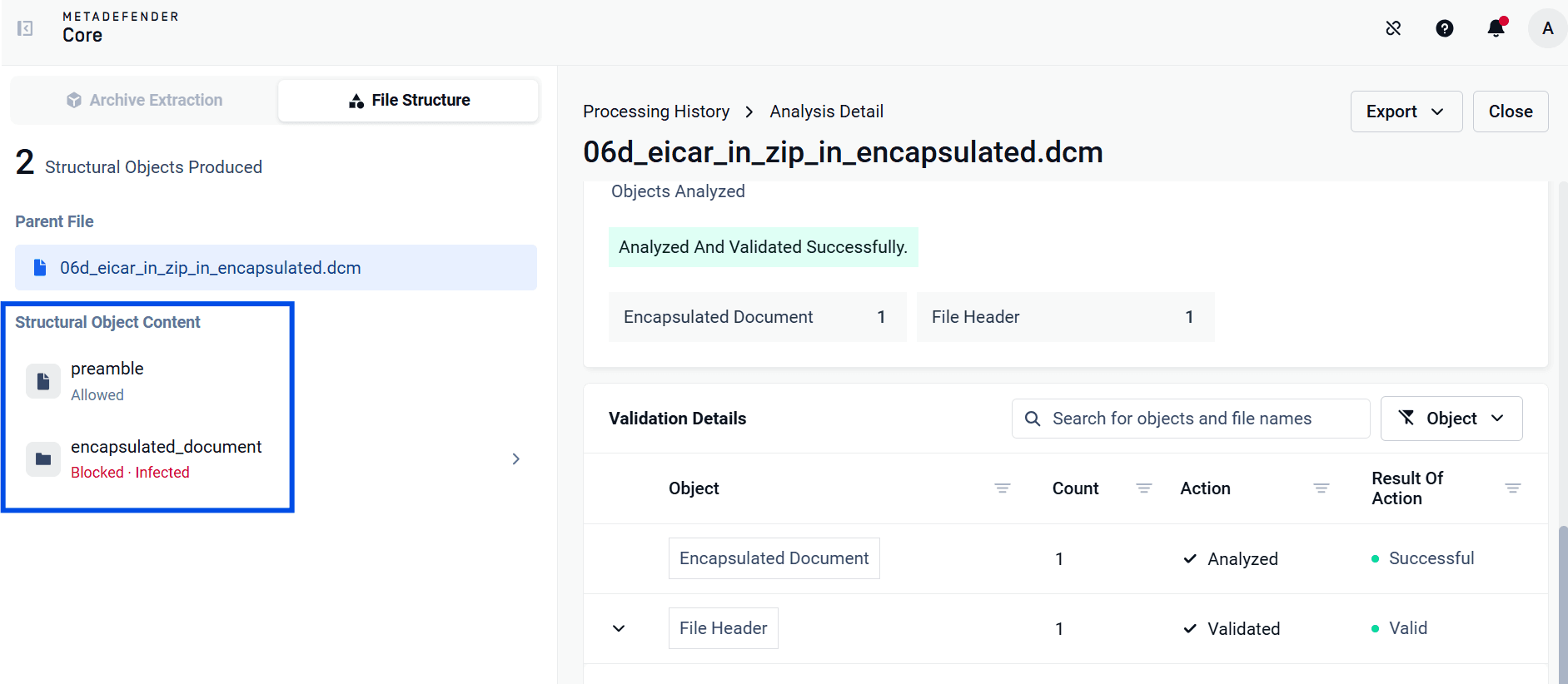
File Structure Validation already validates 160+ file types. DICOM structure validation joins that set, which means DICOM files get the same early-blocking and object-extraction treatment as every other format entering the environment.
Choosing Between Deep CDR™ Technology And File Structure Validation
Both capabilities cover the same attack surface, but they answer different questions, and the deciding factor is simple: is your workflow allowed to modify the file?
If the original must be preserved byte for byte, File Structure Validation is the right fit. It inspects and decides, but never rewrites. If what you need is a file that is safe to open, Deep CDR™ Technology is the right choice. It delivers a rebuilt, sanitized copy.
These are not mutually exclusive, and most deployments use both: File Structure Validation as the gate that blocks malformed and unapproved files early and cheaply, then Deep CDR™ Technology on the files that still have to be delivered. Add Proactive DLP™ wherever PHI has to come out of the metadata or the burned-in image before the study leaves the organization.
The diagram below traces a single DICOM object through both technologies.
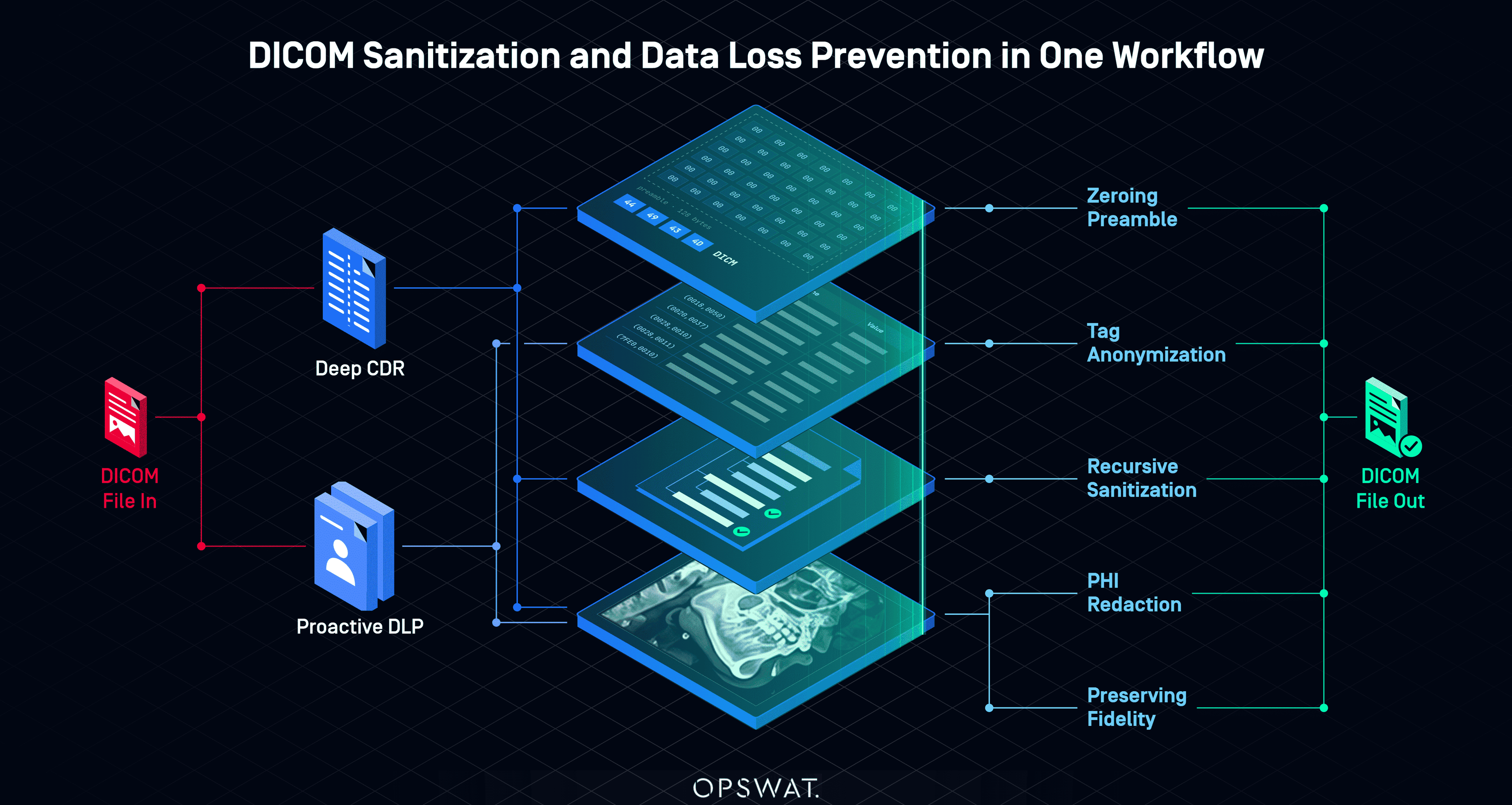
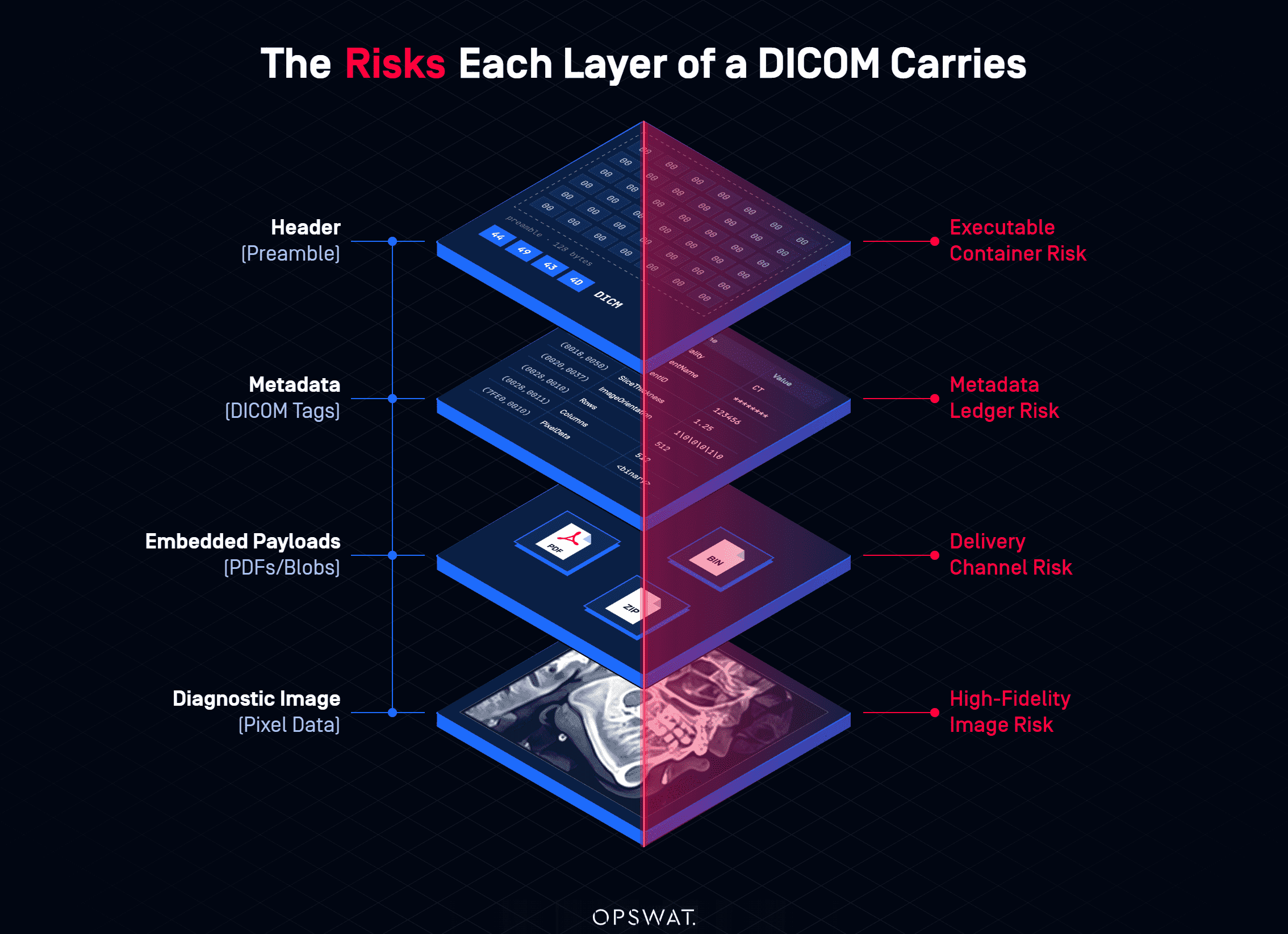
Deep CDR™ Technology works on the container: zeroing the preamble, recursively sanitizing the encapsulated data, and removing what it cannot identify. Proactive DLP works on the values, anonymizing the PHI tags and redacting text burned into the image. One file in, one file out.
Getting Started
DICOM structure validation and recursive encapsulated-data sanitization are available across the OPSWAT File Upload Security portfolio. This includes MetaDefender Core™, MetaDefender ICAP Server, MetaDefender Storage Security, and MetaDefender Cloud™. Existing DICOM workflows pick up the new behavior without reconfiguration; the remove-or-keep policy for unidentified embedded objects is configurable.
If you have any questions or would like more information about DICOM security or OPSWAT File Upload Security solutions, chat with our security experts.