The latest Gears release includes a transition to the latest version of OESIS, UI for the Gears client for Mac, and a newly created full featured status page. Make sure to login to your Gears account to start exploring and taking advantage of all these exciting new features!
Dramatic Performance Improvements
Many of the detection, remediation, and management capabilities of Gears are powered by the OESIS Framework. On Tuesday, the persistent Gears client for Windows received a major upgrade – from OESIS V3 to OESIS V4. Immeasurable effort went into building OESIS V4, and all Gears users will benefit from the improvements. OESIS was rebuilt from ground-up to be smaller, lighter and faster. All aspects of performance are improved, from detection speed, to CPU, memory, disk IO, and package size. Below is a quick comparison chart to demonstrate the enhanced capabilities:
| Windows Persistent Client | Before | Now |
| Gears Installer Size | 22 MB | 14.5 MB |
| CPU Load* | 0% - 90% | 0% - 23% |
| Memory* | 96 MB - 164 MB | 30 MB - 34 MB |
| Avg. Disk Read IOPS* | 1704 | 4 |
| Avg. Disk Write IOPS* | 2 | 0.8 |
*Measurement of OESIS component of Gears
The improvements are dramatic, and you can expect to see more in the near future including reducing the installer size by another 1 - 2MB.
Better Manageability
In addition to these performance benefits, the application detection and management functions are also improved. When logging in to Gears cloud, you will notice many more applications with the

icon next to them. This indicates an action is available for this product. In this initial release, Uninstall is the most common function you’ll notice.
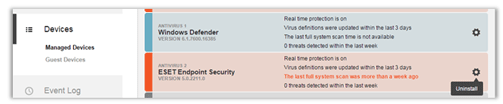
Some other possible functions you may see include Enable Real Time Protection, Update Virus Signatures, Perform Full System Scan, and Enable Firewall. Selecting one of these options will send a message to the Gears client, which will respond by silently executing the desired action. This feature is ideal for performing remote remediation of devices.
UI for the Gears client for Mac
Mac users won’t be able to utilize the OESIS V4 upgrade justyet (OESIS V4 comes to Mac in a few months), but there’s still a very exciting new feature for Mac users with this release: Mac UI for Gears.
With the latest release, Mac users will now see the Gears tool just like Windows users. Most features have been ported from Windows, with the exception of survey integration, submit a support request, and Session Shield. Survey integration and support requests will be added very soon; Session Shield is not planned for Mac at this time.
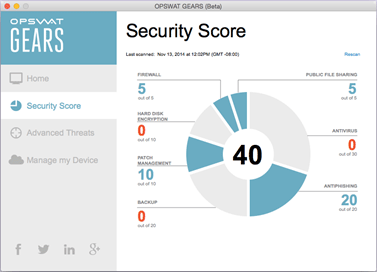
No additional actions are necessary to enable the Mac UI for Gears. Your existing visibility settings and rebranding package will automatically be applied to Mac devices.
This is a stable and well-tested release, but as noted above there are a few features not yet implemented, so we’re putting a beta label on the app for now.
Antivirus Product Allowlisting and Blocklisting
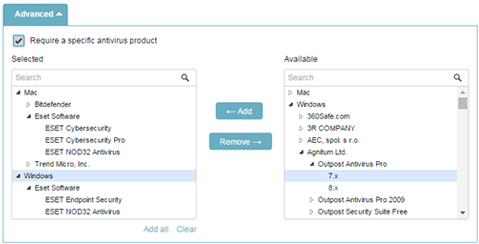
Until now, Gears security policies related to antivirus were all-or-nothing – meaning, if your policy required an enduser to have antivirus installed, it could be any supported antivirus program. Now Gears admins can specify exactly which antivirus products and versions are approved on their managed and guest devices. Because the efficacy of certain antivirus products is better than others, many organizations may wish to disallow free or questionable antivirus products.

To take advantage of this new feature, simply go to:
Configure > Device Policy > Antivirus > “Report if no antivirus application is installed” > Advanced
Status Page - Trust.OPSWAT.com
StatusPage.io has been taking off in popularity, and for good reason. They make it incredibly easy to create a full featured status page. We’ve jumped on the bandwagon and made Trust.OPSWAT.com to help Gears users check on system availability, performance, and planned maintenance events. By subscribing to the page, you can receive notifications of incidents automatically.

Right now we are only tracking OPSWAT Gears, but we will be adding other hosted OPSWAT services very soon.
Additional Changes
- Security Score has a Rescan button added
- Minor bug fixes and performance enhancements
We encourage everyone to login to their Gears account to start exploring these new features!

