Enterprise data at rest rarely lives in one place. It spreads across file shares, SharePoint and OneDrive, NAS appliances, and S3-compatible object storage; and every one of those repositories is a potential entry point for malware and a potential source of data loss. MetaDefender Storage Security protects these environments with OPSWAT technologies such as Metascan™ Multiscanning, Deep CDR™ Technology, and Proactive DLP™.
Version 4.5.0 was shaped around the work storage security teams do every day. Here is what changes for you.
Spend Less Time Navigating, More Time Remediating
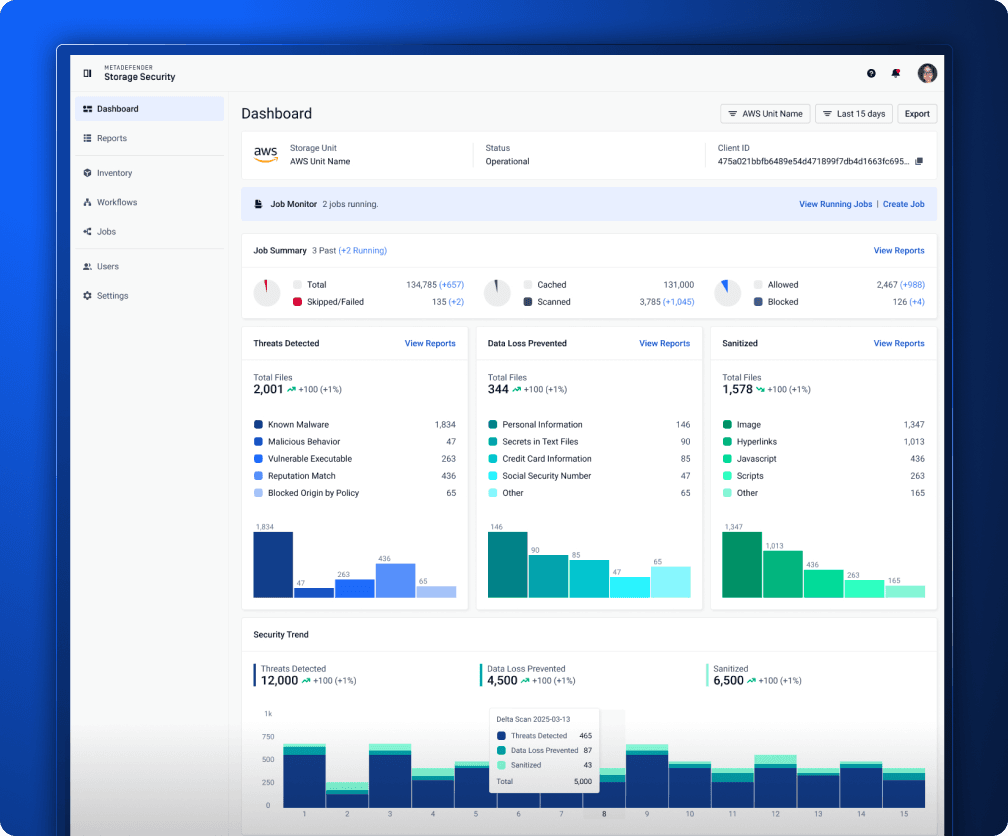
If you manage a large storage estate, most of your day happens in the console: triaging scan results, adjusting workflows, and managing hundreds of accounts, groups, and storages. Version 4.5.0 rebuilds that entire experience around those tasks on OPSWAT's new design system, bringing a consistent experience across every page of the application - and across every OPSWAT product:
- Investigate faster: redesigned Reports with file-level details for threats prevented, sanitization, and Proactive DLP findings
- Act in bulk: bulk actions, filtering, and pagination for working with large data sets
- See what matters: refreshed dashboards with real-time updates, customizable date ranges, and permission-based routing so users see only the areas relevant to their access
- Onboard new team members quickly: guided welcome tours and step-by-step first-time setup
- Work comfortably: dark theme support across the application, and legacy URL redirects so existing bookmarks and links continue to work
Running Multiple Instances? Manage Them from One Place
Distributed organizations often run MetaDefender Storage Security across sites, business units, or environments; and keeping configuration consistent across instances is tedious and error-prone. With full My OPSWAT™ Central Management (version 10) integration, 4.5.0 turns that into a single workflow.
Enrollment, license management, and deployment ID synchronization are centralized: license changes reach every enrolled instance on its next check-in, and a newly enrolled instance automatically picks up an available license. vPack configuration lets you remotely manage scan pools, accounts, groups, storages, workflows, access control, SSO (single sign-on), SMTP (Simple Mail Transfer Protocol), notifications, external loggers, telemetry, and usage reporting.
The result: consistent policy across your fleet, and less operational overhead per instance.
Absorb Scan Peaks Without Overprovisioning
Scan workloads spike; bulk data migrations, backup waves, or a newly connected repository can multiply file volumes overnight. Sizing for the peak wastes resources; sizing for the average creates backlogs. The new autoscaling capability in 4.5.0 resolves that trade-off:
- Capacity follows demand: scaling decisions informed by real-time CPU, memory, and file-throughput signals
- Guidance included: built-in recommendations suggest optimal scaling configurations instead of leaving you guessing
- Visibility built in: a health API (/healthz) and a system usage dashboard show how your deployment is performing and its scaling status
- Fits your architecture: supported on Core, Cloud, and MD Cluster deployment models
Stand Up to Security Reviews and Compliance Audits
Security products face the same scrutiny as the data they protect. When auditors or your own security team review your storage security deployment, 4.5.0 gives you stronger answers: OData injection vulnerabilities have been fixed with proper input sanitization, a license forgery vulnerability has been patched, and findings from internal penetration testing have been remediated, including removal of a hardcoded JWT (JSON Web Token) secret and a fix for an open redirect in SSO login. Containers now run as non-root on Kubernetes (K8S Level 1 compliance), read privileges on the configuration file have been removed for non-admin Windows users, and SBOM (Software Bill of Materials) reports ship with every release for software supply chain transparency.
Coverage That Matches Your Storage Estate
Whatever mix of storage you run, 4.5.0 connects to it more reliably: a rebuilt SMB (Server Message Block) service for Windows deployments, improved event-based real-time protection and autodiscovery deduplication for SharePoint Cloud, Microsoft Graph connection throttling for OneDrive and SharePoint Cloud, NetApp ONTAP enhancements (configurable RPC pipe host and automatic handling of Zone.Identifier metadata files), and S3 autodiscovery extended to all S3-compatible storage such as AWS, MinIO, and Oracle. Diode integration is now documented for cross-domain file transfer scenarios.
Scan results are also more trustworthy: directory listing errors on NFS (Network File System) and SFTP (Secure File Transfer Protocol) are now surfaced as warnings during scans instead of passing silently, and the dashboard Threats Prevented count now matches per-scan report counts.
Behind the scenes, reliability improves across the board: cancelled or stuck in-progress jobs are automatically recovered on service restart, scheduled scans start at the correct time, overlapping scans are blocked at the storage group level (with an environment variable option, SKIP_SCAN_OVERLAP_CHECK, to skip the check - see the custom configuration documentation at https://www.opswat.com/docs/mdss/configuration/custom-configuration), and configurable retention policies keep the database from growing unchecked.
Get the Benefits - Download 4.5.0
If you want to benefit from a faster, more consistent console, centralized fleet management, workload-aware scaling, and a hardened platform, the path is simple: download our latest release. MetaDefender Storage Security 4.5.0 is available now from the OPSWAT Portal.
Release Details
- Product: MetaDefender Storage Security
- Version: 4.5.0
- Release Date: July 22, 2026
- Release Notes: https://www.opswat.com/docs/mdss/release-notes
- Download: OPSWAT Portal