Key Takeaway
MetaDefender™ Cloud for Slack adds multi-layer file security to files shared in supported Slack channels, helping teams identify threats and risky content directly within their workflow.
Files that violate security policies can be deleted across all Slack subscriptions, while Slack Enterprise+ can also block users from accessing an uploaded file until its security inspection is complete.
Scan and Block Threats Before They Reach Users
Every file dropped into a Slack channel, from contracts and reports to code, images, and archives, is available to everyone in that channel the moment it's uploaded. If that file carries malware that bypasses Slack's native file security policies, it can breach systems and spread across an entire organization before anyone notices.
MetaDefender™ Cloud for Slack adds multi-layered file security policies to reduce that risk. It scans files shared in public Slack channels as they're posted, identifying malicious or risky content before it spreads across the workspace. On supported Slack Enterprise+ subscriptions, it enforces your security policy directly, blocking a risky file outright so it never reaches users in the first place.
Why Slack File Sharing Needs another Security Layer
Slack does a great job at preventing data loss or data leaks with data encryption and complaince-based policies. However, zero-days and evasive malware can hide in files.
MetaDefender™ Cloud adds additional security layers, helping teams understand whether a file contains known malware, risky active content, or sensitive data, and decide if it should remain available.
For supported Slack Enterprise+ deployments, MetaDefender Cloud quarantines uploaded files while they are inspected. The files remain in Slack but are unavailable for download until the inspection is complete. Administrators can then apply security policies to allow, block, or delete files based on the results.
For Slack Free, Pro, and Business+ workspaces, MetaDefender Cloud scans the uploaded file and displays the verdict directly in Slack. Because the file may be accessible before the verdict appears, this option provides added security visibility without blocking access while the scan is in progress.
Slack subscription | MetaDefender Cloud experience | User access | Policy action |
Enterprise+ | Pre-access MetaDefender Cloud inspection | File is intended to remain unavailable until the MetaDefender Cloud verdict | Allow, block, or delete according to policy. |
Free, Pro, Business+ | Inline verdict after the file is shared | The file may be accessed before the MetaDefender verdict appears. | No pre-access enforcement. |
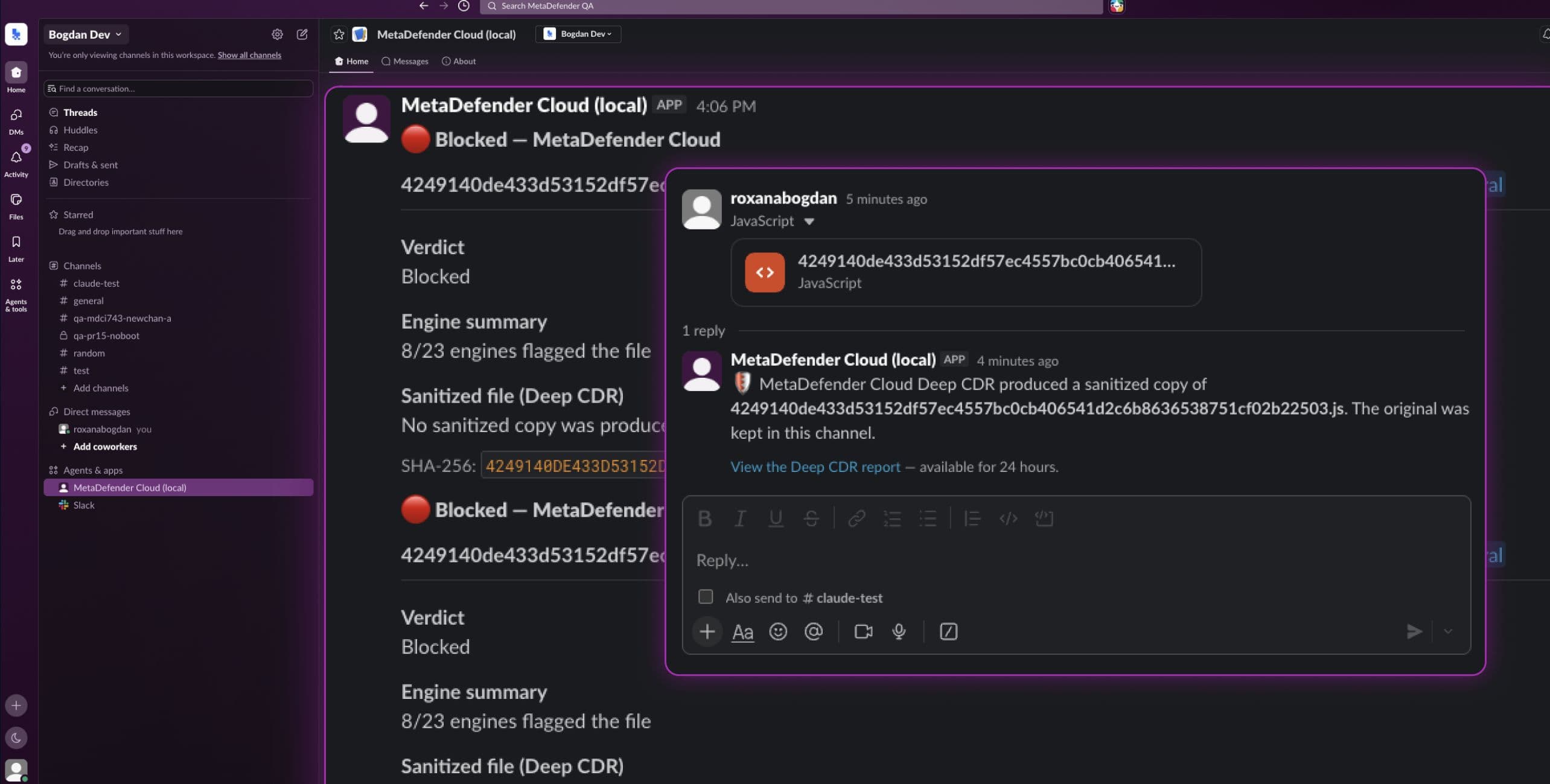
Layered File-Inspection Technologies
Depending on the MetaDefender Cloud tier and the policy configured for the integration, the Slack workflow can draw on technologies such as:
- Metascan™ Multiscanning: inspects files with multiple anti-malware engines and aggregates the results into a single verdict.
- Deep CDR™ Technology: removes potentially risky active content from files and reconstructs a sanitized version without affecting usability.
- Proactive DLP™: detects sensitive information and applies content-based policies.
- Adaptive Sandbox: observes suspicious files in an isolated environment to identify advanced or evasive behavior.
Set the Security Policy in MetaDefender Cloud
Administrators manage the file security policy from the MetaDefender Cloud platform, determining which inspection technologies run and how results are handled.
Centralizing policy in MetaDefender Cloud gives security teams one place to define file-handling rules while users continue collaborating in Slack.
The current integration scans files uploaded to public Slack channels only; it does not scan files shared in private channels or direct messages.
MetaDefender Cloud for Slack is planned for all MetaDefender Cloud tiers:
- Free
- Community
- Commercial
Bring file-security context into the conversation
Slack helps teams move quickly. MetaDefender Cloud for Slack is designed to add file-security context at the point files are shared; without requiring a custom integration.
Frequently Asked Questions
Can MetaDefender Cloud block a malicious file in Slack?
MetaDefender Cloud can delete malicious files regardless of subscription models. However, policies rely on the Slack subscription. For supported Enterprise+ deployments, MetaDefender Cloud policy can prevent access. For Free, Pro, and Business+ workspaces, the integration returns an inline verdict, but the file may be accessible before that verdict appears.
Which Slack plans work with MetaDefender Cloud?
Slack Free, Pro, Business+, and Enterprise+; the available workflow differs by subscription.
Which MetaDefender Cloud tiers include the Slack integration?
The integration is available for all MetaDefender Cloud tiers: Free, Community, and Commercial tiers.
What technologies scan files shared in Slack?
The configured policy may use Metascan Multiscanning, Deep CDR™ Technology, Proactive DLP, and Adaptive Sandbox.