The typical, online office worker realistically downloads about 20 files per day on average. These may include work-related attachments, personal documents, app updates, or shared media.
This process is carried out instinctively, with little regard for security.
Users trust their antivirus software or the built-in security features of their devices to protect them against potential cyber threats.
The assumption is that such risks will never directly affect them.
Until they do.
In 2025, downloading files without scanning them is reckless.
Some of the most damaging and notorious cyberattacks in recent years have been initiated precisely through infected downloads, and it only takes one careless click to open the gate to a serious cyberattack.
Unfortunately, traditional defences like simple antivirus software and URL filters aren’t strong enough to protect against sophisticated threats.
OPSWAT File Security for Browser solves this issue, by adding an extra protection layer at the point of download.
The extension uses advanced technology trusted by Critical Infrastructure and enterprise industries, ensuring that files are scanned and verified before they reach the device.
The Growing Risk of File-Based Attacks
As day-to-day users of online tools, we have an inherent trust in familiar file formats such as docs, archives, or PDFs. Users download and open these files without hesitation, not realizing attackers can take advantage of this trust.
Malicious scripts embedded inside legitimate-looking documents like word documents, PDFs, or images stand out as an attacks vector. In fact, according to Check Point Research, PDF-based attacks account for 22% of all malicious attachments.
Archives as well can be exploited by attackers.
Adversaries can hide malicious content via mass compression, which can deliver payloads through scripts or executables. Attackers can also spoof ZIP filenames or use misleading folder paths within them to avoid threat detection.
Whether it’s an archive, a PDF, an Office document, or an image, these documents all appear harmless at first glance. Unfortunately, once opened, a malicious code can be executed in the background, opening the door to adversaries.
Since 60% of last year’s breaches were possible due to the human element – a mistake carried out in earnest, with no malicious intent – we can’t keep on trusting the files we’re downloading are clean.
Instead, we need to double-down on our suspicions and reinforce security practices.
This includes moving on from previous approaches, as they can no longer handle sophisticated threats.
Why Traditional Endpoint Antivirus is not Enough
While traditional antivirus tools have long been a staple of cybersecurity, they weren’t designed to handle the types of threats we face today.
Antivirus engines rely on signature-based detection. They can only identify vulnerabilities that already exist in their malware signature databases.
Although these databases are updated multiple times a day, modern attacks are specifically engineered to evade detection. By the time a new threat is identified and added to a database, the damage is already done.
To achieve real-time threat detection and prevention, organizations need a far more comprehensive approach:
- Scan files with multiple engines and multiple databases
- Examine every component of a file, including hidden elements
- Remove anything that appears suspicious
- Execute files in a safe, isolated environment to observe potential malicious behavior
OPSWAT File Security for Browser delivers on these requirements.
How Malware Scanning Works Inside Your Browser
How to Install and Use the Extension
Start by adding the extension to Chrome or Edge. You can download it for free here, then simply select “Add Extension” when prompted.
Once installed, it activates automatically, with no additional setup required from your part.
As you browse, the extension monitors all download events and intercepts each file before it ever reaches your device, ensuring threats are caught early.
Once the file is intercepted, it’s securely uploaded to MetaDefender Cloud for analysis. Nothing is modified or allowed onto your system until the security verdict is returned.
The Security Verdict is delivered once the analysis is complete.
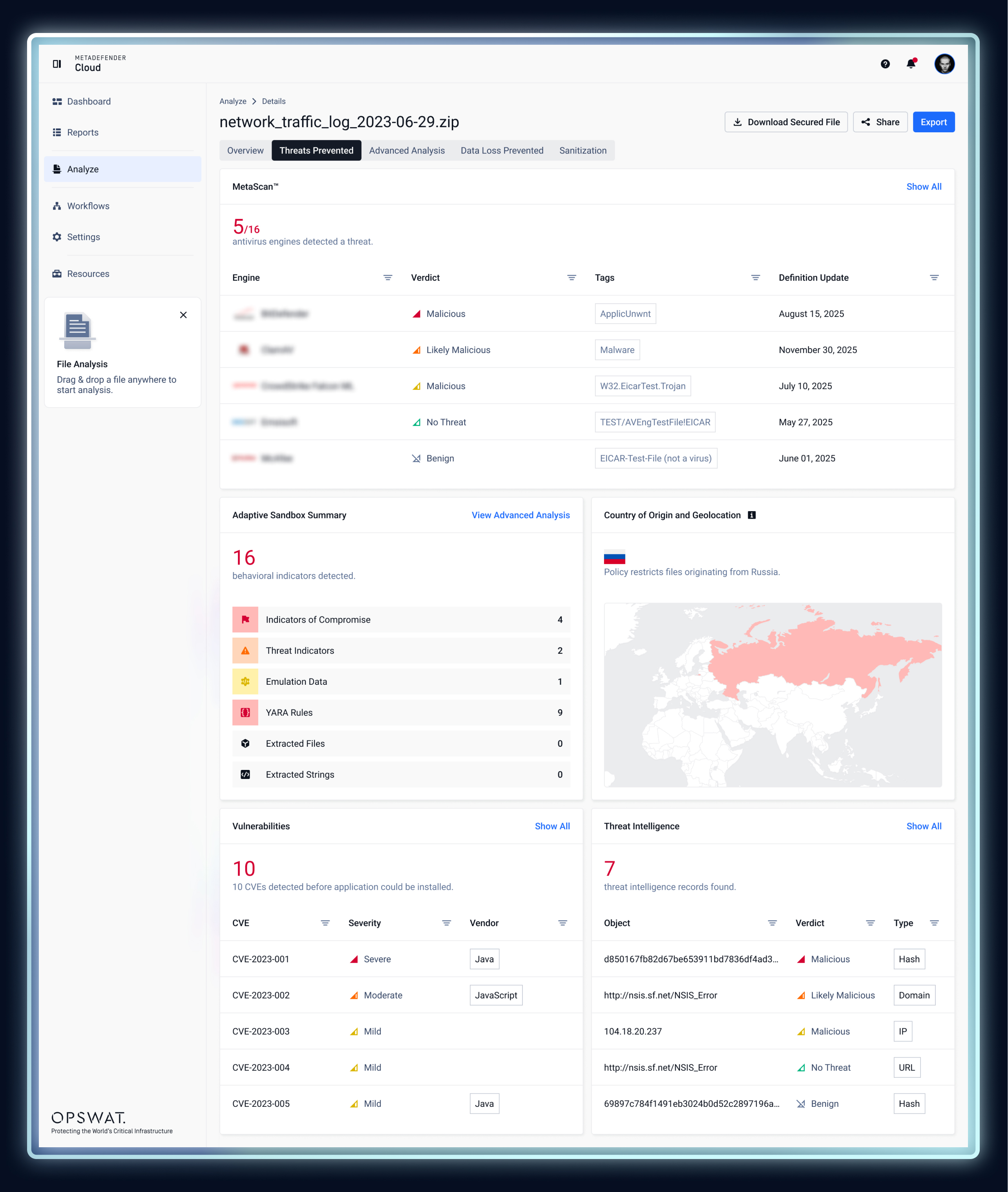
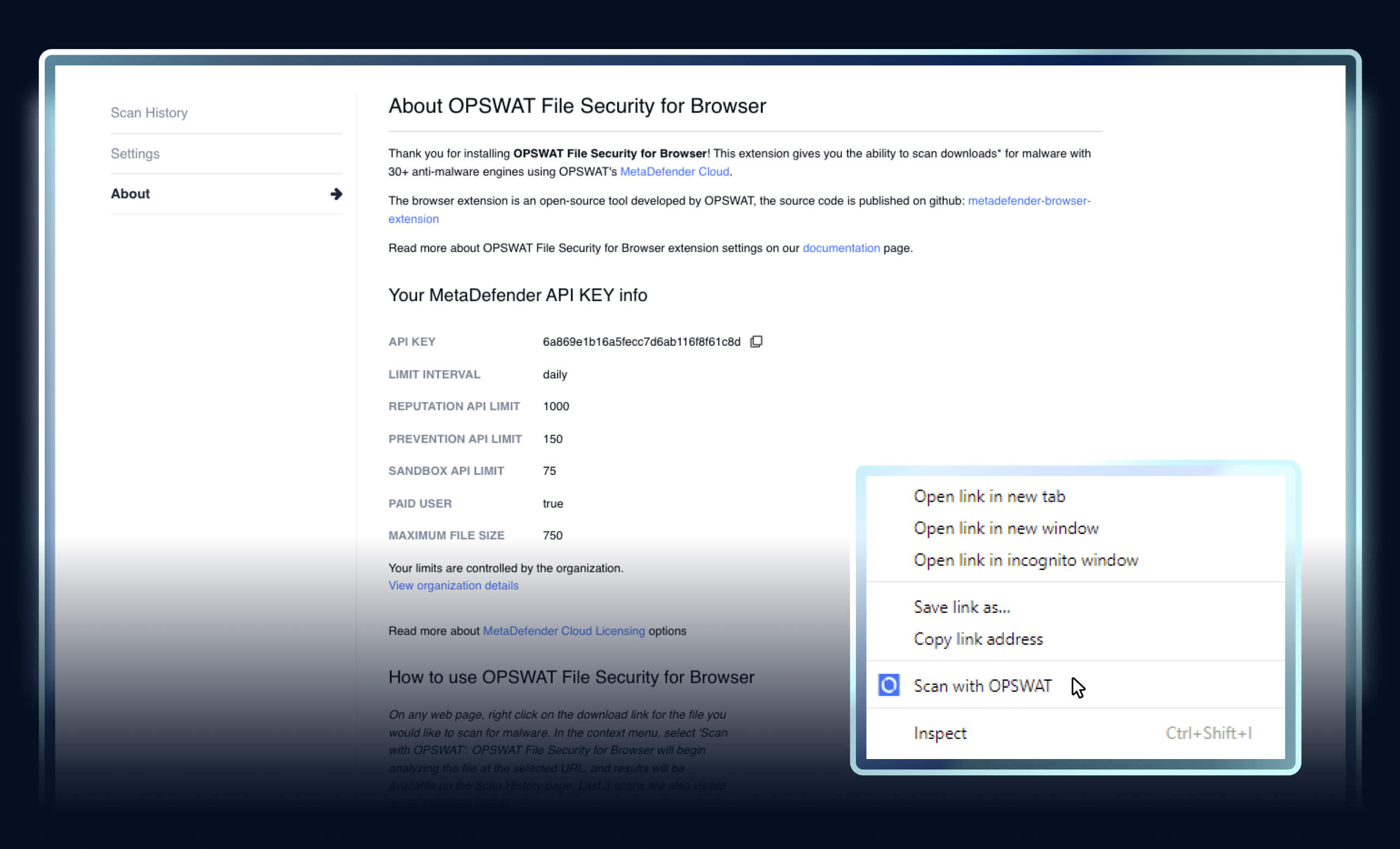
All downloads are scanned automatically, but for manual checks, simply right-click any download link and select “Scan with OPSWAT.”
The extension will scan the file at that URL before downloading it.
Scan results appear in your Scan History, and the three most recent results are also shown in the extension popup.
To adjust behavior, right-click the OPSWAT File Security icon in your browser toolbar and select “Options.” From there, you can configure how scans are handled.
For organizations, administrators can centrally manage settings such as allowlists, API keys, and security policies. The extension supports configuration through GPO, Intune, and the Google Admin Console.
To learn more about the extension, check out the documentation page.
Browser Extension Menu Explained
OPSWAT File Security for Browser provides users with a seamless and efficient way to manage file and URL scans directly from their browser.
With an intuitive interface, it offers a simple left-side menu with three main sections.
Scan History
The Scan History section is where all the files scanned by the extension are stored, along with their verdicts.
To view your scan history, simply click select “View Scan History” in the extension.
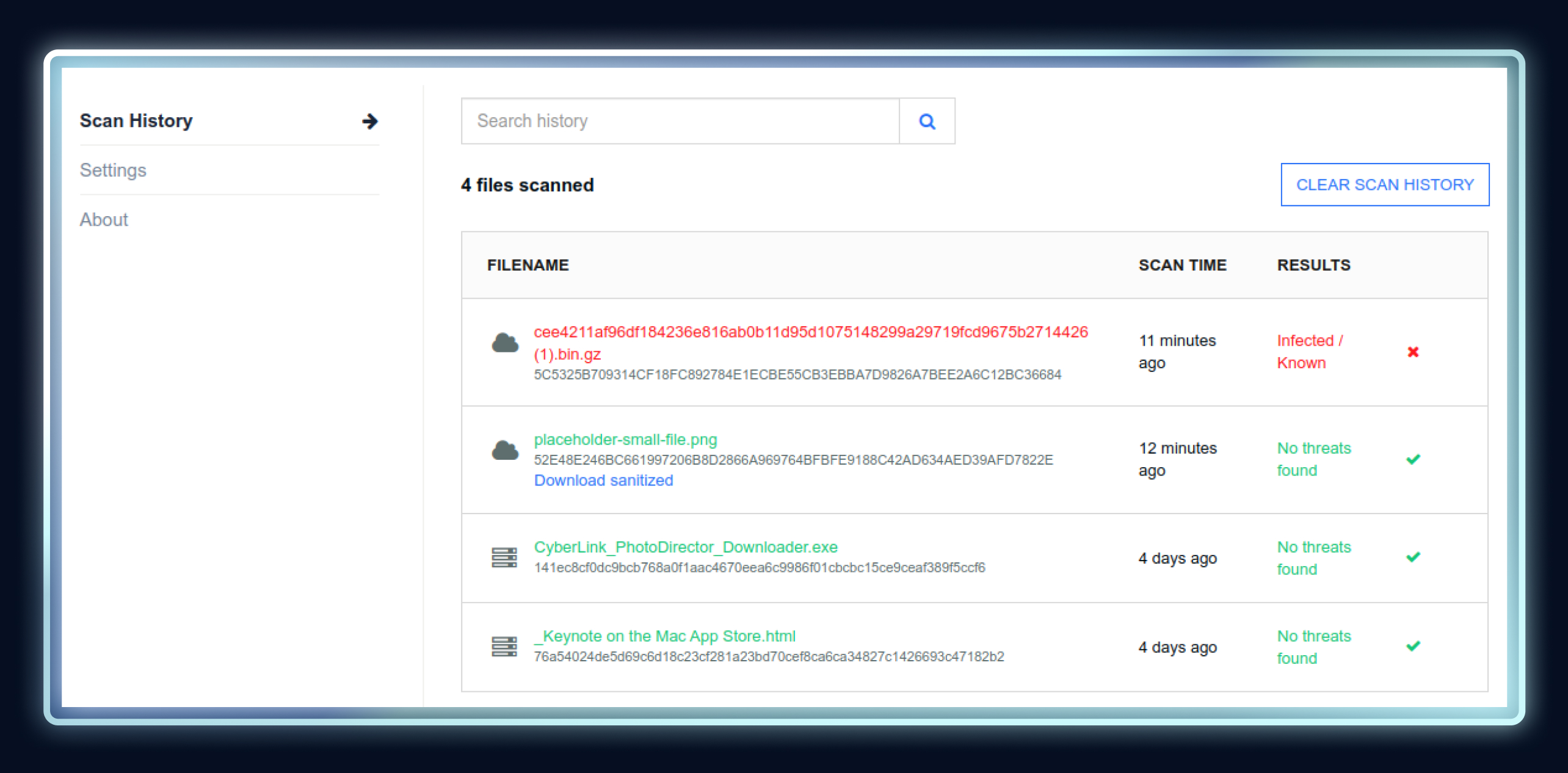
Each entry shows essential details such as the filename, verdict (clean, suspicious, or infected), scan source, and timestamp; clicking on a specific file will open the full report.
You can delete individual scan entries or clear the entire history if needed. The scan history is stored locally within the extension and is not synced with MetaDefender Cloud/Core accounts.
Settings
The Settings section gives you full control over how the extension handles downloads and URL checks.
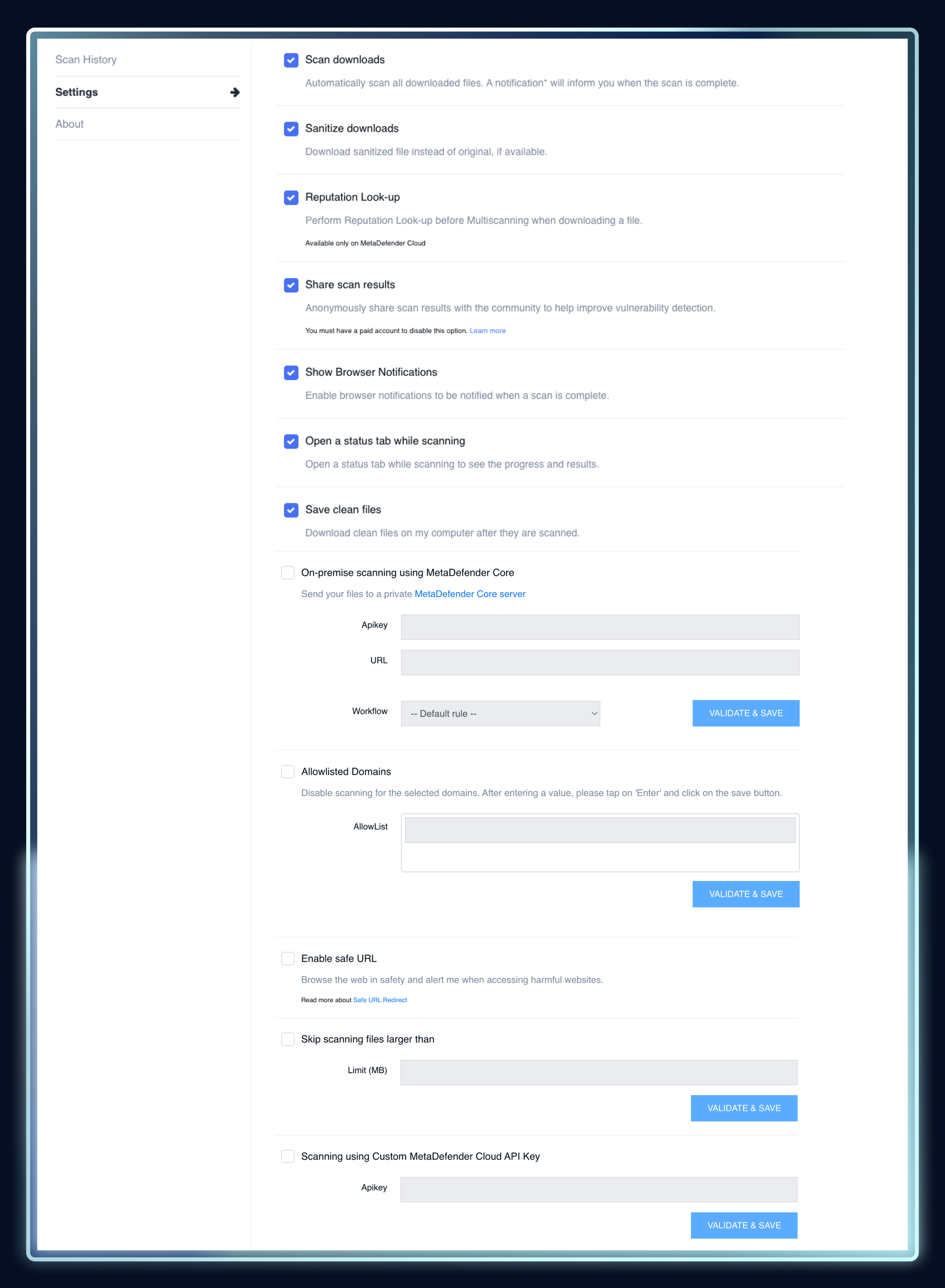
Here are the core configuration options available:
- Scan downloads: automatically scan every file you download.
- Sanitize downloads: download the sanitized version of the file (if applicable)
- Reputation Look-up: check the reputation before Multiscanning when downloading a file.
- Share scan results: anonymously share scan results.
- Show Browser notifications: be notified when a scan is complete.
- Open status bar while scanning: see progress on your scans.
- Save clean files: download clean files on the computer after they are scanned.
- Enable safe URL: browse the web safely and get an alert if accessing harmful websites.
- Skip scanning files larger than: enable this option to save time and resources.
- Scanning using Custom MetaDefender Cloud API Key: input your own API key.
- On-premise scanning using MetaDefender Core: easily link your extension to MetaDefender Core for more advanced scanning features.
- Allowlist Domains: you can add trusted domains to the allowlist to prevent scanning of files from those sources.
About
This final section provides quick access to essential account & support information.
- Logged-In Account Information: view details of the account you're currently logged into.
- API Key Info: Your personal MetaDefender Cloud API key is available here.
- Documentation and Resources: links to helpful resources and official documentation.
The Technologies Powering OPSWAT File Security for Browser
The extension adds a last-mile security gate at the point of download, powered by the same advanced technologies trusted to protect the world’s critical infrastructure.
- Metascan™ Multiscanning checks each file with 20+ anti‑malware engines to catch what single engines miss.
- Deep CDR™ Technology sanitizes documents to disarm any potentially malicious content or zero-day threats without altering structure or functionality.
- The Adaptive Sandbox dynamically analyzes files to uncover zero-day and evasive threats.
- Reputation & Hash Lookups speeds decisions for common files and reduces re‑scans.
- URL Reputation Checks evaluates destination URLs against MetaDefender threat intelligence when users access links or scan before download.
Read the full datasheet for a more detailed look at how the extension works.
OPSWAT File Security for Browser Protects Against Weaponized File Downloads
With its combination of technologies and intuitive interface, OPSWAT File Security for Browser provides fast, light, and effective security against most file-borne threats.
- Document malware
Malicious documents often hide dangerous macros or scripts that activate as soon as you open them.
OPSWAT File Security for Browser scans each file with 20+ antivirus engines and removes suspicious elements (macros or embedded scripts) to give you a safe and usable version of the file.
For evasive malware, the Adaptive Sandbox opens the document in a secure, isolated environment to observe its behavior before it ever reaches your device.
- Trojanized installers
Trojanized installers look like normal software but secretly contain malware.
The Metascan Multiscanning technology used by the extension is compatible with .exe files, so it can scan installers as well.
Since CDR doesn’t apply to executables, Sandboxing runs the installer in a secure, isolated environment to spot hidden behavior.
- Malicious ZIP/PDF files
To counter hidden threats inside ZIPs, the extension uses Multiscanning to unarchive and examine the contents of these files.
Deep CDR™ Technology sanitizes ZIPs or PDFs by stripping embedded scripts or hidden layers from entering the system.
- Payloads hidden in harmless-looking files
Some threats disguise themselves inside images, documents, or other files that appear completely safe.
Deep CDR™ Technology is especially powerful here, as it deconstructs and rebuilds the file to remove any executable or hidden malicious content, even if the threat is brand-new or unknown.
- Threats delivered through compromised or spoofed domains
Even legitimate-looking websites can deliver malicious downloads if they’ve been compromised. The extension prevents these threats by checking URLs, IP addresses, and domains for malicious behavior using multiple IP & URL reputation sources.
- Evasive or zero-day behaviors
Some threats are designed specifically to bypass traditional antivirus tools.
To handle advanced attacks, the extension combines Multiscanning, Deep CDR™ Technology, and the Adaptive Sandbox, to provide a truly comprehensive analysis and detect threats which others miss.
Conclusion
Nearly all systems use files and attackers disguise malicious code in common, trusted file formats (like .docx, .pdf, .zip). The type of files that users open daily.
Online adversaries are highly skilled, highly motivated, and (unfortunately) highly successful individuals: in 2024, nearly 54 people per second fell victim to a cyber attack on a global scale.
You don’t need to become part of the statistics. You don’t even need to change your online habits to stay protected.
OPSWAT File Security for Browser is a built-in, seamless extension that provides multilayered protection without any extra effort on your part.
Multiscanning, Deep CDR™ Technology, and Sandboxing happen in the background, so your downloads are checked in real-time, silently and efficiently.
This means you get peace of mind, knowing that your device and data are protected with virtually no impact on your browsing experience.
Staying safe online becomes as effortless as clicking a link.
Add the Extension to Your Browser Today
Frequently Asked Questions (FAQ)
How does the MetaDefender Chrome Extension scan a file before I download it?
Once the download starts, the MetaDefender Chrome Extension intercepts the file and uploads it to MetaDefender Cloud for analysis. MetaDefender Cloud then scans the file and only releases it if it’s clean; nothing is allowed onto your system until the security verdict is returned.
What happens if the extension detects a malicious or unsafe file?
If the file isn’t safe, the download is stopped to protect your device.
Can I manually scan a file before downloading it using the extension?
If you don’t enable automatic scanning in the browser menu, scans can be started manually.
Will downloads be blocked if files are marked unsafe by MetaDefender Cloud?
Yes, the MetaDefender Chrome Extension blocks files from reaching your device if the scans reveal malware or other malicious behavior.
How does the extension intercept file downloads in the browser?
MetaDefender Chrome Extension identifies file downloads and doesn’t allow the file to reach your device until the scan is complete and the verdict is safe.
Can I configure trusted domains or allowlists with this extension?
Yes. You can add trusted domains to the allowlist to prevent scanning of files from those sources.