TL;DR
- Encrypted transport protects the connection, not the file. Payloads still need inspection.
- MFT security is an architecture: separate control, transfer, and inspection planes behind a DMZ gateway.
- Security solutions via ICAP (internet content adaptation protocol) add a modular inspection layer between intake and delivery without rebuilding workflows.
- Layer the controls: Metascan™ Multiscanning, Deep CDR™ Technology, Proactive DLP™, File-Based Vulnerability Assessment, and Adaptive Sandbox.
- Why Secure Transport Alone Does Not Make Managed File Transfer Safe
- What a Modern Managed File Transfer Security Architecture Includes
- How ICAP Adds an Inspection Layer to Managed File Transfer Workflows
- Which File Inspection Controls Strengthen Managed File Transfer Security
- How To Design Secure File Transfer Workflows Between a DMZ and Internal Networks
- How To Apply Zero-Trust Managed File Transfer Across Segmented IT and OT Networks
- Managed File Transfer vs SFTP Security Architecture and Other Common Design Choices
- How To Evaluate a Security-First Managed File Transfer Platform
- FAQs
Why Secure Transport Alone Does Not Make Managed File Transfer Safe
Encrypted delivery protects the connection, but it does not ensure the file itself is harmless. Managed file transfer (MFT) workflows can still pass along malware, sensitive data, or noncompliant content.
A security-first managed file transfer architecture must validate file trust before delivery. That requirement becomes more important when automated workflows move files across partners, business systems, and segmented trust boundaries, where one accepted file can trigger downstream processing, storage, or distribution.
How Encrypted File Transfers Still Deliver Malicious or Sensitive Content
Encrypted transfers can still deliver malicious or sensitive content because TLS, SFTP, and similar controls protect data in transit, not the file payload itself. These controls prevent interception, but they do not detect malware, active content, embedded objects, or regulated data.
A partner upload can arrive through TLS intact and still contain a weaponized document. An automated batch job can move archived files over SFTP successfully while also transferring sensitive records or risky macros into internal systems.
Why Automated Workflows Can Move Risk Faster Than Manual Processes
Automated workflows can spread file-borne risk faster than manual processes because scheduled and system-to-system transfers operate at speed and scale. That same efficiency accelerates propagation when inspection is absent.
A single uninspected inbound file can be replicated into shared storage, analytics pipelines, or operational applications before anyone reviews it. When detection comes late, incident response gets harder because teams have to trace every downstream transfer, delivery event, and dependent workflow.
Why File Trust Becomes More Important in Regulated and Segmented Environments
In regulated and segmented environments, each file needs to be verified because it often crosses explicit boundaries between lower-trust and higher-trust zones. Regulated data movement and critical infrastructure workflows require proof that each file was inspected, evaluated, and handled according to policy before release.
Compliance obligations also raise the standard for evidence. Architects need auditability, chain-of-custody records, and policy-enforced transfer decisions when files move between business units, external partners, IT systems, and Operational Technology environments.
What a Modern Managed File Transfer Security Architecture Includes
A modern MFT security architecture brings together file movement, inspection, policy enforcement, storage, identity, and governance. MFT is more than a protocol endpoint or scheduling engine. It functions as a coordinated control system for trusted file exchange.
The design goal is to preserve automation while reducing file-borne risk. That requires clear roles for file movement, content inspection, policy enforcement, staging, access control, and logging so each transfer can be trusted and explained.
Which Core Layers Belong in a Security-First Managed File Transfer Design
A security-first MFT design typically includes transfer, inspection, policy, staging, identity, and logging layers. The transfer layer moves files, inspection validates content, policy determines the next action, and staging supports quarantine and controlled release.
The identity layer enforces least-privilege access for users and service accounts. The logging and governance layer records transfer events, inspection results, approvals, and policy outcomes so automation remains controlled instead of opaque.
What a Managed File Transfer Gateway Does in the Architecture
An MFT gateway brokers inbound and outbound file movement at the edge of the environment. It isolates partner connectivity, terminates external sessions, and applies workflow controls before files reach internal orchestration or business systems.
Gateway functions differ from back-end processing functions. The gateway handles connectivity, protocol exposure, and initial intake, while internal services handle approved delivery, downstream routing, and integration with repositories, applications, and business processes.
Where the Control Plane, Transfer Plane, and Inspection Plane Fit
In a well-designed MFT architecture, the control, transfer, and inspection planes should remain as separate logical functions. The control plane handles policy, administration, partner onboarding, and orchestration. The transfer plane moves files between endpoints and staging areas. The inspection plane evaluates content and returns verdicts.
This separation enables governance and resilience. Teams can scale inspection services independently, update security controls without redesigning workflows, and maintain clearer audit trails for who configured policy, what moved, and why a file was released or quarantined.
How ICAP Adds an Inspection Layer to Managed File Transfer Workflows
Security solutions integrated via ICAP (Internet Content Adaptation Protocol) adds an inspection layer to MFT by creating a clean handoff point between file transfer and final delivery. ICAP allows a transfer workflow to submit a file to an external inspection service before policy decides whether to release, reject, sanitize, or escalate the file.
This model lets teams add file inspection without redesigning every transfer workflow. An ICAP-based inspection layer can sit between intake and delivery, so inspection becomes a reusable service across inbound, outbound, and cross-domain workflows.
How Internet Content Adaptation Protocol Works in File Transfer Security
ICAP is a request-response protocol that lets one system send content to an external service for inspection or modification. In file transfer security, it gives MFT workflows a standard way to hand off files to scanning or sanitization services and receive a verdict or transformed file in return.
Its main architectural advantage is modularity. Transfer systems do not need to embed every inspection engine directly because ICAP creates a standard handoff point for external inspection services. Learn more about 6 ICAP best practices.
Where to Place ICAP Between Intake, Policy Decision, and Delivery
ICAP implementation begins after file intake and staging but before final delivery into trusted destinations. A common sequence is intake, temporary staging, ICAP submission, inspection verdict, policy decision, and then release, quarantine, rejection, sanitization, or escalation.
Architects should enforce hold actions before delivery, not after arrival in target systems. That placement keeps the trust boundary explicit because file trust is established during the workflow instead of assumed once transport completes.
How ICAP Keeps File Inspection Modular Without Breaking Automation
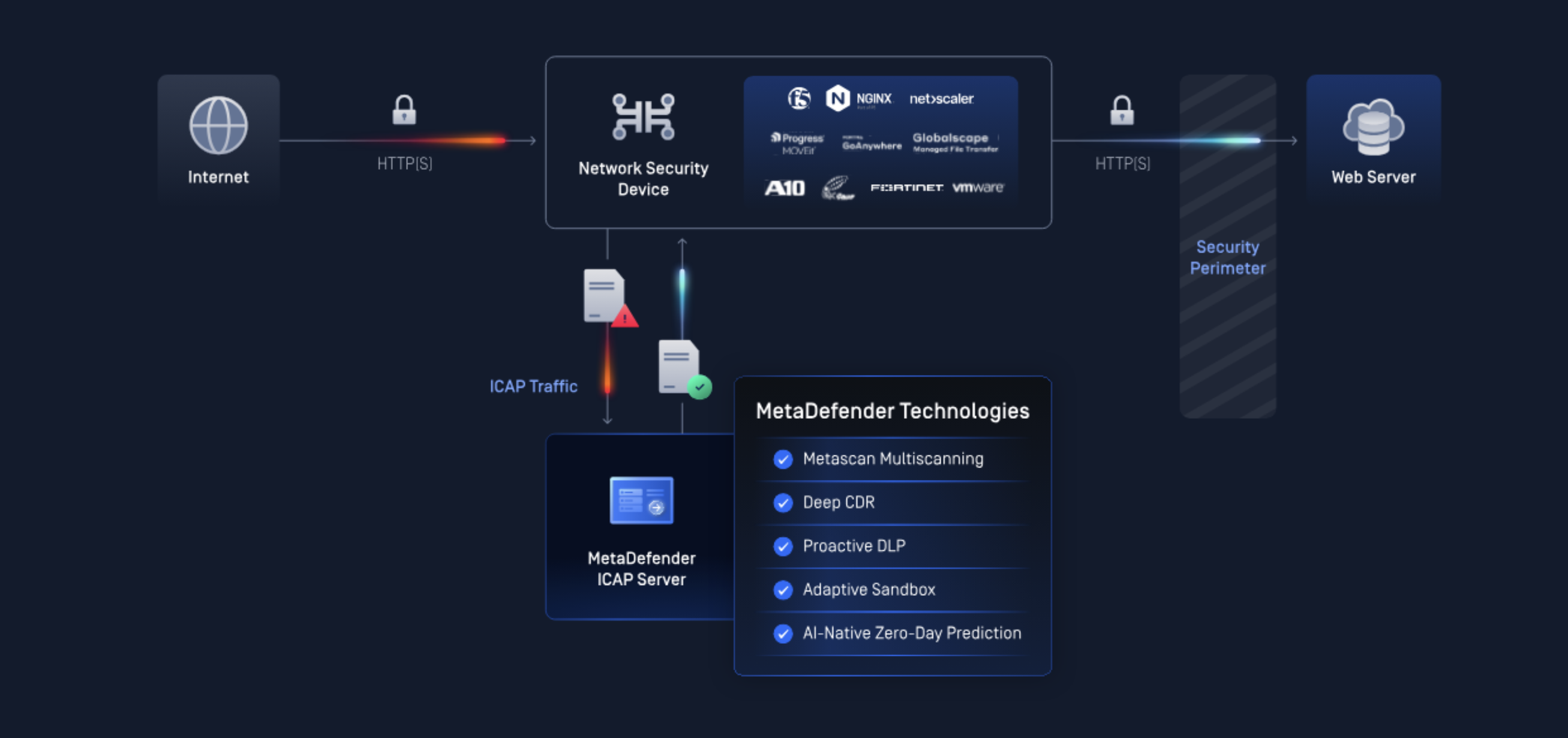
ICAP keeps inspection modular because it separates transfer orchestration from security inspection. Workflow teams can preserve existing routing, scheduling, and partner exchange logic while security teams update scanning depth, sanitization policy, or inspection services independently.
The architecture also supports performance tuning and resilience choices. Teams can choose fail-closed behavior for high-trust zones, allow limited fail-open behavior for lower-risk workflows, and scale inspection capacity without rewriting transfer logic.
Which File Inspection Controls Strengthen Managed File Transfer Security
File inspection controls make MFT safer by verifying files before they reach their destination. A file-trust architecture uses layered inspection controls to detect known threats, reduce active-content risk, prevent sensitive data egress, identify risky file structures, and analyze suspicious files that static checks may miss.
This layered inspection stack differentiates generic transfer automation from prevention-first managed file transfer. The goal is not only successful transfer. The goal is to deliver files that have been verified and handled according to policy.
How Multiscanning Improves Detection of Known Threats in File Transfers
Multiscanning improves detection of known threats in file transfers by comparing content across multiple malware detection engines instead of relying on a single verdict source. Multiscanning increases malware detection coverage and reduces dependence on one signature set or one engine’s classification limits.
Multiscanning is especially useful for partner uploads, shared service intake, and high-volume inbound workflows where file diversity is high. Known-malware detection at intake reduces unnecessary propagation into staging, repositories, and downstream applications.
When Deep CDR™ Technology Reduces Risk from Active Content and Embedded Threats
Deep CDR™ Technology is useful when the business still needs the file, but cannot accept the risk of active content, scripts, or embedded threats. It removes or reconstructs potentially dangerous file components while preserving the document’s intended business content.
This approach works especially well for office documents, PDFs, engineering files, and attachment workflows that commonly carry scripts, macros, or embedded objects. Sanitization helps keep workflows moving because users receive safer files instead of having every suspicious document blocked outright.
Where Proactive DLP Fits in Outbound and Cross-Border File Transfers
Proactive DLP technology fits in outbound and cross-border file transfers at the policy enforcement point, before release from a trusted zone. Proactive DLP technology evaluates files for regulated, confidential, or mission-sensitive content and then supports routing, blocking, redaction, or approval-based handling.
This control matters most when outbound movement involves partners, cloud repositories, or jurisdictional boundaries. Proactive DLP technology turns file transfer policy into enforceable data-handling rules rather than relying on user judgment or post-transfer detection.
How File-Based Vulnerability Assessment Finds Risk in Documents and Archives
File-based Vulnerability Assessment finds risk in documents and archives by identifying exploitable file structures, known risky components, macros, and embedded objects that signature-based detection may not fully capture. It focuses on the file’s attack surface, not just on matching a known malware family.
This layer is valuable for archived content and high-risk document types where nested objects or format-specific exploits matter. Architects can use file-based vulnerability assessment to strengthen pre-delivery inspection for complex or business-critical content.
Why AI-Enhanced Sandbox Analysis Matters for Unknown and Zero-Day Threats
AI-enhanced sandbox analysis matters for unknown and zero-day threats because suspicious files can evade static signatures, reputation checks, and basic file-property inspection. It adds behavioral scrutiny that helps identify malicious actions visible only during controlled execution or deeper dynamic analysis.
This layer is most valuable in critical workflows where unknown threat exposure is unacceptable. Sandbox-based escalation also supports risk-based file handling by reserving deeper analysis for files that need more than standard inspection.
How To Design Secure File Transfer Workflows Between a DMZ and Internal Networks
Secure file transfer workflows between a DMZ (demilitarized zone) and internal networks should keep external intake separate from internal delivery. In practice, a secure MFT DMZ design uses an external-facing gateway in the DMZ, separate staging and quarantine areas, internal transfer services behind the firewall, and a distinct management plane.
This pattern minimizes direct exposure and makes trust boundaries explicit. Files should move into internal systems only after inspection and policy checks to determine whether they should be released, sanitized, rejected, or held for review.
What a Reference Managed File Transfer DMZ Architecture Looks Like
A reference managed file transfer DMZ architecture places the external-facing gateway in the demilitarized zone, the internal transfer service behind internal firewalls, and the control plane on a separate management segment. Staging areas, quarantine zones, and inspection services should be distinct components rather than informal shared locations.
This separation improves containment and operational clarity. External sessions terminate in the DMZ, inspection happens before trusted delivery, and management functions remain isolated from public-facing connectivity and routine transfer traffic.
How To Separate External Intake from Internal Delivery
External intake should terminate in the DMZ, while internal delivery should begin only after inspection and policy approval. That sequence prevents partner or internet-facing sessions from writing directly into internal repositories, business applications, or sensitive file shares.
Separation also reduces blast radius. A compromised partner account or a malicious upload affects the intake boundary first, not the internal delivery path, which gives security controls time to inspect, sanitize, quarantine, or reject content before release.
How To Prevent Direct Trust Paths Between Internet-Facing and Core Systems
Direct trust paths between internet-facing and core systems should be prevented with firewall zoning, controlled service accounts, minimal network paths, and one-way workflow enforcement where appropriate. Internet-facing components should not mount internal storage directly or use broad credentials that bypass policy controls.
Common design failures include unmanaged scripts, shared administrative accounts, and transfer shortcuts created for convenience. Governance improves when every internal movement follows the same inspected and logged release path instead of side channels.
How To Apply Zero-Trust Managed File Transfer Across Segmented IT and OT Networks
Zero-trust managed file transfer across segmented IT and OT networks requires explicit verification for every file crossing between zones. In a zero-trust model, source location, user identity, and encrypted transport are not enough on their own to trust a file moving from a lower-trust zone to a higher-trust one.
That approach is especially important in Operational Technology and Industrial Control Systems environments where reliability, controlled change, and narrow attack surfaces matter. Files should move only through controlled workflows with pre-delivery inspection and clearly enforced trust boundaries.
How To Move Files Between Low- and High-Trust Zones Without Inbound Exposure
Files should move between low- and high-trust zones without inbound exposure by using pull-based retrieval, brokered transfers, controlled staging, or one-way movement options. Sensitive networks should avoid opening general inbound paths for partner or internet-originated file delivery.
This pattern aligns with zero-trust principles because the receiving zone controls retrieval timing and release conditions. Controlled staging also gives inspection and policy services a stable point to validate file trust before higher-trust systems interact with the content.
Which Policy Gates You Need Before Files Reach OT Or Critical Systems
Policy gates before files reach OT or critical systems should include malware scanning, sanitization, data policy checks, file-type restrictions, integrity verification, and approval workflows where required. Each policy gate should establish explicit trust through evidence, not assume trust from sender identity or protocol choice.
Malware scanning reduces known-threat exposure. Sanitization reduces active-content risk. Data policy checks prevent unauthorized content movement. File-type restrictions narrow attack surface. Approval workflows and integrity validation help ensure controlled, accountable release into sensitive systems.
How Managed File Transfer Security Architecture Supports Compliance and Auditability
MFT security architecture supports compliance and auditability by turning file exchange into a controlled workflow that produces clear evidence for review. A compliance-ready MFT design records what moved, when it moved, who initiated or approved it, how it was inspected, and why it was released, quarantined, or blocked.
This governance layer matters because background jobs and ad hoc scripts rarely produce consistent evidence. Security, compliance, and operations teams need records that support investigations, regulatory review, internal accountability, and repeatable policy enforcement.
Which Audit Logs and Chain-Of-Custody Records Compliance Teams Expect
Audit logs and chain-of-custody records compliance teams expect include transfer events, user actions, file hashes, inspection results, policy decisions, quarantine actions, approvals, and final delivery status. Those records should be time-stamped, attributable, and protected against tampering.
Detailed chain-of-custody records support regulatory review and forensic traceability. Investigators can reconstruct where a file entered, how the file was inspected, which controls triggered, who approved release, and where the file ultimately moved.
How Role-Based Access Control (RBAC) and Policy Enforcement Improve Governance
RBAC and policy enforcement improve governance by reducing operational drift and limiting who can configure workflows, approve transfers, or access sensitive content. Separation of duties prevents one account from controlling intake, policy override, and final release without oversight.
Standardized policies also improve consistency across partner onboarding, scheduled transfers, and exception handling. Governance becomes more reliable when approval steps, release conditions, and handling rules are applied centrally instead of encoded in unmanaged scripts or informal local practices.
How To Send File Transfer Events to SIEM and SOAR for Investigation
File transfer events should be sent to SIEM and SOAR platforms so inspection outcomes, policy actions, and transfer anomalies can be correlated with broader security telemetry. SIEM integration improves alerting, trend analysis, and investigation across identity, endpoint, network, and file events.
SOAR integration adds operational response. Security teams can automate quarantine escalation, ticket creation, partner notification, or workflow suspension when a transfer produces suspicious inspection results or repeated policy violations.
Managed File Transfer vs SFTP Security Architecture and Other Common Design Choices
MFT differs from standalone transport tools because it is an architectural and operational model, not just a protocol endpoint. Evaluations should focus on governance, inspection, auditability, partner onboarding, and risk reduction, not just whether a product supports SFTP or another protocol.
Design choices also affect how trust boundaries are enforced. Gateway placement, deployment model, and inspection location all change exposure, operational ownership, and the ability to prove file trust.
How Managed File Transfer Differs from a Standalone SFTP Server
Managed file transfer differs from a standalone SFTP server because it adds orchestration, policy control, auditability, partner governance, and support for modular inspection workflows. Secure Shell File Transfer Protocol is a transport method for secure movement over a network connection.
An SFTP server can encrypt transport and authenticate access, but an SFTP server does not by itself provide inspection-first workflow design, approval-based release, centralized partner onboarding, or broad compliance evidence across automated enterprise exchanges.
When a Gateway Model is Safer Than Direct SFTP Exposure
A gateway model is safer than direct SFTP exposure when internal systems should not be reachable from external parties or partner networks. Gateway-based isolation reduces attack surface by terminating external sessions at a controlled boundary and separating public connectivity from internal delivery services.
The model also improves segmentation and centralized control. Architects can enforce inspection, policy checks, and staging at the boundary instead of relying on internal application servers or file shares to receive externally sourced content directly.
How On-Premises, Cloud, and Hybrid Managed File Transfer Designs Change Risk
On-premises, cloud, and hybrid managed file transfer designs change risk by altering data residency, trust boundaries, connectivity paths, operational ownership, and inspection placement. On-premises designs can simplify direct control over network zoning and local inspection placement. Cloud designs can simplify external connectivity but may require stricter review of exposure, key management, and data jurisdiction.
Hybrid designs often introduce the most architectural complexity because files cross multiple control domains. Architects should define where staging, inspection, and policy decisions occur before choosing convenience-driven routing paths.
Why FTP Is Not Enough for Sensitive or Regulated File Transfers
FTP is not enough for sensitive or regulated file transfers because it lacks the security, governance, and inspection capabilities required for trusted file exchange. It also lacks the architectural controls needed for inspection-first handling, centralized auditability, and policy-based governance.
For sensitive workflows, the problem is not only protocol age. The deeper issue is that basic FTP workflows do not establish file trust, controlled release, or compliance-ready evidence across enterprise transfer operations.
How To Evaluate a Security-First Managed File Transfer Platform
A security-first managed file transfer platform should be evaluated on its ability to verify files before delivery, remain resilient under load, and support compliance at scale. Platform evaluation should examine how the architecture handles inspection depth, policy automation, identity integration, partner onboarding, segmented environments, and governance evidence.
A strong platform brings transport, inspection, policy, and visibility together in a single operational workflow. That matters more than protocol count because risk is driven by how files are handled, not just how they are moved.
Which Architectural Questions Security Leaders Should Ask Before Shortlisting a Platform
Architectural questions security leaders should ask before shortlisting a platform include: Does the platform support ICAP-based inspection? How deep is the inspection stack? Can policy automate hold, release, reject, sanitize, and escalate actions? How does identity integration work for users and service accounts? How are logs exported? How are partners onboarded? How does the platform support segmented networks and IT/OT workflows?
These questions help separate simple transfer tools from managed file transfer platforms built for trusted, auditable, policy-enforced exchange.
How High Availability, Scalability, and Partner Connectivity Affect Long-Term Design
High availability, scalability, and partner connectivity affect long-term design because managed file transfer often supports business-critical workflows with strict uptime and recovery expectations. Evaluation should include disaster recovery design, throughput handling, staging capacity, inspection service scaling, and administration overhead as partner counts increase.
Long-term design also depends on operational simplicity. Protocol coverage, resilient workflow orchestration, and manageable partner onboarding reduce the chance that teams will create exceptions or side channels that weaken governance.
How Prevention-First Managed File Transfer Aligns with OPSWAT Expertise
Prevention-first managed file transfer combines transfer automation with layered inspection, centralized visibility, and support for segmented IT and OT environments. MetaDefender Managed File Transfer solution reflects that approach in a single workflow.
MetaDefender ICAP Server solution extends the same approach by adding modular inspection between intake and delivery. This gives teams a flexible way to enforce inspection and policy controls without rebuilding every workflow around a single embedded scanner.
FAQs
What does a reference MFT security architecture look like (DMZ gateway, internal transfer server, control plane) and where should each component be placed?
A reference MFT security architecture places the DMZ gateway at the external boundary, the internal transfer server behind internal firewalls, and the control plane on a separate management segment. Staging, quarantine, and inspection services should sit between intake and trusted delivery.
- DMZ gateway: external connectivity and session termination
- Internal transfer server: approved delivery and internal routing
- Control plane: policy, administration, and partner governance
How do you implement zero-trust file transfer between IT and OT/ICS networks (e.g., low-to-high zones) using MFT without creating inbound firewall exposure?
Zero-trust file transfer between IT and OT/ICS networks should use pull-based retrieval, brokered transfers, controlled staging, or one-way movement patterns. Sensitive zones should not accept broad inbound file delivery from lower-trust zones.
- Enforce pre-delivery inspection and policy gates
- Use approval workflows for high-risk content
- Release only files that have established explicit trust
What security controls should an MFT platform enforce beyond encryption—malware scanning, CDR/sanitization, DLP, and file integrity validation—and where do they run in the flow?
An MFT platform should enforce malware scanning, Deep CDR™ Technology or sanitization, DLP, file-type restrictions, vulnerability assessment, and file integrity validation beyond encryption. Those controls should run after intake and staging but before final delivery.
- Intake and staging: hold the file for inspection
- Inspection layer: scan, sanitize, and validate
- Policy layer: decide release, reject, quarantine, or escalate
How should identity and access be designed for MFT (SSO/MFA, RBAC/ABAC, service accounts) and how do you manage keys/certificates for SFTP, FTPS, AS2, and PGP?
For MFT, identity and access should be centralized, strongly authenticated, and tightly scoped across both users and service accounts. Keys and certificates should be managed with formal ownership, rotation, storage, and revocation procedures.
- Use SSO and MFA for administrative and user access where appropriate
- Apply least privilege to workflows and service accounts
- Separate partner credentials, signing keys, and encryption keys by use case
How do you integrate MFT audit logs and alerts with SIEM/SOAR to detect suspicious transfers and prove chain-of-custody for compliance audits?
MFT audit logs and alerts should be forwarded to SIEM and SOAR platforms with transfer events, user actions, file hashes, inspection results, policy decisions, and final delivery outcomes. This integration supports suspicious-transfer detection and compliance-ready chain-of-custody evidence.
- SIEM: correlation, alerting, and investigation context
- SOAR: automated response and case handling
- Audit records: proof of what moved, why, and under whose approval
What are the most common architectural failure points in MFT (DMZ misconfiguration, credential sprawl, weak partner onboarding, unmanaged scripts) and how do you mitigate them?
Common architectural failure points in MFT include DMZ misconfiguration, credential sprawl, weak partner onboarding, unmanaged scripts, direct mounts into internal systems, and bypass paths around inspection. Mitigation requires standardized governance and explicit architecture boundaries.
- Terminate external sessions only at controlled gateways
- Reduce credential scope and rotate secrets regularly
- Replace unmanaged scripts with policy-enforced workflows
What evaluation criteria and questions should CISOs/security architects use to shortlist an enterprise MFT solution (HA/DR, scalability, cloud/hybrid support, partner connectivity, compliance reporting)?
Enterprise MFT shortlisting should evaluate inspection depth, ICAP support, policy automation, HA/DR design, scalability, cloud and hybrid deployment options, partner connectivity, identity integration, and compliance reporting. The core question is whether the platform proves file trust as part of normal operations.
- Can the platform enforce inspection-first handling at scale?
- Can the platform support segmented and regulated environments?
- Can the platform produce audit-ready evidence without custom workarounds?