- What’s New?
- Upcoming Changes
- Clearer Windows Defender Real-time Protection Status when managed by Third‑Party AV
- Support for Ubuntu 26.04 LTS
- Support phased updates in GetMissingPatches for Ubuntu apt
- Integration between OESIS Framework and WinGet
- Bulletin Support for Patching
- Support Vulnerability Assessment and Patching for Windows Drivers
- Required Actions
- Detailed SDK Information
- Contact
Prefer to Read Offline?
1 - What’s New?
We are thrilled to unveil the latest updates to the OESIS Framework this month. Get ready to supercharge your endpoint protection solutions with expanded support for more products and some new, exciting features. Build stronger defenses with advanced capabilities that integrate seamlessly into your products. Prepare for an epic upgrade that'll take your security to the next level.
1.1 Separating TortoiseGit Signature for x64, x86, and Arm64 Installers
FEATURE: COMPLIANCE
BEHAVIOR CHANGE, WINDOWS, DATA UPDATE NEEDED
As part of this month’s release, we have improved our TortoiseGit detection on Windows by separating the existing TortoiseGit signature into distinct entries per installer architecture (x86, x64, Arm64). The existing TortoiseGit signature (ID 214) has been re-scoped, and new signatures were introduced to enable architecture-specific detection and fresh-install handling:
- TortoiseGit (x64): Signature ID 214
- TortoiseGit (x86): Signature ID 4129
- TortoiseGit (Arm64): Signature ID 4148
These signatures now map to the respective 32-bit, 64-bit, and Arm64 installers for TortoiseGit on Windows. This update ensures more accurate detection, better handling of fresh installs, and fixes earlier version-mismatch issues.
1.2 Remove “method_status” hive from patch_status.json
FEATURE: PATCHING
BEHAVIOR CHANGE, ANALOG PACKAGE, DATA UPDATE NEEDED, CODE CHANGE
To ensure that patch_status.json is dedicated solely to indicating the patching status of applications, and to consolidate application capabilities into a single data file (products.json), the "method_status" hive is removed from patch_status.json starting this May.
As a replacement for the "method_status" hive, we have introduced a new field called "useable_download_link" in products.json. This field serves the same purpose as the "method_status" hive, indicating whether the GetLatestInstaller method can return a download link when the "download" field is set to 0.
*You will need to make a code change to implement this feature. Please contact the OPSWAT team to assist with this*
1.3 Support for Patching Multiple App Instances on Linux
FEATURE: PATCHING
ENHANCEMENT, LINUX, ENGINE UPDATE NEEDED, CODE CHANGE
We have enhanced our patching support to better handle applications that are installed more than once on the same Linux device.
OESIS Framework can now detect multiple instances of the same application on a Linux endpoint. Patch level checks can distinguish between up-to-date and outdated instances, instead of treating them as a single installation.
This enhancement allows customers to patch the intended instance without leaving confusion regarding the patching status or vulnerability reporting.
*You will need to make a code change to implement this feature. Please contact the OPSWAT team to assist with this*
1.4 New OESIS SDK Error Codes for Office 365 Installations
FEATURE: PATCHING
ENHANCEMENT, WINDOWS, ENGINE UPDATE NEEDED
We're introducing two new SDK error codes to provide clearer diagnostics for Microsoft Office 365 installation and update scenarios. These changes are based on Microsoft's documentation regarding Office CSP / Office Deployment Tool and are designed to map more accurately to Office native error codes 17002 and 17006.
Two new return codes have been added to the OESIS SDK:
- WAAPI_VMOD_ERROR_COMPLETING_INSTALLATION_SCENARIO (id: -1064)
Brief: Indicates an installation failure due to reasons like user cancellation, another installation in progress, insufficient disk space, or an unknown language ID. - WAAPI_VMOD_ERROR_INSTALLATION_SCENARIO_CANCELED (id: -1065)
Brief: Indicates an installation canceled by the installer because running applications are blocking the update.
To take advantage of these mappings, please upgrade to OESIS version 4.3.5341 or later.
If you continue using an older SDK version, the error.define field for these scenarios will remain empty, hindering accurate interpretation of Office deployment failures.
1.5 Uninstall Files added to the removal Folder in the SDK Package
FEATURE: UNINSTALL
ENHANCEMENT, WINDOWS
NOTE: Customers using the Uninstall feature of the SDK DO NOT need to make any changes regarding this change, though you should be aware of the two new files that will be added to the removal folder in the SDK.
The SDK Package has a folder structure like:
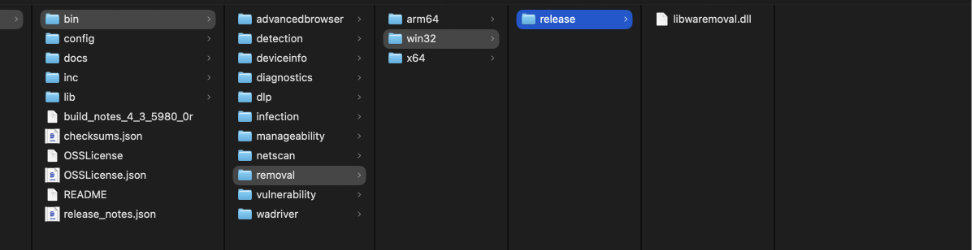
Beginning with the SDK packages built after May 2nd, 2026, two new files will be added to the release folder inside the removal folders (the arm64, win32, and x64 folders):
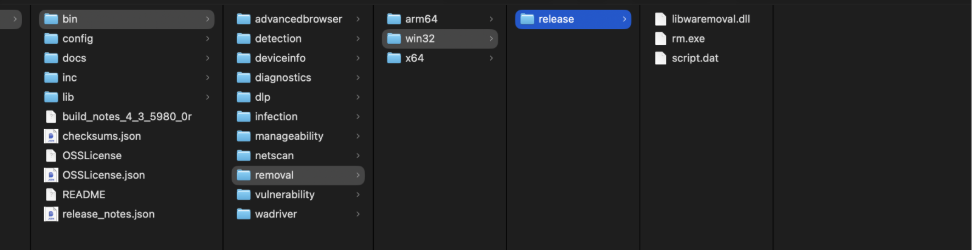
If you are currently distributing the libwaremoval.dll to your endpoints, you DO NOT need to make any changes. This Newsletter Update is only meant as FYI.
2– Upcoming Changes
2.1 Clearer Windows Defender Real-time Protection Status when managed by 3rd Party AV
FEATURE: COMPLIANCE
ENHANCEMENT, WINDOWS, ENGINE UPDATE NEEDED, CODE CHANGE
We are enhancing the GetRealTimeProtection method for Windows Defender to make it clear when Windows Defender is being managed (and effectively disabled) by a third-party antivirus product.
Today, customers sometimes see Windows Defender protection state reported as ON or OFF inconsistently, which is expected when a third-party AV is in control. But the current output does not explain why.
With this change, when Windows Defender is managed by another AV, JSON output of GetRealTimeProtection will include a new managed_by_3rd_party_products array listing the managing product's information. If Windows Defender is not managed by any third-party AV, this field will be omitted.
{
  "result": {
    "code": 0,
    "details": {
      "antispyware": false,
      "antivirus": false
    },
    "enabled": false,
    "managed_by_3rd_party_products": [
      {
        "displayName": "CrowdStrike Falcon",
        "pathToSignedProductExe": "C:\\Program Files\\CrowdStrike\\CSFalconService.exe",
        "signature": 2866
      }
    ],
    "method": 1000,
    "signature": 477,
    "timestamp": "1765255198",
    "timing": 16
  }
}
This additional context helps customers understand that Windows Defender's state is no longer the primary indicator of protection and that they should rely on the third-party AV's real-time protection state for posture and compliance decisions.
*You will need to make a code change to implement this feature. Please contact the OPSWAT team to assist with this*
2.2 Support for Ubuntu 26.04 LTS
FEATURE: VULNERABILITY ASSESSMENT
ENHANCEMENT, LINUX, DATA UPDATE NEEDED
We're expanding our Linux coverage to include the upcoming Ubuntu 26.04 LTS release in OESIS.
Ubuntu 26.04 LTS is now recognized and supported across OESIS modules. All applicable functionality will behave consistently with other supported Ubuntu versions, even during the early period where no CVEs have yet been published for 26.04.
2.3 Support phased updates in GetMissingPatches for Ubuntu apt
FEATURE: COMPLIANCE
ENHANCEMENT, LINUX, DATA UPDATE NEEDED
We're developing an enhancement to the GetMissingPatches method for apt (Advanced Package Tool - the primary package management system on Debian-based systems such as Ubuntu), adding visibility into Ubuntu's phased updates.
Ubuntu uses "phased updates" for some apt packages, where updates are gradually rolled out to a percentage of endpoints. Our GetMissingPatches (WAAPI_MID_GET_MISSING_PATCHES – ID 1013) API will detect those and return a new optional field, patches.phased, when a package is in a phased rollout.
2.4 Integration between OESIS Framework and WinGet
FEATURE: ALL MODULES
NEW FEATURE, WINDOWS, ENGINE UPDATE NEEDED, CODE CHANGE
Starting in May, we will introduce integration between the OESIS Framework and WinGet. With this integration, the number of applications supporting detection, vulnerability assessment, and patch management will increase rapidly.
Data from WinGet will be returned when the new “data_source” flag is defined in the JSON input of the DetectProducts, DiscoverProducts, and GetLatestInstaller methods with the appropriate value (“opswat” and/or “winget”). When the “data_source” flag is enabled, the JSON output will include products/patches covered by the WinGet integration. Users can distinguish between data from OPSWAT and WinGet by using the “data_source” field with the value “opswat” or “winget.”
*You will need to make a code change to implement this feature. Please contact the OPSWAT team to assist with this*
2.5 Bulletin Support for Patching
FEATURE: PATCHING
NEW FEATURE, ALL PLATFORMS, ENGINE UPDATE NEEDED, CODE CHANGE
We are introducing Bulletin-based patch organization in the OESIS Framework, enabling customers to view and sort patches by Bulletin ID — consistent with how major software vendors publish and communicate their updates, which may include security fixes, bug resolutions, and general software improvements.
With this update, customers can now filter and retrieve patch information by Bulletin ID (e.g., Adobe's APSB25-14), making it easier to align remediation workflows with vendor-issued advisories.
*You will need to make a code change to implement this feature. Please contact the OPSWAT team to assist with this.*
2.6 Support Vulnerability Assessment and Patching for Windows Drivers
FEATURE: VULNERABILITY ASSESSMENT, PATCHING
NEW FEATURE, WINDOWS, ENGINE UPDATE NEEDED, CODE CHANGE
OESIS Framework is extending its Vulnerability Assessment (VA) and Patch Management (PM) capabilities to cover Windows drivers. This enhancement enables customers to detect, assess, and remediate vulnerabilities at the driver level.
With this update, customers can leverage OESIS to identify outdated or vulnerable Windows drivers, evaluate risk exposure, and apply available patches.
*You will need to make a code change to implement this feature. Please contact the OPSWAT team to assist with this.*
3 – Required Actions
3.1 Engine Release Cadence Change (Starting October)
RELEASE SCHEDULE UPDATE, ALL PLATFORMS
Starting in October, we will be updating our Engine Package release cadence from weekly to bi-weekly. Under this new schedule, releases will occur twice per month, once in the second week and once in the fourth week of each month. This change aligns with our new development framework, enabling more accurate estimations, clearer updates, and more reliable on-time releases. We believe this adjustment will help us deliver higher-quality updates more consistently.
*The initial rollout timeline has been revised from April to October. If you have any concerns or need clarification on this update, please contact the OPSWAT team to assist with this*
3.2 End of Support for AppRemover package with the old engine on macOS
END OF SUPPORT, MAC
As we have refactored the AppRemover module on macOS to provide a more optimized and streamlined experience, two packages of the AppRemover module on macOS are being maintained on the My OPSWAT Portal: AppRemover OSX and AppRemover OSX V2.
Starting January 1, 2026, the OSX package will be removed. We recommend upgrading to AppRemover OSX V2 to ensure your system receives all new updates and comprehensive technical support for the AppRemover module.
3.3 End of Support for Windows 7 & Windows 8
END OF SUPPORT, WINDOWS
After careful consideration, support for Windows 7 and Windows 8 (server versions included) will be removed from the SDK beginning January 1st 2027 (one year later than previously planned).
To ensure security, compatibility, and optimal performance with the OESIS Framework, we recommend upgrading endpoints to a supported Microsoft operating system.
4 – Detailed SDK Information
This is just the tip of the iceberg! You can view all the supported applications on our support charts:
5 – Contact
Are you a customer and have questions about this list? Please contact our trusted support team at opswat-support@opswat.com.