The Hidden Risk in Your Cloud File Uploads
Regarding the global cybersecurity state, 2024 reports revealed while ransomware and extortion attacks accounted for 32% of all breaches, human error was contributing to 68% of incidents.
With more than half incidents attributed to human error, the way we look at securing cloud file uploads and collaboration platforms like Salesforce file security, SharePoint file security needs to change.
Yes, tools like Salesforce, SharePoint, Google Drive, and AWS S3 facilitate collaboration on a scale which we haven’t seen before.
And yet, they lack the native cloud storage security needed to mitigate the damage human error can cause.
Seamless collaboration comes at a price; the risk of malicious files entering your system, then releasing malware which can steal your data or hold it for ransom.
MetaDefender Cloud addresses file-based vulnerabilities through multi-engine malware scanning and CDR (Content Disarm & Reconstruction) technology.
The Zero-Trust preventive approach ensures that only safe files are delivered to your users and cloud storage, safeguarding your organization from potential file-borne threats.
Why Cloud Applications Are Vulnerable
Collaboration platforms like Salesforce, SharePoint, Box, and Google Drive are designed for usability, not deep file security.
While they do showcase some level of security, the tools focus on validating file type, size, or user permissions.
However, they lack features for comprehensive content inspection, creating a vulnerability which attackers can’t wait to exploit.
Unchecked files expose your organization to:
Ransomware
Password-protected archives or macro-enabled Office files uploaded to SharePoint libraries, or customer portals can encrypt critical business data when opened.
Zero-Day Exploits
Software flaws undiscovered by the developer can be weaponized through file sharing.
PDFs, Office documents, or images can be infected and distributed. Since these flaws aren’t yet known to the developer, they aren’t included in Antivirus databases, so your engines can’t detect them.
Supply Chain Attacks
Even if your organization is unenterable, your vendors and malware can still be hacked. Files uploaded by a third-party may carry malware, unintentionally introducing threats into your network.
The most recent example of a supply chain attack is Discord. Their customer-service platform was compromised, exposing 2 million Government ID Photos of their users.
Data Exfiltration
Malicious scripts hidden in uploaded files can steal sensitive information, credentials, or access tokens.
Looking at the risks, the Zero-Trust philosophy does not look like paranoia. It becomes the only rational approach to cybersecurity, as even trusted collaborators or customers can unknowingly introduce risks.
Assuming all files are compromised, complex scanning and comprehensive sanitization becomes essential.
High-Risk File Upload Zones Across Popular Cloud Platforms
You now understand how attackers can use weaponized file uploads to gain access and the damage they can cause.
Now, let’s look at the entry points they use to get into your systems:
Salesforce: Case Attachments, API Uploads, Chatter Files
The file upload points in Salesforce (such as case attachments, Chatter files, and API uploads) are common targets for attackers, as files can be uploaded directly by users, providing numerous entry points.
While Salesforce has security measures in place, they can't perform advanced threat detection such as behavioral analysis or sandboxing.
Sophisticated attackers can (and will) take advantage of this to hide malicious codes within innocent-looking files, change file hashes (or signatures) to evade detection, and, when possible, even use zero-day exploits in file formats to penetrate a system.
Common attacks in Salesforce include:
- Macro-Enabled Office files
- Weaponized PDFs
- Compromised archives
Box / Google Drive: Public Folders and Shared Drives
For Box and Google Drive, public folders and guest upload links are particularly dangerous, as they can also expose sensitive files if permissions aren’t properly managed.
A folder left unsecured can be an invitation for attackers to upload infected files or replace backups with malicious versions.
AWS S3: Public Buckets, Customer Upload
Misconfigured public buckets and insecure customer upload endpoints are common vulnerabilities for AWS S3. These can be further exploited by uploading files with embedded scripts or backdoor files that are executed on the server or client side.
They could also hide malicious files within zip archives, which are often processed automatically, or create scripts which allow attackers to take control of the system once uploaded.
When it comes down to it, it doesn't really matter which entry point is chosen by attackers. Yes, all these platforms come with native security features. And yes, most users know that they shouldn’t download a file without scanning it first.
But ultimately, detection-based cybersecurity simply isn’t enough; even if you use the best antivirus software available, your organization is still exposed to:
- Zero-Day exploits
- File obfuscation (malicious code hidden within files in ways that make them hard to detect).
- Polymorphic malware can change its structure each time it’s uploaded to avoid signature detection.
For true prevention-based protection, you need sophisticated cybersecurity solutions which support behavioral analysis, complete file disarming, and sandboxing.
How to Secure Cloud File Uploads
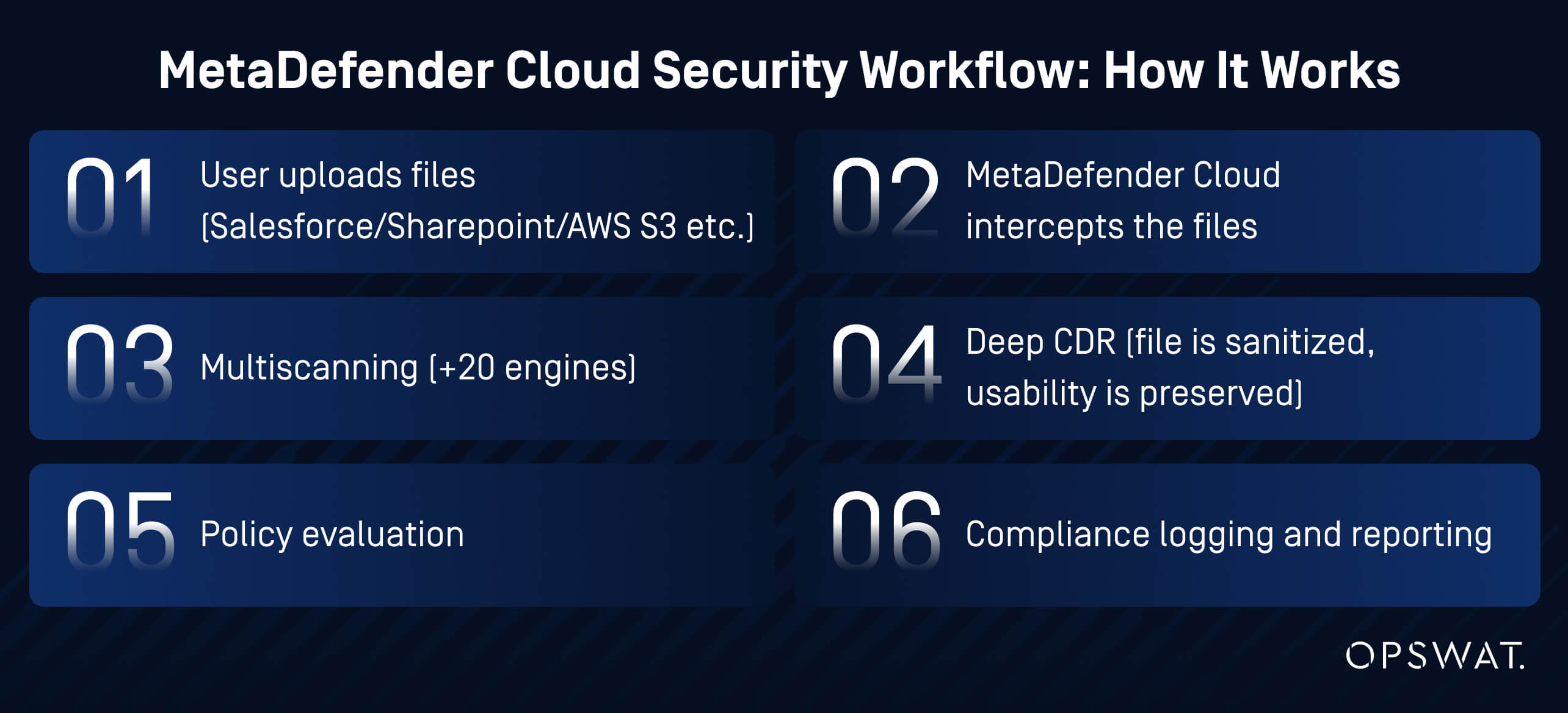
1. Implement Automatic File Interception
MetaDefender Cloud technologies intercept files at the moment of upload before they're stored or accessed by users.
It works without adding any extra steps for users; they upload files normally, and MetaDefender Cloud works in the background.
With its rich integration capabilities, you get total file protection in the cloud, wherever you work:
- MetaDefender for Salesforce: A native AppExchange solution that integrates file security directly into Salesforce, automatically scanning and sanitizing file uploads, including Chatter posts, workflows, records, and attachments, to ensure all content is threat-free and compliant with your security policies.
- MetaDefender Storage Security Cloud: Protects your files in the cloud, including SharePoint, OneDrive, AWS S3, Azure Blob, Box, Google Drive and more, by scanning for malware, ransomware, and other threats before they can cause harm.
- Real-time scanning: Every file is analyzed within seconds, with no user workflow disruption
2. Multi-Engine Malware Scanning for Maximum Detection
Traditional antivirus relies on a single vendor's threat intelligence. If that vendor hasn't cataloged a specific malware variant, it goes undetected. You think you are safe, but in reality, you might already be infected.
MetaDefender Cloud uses Metascan™ Multiscanning technology, scanning files with 20+ antivirus engines simultaneously, including Bitdefender, Kaspersky, and McAfee.
Metascan achieves catches 99.9% of known malware, including polymorphic and obfuscated threats.
It works on a simple premise: if one engine misses a threat, others catch it.
A malicious Excel file might evade detection by Engine A, but Engines B, C, and D will flag it immediately.
MetaDefender Cloud's consensus-based approach, based on databases coming from multiple engines, ensures nothing slips through.
3. Deep CDR™ Technology
Even the best antivirus can only detect known threats. Zero-day exploits, custom malware, and APTs (advanced persistent threats) can bypass signature-based detection.
MetaDefender Cloud adds another element of protection, by removing malicious elements from files, regardless of whether they're detected by antivirus engines:
- File Deconstruction: MetaDefender Cloud extracts all components (text, images, metadata, macros, scripts)
- Threat Removal: Eliminates macros, JavaScript, embedded executables, suspicious links, and hidden payloads
- Clean Reconstruction: Rebuilds the file from scratch using only safe content
- Functionality Preserved: Documents, spreadsheets, and PDFs remain fully usable, without the threats
If, for example, an employee unknowingly uploads a PDF invoice with embedded JavaScript exploit code, it might be missed by the AV. Deep CDR™ Technology will strip out the JavaScript entirely, delivering a clean, safe PDF that still contains all the invoice data.
MetaDefender Cloud’s Deep CDR™ Technology, ranked #1 in the industry, supports file types for any workflow:
- Microsoft Office (DOCX, XLSX, PPTX)
- PDF documents
- Images (JPEG, PNG, TIFF, BMP)
- Archives (ZIP, RAR, 7Z)
- CAD files (DWG, DXF)
- Email files (MSG, EML)
- Over 100+ additional formats
4. Automated Policy Enforcement
When you use the complete MetaDefender cloud suite (MetaDefender Cloud, MetaDefender ICAP Cloud, MetaDefender Storage Security Cloud, MetaDefender for Salesforce) you can apply security policies after scanning and file sanitization:
- Auto-approve clean files to store safely in Salesforce, SharePoint, or other connected cloud storage
- Block infected files and notify security teams
- Sanitize and upload CDR-cleaned versions of files
- Notify users when files are blocked or sanitized
- Maintain compliance logs for GDPR, HIPAA, PCI-DSS, SOC 2
Admin Dashboard Features:
- Real-time threat detection statistics
- File upload analytics by user, department, or portal
- Integration with SIEM tools (Splunk, QRadar, Elastic Stack)
Protecting 70,000 Devices from Threats with MetaDefender Cloud
EPAM Systems is a leading global provider of digital platform engineering and software development services to hundreds of Fortune 1000 clients.
With a distributed workforce of approximately 40,000 employees across 30 countries, they needed to secure file uploads across multiple cloud platforms without slowing down operations.
By integrating MetaDefender Cloud, EPAM implemented a multi-layered approach combining multiscanning with Deep CDR™ Technology. Every file uploaded was automatically scanned and sanitized, ensuring only safe content reached employees and systems.
The outcome was a significant reduction in malware risk, enhanced cybersecurity, and compliance with industry standards, all without impacting productivity.
Why Organizations Choose MetaDefender Cloud for File Security
MetaDefender Cloud protects your files wherever you work.
It provides total file protection in the cloud, across multiple platforms, including Salesforce, SharePoint, AWS, Azure, Google Workspace, and more.
| Native Cloud Integration | Works seamlessly with Salesforce, SharePoint, AWS, Azure – no custom development required |
| 20+ AV Engine Scanning | Detects 40% more threats than single-vendor solutions |
| Multi-Cloud Coverage | Single solution protects Salesforce, Microsoft SharePoint, Google Cloud Storage, Amazon S3 Storage |
| Multi-Cloud Coverage | Single solution protects Salesforce, Microsoft SharePoint, Google Cloud Storage, Amazon S3 Storage |
| Compliance Support | Pre-built compliance for GDPR, HIPAA, PCI-DSS, SOC 2, ISO 27001 |
| API-First Architecture | API-first architecture to integrate with SIEM, SOAR |
| Low Latency Performance | 95% of files typically scanned within 2s [Enterprise tier] |
| Threat Intelligence Updates | Continuous engine updates ensure protection against emerging threats |
Implementation Checklist: Secure Your Cloud File Uploads Today
In 2024, 80% of companies noticed an increase in the frequency of cloud attacks.
It’s not a matter of “if” you might get attacked, but a matter of “when”.
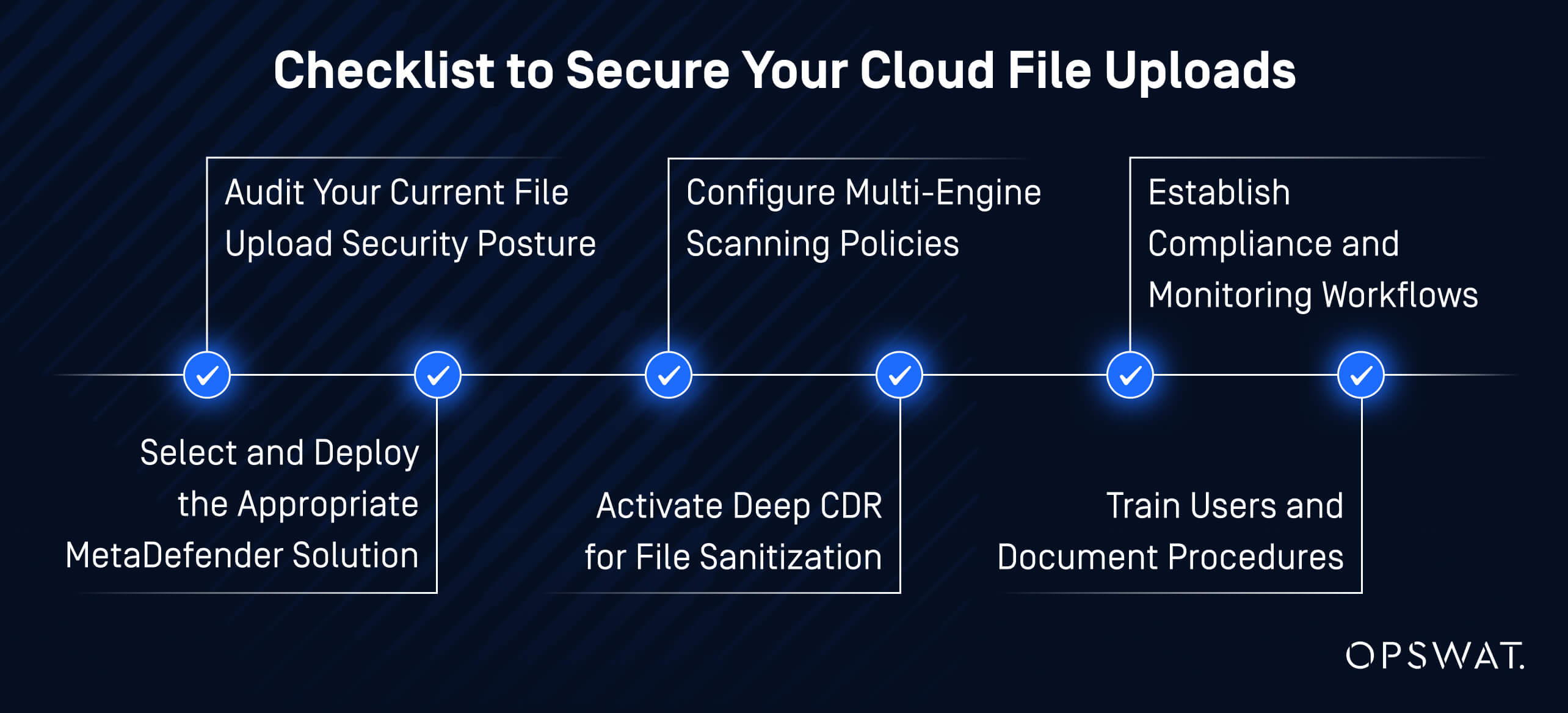
Use this checklist to plan a file upload security strategy that fits your unique environment.
The deployment of MetaDefender depends on your environment and security requirements. Some clients may implement MetaDefender for Salesforce only, others may deploy MetaDefender Storage Security Cloud across various cloud storage platforms, and many adopt a hybrid approach combining multiple MetaDefender products to cover all upload vectors.
1. Audit Your Current File Upload Security Posture
- Identify all platforms that accept file uploads
- Document high-risk upload points (customer portals, API endpoints, shared folders)
- Review existing security controls and gaps
2. Select and Deploy the Appropriate MetaDefender Solution
- For Salesforce only: Install MetaDefender for Salesforce from AppExchange
- For cloud storage environments: Configure MetaDefender Storage Security Cloud for SharePoint, AWS S3, Azure Blob, Box, or Google Cloud Storage
- Set up API integrations and authentication as required
3. Configure Multi-Engine Scanning Policies
- Enable all available antivirus engines for maximum detection
- Set user notification preferences
4. Activate Deep CDR™ Technology for File Sanitization
- Enable CDR for Office documents, PDFs, and archives
- Test CDR with sample files to verify functionality
5. Establish Compliance and Monitoring Workflows
- Configure audit logging for regulatory requirements (GDPR, HIPAA, PCI-DSS, SOC 2)
- Integrate with SIEM tools for centralized threat monitoring
- Set up admin dashboards and reporting schedules
6. Train Users and Document Procedures
- Educate teams on new file upload security measures
- Document quarantine review and remediation processes
- Create incident response playbooks for detected threats
Key takeaway: Your implementation should match your use case - whether protecting Salesforce, a single cloud storage platform, or multiple environments. There is no one-size-fits-all solution.
Protect Your Cloud Environment from File-Borne Threats
File-based attacks are increasing in sophistication and frequency, and every unscanned file upload is a potential breach waiting to happen.
Get started with MetaDefender Cloud to protect your Salesforce, SharePoint, and cloud storage environments.
MetaDefender Cloud: Frequently Asked Questions
How do I scan files uploaded to Salesforce before they're stored?
By using MetaDefender for Salesforce, files uploaded through your Salesforce environment are scanned and sanitized in real time before they are saved. This ensures that malware, ransomware, and other threats are blocked or neutralized, keeping your Salesforce data safe without disrupting normal workflows.
Does SharePoint have built-in malware scanning?
Microsoft 365 includes basic virus detection, but it relies on a single antivirus engine with limited coverage. MetaDefender Storage Security Cloud provides multi-engine scanning plus CDR for comprehensive protection.
How does MetaDefender Storage Security Cloud protect files in cloud storage?
MetaDefender Storage Security Cloud integrates with cloud-storage and collaboration platforms (e.g., SharePoint, OneDrive, Box, AWS S3, Azure Blob) to perform real-time and on-demand file scanning and sanitization.
What file types does MetaDefender Cloud scan?
MetaDefender scans 100+ file formats including PDFs, Office documents, images, archives (ZIP, RAR), executables, CAD files, email files, and more. CDR sanitization is available for Office documents, PDFs, images, and archives.
Is Content Disarm & Reconstruction (CDR) better than antivirus?
CDR complements antivirus. While AV detects known threats using signatures, CDR removes malicious elements from files, even if they're zero-day exploits that AV has never seen before. Together, they provide defense-in-depth.
How does MetaDefender integrate with AWS S3 or Azure Blob Storage?
MetaDefender Storage Security Cloud uses API connectors and event triggers (S3 notifications, Azure Event Grid) to scan files automatically when they're uploaded to cloud storage buckets or containers.
Will file scanning slow down my workflows?
No. MetaDefender Cloud processes files in 1-4 seconds on average. Users experience no noticeable delay, and file uploads appear instantly from their perspective.
Can I use MetaDefender Cloud for compliance reporting?
Yes. All MetaDefender Cloud products provide detailed audit logs including file metadata, scan results, threat detections, user information, and timestamps, perfect for GDPR, HIPAA, PCI-DSS, and SOC 2 audits.