
How do I send the MetaDefender Core logs in Windows event log?
This article applies to all MetaDefender Core version 5.0 and newer releases deployed on Windows systems.
Introduction:
This knowledge base article provides a way to replicate the MetaDefender Core logs in the Windows event logs. These are helpful for easy log capture when there are already existing syslog integrations with the Windows event log.
Details:
There are situations where the syslog integration is already configured with the Windows event log and it’s easier to get the MetaDefender Core logs from the Windows event log than to create a new integration with the MetaDefender Core.
In such cases we do have the option to replicate the MetaDefender Core logs in the Windows event log by performing the below steps.
Please open the regedit and navigate to:
HKEY_LOCAL_MACHINE\SOFTWARE\OPSWAT\Metascan\logger
Create a new string value (REG_SZ) named “wineventlog_ level” and enter one of the following values: debug, info, warning, error.
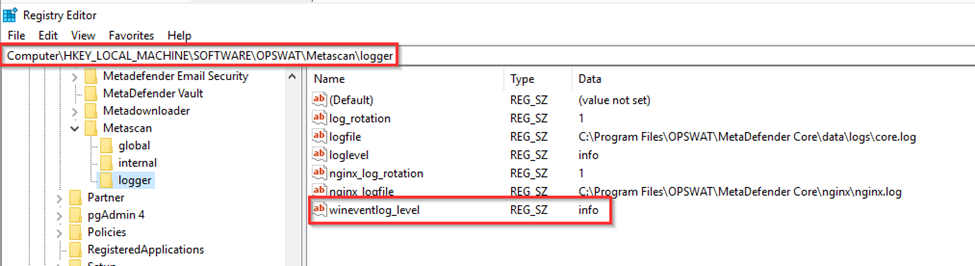
After the changes are made, please restart the services to implement the changes.
If Further Assistance is required, please proceed to log a support case or chatting with our support engineer.