
Purpose of this Document
This page lists the differences in specification between My OPSWAT Central Management v8 (CM8) and My OPSWAT Central Management v10 (CM10). It covers configuration items, operation and day-to-day usage, so teams migrating with the official Migration Plan: Upgrading from CM8 to CM10 can find where each CM8 function lives in CM10 and what behaves differently.
Versions compared
CM8 = My OPSWAT On-premises 2025.4.1-OP with the Product Management component 2025.4.1 (docs: /docs/myop, /docs/product-management).
CM10 = My OPSWAT Central Management 10.7.x (on-prem 10.7.26062, docs build 10.7.26091, /docs/cm).
In This Guide
Summary of Key Changes
CM10 is not a redesign of the CM8 user interface. It is a different platform that merges the former My OPSWAT cloud console (Endpoint, Secure Access, NAC) with on-prem product management.
The biggest visible change is how menus are organized:
CM8 organizes menus by product.
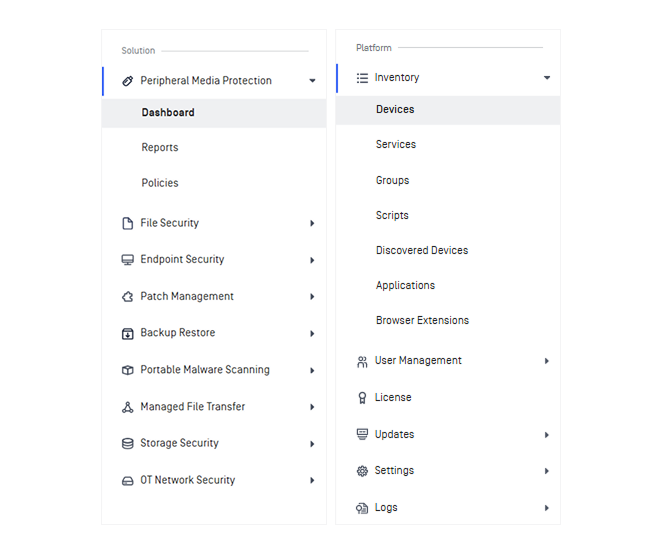
CM10 organizes menus by security solution, such as File Security, Peripheral Media Protection, Portable Malware Scanning, and Endpoint Security. Each solution is an expandable group with its own Dashboard and Policies.
This is why the CM10 interface feels so different. For information related to MetaDefender Kiosk, you can look under Inventory > Devices or Peripheral Media Protection.
Area | CM8 | CM10 | What it means for users |
|---|---|---|---|
Menu organization | Product-centric: Products → [product] → Instances / Groups / Overview For Kiosk: Products → MetaDefender Kiosk → K-Series / L-Series → Instances / Groups; Overview at the Kiosk level | Solution-centric: Dashboard, Inventory (Devices / Services / Groups), [Solution] → Policies, Updates, License, Logs, Settings, User Management. | Use the navigation map in section 2 to find CM8 function. |
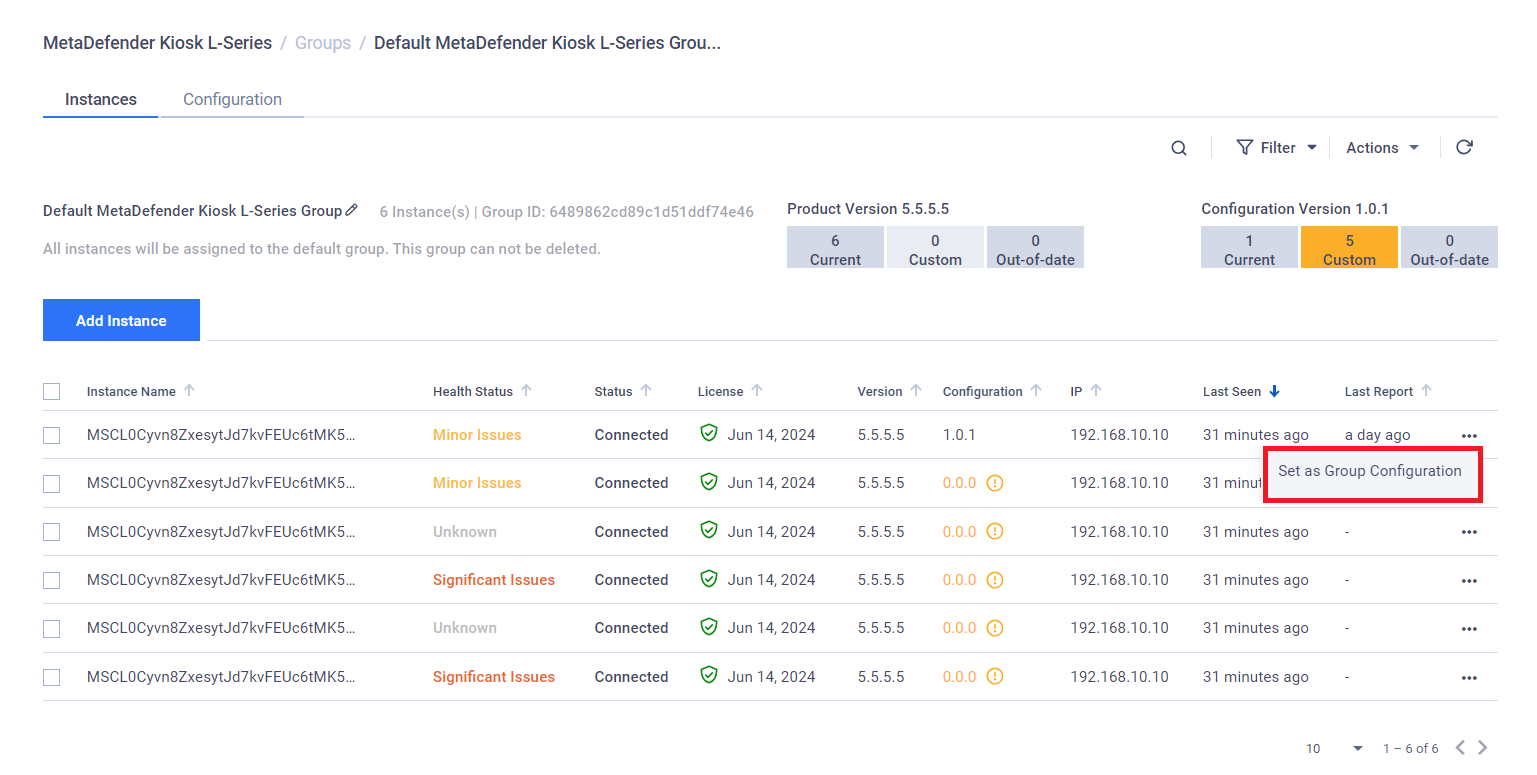
Configuration model | Group configuration taken from a selected instance (Set as Group Configuration → Apply Group Configuration). It is versioned and requires strict product-version parity. | You manage configuration as Policy, created from the defaults of the latest product version, or imported from an instance. Edit it in the console, then assign it to a group. Optional auto-sync. Version-compatibility handling. | After migration, CM8 Group Configuration becomes the CM10 Policy Name. Configuration changes are now made on the Policy. |
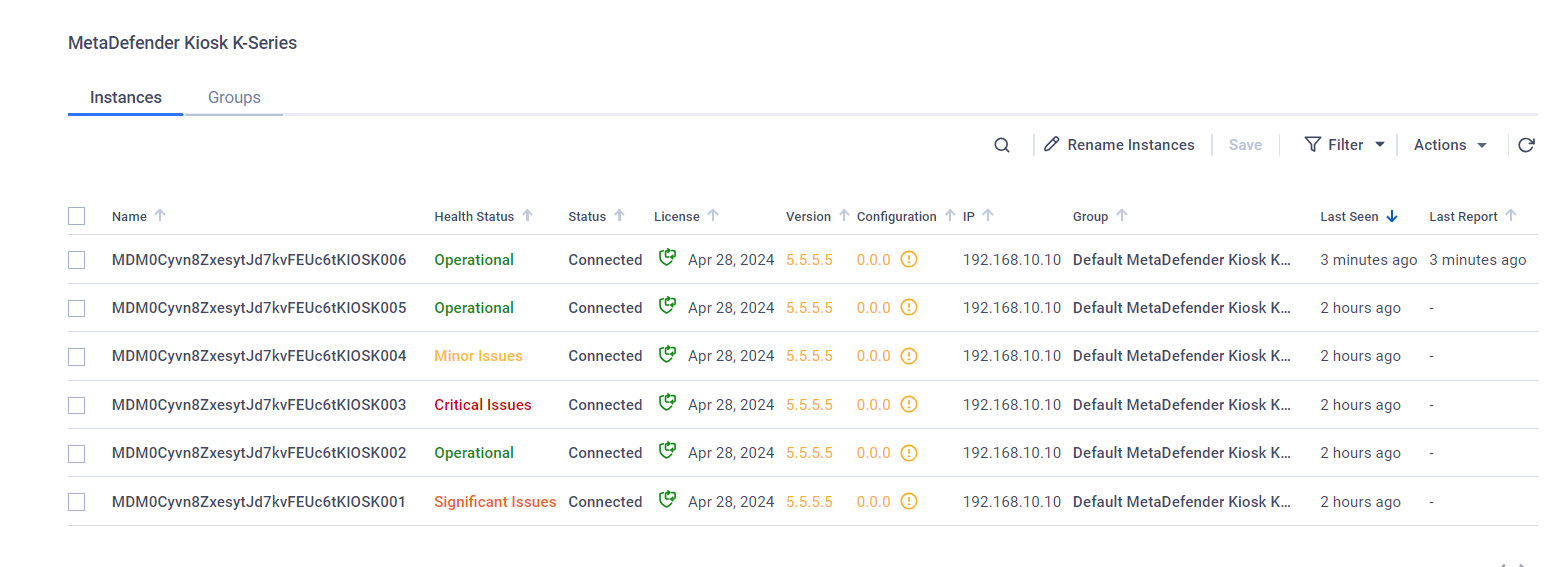
Inventory | Instances are listed per product. | One unified inventory, split into: •Devices (Kiosk Windows, Kiosk Linux, Media Firewall, Drive, Industrial Firewall, Endpoint) •Services (Core, ICAP, MFT, Aether; Storage Security on SaaS) Includes tags, filters, and health and connection status. | Find your Kiosks under Inventory → Devices. |
Console access |
|
| You get more control over secure connections. |
Updates | Module updates (Manual / Internet / SMB folder); Kiosk K/L-Series firmware update (Manual / Internet); auto-update toggle for Media Firewall only. | Updates → Modules (Internet / Manual), Firmware (Kiosk Windows / Linux), Software: remote update / rollback jobs with maintenance windows (Kiosk, Core, Industrial Firewall); Endpoint Components. | You get more control over product and engine versions for each group. |
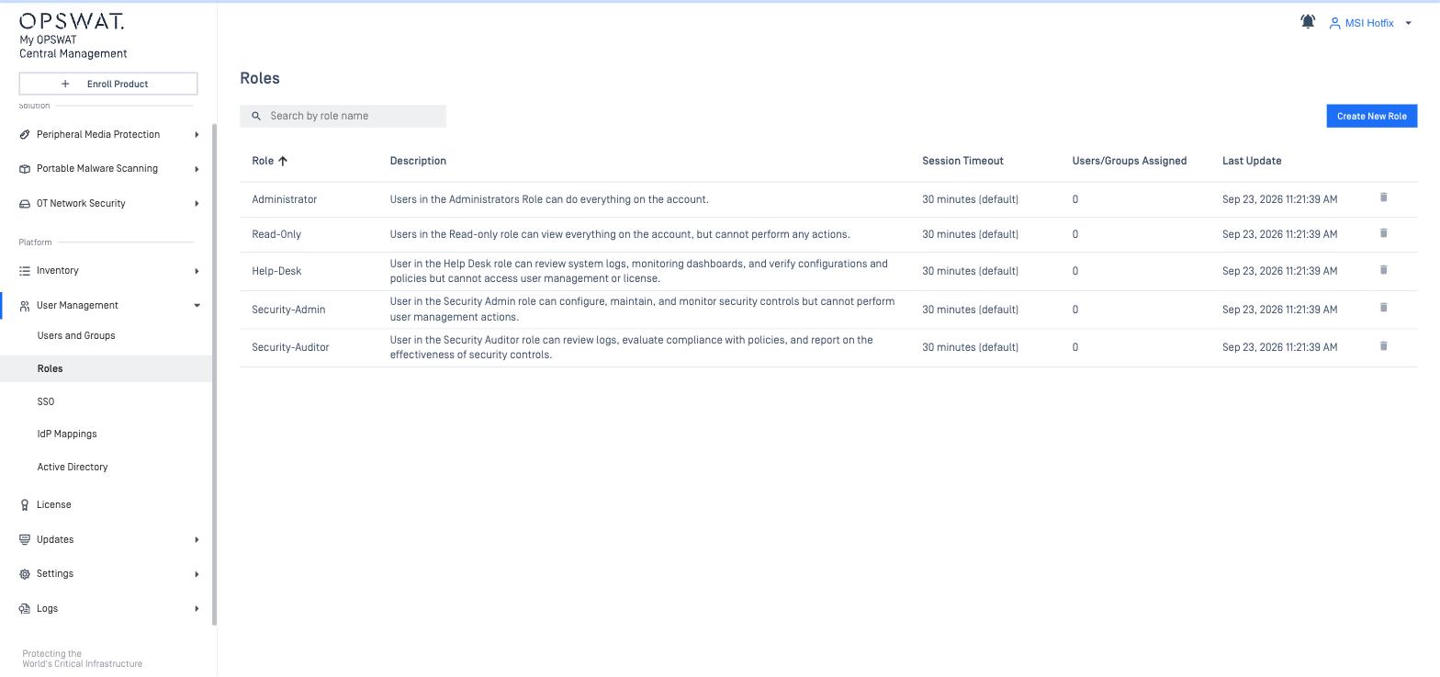
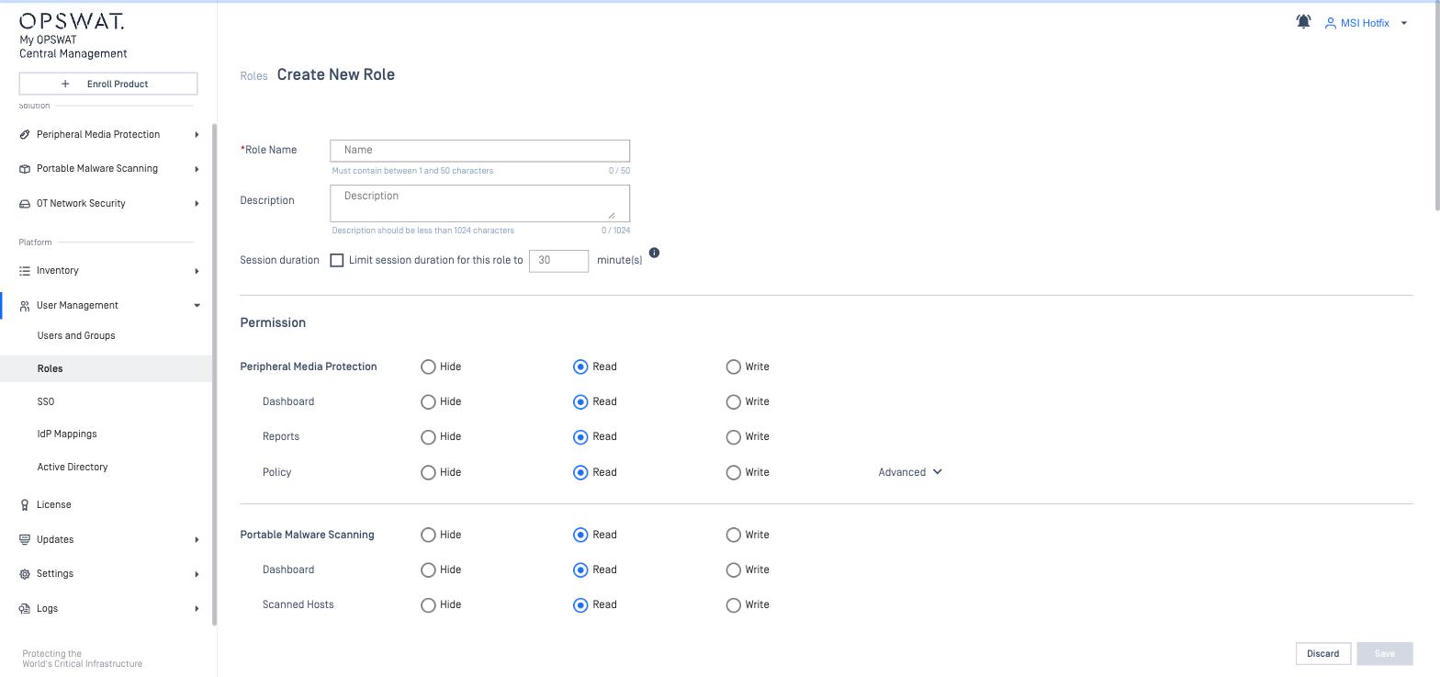
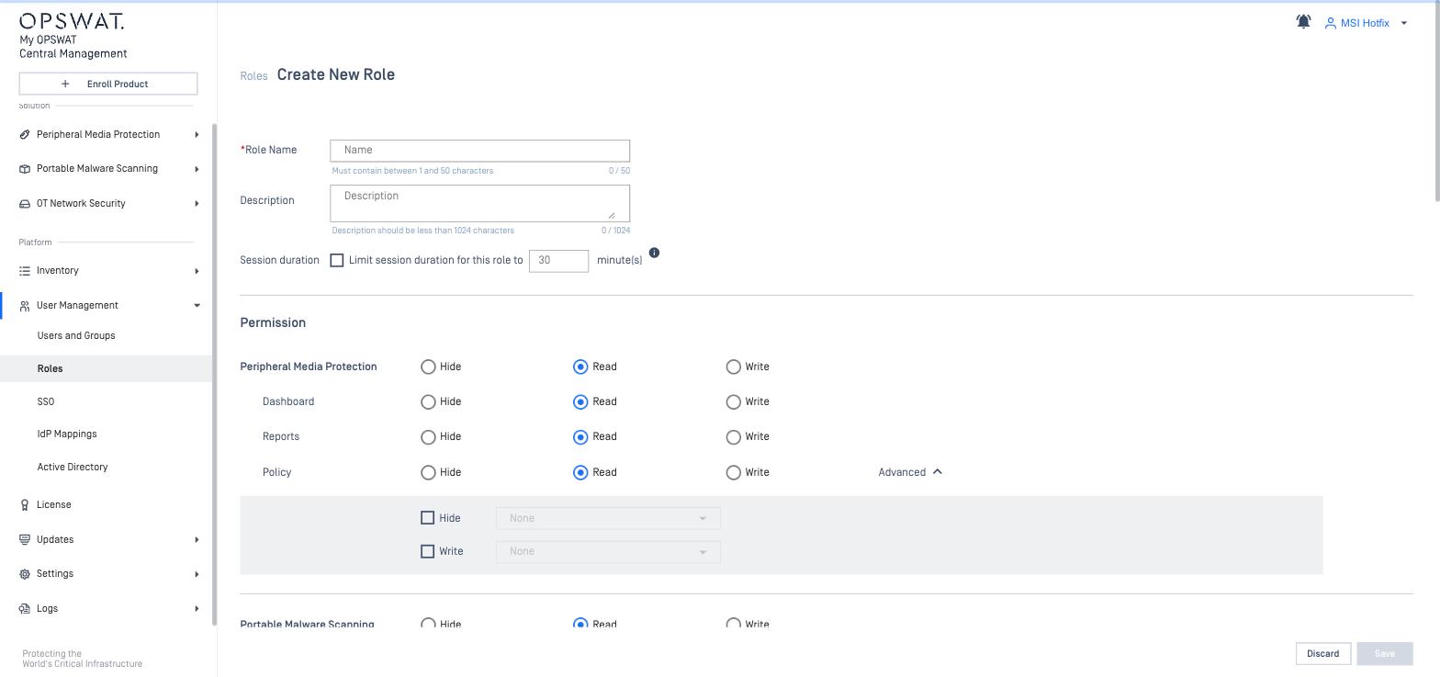
Users and role-based access control (RBAC) | Local / AD / SAML directories; roles with None / View Only / Full Access per feature. | Local, AD, SAML 2.0 and OIDC SSO, SCIM (Okta); roles with Hide / Read / Write per UI section, plus advanced permissions per group or per policy; role-based session timeout. | Roles must be re-designed in the new permission model. Role changes: in CM8 a new / changed role takes effect immediately (at most a page reload); in CM10 the user must log out and log in again. |
Notifications & SIEM | Email only (4 threshold triggers + Kiosk summary reports). Prometheus metrics endpoint. | Notification Groups (email HTML/JSON), webhooks, Syslog (CEF), Google Cloud Logging, Splunk add-on; | Alerting must be rebuilt as Notification Groups. |
Scope of management | MetaDefender products (Core, Kiosk, ICAP, MFT, Media Firewall, and more) plus inventory-only products. | MetaDefender products plus Endpoint management, Patch Management, Secure Access (SDP, IdP MFA), NAC (RADIUS), Vulnerability management. | Many new menus (Endpoint, Patch, Secure Access, NAC) do not exist in CM8 and are not needed for Kiosk. Use Navigation Map to find each CM8 function. |
Navigation Map: Find CM8 function in CM10
CM8 Menu: Products
Function | CM8 location | CM10 location (10.7) |
|---|---|---|
List of product instances | Products → [product] → Instances tab For Kiosk: Products → MetaDefender Kiosk → K-Series / L-Series → Instances | Inventory → Devices (Kiosk) |
Product groups | Products → [product] → Groups tab | Inventory → Groups |
Group configuration | Products → [product] → Groups → [group] → Configuration tab | Peripheral Media Protection → Policies (Kiosk); assign the policy at Inventory → Groups → [group] → Settings → Assign Policy |
Single-instance configuration | Instance details → Configuration tab → Edit | Inventory → Devices → Kiosk tab → Settings tab → Edit |
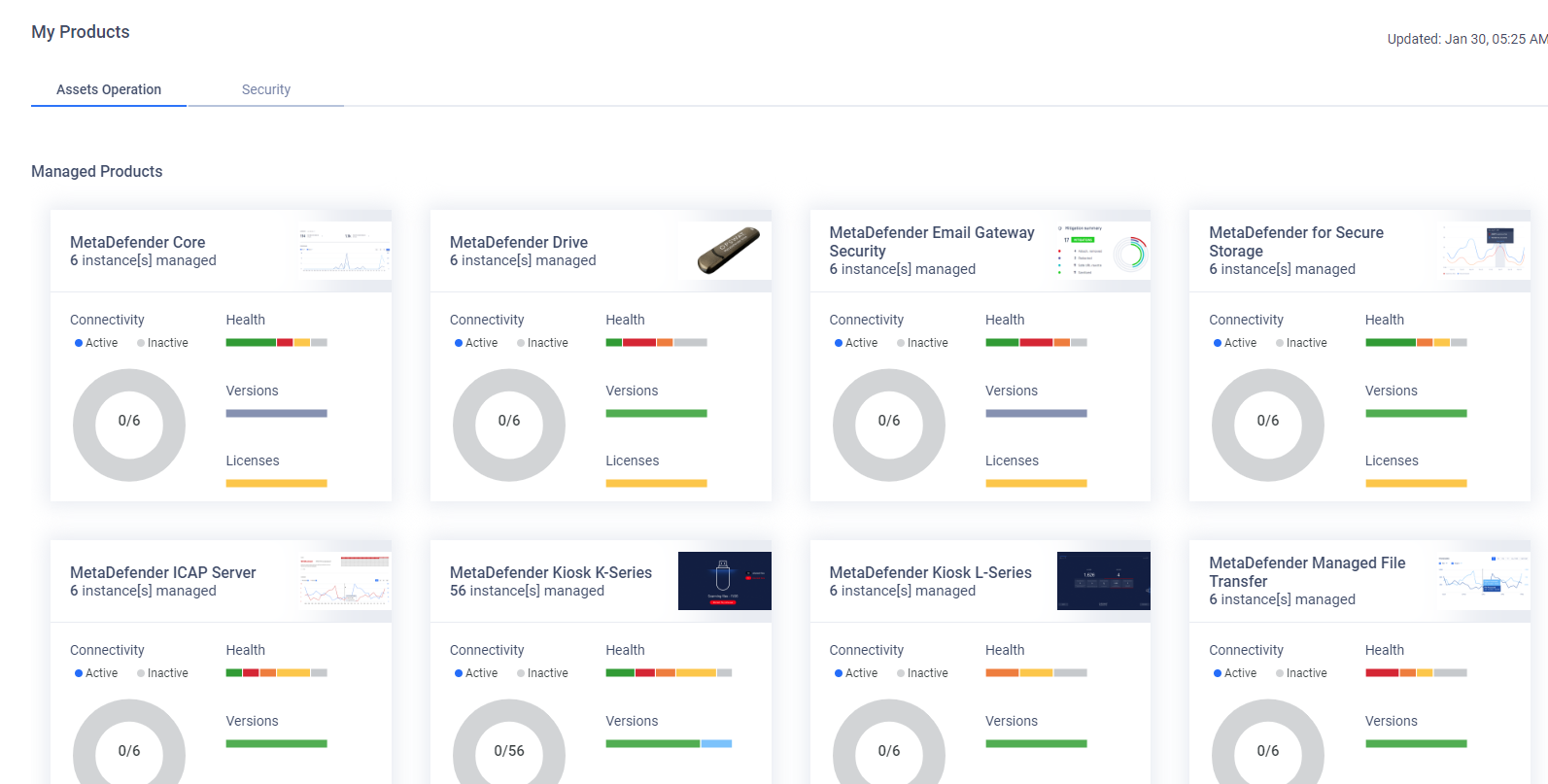
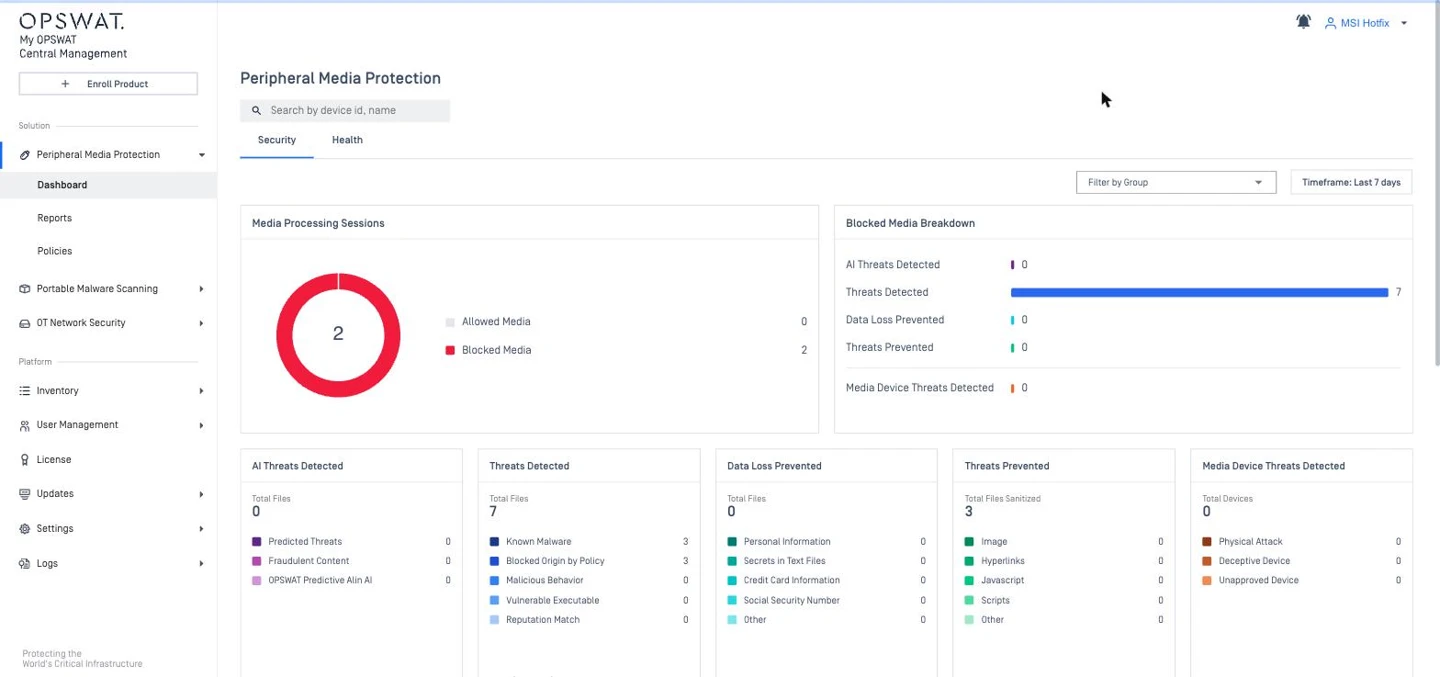
Product dashboards | Products → [product] → Overview | Peripheral Media Protection → Dashboard |
Licenses | Licenses (left menu) → product tab | License (left menu) → Kiosk L-Series / Kiosk K-Series CM10 has no license |
CM8 Menu: User Management
Function | CM8 location | CM10 location (10.7) |
|---|---|---|
Users, roles, directories | User Management → Users & Groups / Roles / User Directories | User Management → Users and Groups / Roles / Active Directory / SSO / IdP Mappings |
CM8 Menu: Events History
Function | CM8 location | CM10 location (10.7) |
|---|---|---|
Audit / event log | Events History | Logs → Admin Events / Device Events / Service Events / Webhook Events (SaaS version also includes Syslog, Export, OAuth API, Patch, and Backup Restore events) |
CM8 Menu: Settings
Function | CM8 location | CM10 location (10.7) |
|---|---|---|
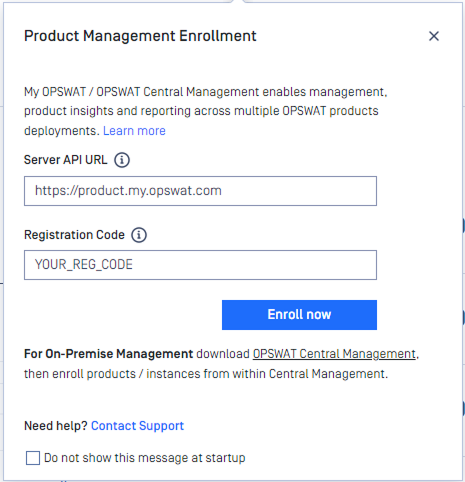
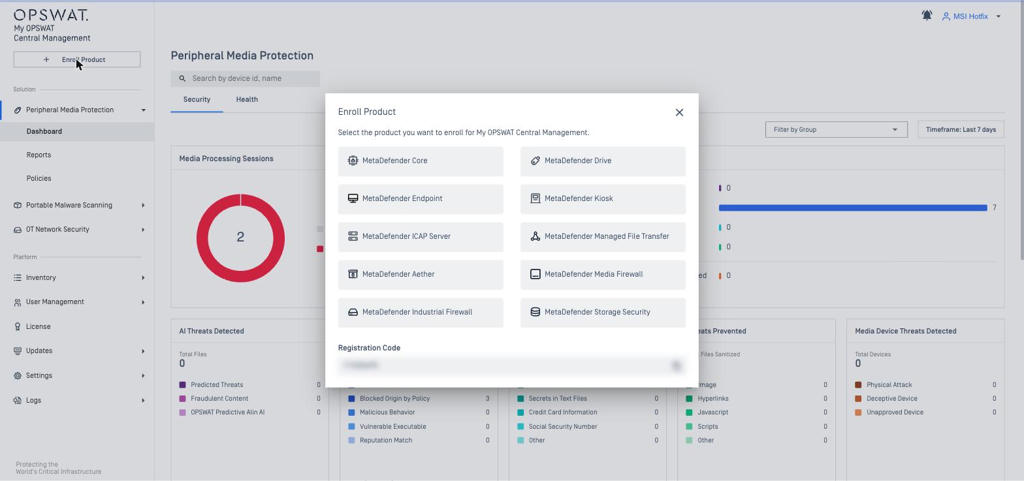
Registration code | Settings → Global → Organization → Registration Code | Settings → Global → Account → Registration Code; also the +Enroll Product button |
Session timeout / PIN requirement | Settings → Global → Organization → User Settings | Settings → Global → Account (Enable Account PIN security prompt, Inactivity Timeout) User Management → Roles |
Data retention | Settings → Global → Organization → Data Retention | Settings → Global → Data Storage → Global data retention (days) |
Certificates | Settings → Global → Certificates | Settings → Servers → Secure Connection (console certificate) Settings → Certificates (certificates distributed to Kiosk K-Series 4.7.11+) |
HTTPS / Proxy / Email | Settings → Global → Server → Secure Connection / Proxy / Email | Settings → Servers → Secure Connection / Proxy Server / Email Server |
Module (engine) updates | Settings > Products > Modules tab | Updates > Modules (Kiosk Linux / L-Series) |
Product upgrades | Settings → Products → Products tab (Kiosk K-Series / L-Series Update, Media Firewall Update with auto-update toggle) | Updates → Software → Kiosk Windows and Kiosk Hardened Image (also Core, Industrial Firewall) → Jobs / Packages (update / rollback jobs) Updates → Firmware → Kiosk Windows / Kiosk Linux |
Upgrade of CM itself | Settings → Products → Upgrade My OPSWAT | There's no in-console upgrade. Run the newer MSI or RPM on the server (OVA: bootc switch). |
Reports & alerts | Settings → Reports & Notifications | Settings → Global → Notifications tab (Notification Groups + Assign Group) Settings → Reports → Report Manager |
API keys | Settings → Integrations → APIs | OAuth application (client credentials); Settings → Integrations (Endpoint Identity, Webhook Integration, Syslog, Google Cloud Logging) |
Backup | Settings → Global → Import/Export tab | Settings → Servers → Backup |
Data migration to CM10 | Settings → Global → Data Migration (Processing History → CM10) | Not applicable. CM10 is the migration target. |
CM8 Menu: Outside The Console
Function | CM8 location | CM10 location (10.7) |
|---|---|---|
Support package | SSH to appliance + |
|
Detailed Differences by Area
Each area starts with the CM8 menu you used and its equivalent location in CM10, so you can go straight from the settings you know to where they live now.
Product Enrollment and Inventory
Item | CM8 | CM10 |
|---|---|---|
Enrollment direction | Product → CM (product clicks Unmanaged → Server API URL + Registration Code → Enroll Now) | Same product-initiated model. CM10 shows URL + code in the +Enroll Product dialog. Kiosk can also enroll during OOBE / setup wizard. |
Server API URL |
| CM10 Server URL (ports 9000 / 443). Keep the same FQDN during migration to avoid re-enrollment. |
After enrollment | Instance status Managed | Instance status Managed; |
Inventory view | Per product (Kiosk: Products → MetaDefender Kiosk → K-Series / L-Series → Instances / Groups): Instances tab; Actions Delete / Move to group / Acknowledge all threats / Export to CSV; bulk rename | Inventory → Devices / Services: health (Unknown, Operational, Minor, Significant, Critical, Blocker), connection (Connected / Disconnected > 24 h), version, group, location, last seen; filters by Product Type, Product Status, License Status, Health Status (10.3.2511); custom tags; export |
Unenroll | Delete instance in CM or Disconnect in product | Delete from Inventory (Inventory → Devices / Services → [item] → Actions → Delete, or select rows > Select Action) or Disconnect in the product – same as CM8 |
Supported Kiosk | K-Series (Windows) 4.7.3+; L-Series (Linux) 5.5.2+ | K-Series (Windows) and L-Series (Linux), listed under Inventory → Devices |
Managed features | Inventory, dashboard, reports, configuration, license, auto-upgrade; module updates (L-Series) | Peripheral Media Protection dashboard and policies; license; remote update and rollback (Kiosk Windows 4.8.0+, Hardened Image 4.8.3+); firmware updates; certificates (4.7.11+); BadUSB protection; module updates (Kiosk Linux) |
CM8 Enrollment dialog on the product
CM10 +Enroll Product dialog
CM8 Products > Instances
CM10 Inventory
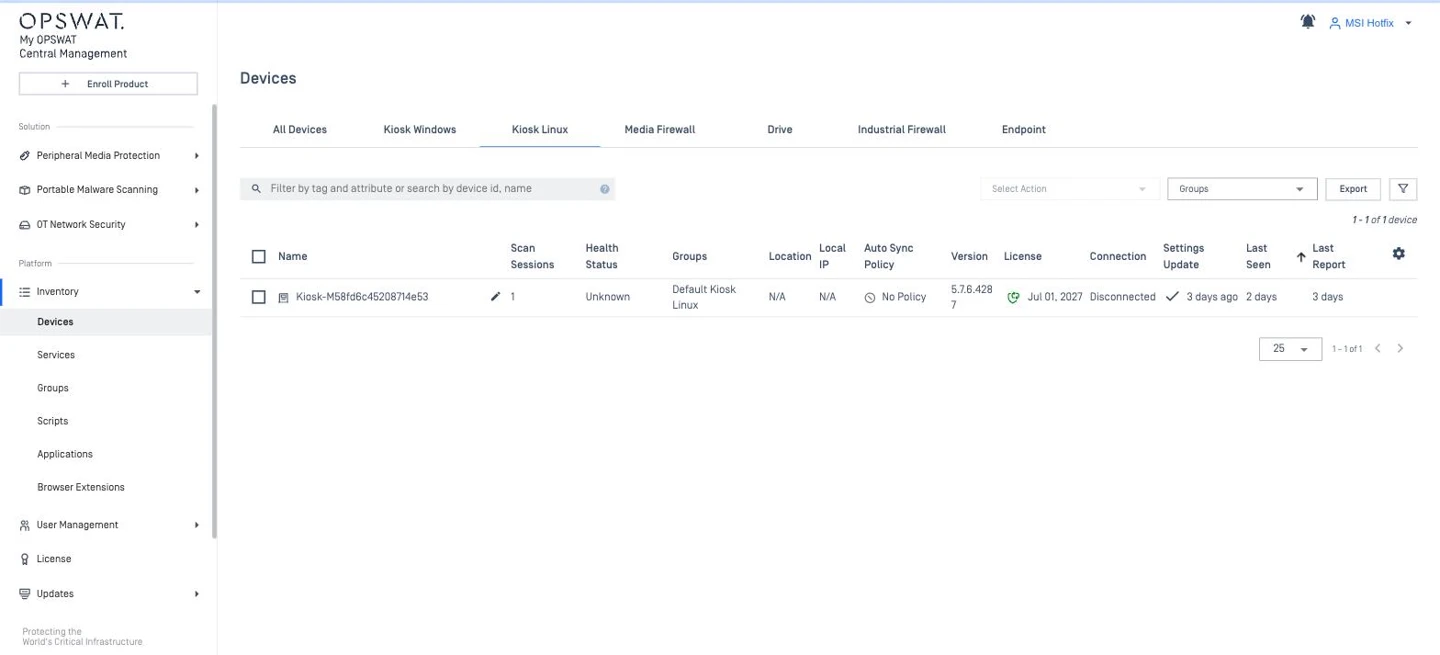
Groups and Configuration Management (Configuration → Policy)
This is the biggest change in daily operation.
Item | CM8 | CM10 |
|---|---|---|
Group scope | Per product; default group created at first instance / license; instance belongs to one group | One product type per group; default group per product (not deletable); |
Where the configuration lives | On the group ("Set"), derived from one instance | In a Policy object, independent of instances, assigned to one or more groups (one policy per group) |
How to create | Instances tab → instance menu → Set as Group Configuration | Depends on each solution For Kiosk: Peripheral Media Protection → Policies → Create (defaults of latest product version) or Import Policy from a Kiosk; row menu: Clone / Delete |
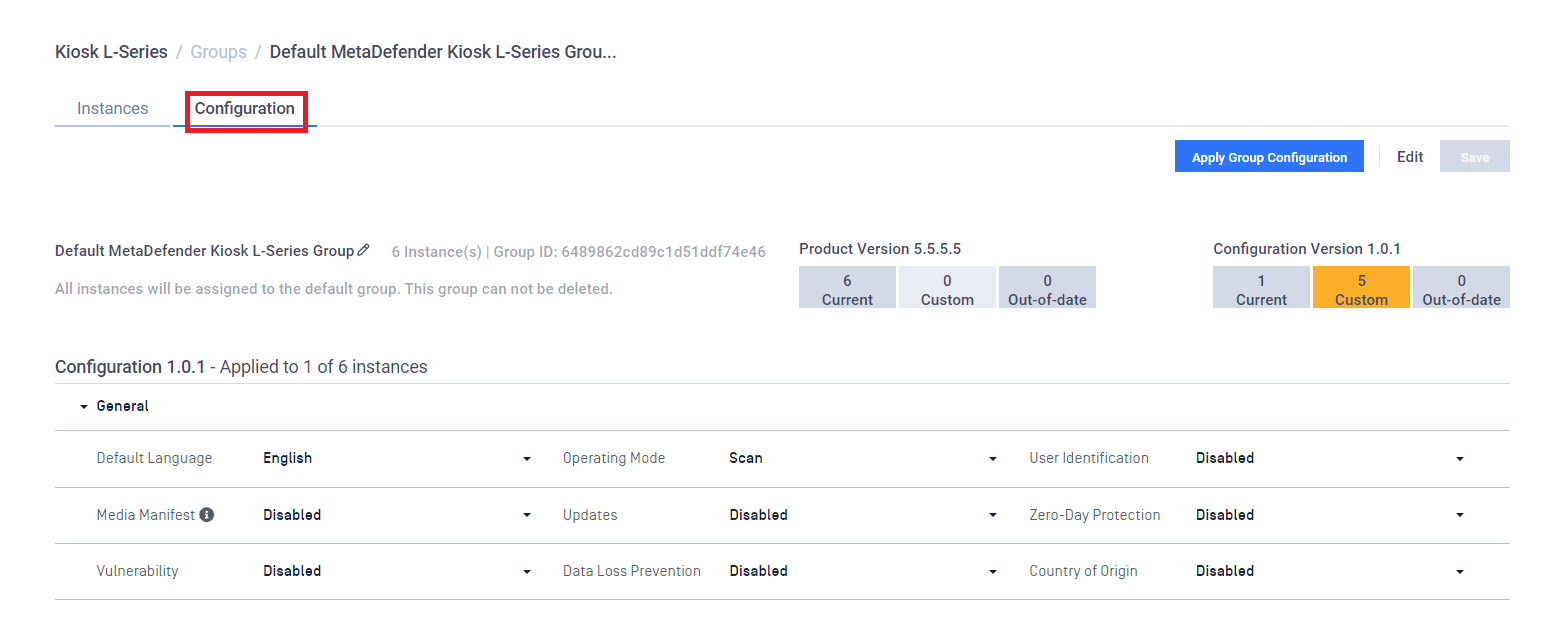
How to edit | Two ways: (1) Group > Configuration tab > Edit directly, then Apply Group Configuration; (2) edit an instance's configuration, then Set as Group Configuration again | Edit the policy sections in the console → SAVE → PIN |
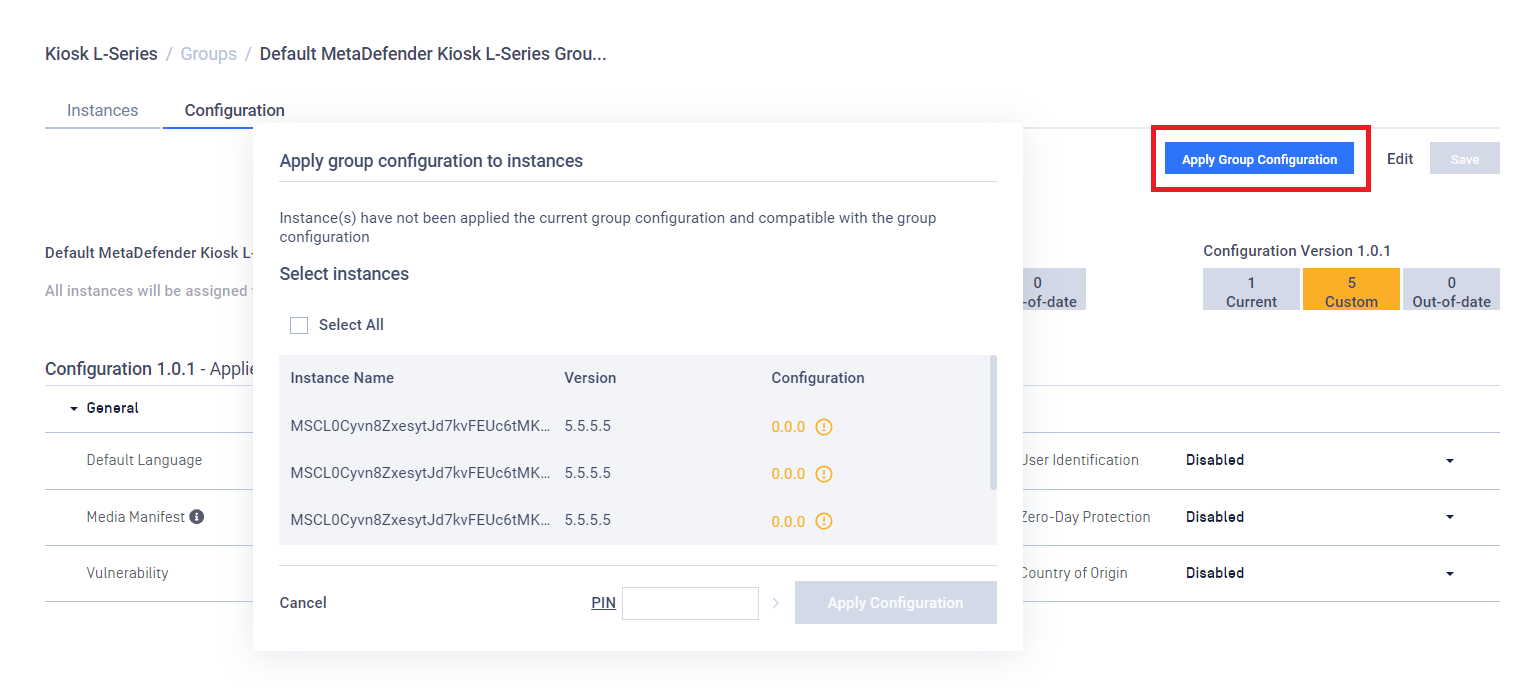
How to deploy | Group > Configuration tab → Apply Group Configuration → select instances (delivered when the instance checks in) | Inventory > Groups > [group] > Settings > Assign Policy (+ Policy Version); optional Automatically sync group policy for new devices (Kiosk, CM10 10.5+; Services products: "new instances"); instance-level Apply Group Settings |
Versioning / status | Configuration version (e.g. 1.0.1), * = locally modified, sync icon; Current / Custom / Out-of-date / Pending; Not Compatible tab | Policy version indicators (10.1.2507), Inherit vs Custom mode (10.1.2508), version-compatibility status (10.3.2512) |
Version parity | Strict: source and target instances must run the same product version, otherwise "NOT COMPATIBLE" | No version-parity limitation when CM10 manages Kiosk 4.7.11+ |
Per-product setting content | CM8 renders the product's own configuration model | The Kiosk policy is based on the Kiosk product configuration. |
Additional central objects | — | Certificates (Kiosk K-Series 4.7.11+) assignable to policies / groups |
CM8 Promote an instance, then apply to the group:
CM10 Import or create a policy, assign it to a group, enable auto-sync:
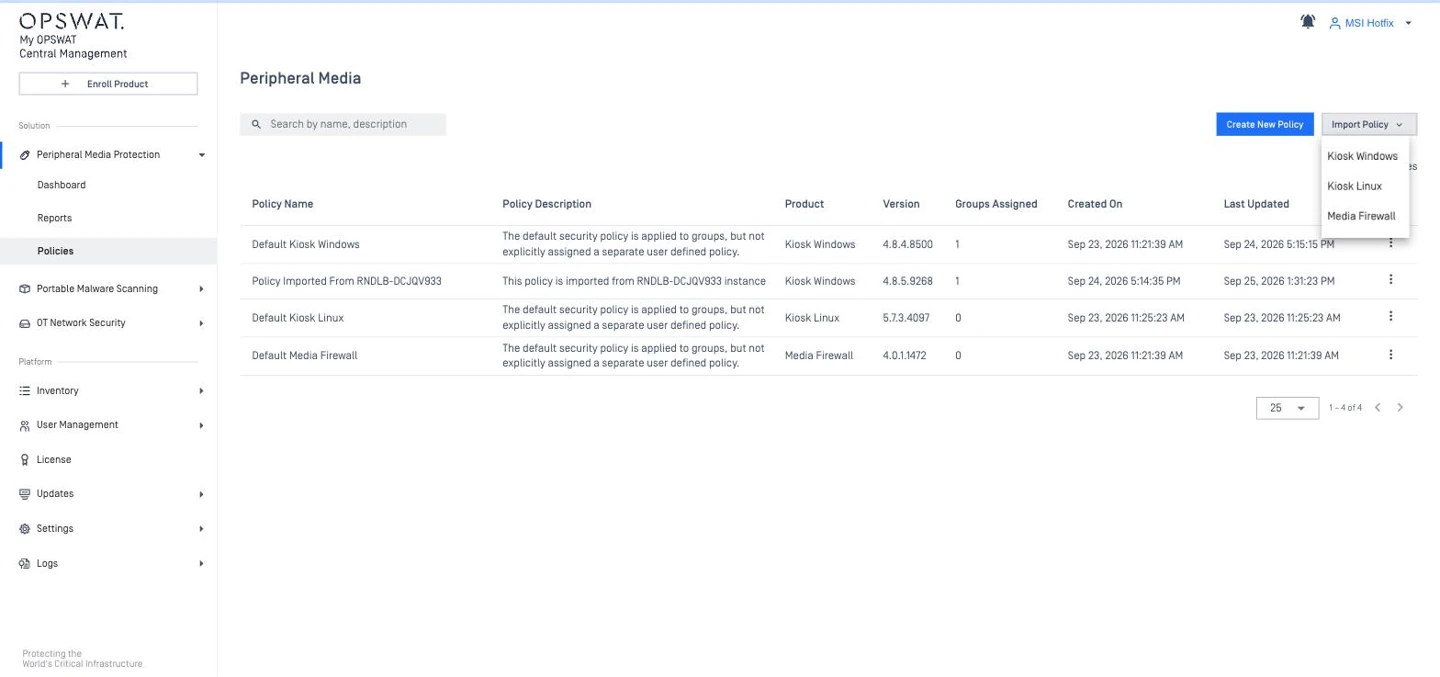
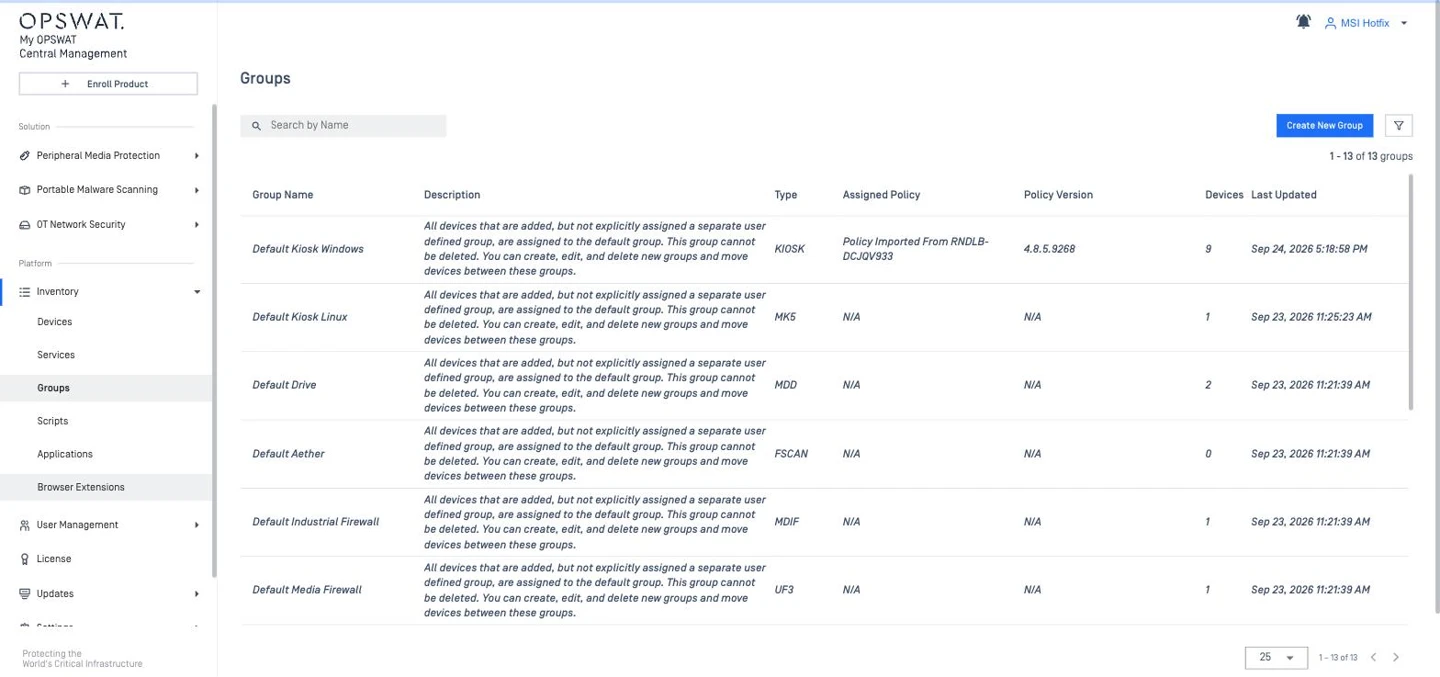
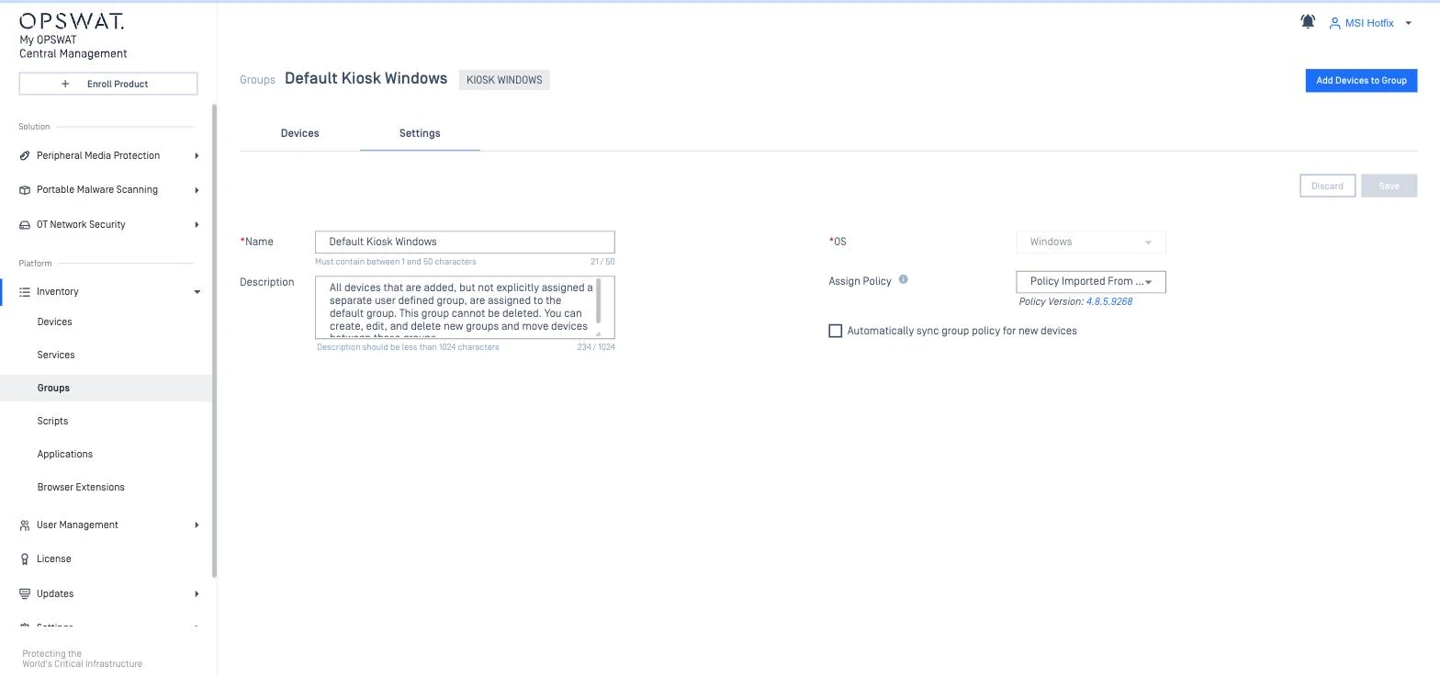
If auto-sync is not enabled for the group, open the device settings to enable it, or click Apply Group Settings.
Tip CM8 users are used to Apply Group Configuration. In CM10, assign the policy to the Kiosk group and enable Automatically sync group policy for new devices so newly enrolled Kiosks receive the group policy.
Dashboards, Reports and Notifications
Item | CM8 | CM10 |
|---|---|---|
Dashboards | Per-product Overview (Kiosk); widget add / remove | Peripheral Media Protection → Dashboard; customizable dashboards (max 20 widgets / page) |
Scan reports / history | Instance > Scan Reports (export .json / .pdf / .txt) | Kiosk session PDF reports: Inventory > Devices > [Kiosk] > Overview > Scan Sessions (7D / 30D, search by Session ID; Timestamp / Session ID / Processed Files / Files with Issues). Per session: Download JSON or Generate Report (PDF). By default the Kiosk submits a PDF only when files with issues were found; otherwise Generate Report builds one (older format, may differ from the latest Kiosk format). → JSON + PDF per session (CM8: .json / .pdf / .txt) |
Scheduled reports | Summary report (Minutely … Monthly, email list, instances). Supported for Kiosk only. | Supported for Hardware products Settings > Reports > Report Manager (Daily / Weekly / Monthly); History tab |
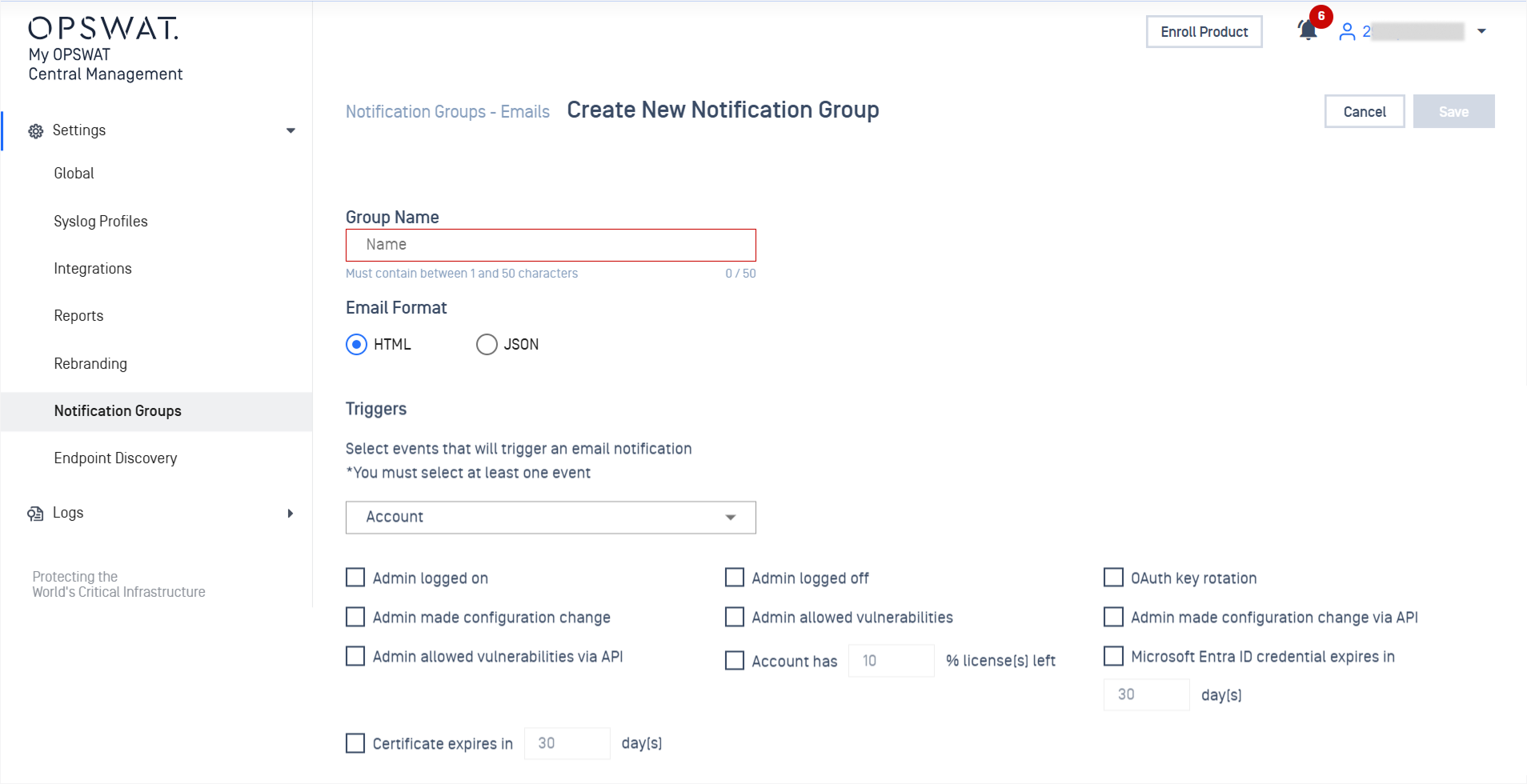
Alerts | Email only, 4 triggers: risk level, health status, CM storage < X GB, product free space < X GB | Notification Groups (HTML / JSON email, recipients, trigger events) assigned globally or per group; webhooks; in-app bell; Kiosk availability, certificate expiry and group-config-change events |
CM8 Notifications (email triggers)
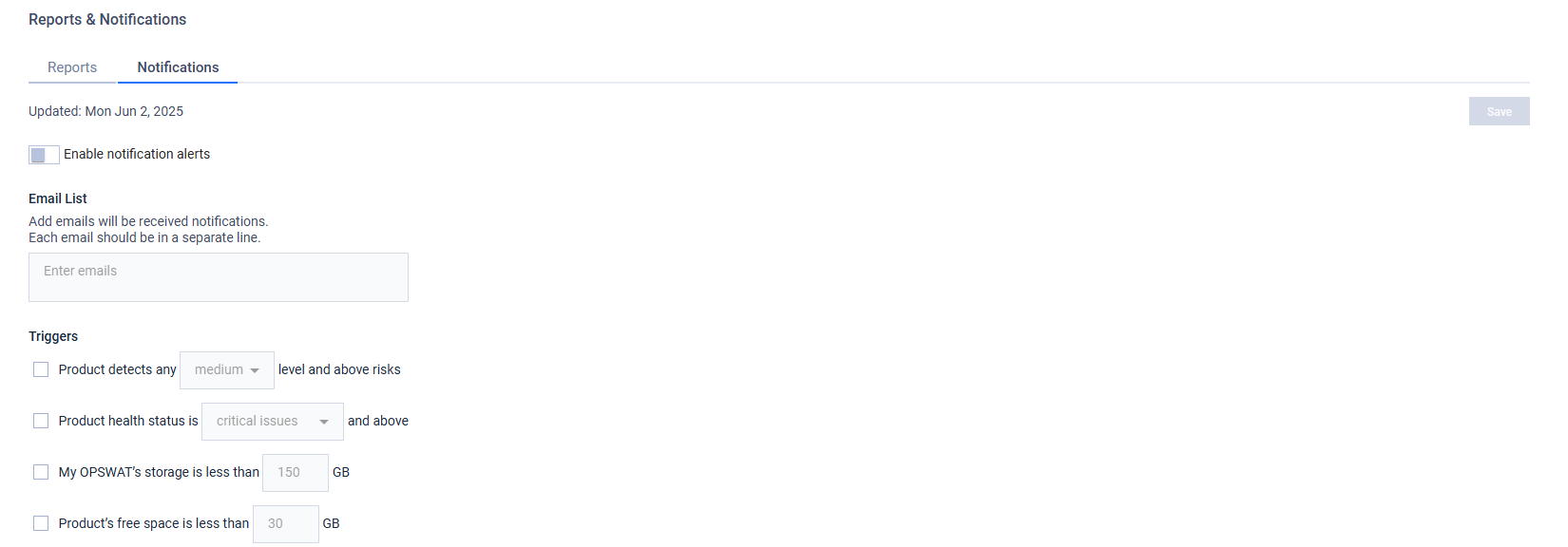
CM10 Notifications (email triggers)
CM8 Products > MetaDefender Kiosk > Overview tab
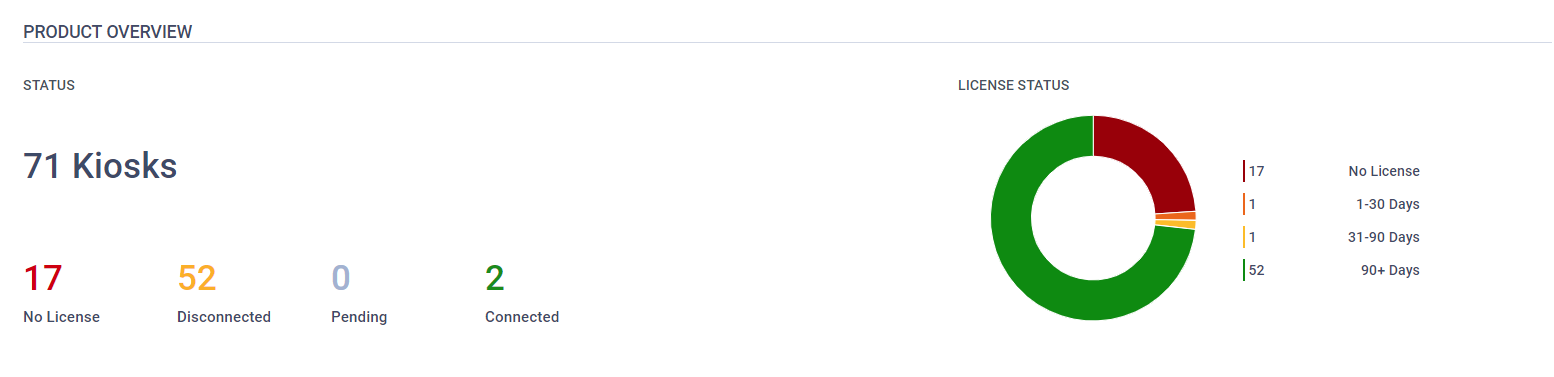
CM10 Peripheral Media Protection > Dashboard
License Management
Item | CM8 | CM10 |
|---|---|---|
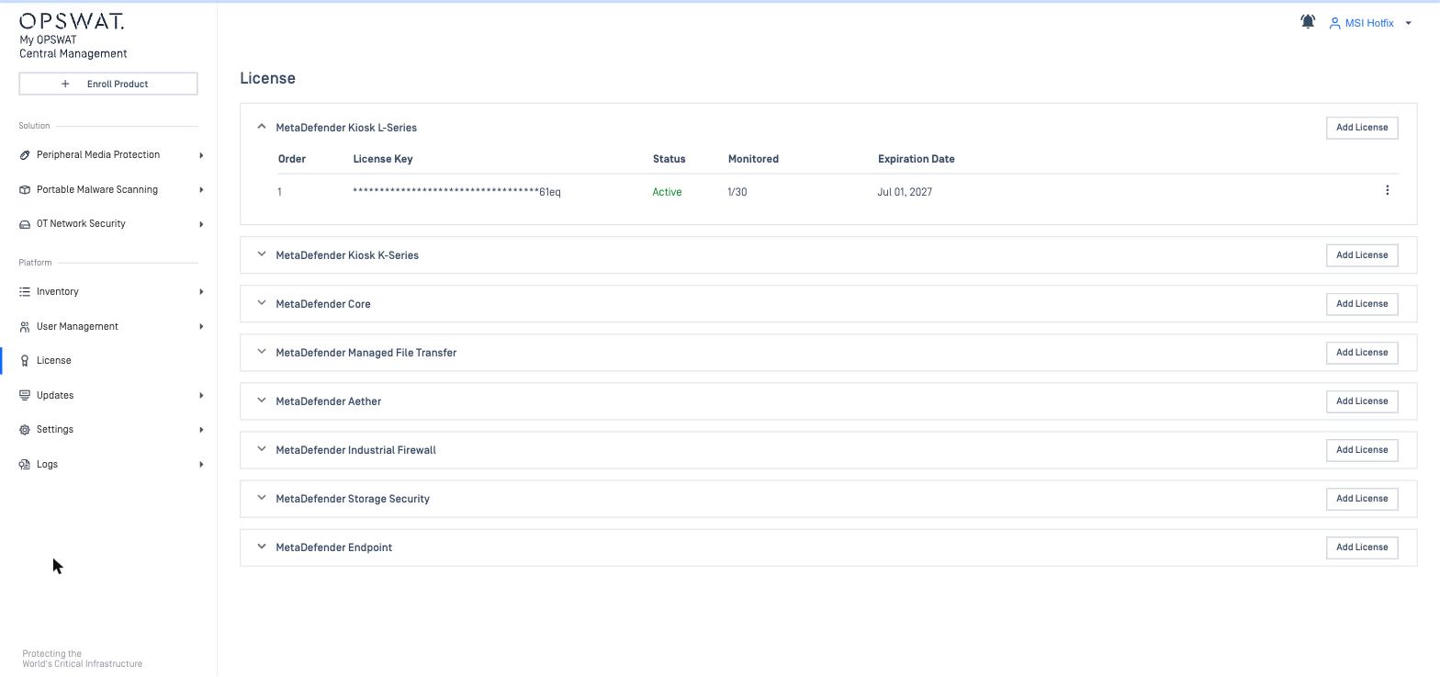
Products | My OPSWAT (CM server), Core, ICAP, Kiosk K-Series, Kiosk L-Series | Endpoint, Kiosk L-Series / K-Series, Core, MFT, Aether (formerly Sandbox), Industrial Firewall, Storage Security |
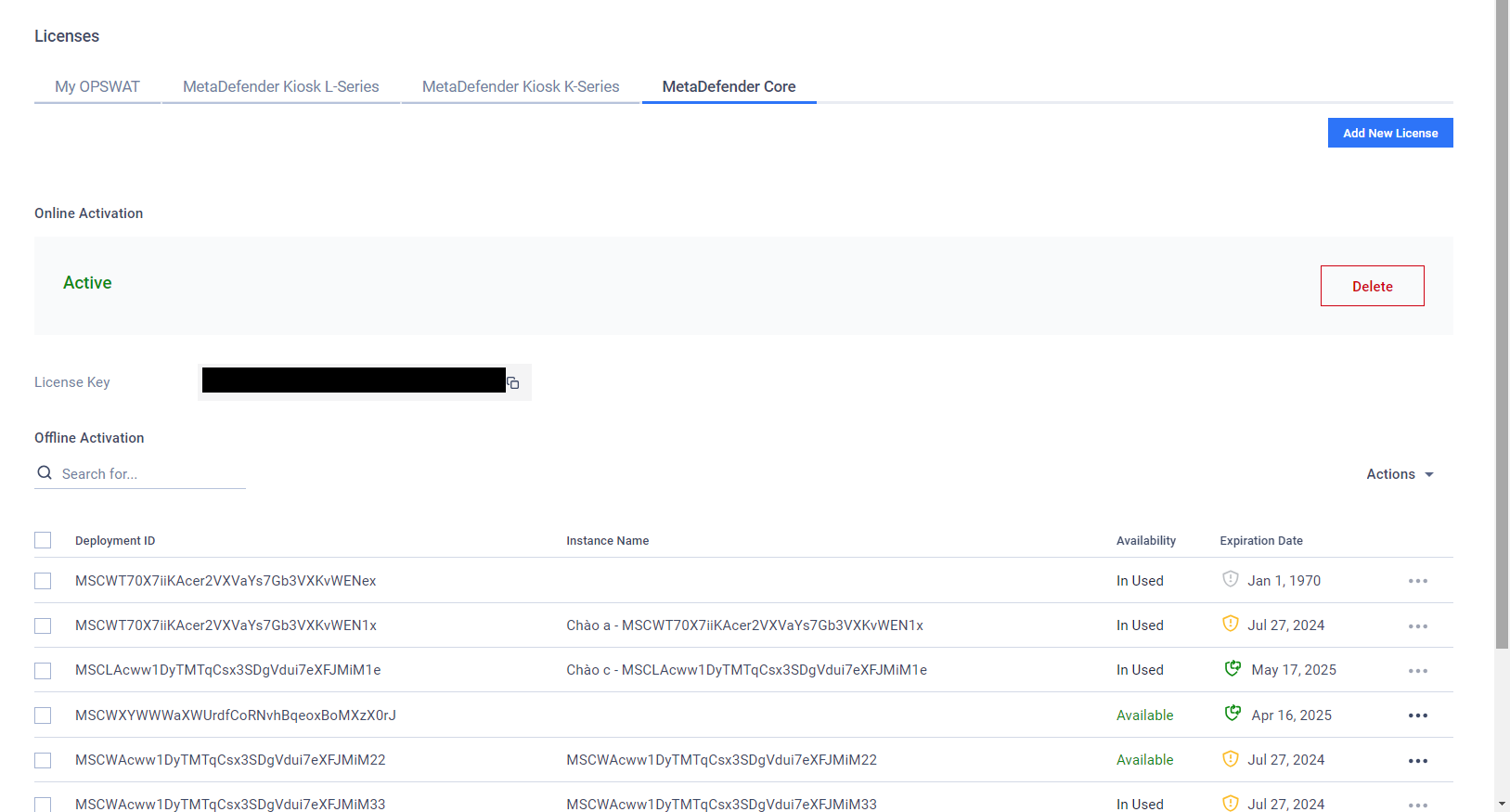
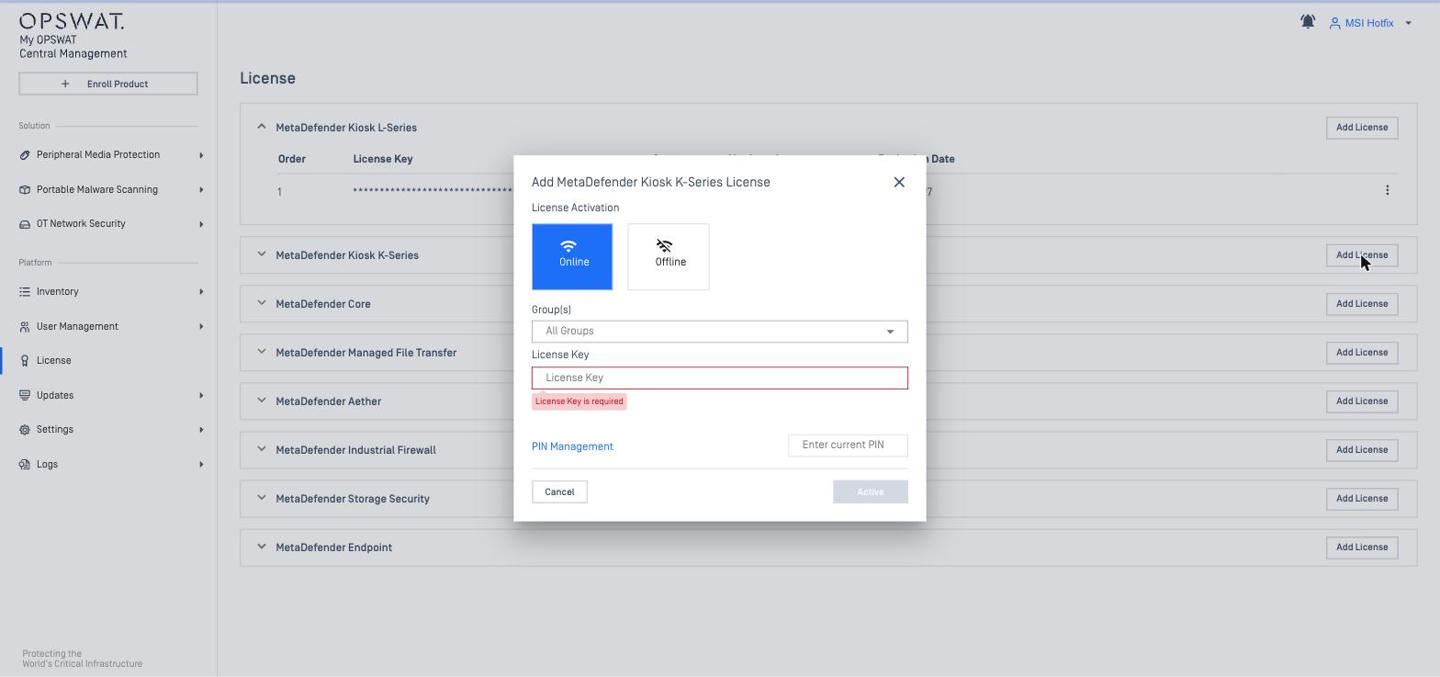
Online activation | Licenses > [product tab] > Add New License > Activation Mode Online: enter License Key > Add; only one online license active per product type | Allows multiple license keys per product License > product > Add License (key + group); enrolled unlicensed instances pick up a license automatically |
Offline activation | Add New License > Activation Mode Offline: 1. use the Product Deployment ID on the My OPSWAT portal to download a license file, 2. upload the activation file (Add More File for several). No group selection. | Same flow in the Offline tab; offline licenses cannot be allocated to groups (Group column: "Not applicable for offline activation") |
License page display | Per product tab, two sections: Online Activation (status Active + License Key + Delete) and Offline Activation (list per Deployment ID: Instance Name / Availability / Expiration Date, Actions menu, search by Deployment ID) | One expandable card per product; online and offline licenses in the same table (Order / License Key / Status / Monitored / Group / Expiration Date). Online: masked key + Group (e.g. "All Groups", editable). Offline: "Offline Activation (<Deployment ID>)" |
Group allocation | — | Allocate Group License: dedicate slots to groups; "All Groups" as fallback; audit log |
CM server license | Licenses > My OPSWAT tab (Active / Deactivate, Deployment ID) | Settings > Global > Account tab > License section (Device Monitored / Devices Limit / Status) |
Migration | Entitlement stays valid (no new purchase) but licenses are not migrated automatically – re-add the product licenses in CM10. | |
CM8 License Management
CM10 License Management
User Management, Authentication and RBAC
Item | CM8 | CM10 |
|---|---|---|
Menu | User Management > Users & Groups / Roles / User Directories | User Management > Users and Groups (Console Users / End Users) / Roles / Active Directory / SSO / IdP Mappings |
Local users | Local directory with password policy and login-attempt policy (3 failures, 5 min lockout by default) | Local console users (on-prem), invited users (SaaS via OPSWAT account) |
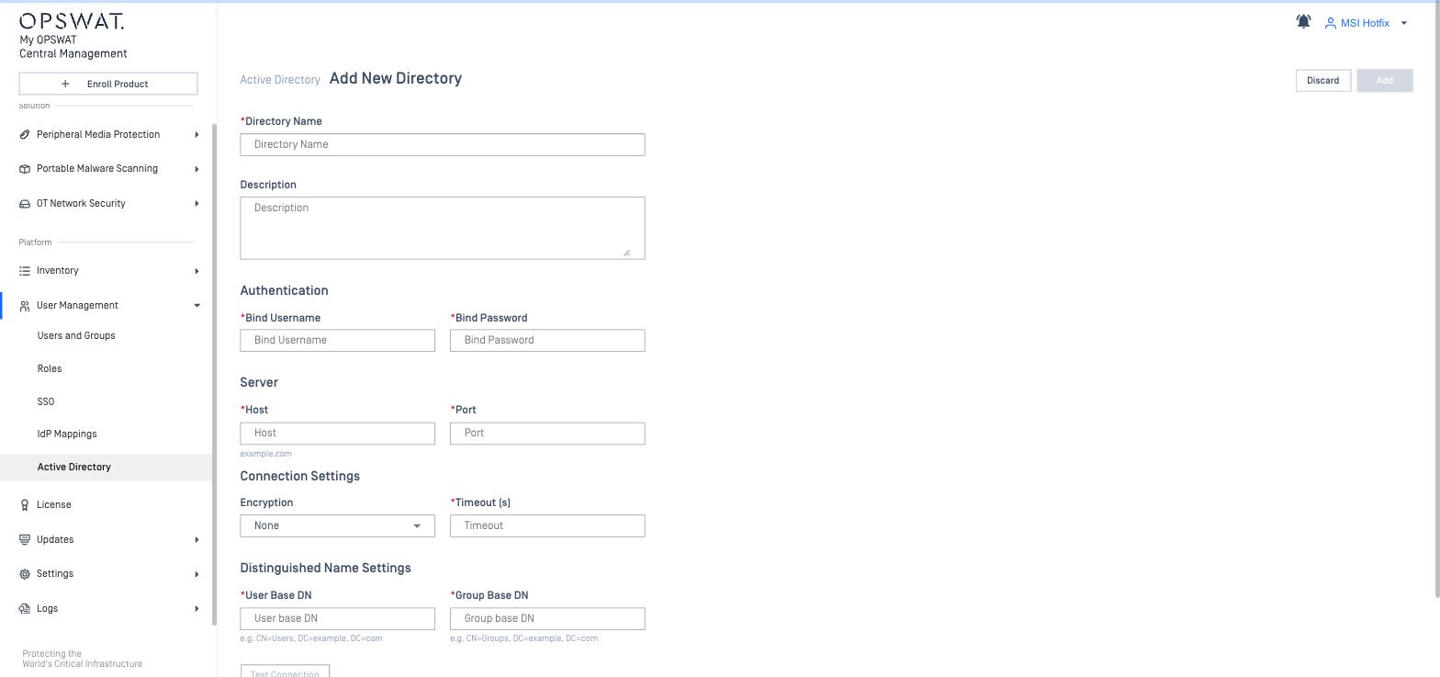
Active Directory | Bind user, host / port, TLS / StartTLS / None, timeout, user / group base DN; add AD users or groups; multi-group role resolution rules | Add New Directory → Test Connection; add AD users or groups; directory chosen on the login page |
SSO | SAML 2.0 (IdP / SP initiated, single logout), IdP group → role mapping, default role | SAML 2.0 (Entra ID, Okta, PingOne, ADFS), OIDC (10.7), SP-initiated on-prem (10.5), JIT users created as Read-Only, SCIM provisioning with Okta |
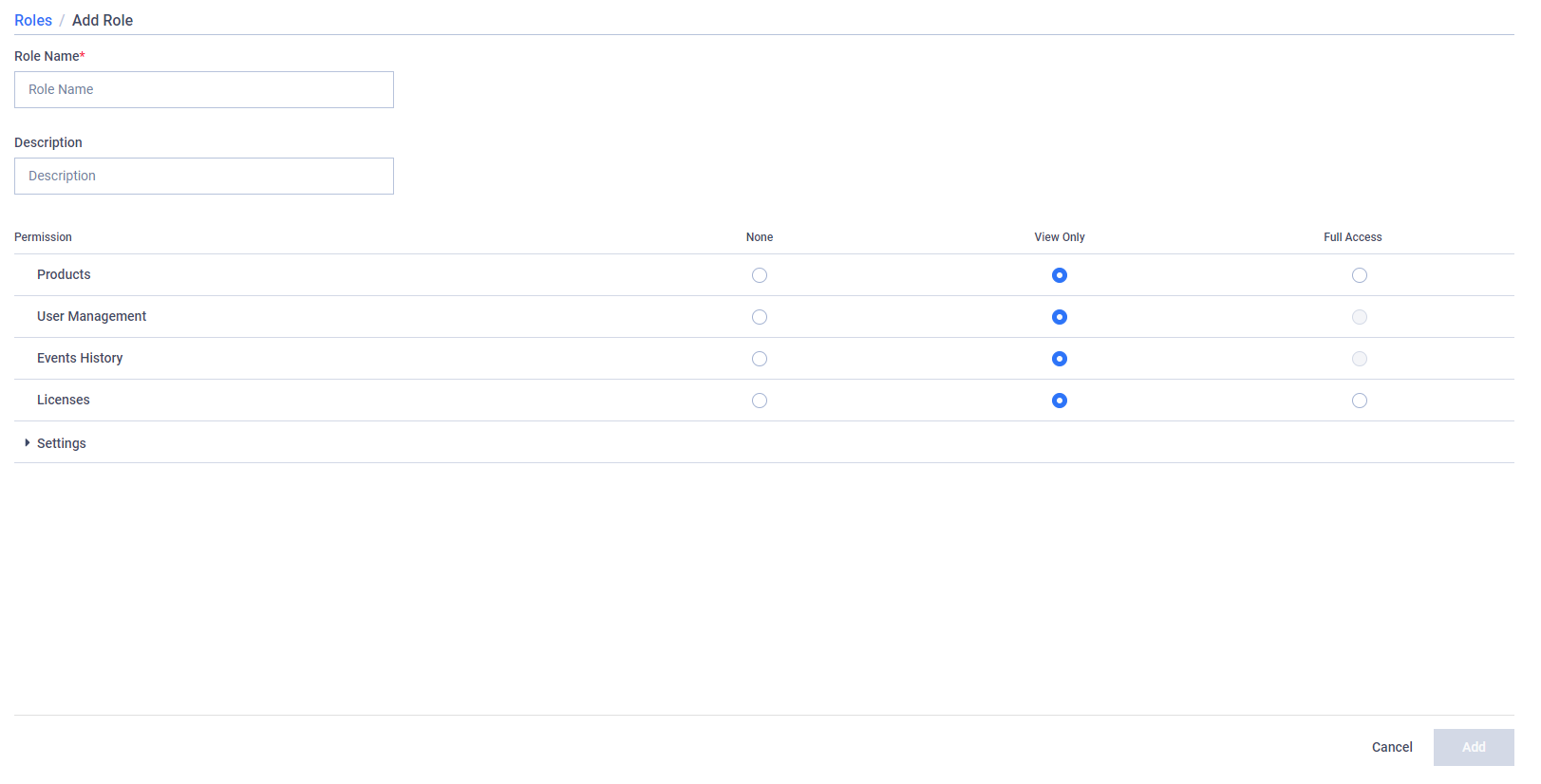
Roles | Administrator, View-Only + custom; per feature: None / View Only / Full Access | Per UI section: Hide / Read / Write + Advanced Permissions for specific Device Groups and Policies; up to 50 custom roles (10.6); feature permissions (e.g. Skip By Hash, Password Storage) |
Session timeout | Global 30 min (max 480) | Global + per-role absolute custom timeout |
Role change takes effect | Immediately (at most a page reload) | After the user logs out and logs in again |
PIN | Set in User Profile; reset by admin | User Settings; "Forgot your PIN?" sends a temporary PIN by email |
Migration | User accounts are not imported by CM8Importer. Re-create users and roles in the new model and re-configure AD / SSO after cut-over. | |
CM8 Add Role (None / View Only / Full Access)
CM10 Create Role (Hide / Read / Write)
CM8 Active Directory
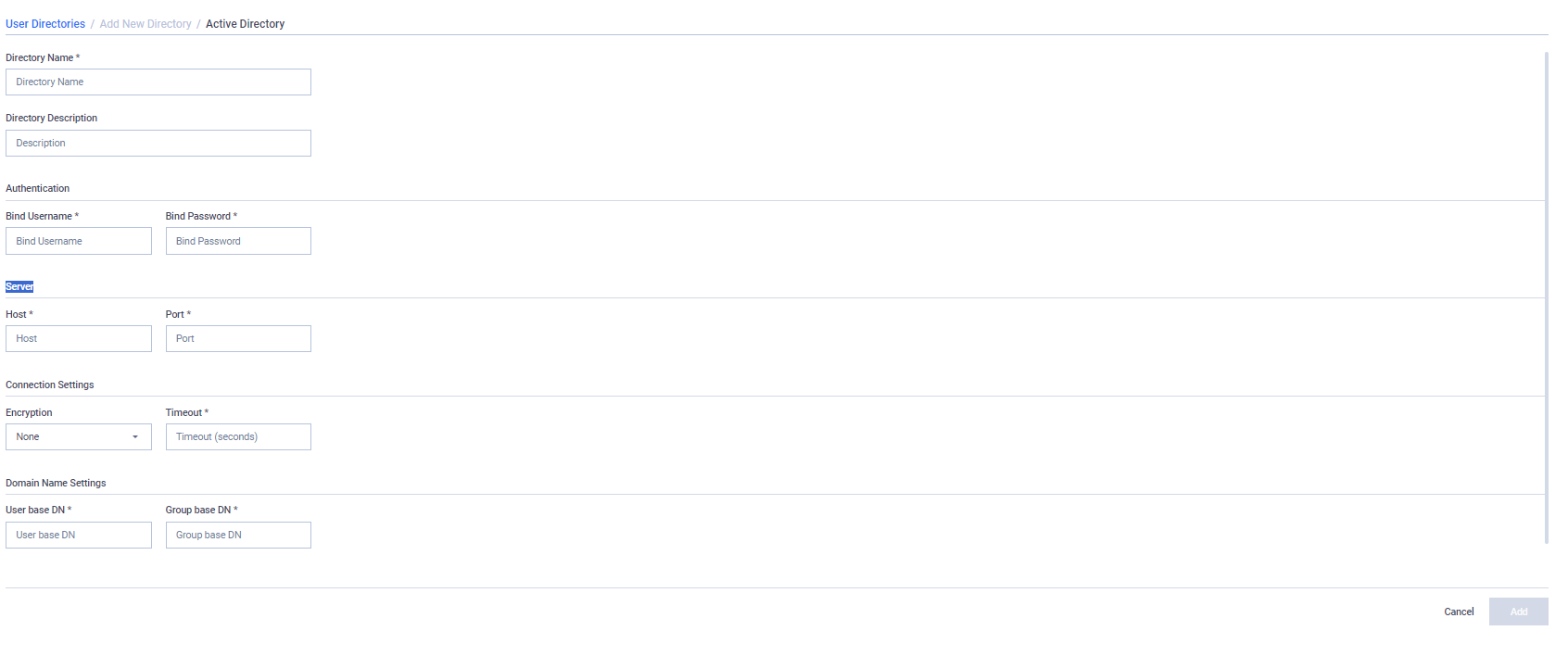
CM10 Active Directory
Audit Logs and SIEM Integrations
Item | CM8 | CM10 |
|---|---|---|
Audit log | Events History (config sync, license events) | Logs > Admin Events (logon / logoff / failed auth, configuration change, registration-code revoke…), Device Events, Service Events (Core / MFT / ICAP…), Webhook Events; SaaS also has Syslog / Export / OAuth API / Patch / Backup Restore Events; CSV export with PIN |
SIEM / log forwarding | N/A | Settings > Integrations (on-prem 10.7.26062 tabs: Endpoint Identity / Webhook Integration / Syslog / Google Cloud Logging): Syslog (CEF), Google Cloud Logging, Webhooks, Splunk add-on (Splunkbase 5530). |
Note | For Kiosk, the CEF event list covers enrollment lifecycle events (enrolled, deleted, unenrolled). | |
Account-level Settings
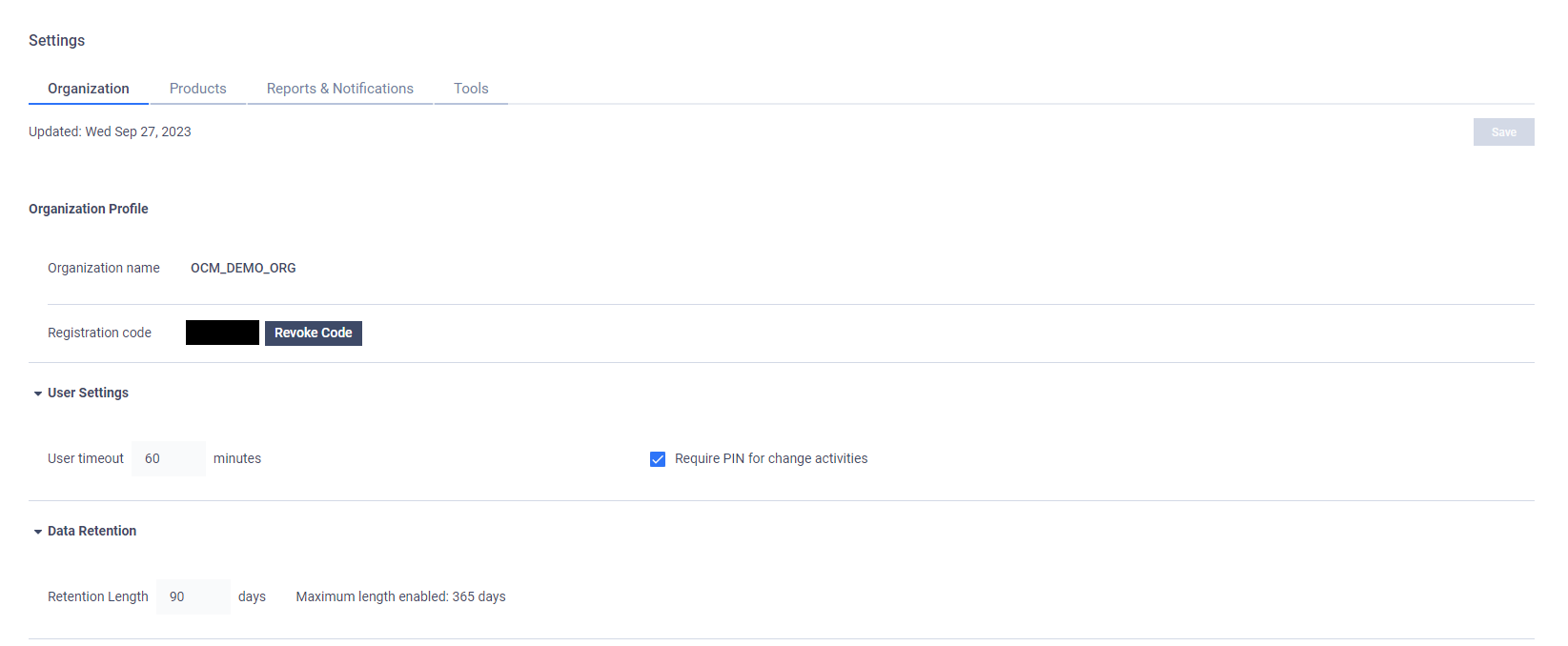
Item | CM8 (Settings > Global > Organization) | CM10 (Settings > Global > Account) |
|---|---|---|
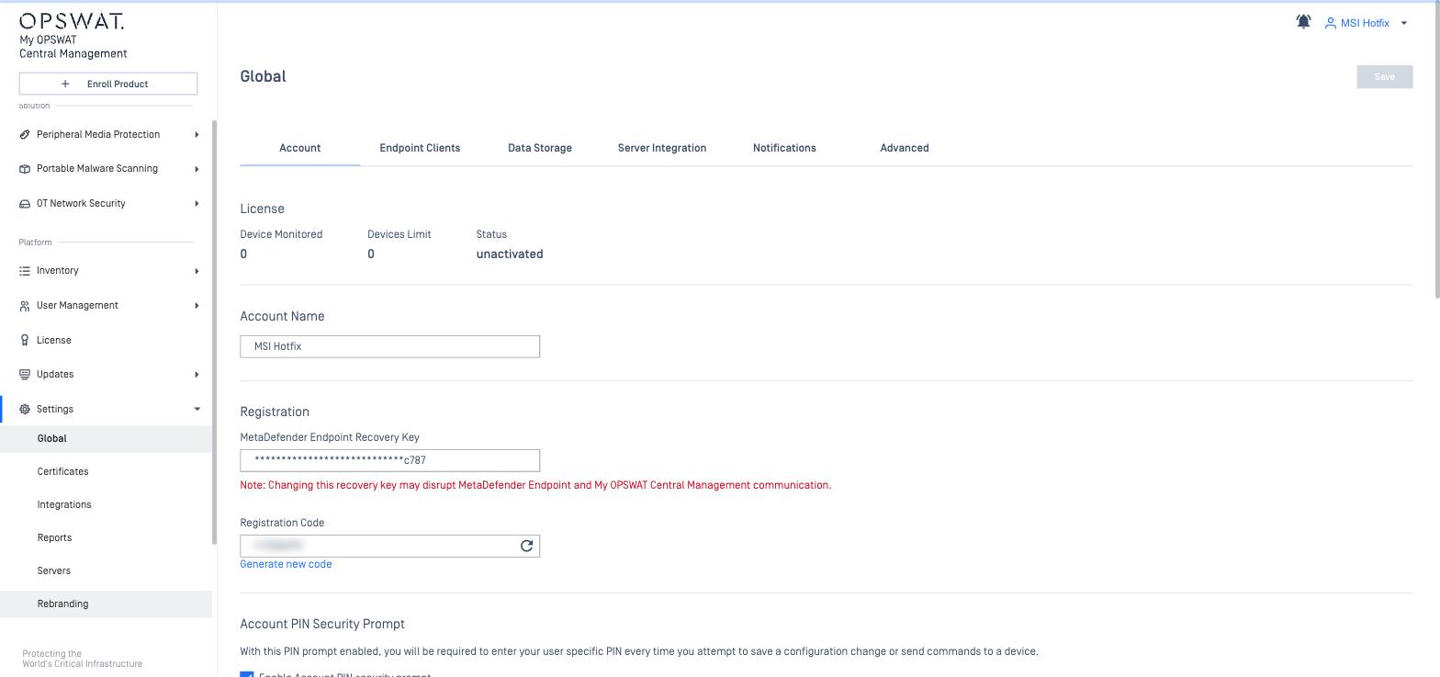
Registration code | One per organization; Revoke Code generates a new one (enrolled instances unaffected) | Registration section; Generate new code (refresh icon) creates a new one; the section also holds the MetaDefender Endpoint Recovery Key. Imported from CM8 so enrolled products keep working |
User timeout | Default 30 min, max 480 min | Account > Inactivity Timeout |
PIN for changes | Require PIN for change activities | Enable Account PIN security prompt; PIN is asked for most write actions (policy save, export, role change…) |
Time zone | User time zone | Account time zone (Local / UTC), 24h / 12h format |
Multi-organization | Switch Organization from user menu | Account model. Users are invited per account |
CM8 Global settings – Organization tab

CM10 Settings (platform-wide)
Server Settings (HTTPS, proxy, email, certificates, backup, monitoring)
Configuration item | CM8 | CM10 |
|---|---|---|
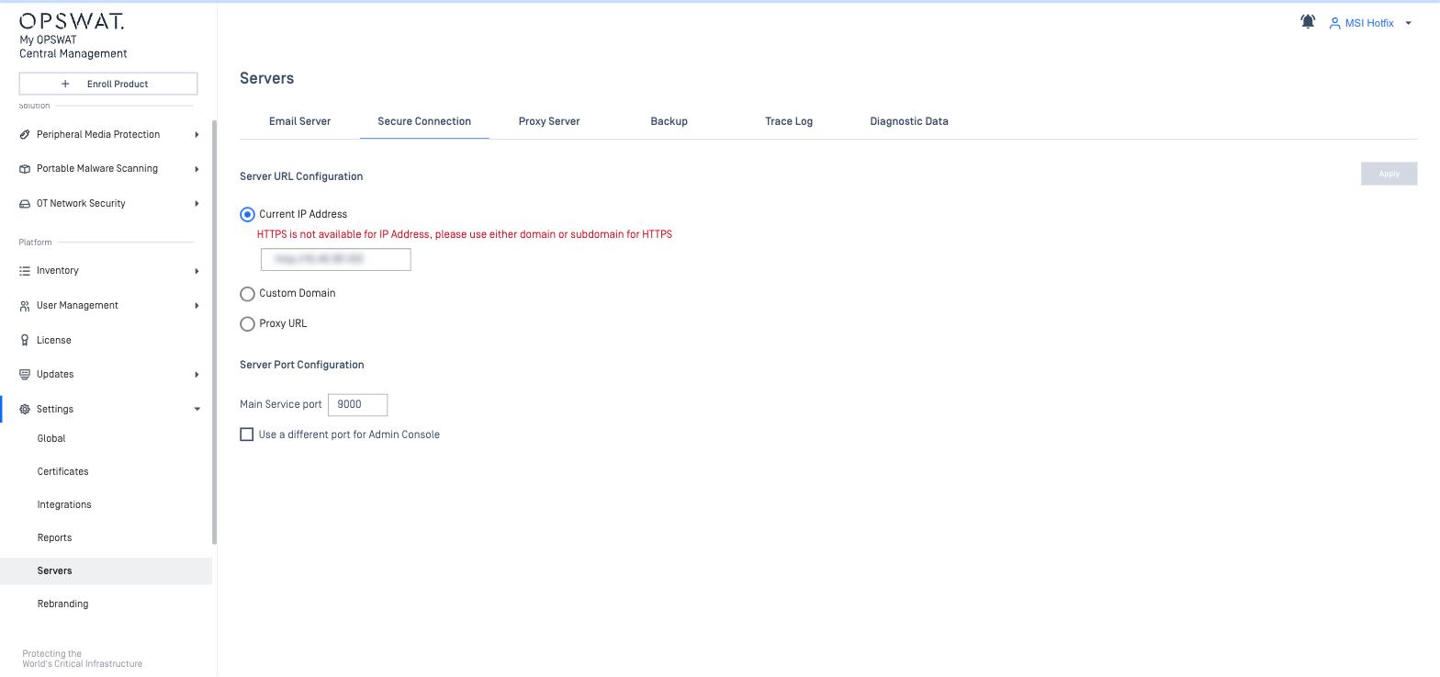
HTTPS / secure connection | Settings > Global > Server > Secure Connection: toggle Enable HTTPS, choose TLS version(s), port fixed; certificate uploaded in Certificates tab; Server URL field used in report links. | Settings > Servers (tabs: Email Server / Secure Connection / Proxy Server / Backup / Trace Log) > Secure Connection: three modes – Current IP Address (HTTP only), Custom Domain (upload .crt + .key), Proxy URL (reverse proxy). Ports: Main Service port (9000) + checkbox Use a different port for Admin Console. |
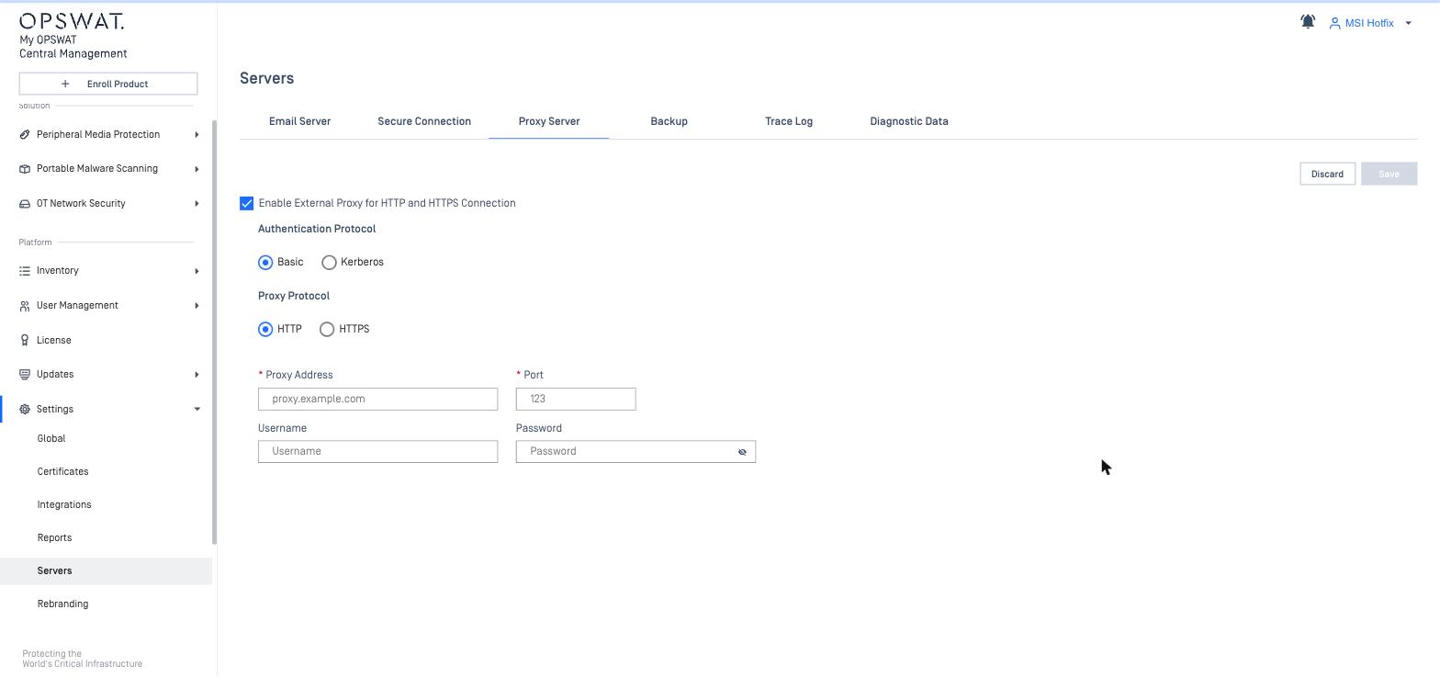
Proxy | Settings > Global > Server > Proxy: Server address, Port, Username / Password (Basic only), "Use the same proxy for HTTPS", Bypass list (CIDR / wildcards). | Settings > Servers > Proxy Server: Enable External Proxy for HTTP and HTTPS; auth Basic (address, port, user / password, HTTPS proxy option) or Kerberos (KDC address / port, Realm, SPN, user / password). |
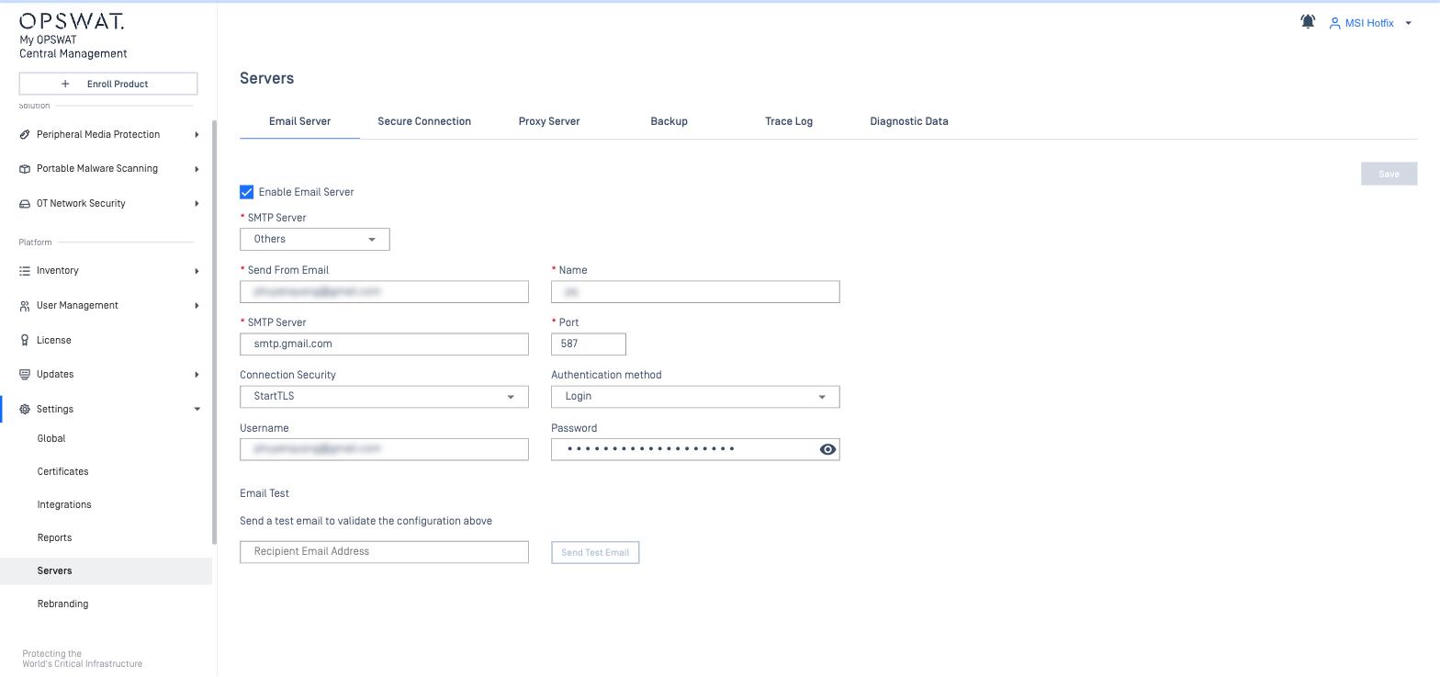
Email (SMTP) | Settings > Global > Server > Email: type Microsoft 365 (Tenant ID, User ID, Client ID, Client Secret) or Others (sender, name, server, port, None / TLS / StartTLS, Login auth); Send Test Email. | Settings > Servers > Email Server: Enable SMTP; Send From, SMTP Server, Port, None / StartTLS / TLS, Authentication None / Login, Username / Password. |
Certificates | Settings > Global > Certificates: server certificate (HTTPS) + Trust Certificates for email / AD / proxy; "Verify SSL certificates" option. | Console certificate under Secure Connection. Settings > Certificates = certificate store that can be distributed to Kiosk K-Series (4.7.11+) per instance or per policy. |
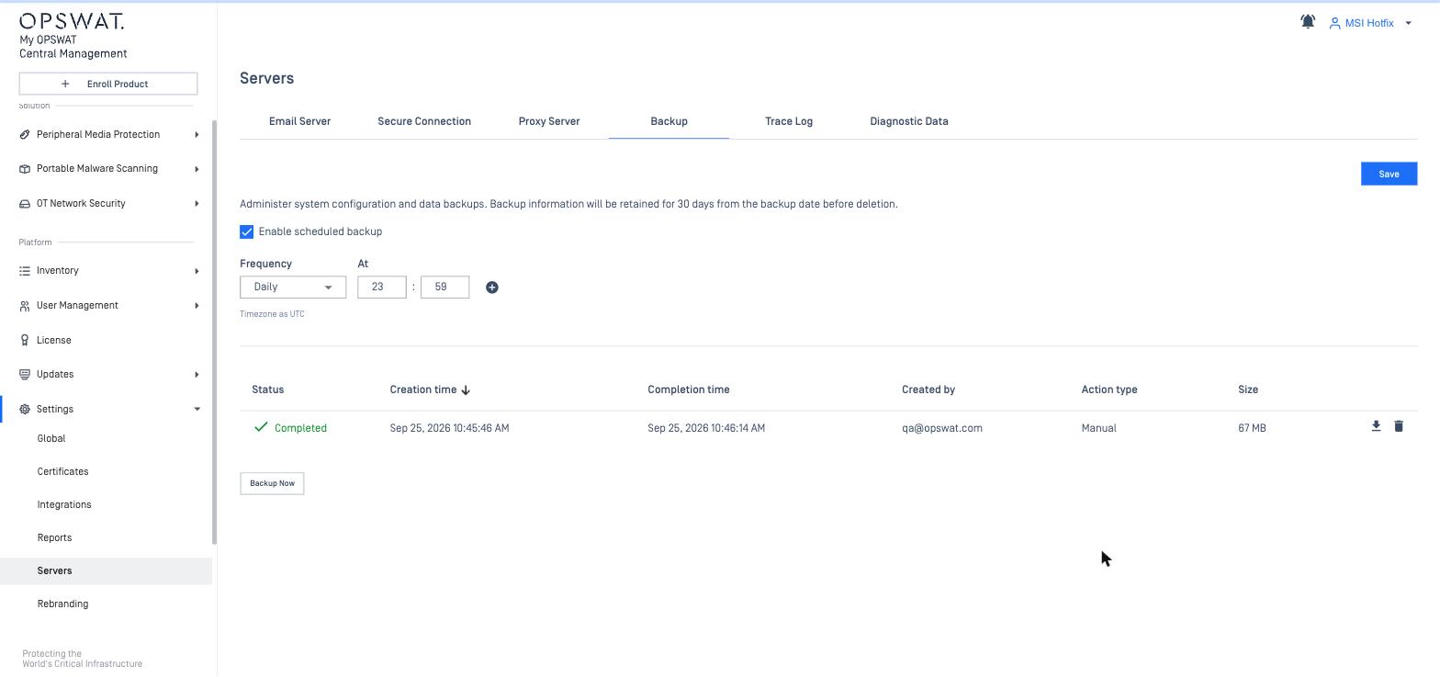
Backup / restore | Settings > Global > Import/Export: select data categories, AES-256 encrypted .zip, manual only, max 10 GB; import replaces configuration. | Settings > Servers > Backup: scheduled (daily, UTC time) or manual; .CMX files; kept 30 days; restore only via Setup Wizard on a fresh install. |
Troubleshooting | Prometheus metrics at | Help Center > Support Packages, optional diagnostic data to OPSWAT; Settings > Servers > Trace Log (max rotated file size, delete logs older than N days, retain N files, min log level). |
Data retention | Single value for event logs + product reports (Settings > Global > Organization > Data Retention): default 30 days, maximum 18250 days. | Settings > Global > Data Storage: Global data retention (days) + Advance settings, plus a separate MetaDefender Endpoint section (default 30 days); processing-history retention 3–365 days depending on file status (10.3.2511+); trace logs default 14 days (10.6). |
CM8 Settings > Global > Server > Secure Connection
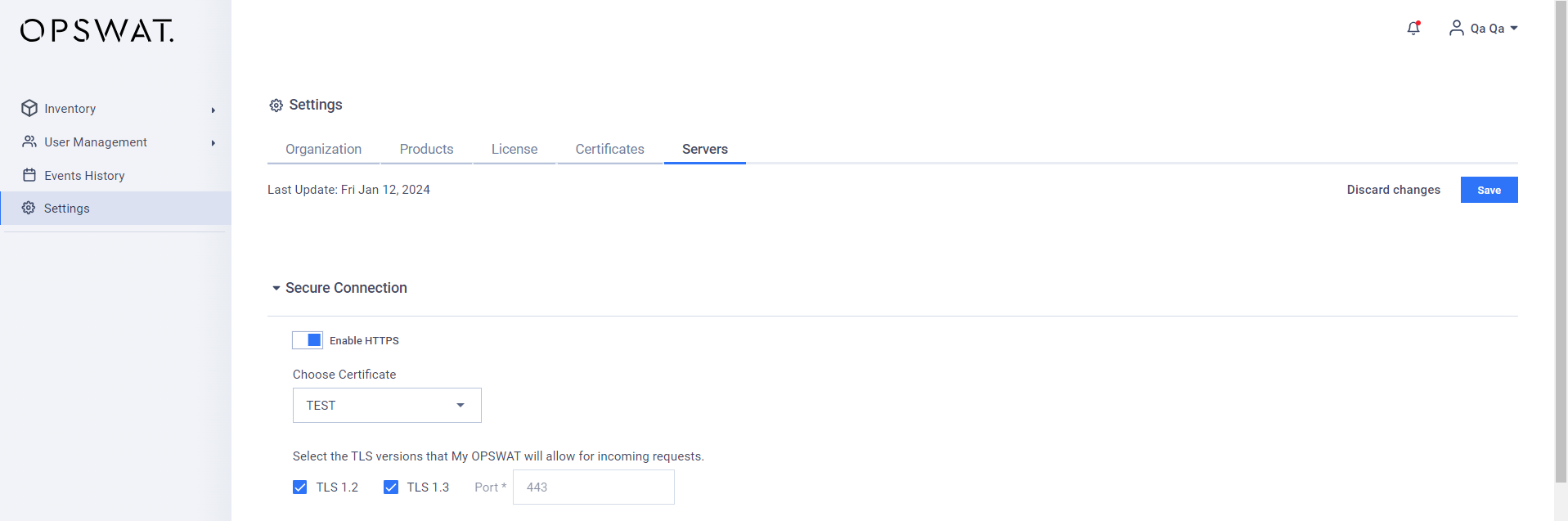
CM10 Settings > Servers > Secure Connection
CM8 Proxy (Basic auth, bypass list)
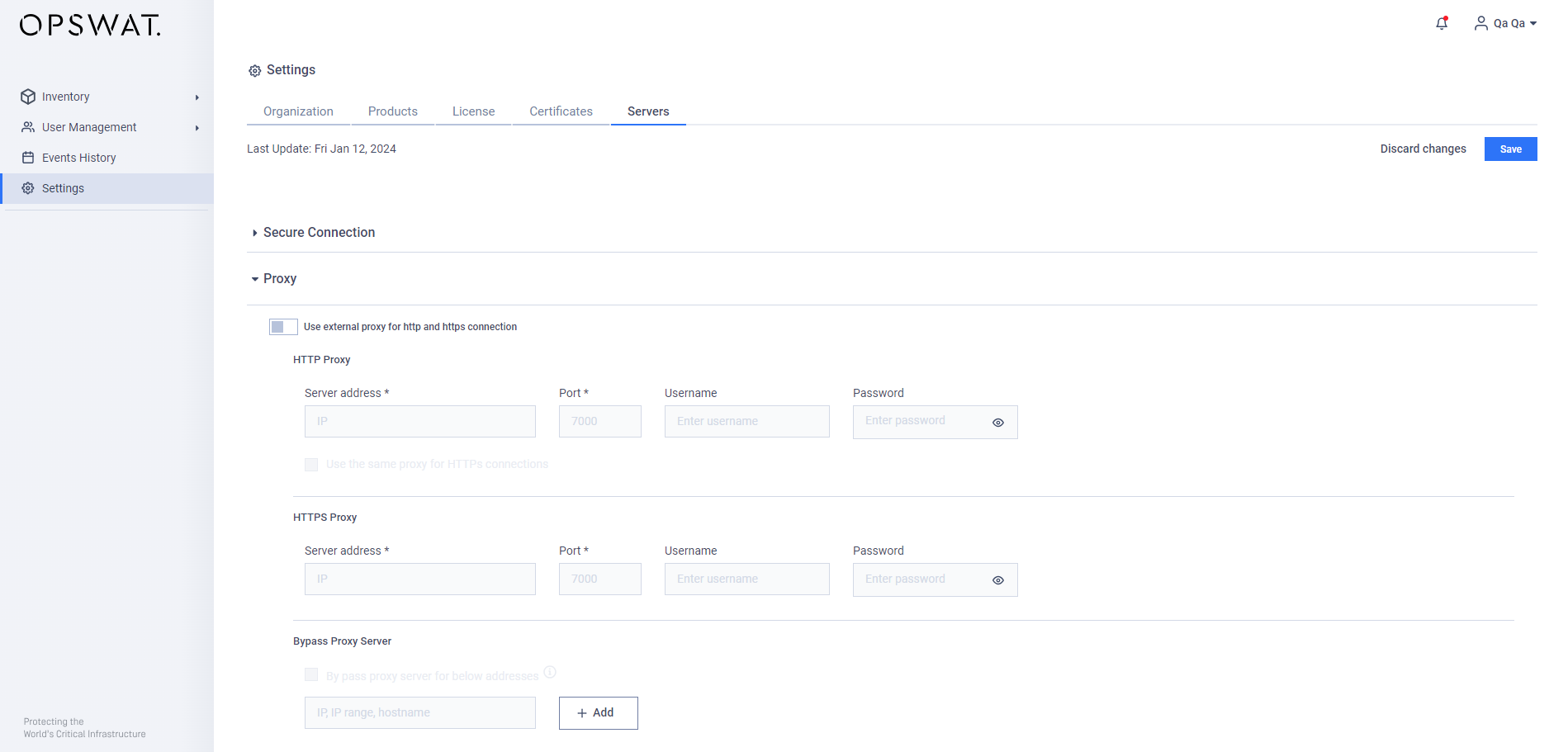
CM10 Proxy (Basic / Kerberos)
CM8 Email – Microsoft 365 / Others
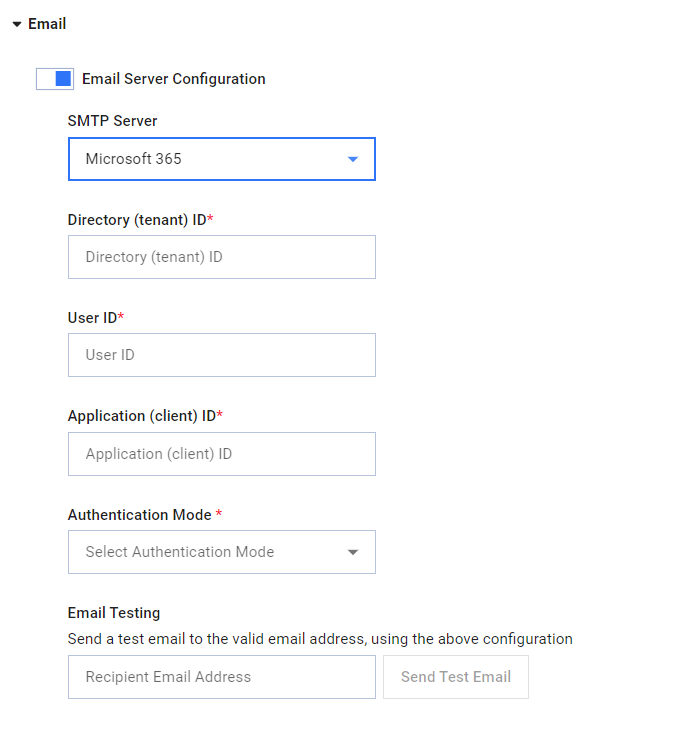
CM10 Email Server (SMTP)
CM8 Certificates
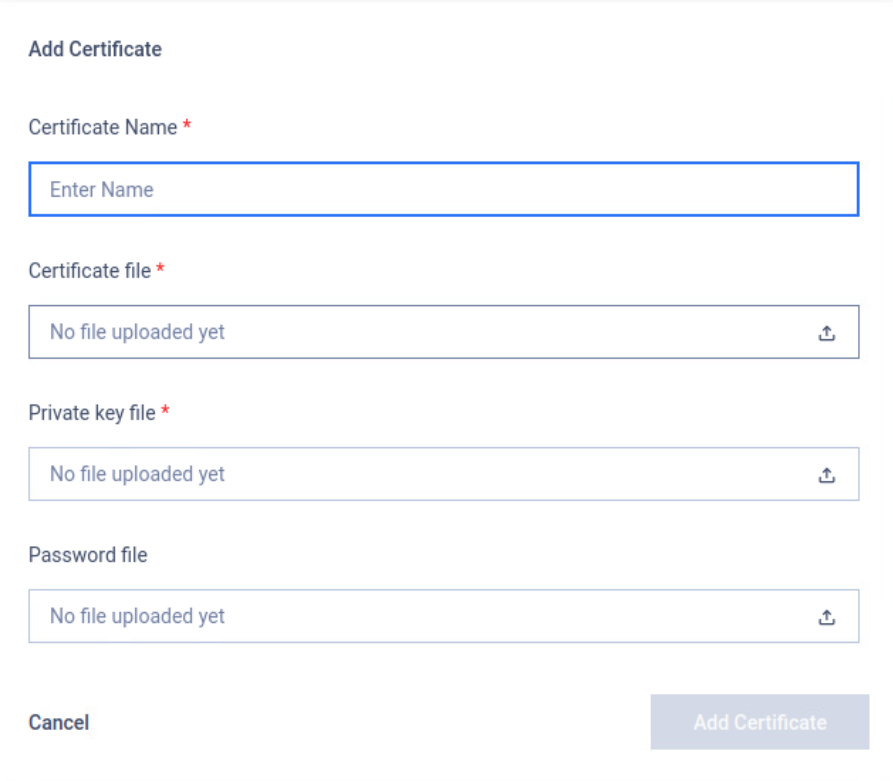
CM10 Certificates
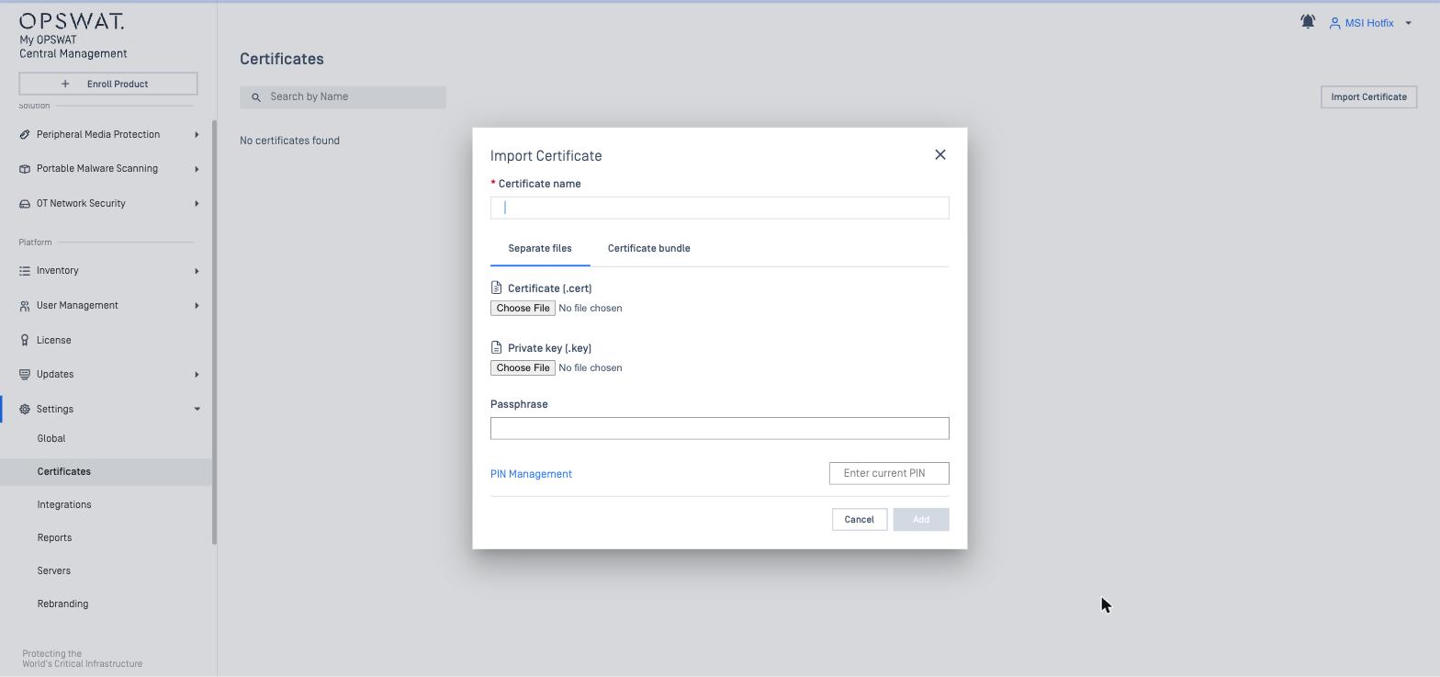
CM8 Import / Export
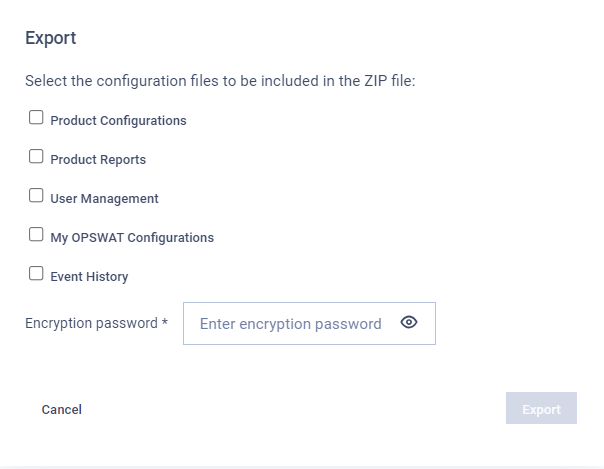
CM10 Backup
Product Updates and Engine / Module Updates
Item | CM8 | CM10 |
|---|---|---|
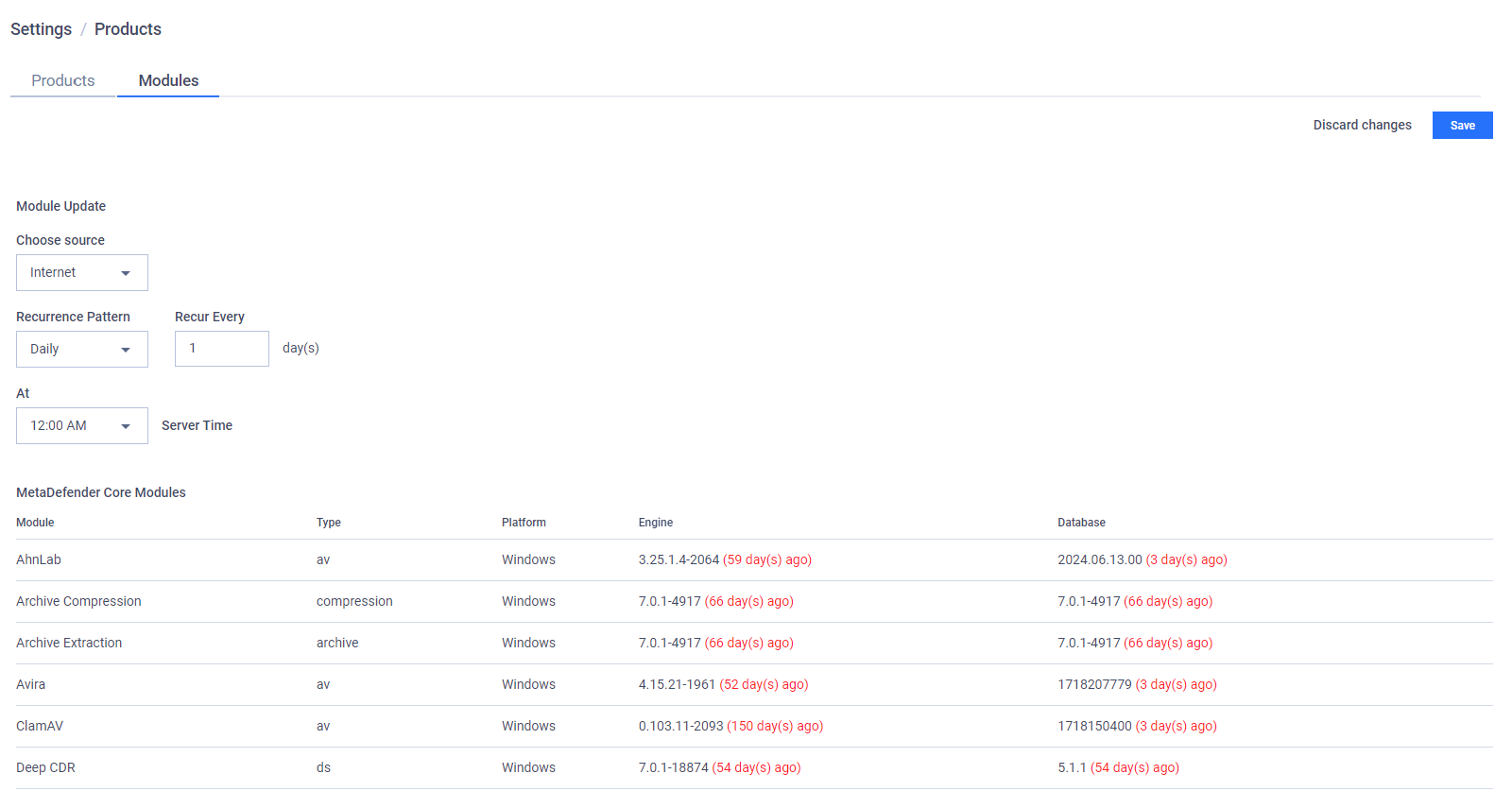
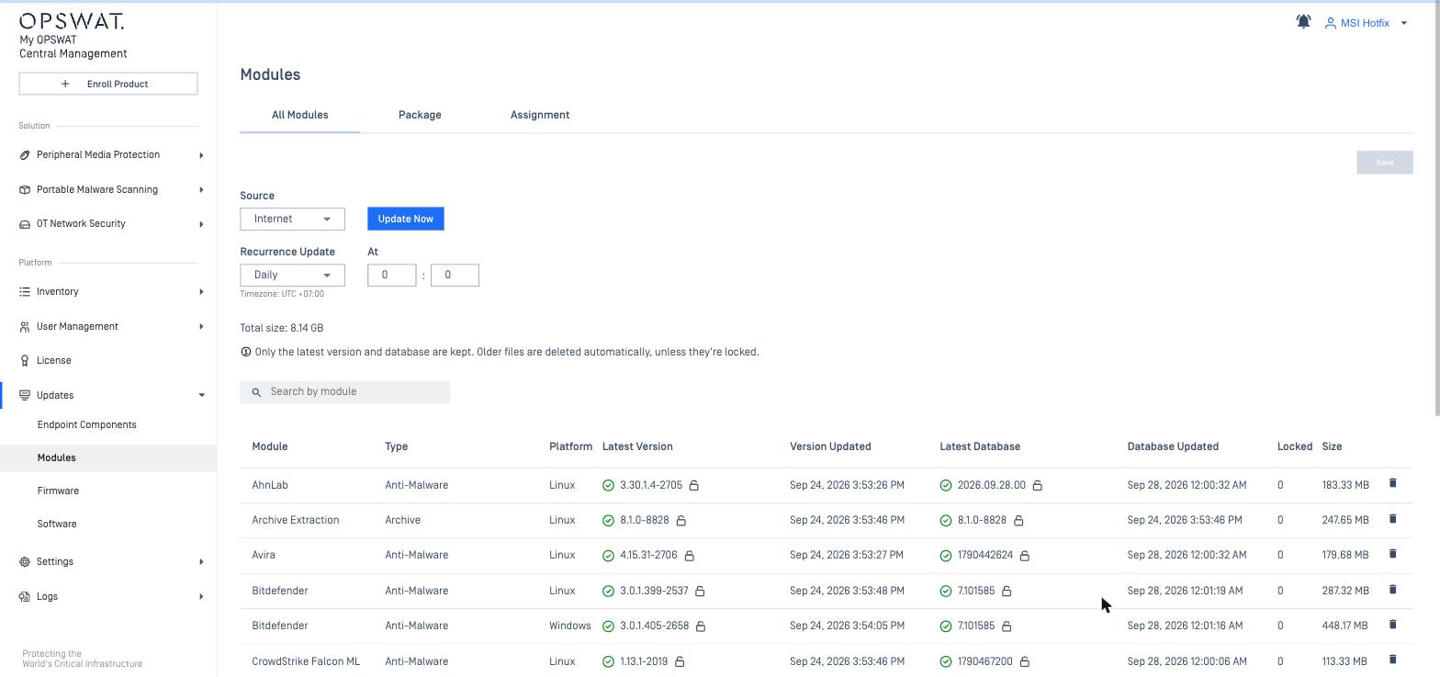
Module (engine) update sources | Settings > Products > Modules tab: Manual (.yml + .zip), Internet (Minutely … Monthly), Folder (SMB share). Paused if free disk < 20 %. | Updates > Modules for Kiosk Linux: Internet (Daily / Weekly at a time) or Manual (.yml + .zip). |
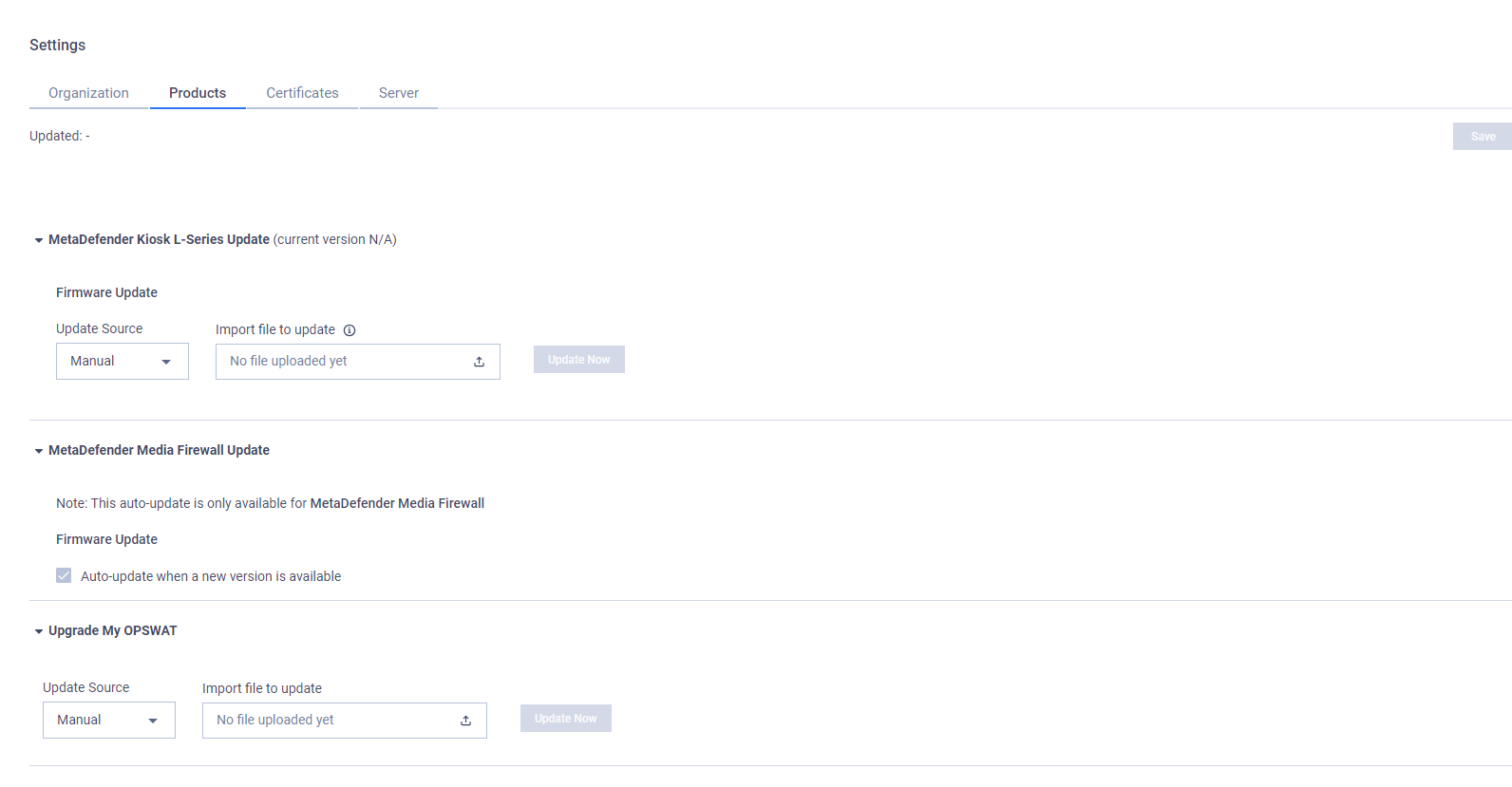
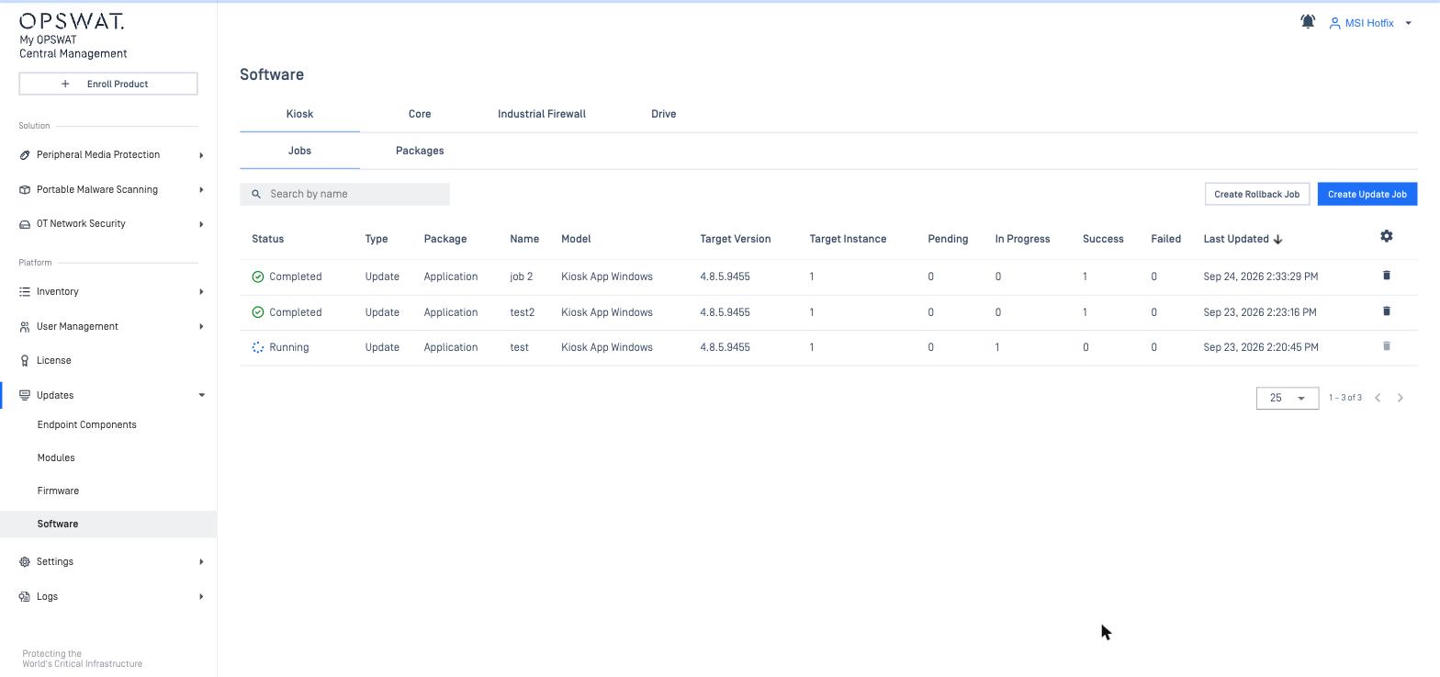
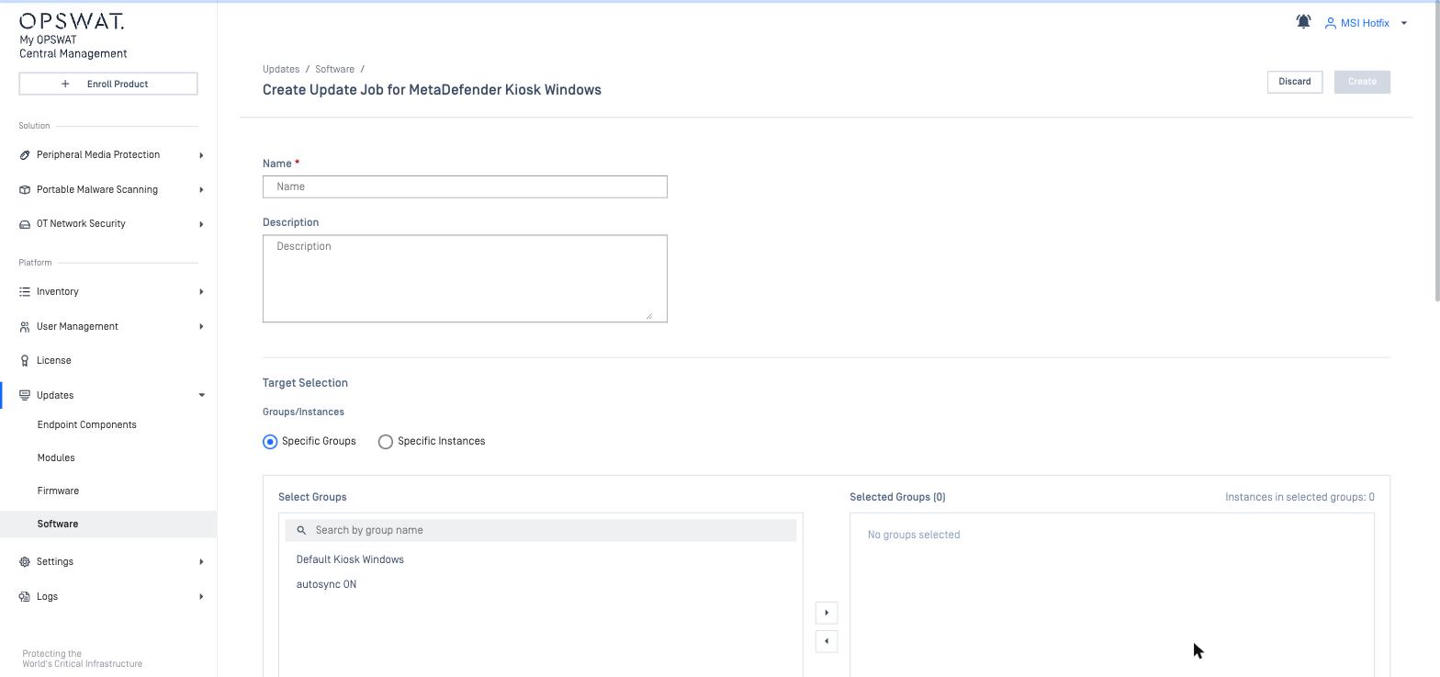
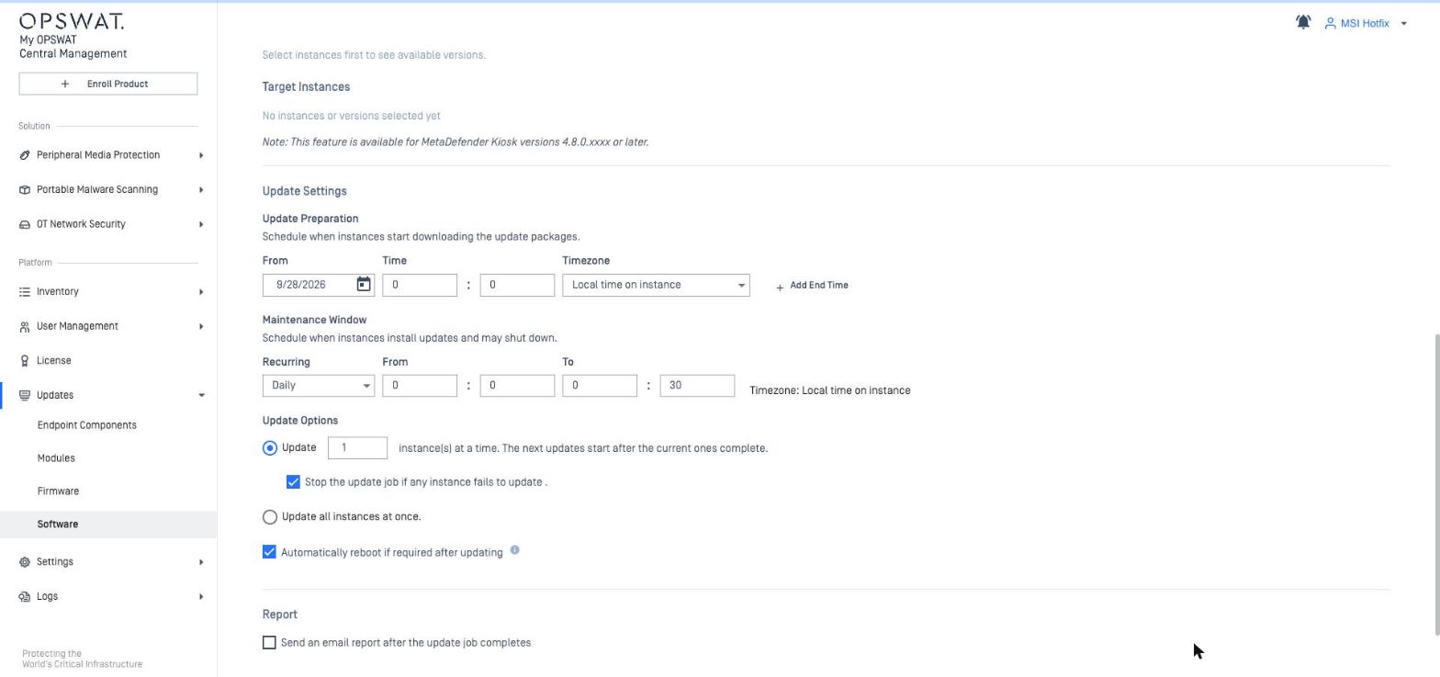
Product (application) upgrade | Settings > Products > Products tab: Kiosk K-Series Update (Internet + Recurrence Pattern); Kiosk L-Series Update (Update Source Manual / Internet); Media Firewall Update with the only auto-update toggle ("only available for MetaDefender Media Firewall"); Upgrade My OPSWAT (.tgz) | Updates > Software > Kiosk (also Core, Industrial Firewall) > Jobs: target groups / Kiosks, target version, download window, maintenance window, concurrency, stop-on-failure, auto reboot, email report; rollback jobs |
CM8 Module Updates
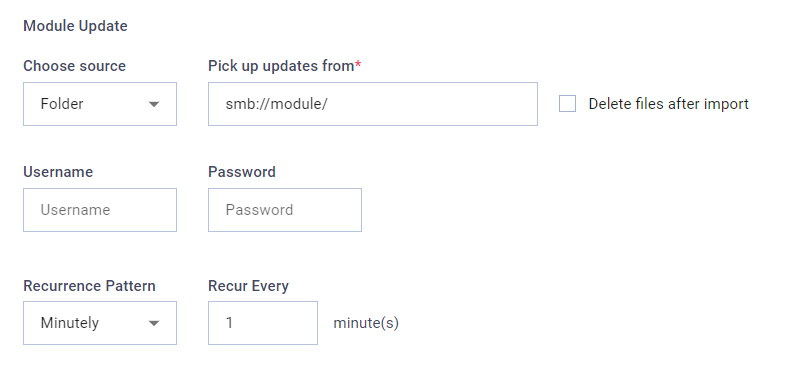
CM10 Module Updates
CM8 Product Updates
CM10 Product Update Job
API
Item | CM8 | CM10 |
|---|---|---|
Authentication | Secret key → | OAuth 2.0 client credentials → |
Coverage | Read-mostly: inventory, Core / Kiosk processing overview, blocked files, scan reports, process history; only write = Core module update source | Devices, device actions, logs, reports, Kiosk configuration (YARA / skip-by-hash) |
Compatibility | Endpoints and authentication are different. Scripts / integrations built on the CM8 API must be rewritten. | |
Remote Command
Item | CM8 | CM10 |
|---|---|---|
Remote support package | N/A | SUPPORTED Generate / download a Kiosk support package remotely (Kiosk Windows 4.8.1+): Inventory > Devices > [Kiosk] > Actions > Generate Support Package, or Help Center > Support Packages. |
Remote script execution | N/A | SUPPORTED Run PowerShell / cmd / bash / sh scripts now or on a schedule (Once / Daily / Weekly / Monthly), up to 500 instances per job (Kiosk 4.8.3+): Inventory > Scripts. |
Remote application update / rollback | N/A | SUPPORTED Update jobs with maintenance window, concurrency and auto-reboot; rollback to the previous version (Kiosk Windows 4.8.0+, Hardened Image 4.8.3+): Updates > Software > Kiosk > Jobs. |
New in CM10 (no CM8 equivalent)
Deployment: Windows MSI / RHEL RPM, distributed mode with MongoDB replica set, HA on AWS, scheduled backups, diagnostic data.
Product management: policy objects with import / clone, auto-sync, staged module rollout, remote application update and rollback jobs, remote support packages, central certificate distribution, Skip by Hash, Password Storage, group license allocation, custom tags, Direct Instance Management API.
Endpoint Security: MetaDefender Endpoint management, compliance policies, deep compliance, application control, playbooks, vulnerability management, endpoint discovery, rebranding of remediation pages, Endpoint Backup & Restore.
Patch Management: OS and third-party patching (on-demand, policy, ring deployment incl. Patch Tuesday), SLA tracking, PDF reports.
Secure Access / NAC: SDP (zero-trust access gateways), SAML / OIDC SSO, IdP MFA, access rules, RADIUS NAC (MetaDefender NAC v10).
Integrations: Syslog CEF, Google Cloud Logging, webhooks, Splunk add-on;
Administration: Hide / Read / Write RBAC with per-group / per-policy scoping, role-based session timeout, SCIM provisioning, richer audit logs.
Note
The "v8 vs v10" comparisons in the CM10 Secure Access > NAC docs refer to MetaDefender NAC v8, not Central Management v8.
Quick Guide: Common Kiosk Tasks in CM10
Task | CM8 steps | CM10 steps |
|---|---|---|
Enroll a new Kiosk | On the Kiosk: Unmanaged → Server API URL + Registration Code → Enroll Now | CM10: +Enroll Product to get the Server API URL and Registration Code → enter them on the Kiosk (or during the Kiosk OOBE / setup wizard) |
Change settings for all Kiosks in a group | Group > Configuration tab > Edit → Apply Group Configuration; or edit one Kiosk → Set as Group Configuration → Apply Group Configuration | Peripheral Media Protection > Policies → edit the policy (or Import Policy from a Kiosk) → SAVE + PIN → make sure the policy is assigned at Inventory > Groups > [group] > Settings > Assign Policy |
Change one Kiosk only | Instance > Configuration > Edit | Inventory > Devices > [Kiosk] > Settings > Edit |
Add a new Kiosk group | Products > Kiosk > Groups > Add New Group | Inventory > Groups > Create New Group → name, product type Kiosk, policy |
Update engines on Kiosk (L-Series / Linux) | Settings > Products > Modules tab | Updates > Modules |
Upgrade Kiosk software | Settings > Products > Products tab > Kiosk K-Series / L-Series Update | Updates > Software > Kiosk > Jobs → Create Update Job (rollback job if needed) |
Add a Kiosk license | Licenses > Kiosk tab > Add | License > Kiosk L-Series / K-Series > Add License (select group; online only) |
Get an email when a Kiosk is unhealthy / offline | Settings > Reports & Notifications > triggers | Settings > Global > Notifications → create a Notification Group (Kiosk availability event) → Assign Group or per group |
View Kiosk scan activity | Products > Kiosk > Overview; Instance > Scan Reports | Peripheral Media Protection > Dashboard; Inventory > Devices > [Kiosk] > Overview > Scan Sessions |
Create a read-only operator | Roles: View-Only | User Management > Roles → Read on required sections, Hide the rest |
Collect logs for support | SSH + cent-generate-sup-package.sh (CM server) | Account menu > Help Center > Support Packages (tabs: Contact Support / Support Packages / Additional Resources); remote Kiosk support package (Kiosk Windows 4.8.1+) |