
Limitation : Due to an Azure Files restriction, uploading 0-byte files is not supported. If a remediation action attempts to upload an empty file, the operation will fail.
In order to integrate Azure Files with MetaDefender Storage Security please follow these steps:
From the left side menu, navigate to Inventory, click Add New > Account, choose Azure Files and click Next
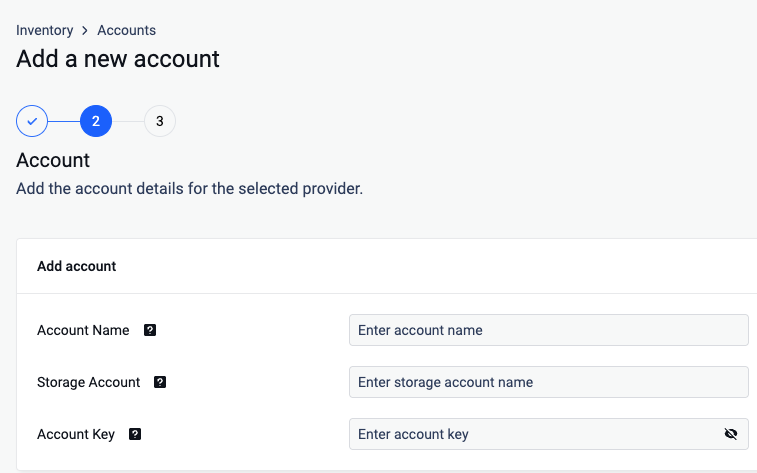
In Account Name, enter a name that identifies this account in MetaDefender Storage Security. It is not the Azure storage account name.
In Storage Account, enter the name of your Azure storage account.
Enter your Account Key. Scroll to the end of this page for more details.
Click Next and finish the process.
Add a new unit for the previously created account (Inventory > Add New > Unit).
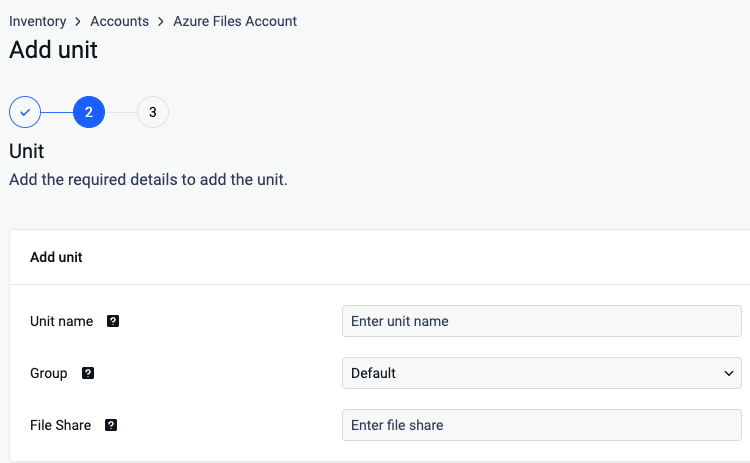
Give your unit an unique name
Assign your unit to a Group
Enter the name of the share you wish to process with MetaDefender Storage Security.
Click Next in order to finish the process.
Where can I find the Account Key?
To find the Account Key, please follow these steps:
https://learn.microsoft.com/en-us/azure/storage/common/storage-account-keys-manage?tabs=azure-portal