
Product Specification Requirements | Version |
|---|---|
Dell EMC OneFS | Version 8.x |
Service Message Block (SMB) protocol | SMB 3.1.1 (or SMB3) |
Integration with Dell Isilon is currently accomplished via the Service Message Block (SMB) protocol. Before you begin, you should ensure that this protocol is enabled in your Dell Isilon configuration.
In order to integrate Dell Isilon with MetaDefender Storage Security please follow these steps:
From the left side menu, navigate to Inventory -> Add -> Account -> Choose Dell Isilon
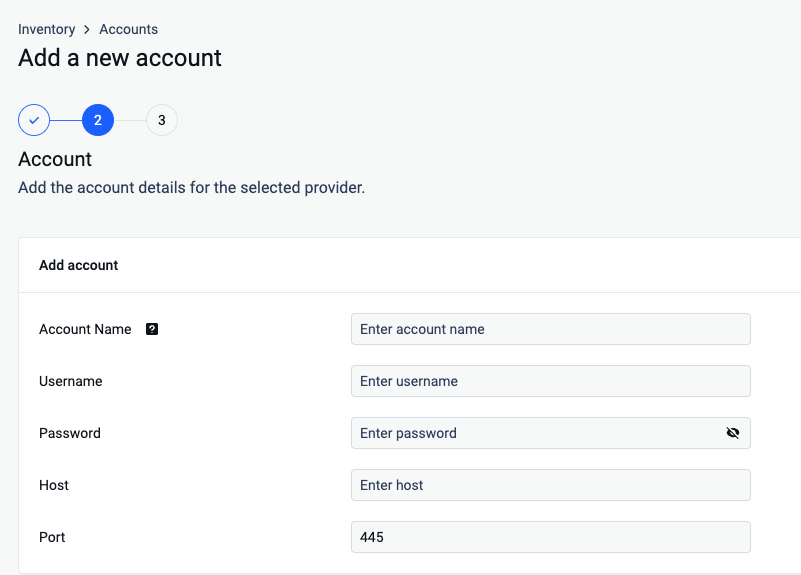
Give your account a name so you can easily identify it later
Input the Username required to authenticate your access to the server. (The user should have at least read and write security permissions)
Provide the Password associated with the username from step 3.
Host: Enter the IP address of the server you wish to connect to.
Port: Specify the port number used for the connection, 445 being the default port
Click Next in order to finish the process
From the left side menu, navigate to Inventory -> Add -> Unit -> Choose the previously created account
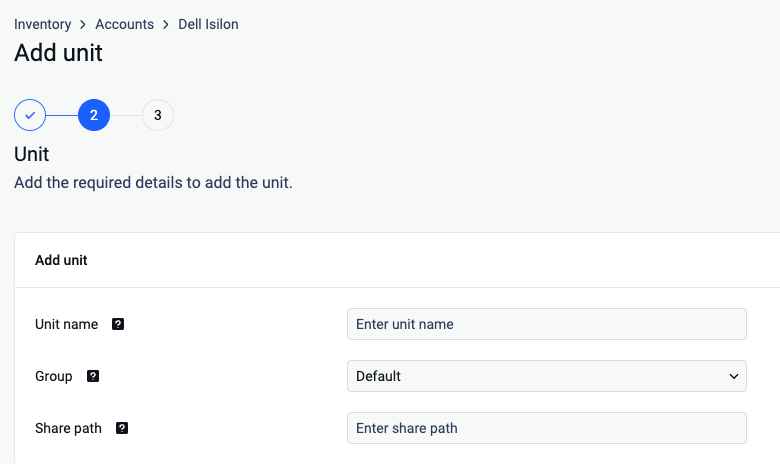
Give your unit an unique name so you can easily identify it later
Assign your unit to a Group
Indicate the specific directory path on the server from which you want to access files
Click Next in order to finish the process.
To avoid authentication issues the Username should have one of the following formats:
local users should be .\username (for example: .\Administrator)
domain users should be username@domain or domain\username
If you use a hostname in the host portion of IPv4/v6 socket address, the program may show a non-deterministic behavior. The socket address will be resolved differently into an actual IPv4/v6 address, depending on the results from DNS resolution and/or the host configuration. For deterministic behavior use a numeric address in host portion.