
The minimum supported MinIO version is RELEASE.2020-09-10T22-05-01Z.
In order to integrate MinIO with MetaDefender Storage Security please follow these steps:
From the left side menu, navigate to Inventory, click Add New > Account, choose S3 Compatible and click Next
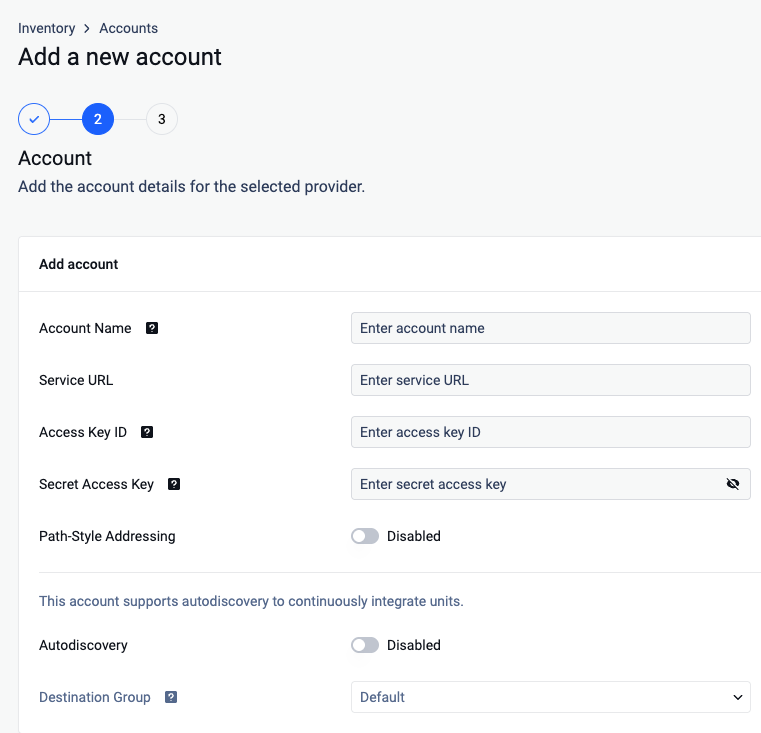
Give your account a name so you can easily identify it later
Enter the Service URL for your MinIO endpoint
Enter your Access Key ID. Scroll to the end of this page for more details.
Enter your Secret Access Key. Scroll to the end of this page for more details.
If you want to enable path style addressing for the bucket, tick the checkbox.
(Optional) Enable Autodiscovery
Once the account is successfully added, navigate to Inventory, click Add New > Unit, choose the account and click Next
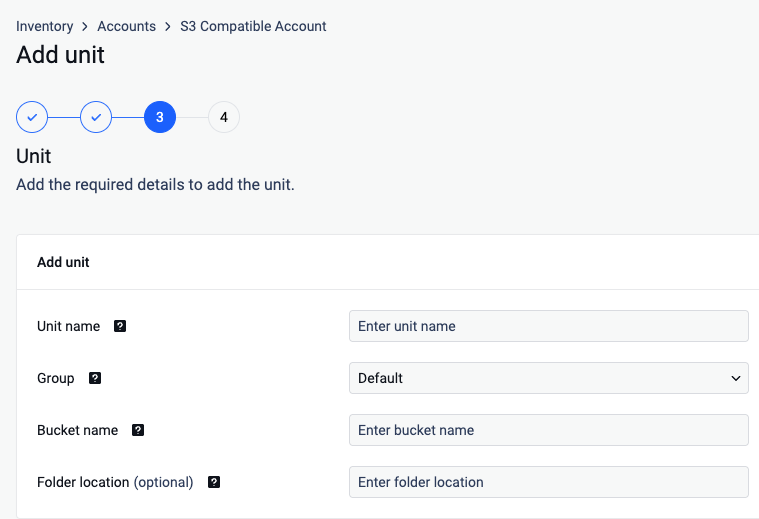
Give your unit an unique name
Choose Group
Enter a valid bucket name
Enter a Folder location (optional)
Where can I find the Access Key ID and Secret Access Key
To generate an Access Key ID / Secret Access Key pair please follow these steps:
Log in to MinIO Console and go to Access Keys
Copy an existing Access Key ID and Secret Key or generate a new one by clicking Create New Key.
