
Knowledge Base
v5.16.0
Search this version
How to configure SMTP server with authentication under MetaDefender Core to send notification to M365?
Copy Markdown
Open in ChatGPT
Open in Claude
Solution
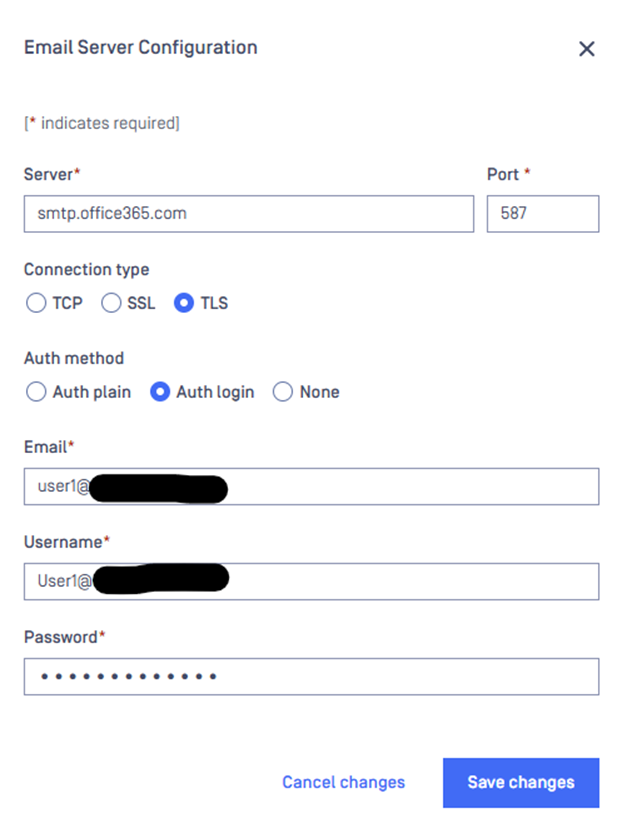
To be able to send notification to your M365 tenant from MetaDefender Core, the following fields should be configured properly under MetaDefender Core:
Server: smtp.office365.com
Port: 587
Connection type: TLS
Auth Method: Auth Login
Email: Email address for sender of notification, it should be a real mailbox which is licensed on M365 side.
Username: username of the mailbox provided under “email” field.
Password: password of the mailbox provided under “Email” field.
More details about M365 URLs can be found checking following link: Microsoft 365 URLs and IP address ranges - Microsoft 365 Enterprise | Microsoft Learn
Example:
Support:
If Further Assistance is required, please proceed to log a support case or chatting with our support engineer.
Last updated on
Was this page helpful?
null
Discard Changes
Do you want to discard your current changes and overwrite with the template?
Archive Synced Block
Message
Create new Template
What is this template's title?
Delete Template
Message
Knowledge Base
Knowledge Base
Configuration and Settings
Errors and Troubleshooting
Features and Functionality
Licensing, Setup and Deployment
Updates, Patches and Bug Fixes
Version Upgrades
Page
Code Steps
Category
Label
Link
Separator
Title
Message
Page icon
No icon. This page keeps the plain index row.
orSVG or PNG, square, at least 32×32.
Create new category
What is the title of your new category?
Edit page index title
What is the title of the page index?
Edit category
What is the new title of your category?
Edit link
What is the new title and URL of your link?