
Version | 5.16.0 |
|---|---|
Release date | 30 September 2025 |
Scope | This major version introduces CIS level 2 support for Windows Server 2022, new Access History screen for session audit, detailed PDF reports for SBOM and Adaptive Sandbox results, SSL certification expiry notification, and many more enhancements. |
Making sure to check out the Known Limitations
New Features, Improvements and Enhancements
Support for CIS Level 2
MetaDefender Core now aligns with CIS Level 2 benchmarks for Windows Server 2022. This enhancement supports organizations that require stricter security controls.
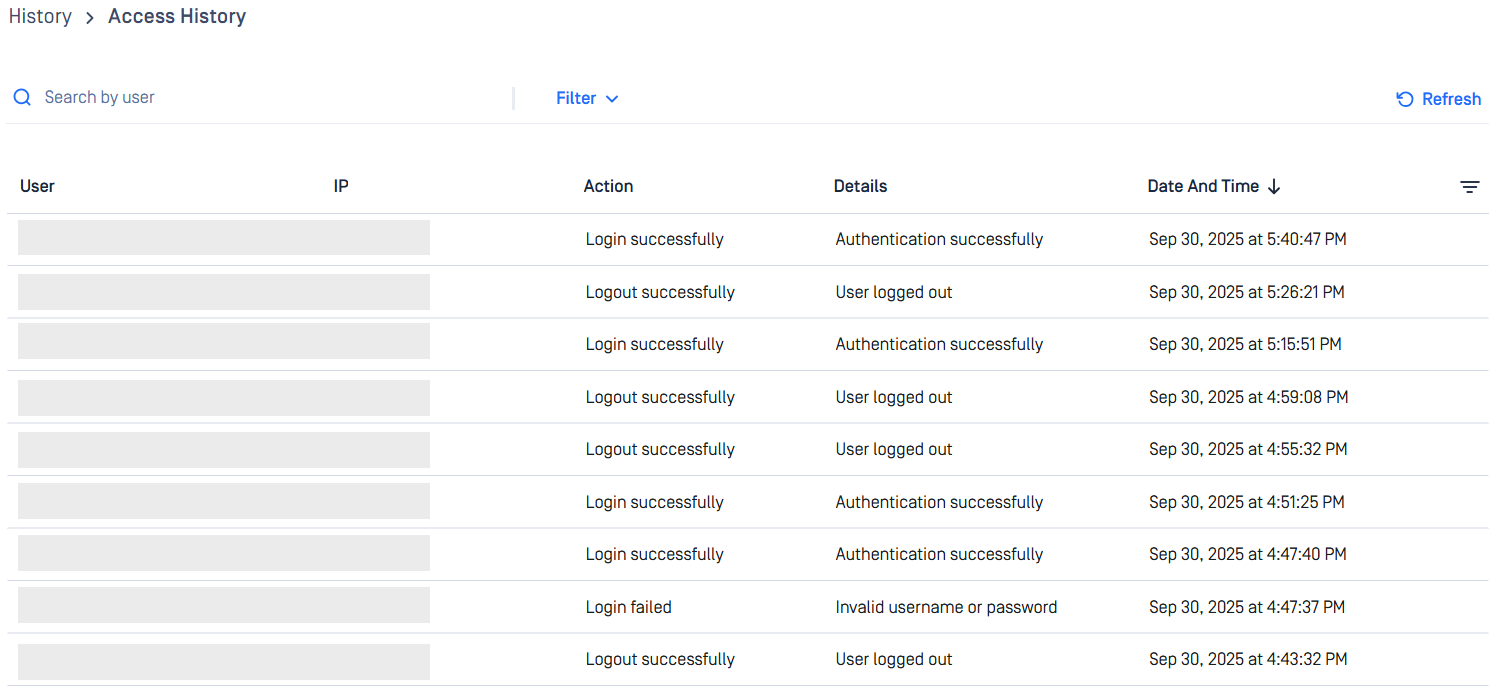
Access History Screen, tracking Session Activities
A dedicated interface under the History menu displays a comprehensive log of user session activities, including:
Sign-in and sign-out events with timestamps and IP addresses.
Session timeout occurrences.
Password change events.
Role and permission modifications, with details of the initiating user.
Administrators can filter logs by date range, action type, IP or user to streamline investigations and reporting.
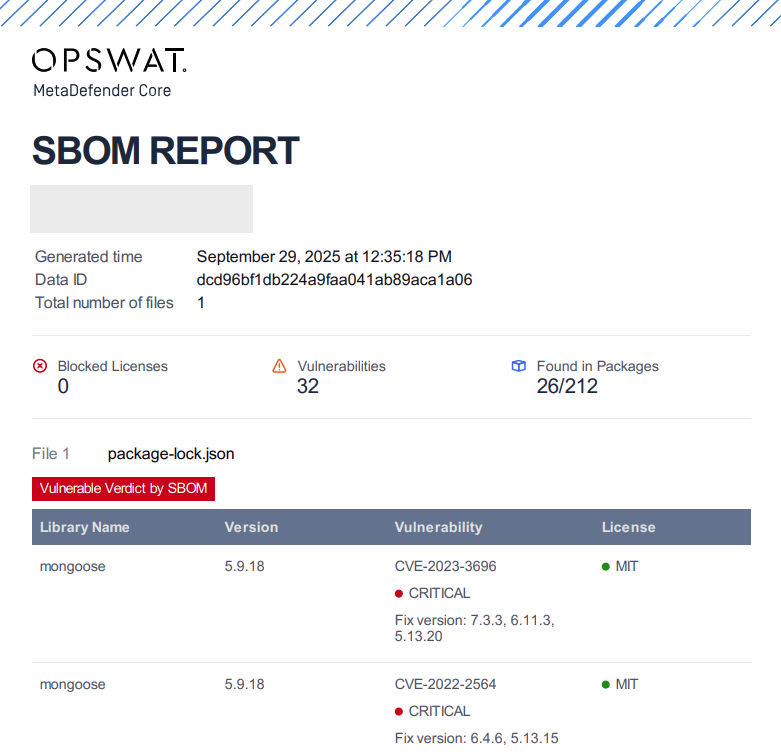
New Exportable SBOM Report
This version introduces a new PDF report specifically for Software Bill of Materials (SBOM) processing results. This dedicated report provides detailed library information including:
Library metadata and versions
Associated CVE (Common Vulnerabilities and Exposures) information
License information and compliance details
Component dependency relationships
This new report type enables users to receive complete SBOM analysis results in a shareable PDF format, addressing enterprise workflows where detailed library information should be distributed and verified for security assessment, vulnerability remediation, and compliance review.

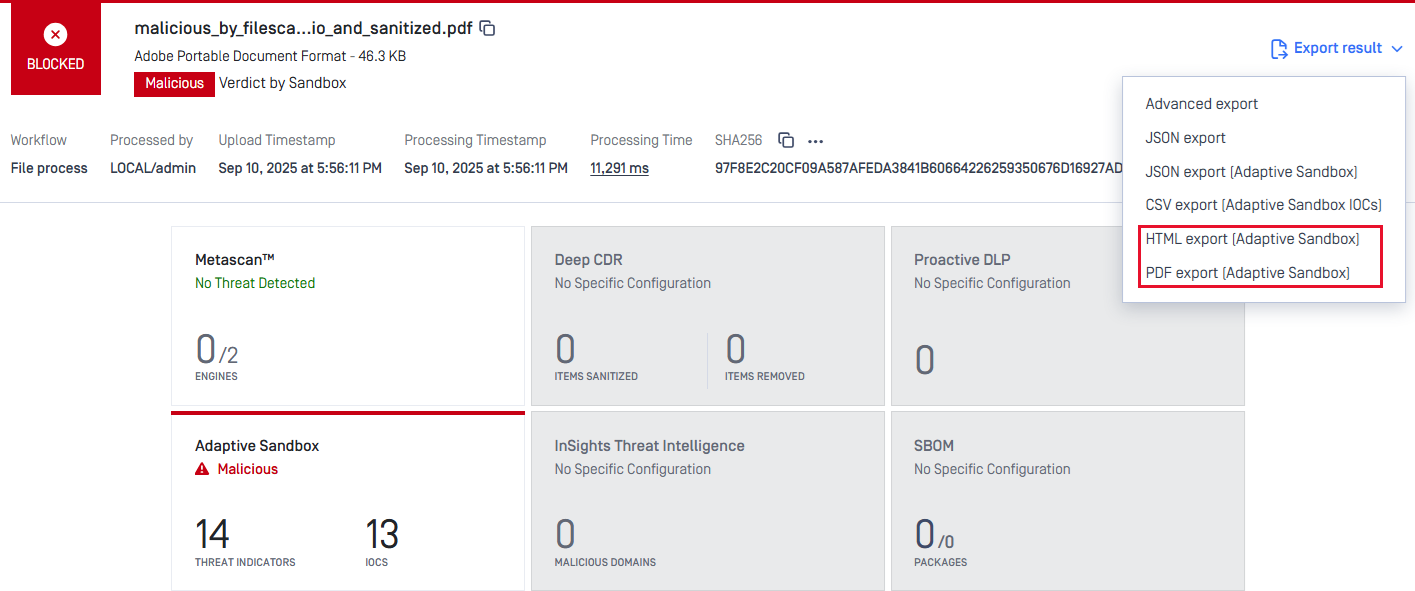
Full Report of Remote Adaptive Sandbox in HTML and PDF Formats
Previously, users had to retrieve the full report from Adaptive Sandbox interface. Now, the life is easier when users can directly download complete reports in PDF or HTML from MetaDefender Core web console with a single click.
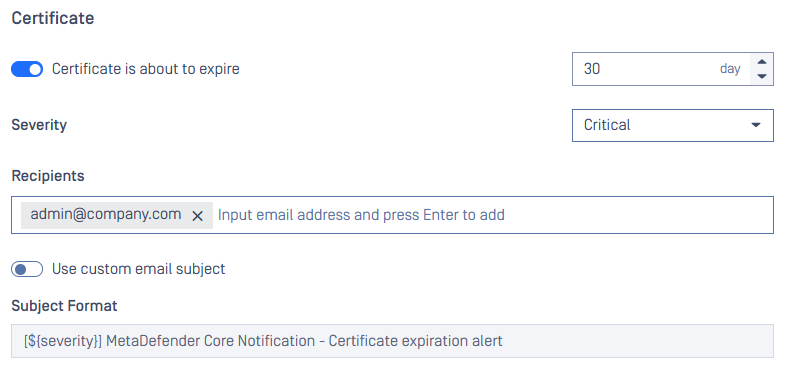
SSL Certificate Expiration Notification
Administrators can now configure alerts for SSL certificates that are approaching expiration. The notification window is customizable. This helps prevent service disruptions and ensures secure communication remains uninterrupted.
These options can be found under Email Notification tab in Settings.
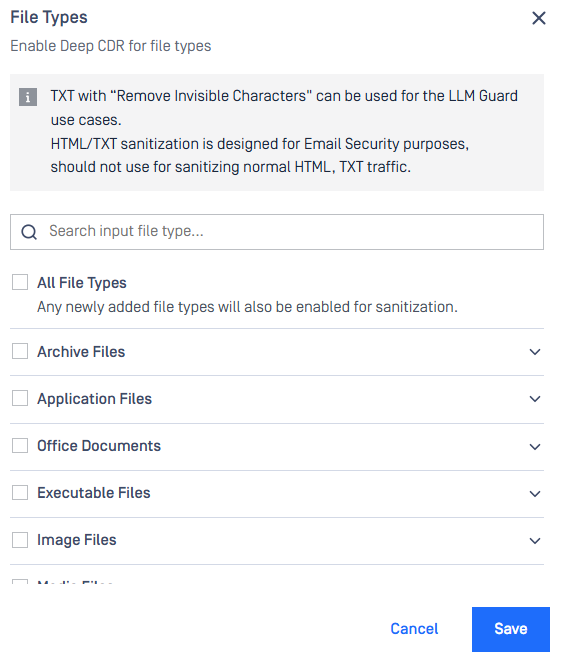
Better Experience for Deep CDR File Type Selection
A new search textbox enables users to quickly locate specific file types, such as JPG, by typing keywords and Enter. Info section and option to select all All File Types are also arranged.
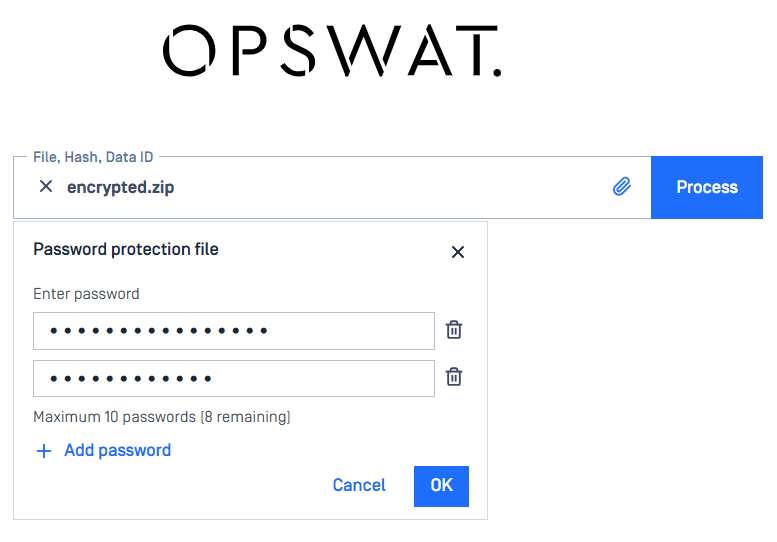
Multi-Password Input Interface
Users can now specify a list of passwords during file upload processes on Web Console, allowing the system to iteratively attempt decryption against each provided password.
Blocklist All Except Child File Type, Extending Capability to more File Type Groups
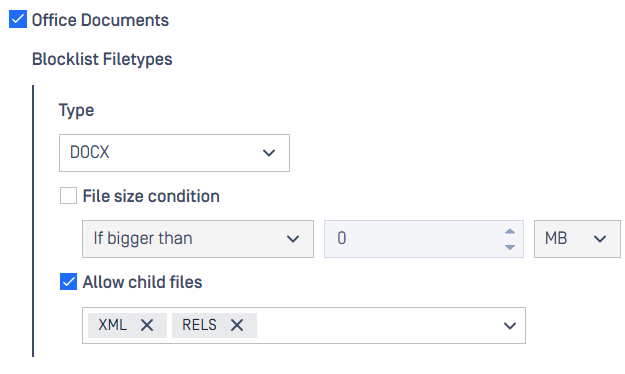
The option Allow child files under Blocklist All Except feature allows users to define predefined child file types for further processing while instantly blocklisting others.
This update now, besides Archive Files, is covering more file type groups: Disk Image Files, Email Files, Encrypted Archive Files, Executable Files, and Office Documents.
For example, with the following settings, XML and RELS child files of DOCX file will be processed, meanwhile, other file types else will be blocklisted.
Logging Enhancements
1) When available disk space is low (< 10%), there will be a log message filed in core.log.
2) Additional fields in msgid 82 for same-level extracted files and total extracted files.
files_extracted_count: number of extracted files in the DIRECT level.
total_extracted_files: total number of extracted files in ALL level.
REST API Enhancements
1) APIs GET - Fetch a list of blocked leaf files inside archive and Fetch a list of blocked leaf files inside archive by hash include
Hash-related fields:
md5sha1sha256sha512is_skip_hash
And YARA rule fields: yara_info
Begin tracking Proactive DLP wait time:
dlp_wait_time. This new field is included in Fetch Analysis Result and other result fetching APIs.
Further Enhancements
1) Improved workflow configuration handling to prevent save errors and validation issues while scanning engines are being updated.
2) Quarantine feature now hides or grays out the option Check with when the respective module is inactive or unlicensed.
3) Quarantine feature offers options for searching for Technology results like SBOM, Adaptive Sandbox and sorting by Date Added.
4) Administrators may enable SSL connection for bundle PostgreSQL. More details at How to setup SSL connection for PG.
5) Session cookie sent or not sent with cross-site requests is configurable on web console under Security tab in Settings.
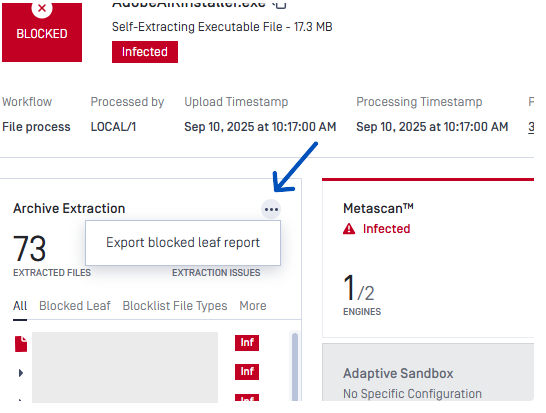
6) Ability to export results of all single files (non-archive) files within an archive file as JSON.
Security Enhancements
Upgraded libraries for vulnerability fixes:
Libxml2 v2.14.6
OpenSSL v3.5.2
ng2-file-upload, ngx-bootstrap, ngx-infinite-scroll
YARA rules using HTTP are now subject to the following restrictions:
Archive size limit: Maximum of 50 MB.
File count limit: Maximum of 1,000 files.
Folder depth limit: Maximum of 50 nested levels.
Path length limit: Maximum of 255 characters, excluding the engine database folder path length.
Extracted size limit: Maximum of 50 MB total after extraction.
Bug Fixes
Addressed an issue that negated
datatype in the optionAllow child filesof Block All Except in Blocklist.Addressed a rare crash issue in the product that occurred after enrolled with MOCM.
Addressed an issue that did not set correct customized IP and port to Desktop shortcut.
Addressed an issue that caused a failure to Email Server authentication mode
None.Addressed a UI issue that displayed an incorrect number of supported file types of Adaptive Sandbox in workflow configuration.
Addressed an issue that incorrectly prohibited certain accepted special characters (e.g., underscores and hyphens) in usernames within the Email Server configuration settings.
Known Limitations
Details | |
|---|---|
Slow or Inaccessible Management Console | This issue has been resolved in version 5.13.2 In version 5.12.0, an issue was identified that caused some APIs to load more slowly than expected. As a result, the Web Management Console might experience slower performance or become unresponsive Please read more details on this page: Slow or Inaccessible Management Console |
The 'Proxy server requires password' setting cannot be disabled once it has been enabled | This issue has been resolved in version 5.14.2. In version 5.14.1, there was an issue that prevented disabling the |
Database connection failure occurred in a specific circumstance after upgrading to version 5.11.0 | This issue has been resolved in version 5.11.1. This issue does not affect all cases when upgrading to version 5.11.0. After applying the authentication method
We prepare a Knowledge Base (KB) for troubleshooting the issue and bringing the system back online: How to Troubleshoot an Error related to Connection to Database Failing after an Upgrade to v5.11.0? The issue will not occur in the following scenarios:
|
Archive compression may fail with very large archive files that contain a large number of subfiles | This issue has been addressed in version 5.14.0. MetaDefender Core has a limitation when compressing very large archive files that contain a high number of subfiles. In our test scenario, it failed when processing an archive with 300,000 or more subfiles. |
Reuse processing result by hash might be slow in high-load situations | This issue has been resolved in version 5.10.1. Since its introduction in version 5.8.0, this feature has helped improve overall performance and reduce significant load when processing similar files. However, we have realized this feature might run slowly in high-load scenarios against large database sizes. |
Temporary files in the resource folder may not be properly cleaned up if the Archive Extraction engine crashes | Starting from MetaDefender Core version 5.10.1, if the Archive Extraction engine crashes, temporary files from specific extraction transactions may not be properly cleaned up. However, this issue is relatively rare. |
Reject importing non-empty required_engines setting in containerized environments | This issue occurs only in containerized environments. If the config zip file includes non-empty required_engines setting, MetaDefender Core will reject the import. Workaround:
|
The Engine Update feature may not work as expected in certain environments | We have observed that the Engine Update feature may not work properly in an environment protected by a Palo Alto firewall. In the log file, you might find the error message ' If upgrading to the latest version of MetaDefender Core does not solve the issue, please consider setting up MetaDefender Update Downloader product. This product is responsible for downloading engines, and MetaDefender Core will retrieve and update its engines from there. |
Performance degradation when processing large archive files | This issue has been resolved in MetaDefender Core version 5.5.0 and the Archive Extraction engine version 6.2.1.
|
Stability issues on Red Hat / CentOS systems with kernel version 372.13 | MetaDefender Core version 5.2.1 or later may not function correctly with Red Hat or CentOS operating systems that use kernel 372.13. Red Hat is addressing the kernel issues. Please try upgrading to kernel version 372.26. |
PostgreSQL and MetaDefender Core services cannot initialize in certain containerized environments | This issue was addressed in version 5.11.1. In a containerized environment, MetaDefender Core version 5.2.0 or newer may work properly when:
Workarounds for older versions:
|
MetaDefender Core's NGINX web server will not start if weak cipher suites are used for HTTPS | On MetaDefender Core version 5.2.0 and later, OpenSSL 1.x has been replaced by OpenSSL 3.x within the product and its dependencies, including PostgreSQL and NGINX, to enhance security and address known vulnerabilities in OpenSSL 1.x. However, NGINX's implementation of OpenSSL 3.x in MetaDefender Core enforces strong encryption by rejecting all weak cipher suites. It only accepts "HIGH" encryption cipher suites as defined by OpenSSL https://www.openssl.org/docs/man1.1.1/man1/ciphers.html. This means ciphers based on MD5 and SHA1 hashing are no longer supported. Consequently, if you previously configured MetaDefender Core for HTTPS connections using a weak SSL cipher with your certificate, the service will not start due to NGINX's OpenSSL 3.x security enforcement. To prevent and remediate the issue before upgrading MetaDefender Core, please refer to the following resources: HTTPS Failure on MetaDefender Core 5.2.0 (or newer) |
TCP socket port exhaustion may cause the service trouble, preventing from restarting, and Workflow configuration corrupted | This issue affected MetaDefender Core (MD Core) version 5.15.0 and earlier and is enhanced starting from version 5.15.1. TCP socket port exhaustion might be triggered by other applications; for example, MetaDefender KIOSK v4.7.6.3514 (fixed in later releases). Consequently, MD Core may behave abnormally, corrupt its Workflow Configuration, and fail to restart. |