
Check Your Version
This article applies to MetaDefender Core All MetaDefender Core releases deployed on Windows and Linux.
Phenomenon
File submissions fail with the following error, even though the expected workflow is visible in the MetaDefender Core Management Console:
No available rule is present for scanning.
Main Cause
The incoming scan request does not match an available workflow. This may be related to an incorrect workflow/rule name or restrictions that prevent the request from using the workflow, such as role permissions, User-Agent conditions, or Security Zone settings.
Resolution
Step 1. Verify the workflow name
Navigate to:
MetaDefender Core → Workflow Management → Workflows
Confirm that the expected workflow exists. If the application specifies a workflow using the rule header, ensure its value matches the workflow name exactly, including capitalization.
Step 2. Review workflow restrictions
Open the workflow and review Restrict access to following roles, along with any other configured restrictions.
Confirm that the application’s scan requests meet these conditions, and adjust the relevant settings where necessary.
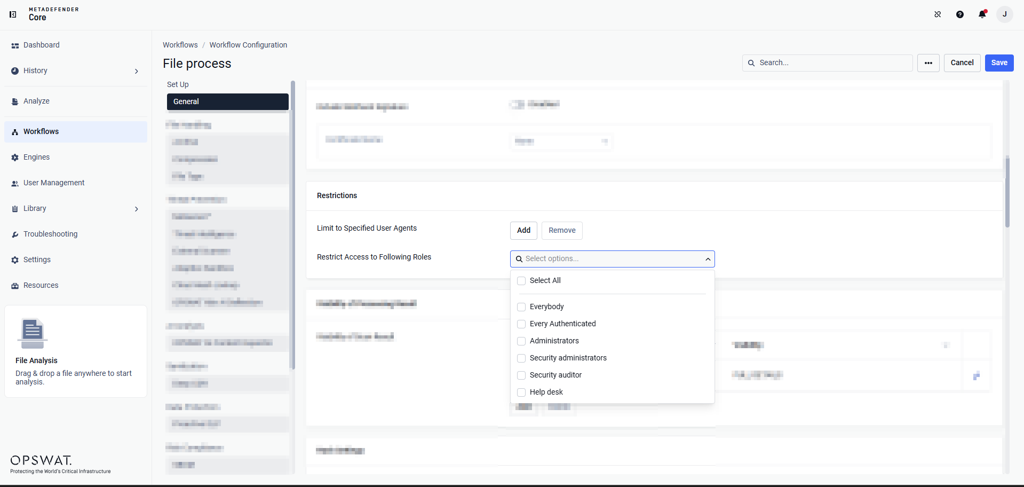
Important: Removing restrictions can broaden access to the workflow. Any changes should follow your organization’s security requirements. If restrictions are temporarily relaxed for testing, restore the appropriate access controls afterward.
Step 3. Test and compare the requests
Submit the same test file using Postman or curl, with the same workflow and authentication details as the application.
If direct submission succeeds but the application still fails, compare the endpoint, request headers, and authentication information. A successful direct API test does not, by itself, confirm a defect in the application or SDK.
Refer to the MetaDefender Core File Analysis API documentation.
After applying the changes, retry scanning through the original application and confirm that the error no longer occurs.
If Further Assistance is required, please proceed to log a support case or chat with our support engineer.