
Info:
This article applies to all MD Core.
Issue
Customers may experience severe performance degradation in MetaDefender Core, characterized by frequent request timeouts and NGINX 499 errors. This typically occurs when a client application generates a high volume of login requests without corresponding logouts or session expiration.
Symptoms
NGINX 499 Errors: Client applications close the connection after waiting for a response, typically at a 15-second threshold.
Request Latency: Backend processing for simple data fetches exceeds normal thresholds due to database overhead.
Repeated Timeouts: The same
data_idmay fail multiple times as the client retries the timed-out operation.
Evidence
NGINX Log Analysis
The NGINX logs show the client terminating the connection (499) after exceeding a 15-second threshold. This delay occurs specifically during the request to fetch scan results, even though the backend processing for the file itself was successful.
Example Log:
XX.XXX.XX.XX - - [11/Dec/2025:22:38:04 +0000] "GET /file/f8613d4e9e9247b4be5673e50895fd28 HTTP/1.1" 499 0 "-" "Apache-HttpClient/5.2.3 (Java/17.0.16)" 15.012XX.XXX.XX.XX - - [18/Dec/2025:16:22:45 +0000] "GET /file/73e0ff8426d64bea97ce1101ad31e58e HTTP/1.1" 499 0 "-" "Apache-HttpClient/5.2.3 (Java/17.0.16)" 14.995XX.XXX.XX.XX - - [18/Dec/2025:16:23:01 +0000] "GET /file/73e0ff8426d64bea97ce1101ad31e58e HTTP/1.1" 499 0 "-" "Apache-HttpClient/5.2.3 (Java/17.0.16)" 15.012Session Management Settings
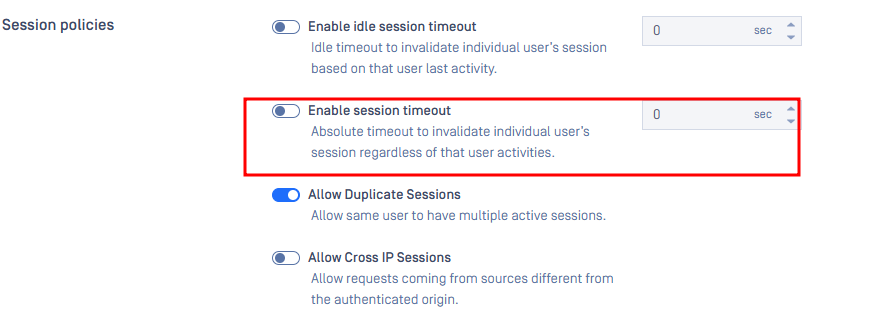
The issue is linked to the following configuration where session timeouts are disabled:
Login/Logout Imbalance
There is a massive discrepancy between the number of sessions created and those explicitly closed.
Total Login Requests: Approximately 1,000,000.
Total Logout Requests: Only 6,765 matches found in the logs.
Log Evidence of Discrepancy: The logs illustrate a high volume of file processing requests (logins) compared to very few successful logouts:
Login/Session Activity:
... "POST /file HTTP/1.1" 200 57 ...Logout Example:
Root Cause
With session timeouts disabled, session IDs never expire and are stored forever. Over several days of continuous operation, the high volume of login requests causes the number of session IDs to increase indefinitely. This creates a significant bottleneck during session validation, causing a slowdown for every request that requires a session check—most notably GET /file/data_id.
Resolution
To resolve the bottleneck and restore performance, session management must be configured to allow for the purging of old data.
Step 1: Enable Session Timeouts
Re-enable automatic session cleanup in the MetaDefender Core Management Console:
Go to Settings > Security > Session Settings.
Set Session Timeout to a functional value (e.g., 60 minutes).
Set Absolute Session Timeout to a functional value (e.g., 1440 minutes / 24 hours).
Step 2: Update Client Integration
Ensure the client application follows best practices:
Reuse Session IDs: Do not call
POST /loginfor every request. Login once and reuse the ID for the duration of the session.Explicit Logout: Call
POST /logoutwhen the application has finished its task.
Step 3: Service Restart (If Necessary)
If performance does not improve immediately after changing settings, restart the MetaDefender Core service to force a refresh of the session cache and trigger the initial cleanup of the oversized session table.
Prevention
Ensure the client application follows best practices:
Reuse Session IDs: Do not call
POST /loginfor every request. Login once and reuse the ID for the duration of the session.Explicit Logout: Call
POST /logoutwhen the application has finished its task.
Support:
If you require further assistance, please follow these instructions on How to Create Support Package?, before creating a support case or chatting with our support engineer.