
ℹ️ Check Your Version: This article applies to MetaDefender Core versions that include the health check API (GET /readyz).
The MetaDefender Core health check API (GET /readyz) returns an outdated field for each engine. This field indicates whether the engine's installed definition database is older than the Outdated Threshold configured in the Health Check settings.
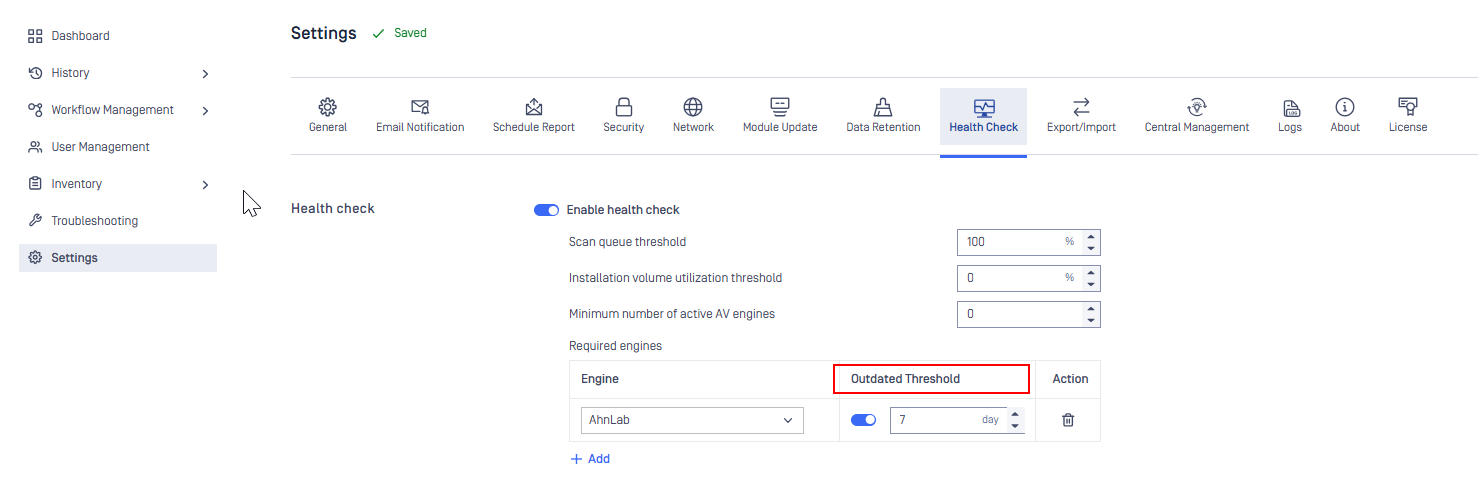
How the field works
The outdated field is a staleness indicator based on the age of the installed definitions. It does not compare the installed definitions against the latest definitions published by OPSWAT.
No Outdated Threshold configured: Core always reports
"outdated": false, regardless of how old the installed definitions are.Outdated Threshold configured:
"outdated": falsemeans only that the installed definitions have not exceeded the configured threshold. It does not confirm that the engine is using the latest definitions available from OPSWAT or the antivirus vendor.
Example
If an engine update failed yesterday but the installed definitions are still within the configured threshold, the health check API continues to report:
Recommendation
Do not rely on the outdated field alone to confirm that an engine is running the latest available definitions. To verify that engines are up to date, see How to check whether AV engines are running the latest update from the OPSWAT update server?
ℹ️ Support: If further assistance is required, please log a support case or chat with our support engineers.