
This article applies to Archive Engine version 6.2 and later, which requires MetaDefender Core version 5.13.1 or higher to function properly.
Default Behavior When Encoding Preference is Disabled* If “Encoding preference for entry name” is disabled, the engine will use UTF‑8 as the default character encoding when extracting file names. (Release Notes: MetaDefender Core 5.4.1)
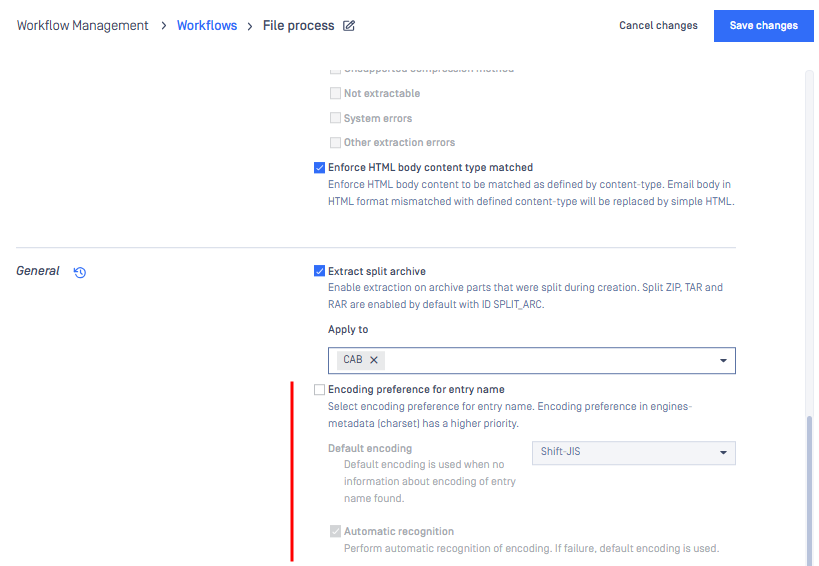
Environment‑Dependent Behavior The files being extracted might have been created in an environment that uses a different character encoding from the one used by the MetaDefender Core. As a result, the Archive Extraction engine might not be able to correctly interpret or display filenames that use system‑specific encodings (such as Shift‑JIS) during extraction. In these cases, users should enable the “Encoding preference for entry name” setting and set the “Default encoding” option to match the character set used in the original environment or enabling “Automatic recognition.” This will help ensure that filenames are extracted and shown correctly.
Garbled Characters on Different Systems In certain cases, after sanitization, the Japanese filenames are stored in UTF‑8, and they appear correctly on systems that use UTF-8. When these files are opened in a Japanese environment, the names may appear garbled due to the difference between the environment’s expected character set (Shift‑JIS) and the actual character set used (UTF‑8). If this occurs, customers are encouraged to open a support ticket for further investigation.
If Further Assistance is required, please proceed to log a support case or chatting with our support engineer.