
This article applies to all MetaDefender Core v5 releases deployed on Windows systems.
Overview
Windows Error Reporting (WER) can automatically generate crash dump files when a process fails unexpectedly. Configuring WER through the Windows Registry allows administrators to capture .dmp files for MetaDefender Core components such as engineprocess.exe and ometascan.exe.
Prerequisites
Administrative access to the Windows system.
Adequate free disk space (full dumps can be several GB).
The MetaDefender Core service account must have permission to write to the dump folder.
Steps to Enable LocalDumps for MetaDefender Core
Step 1: Create the dump folder
Create a directory, for example: C:\Dumps\MetaDefender
Grant SYSTEM and the MetaDefender Core service account write permissions.
Step 2: Configure the registry
Create the following registry keys and values for each process if missing:
HKEY_LOCAL_MACHINE\SOFTWARE\Microsoft\Windows\Windows Error Reporting\LocalDumps\engineprocess.exe
HKEY_LOCAL_MACHINE\SOFTWARE\Microsoft\Windows\Windows Error Reporting\LocalDumps\ometascan.exe
Under each key, add:
Value Name | Type | Data |
|---|---|---|
DumpFolder | REG_EXPAND_SZ | C:\Program Files\OPSWAT\MetaDefender Core/crashdump |
DumpCount | DWORD | 32 |
DumpType | DWORD | 2 (Full dump) or 1 (Mini dump) |
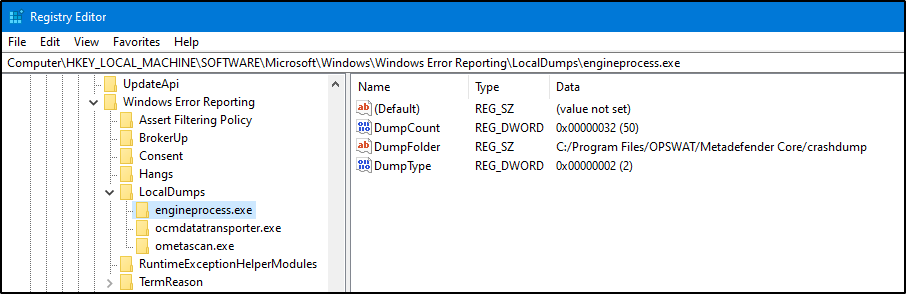
You can automate this using a .reg file:
Step 3: Restart services
After creating the registry entries, restart the MetaDefender Core services or reboot the system to apply changes.
4) Verification
When a crash occurs, WER should generate .dmp files in the specified folder (e.g., C:\Program Files\OPSWAT\MetaDefender Core\crashdump).
If dumps are not generated:
Verify if WER is not disabled by Group Policy.
Confirm the process has permission to write to the dump directory.
Check Event Viewer > Application for WER-related errors.
5) Notes
DumpType=1generates a small (mini) dump, suitable for basic debugging.DumpType=2generates a full dump, preferred for OPSWAT Support investigations.Only enable dumps temporarily to avoid excessive disk usage.
If Further Assistance is required, please proceed to log a support case or chat with one of our support engineers.