
User type: Organization user
Organization type: Partner Organization
Role: View Only/Full Access on Organization General Information
The Partner Information tab provides OPSWAT partners with key details about their partnership profile.
How to access:
Go to My Organization from the left navigation menu, then select Partner Information.
From the Partner Portal > Overview page, click the View Partner Details hyperlink.
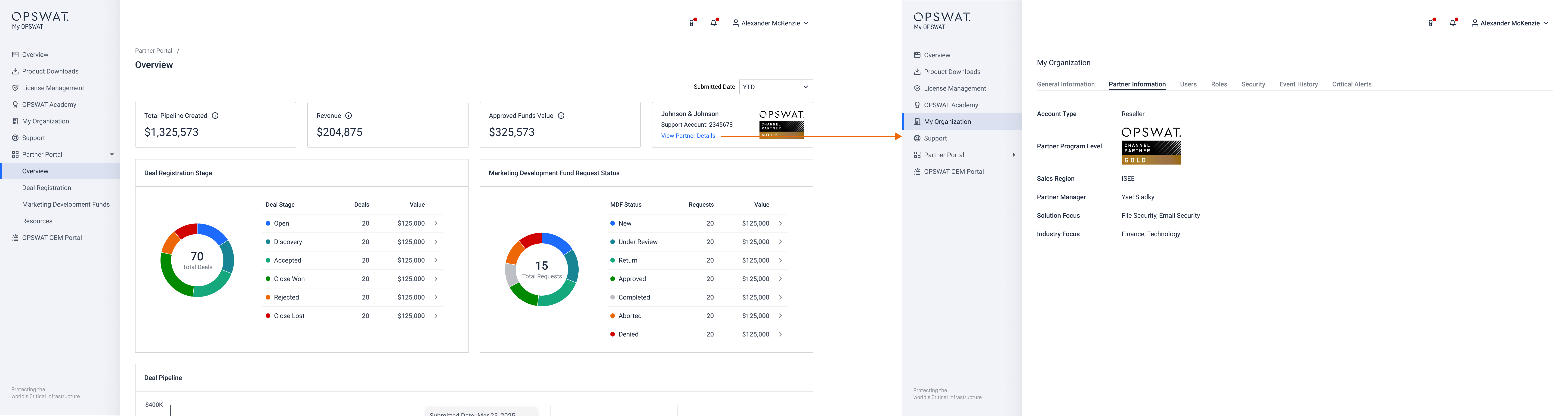
The Partner Information tab shows the following details related to your partnership with OPSWAT:
Account Type
Partner Program Level
Sales Region
Partner Manager
Solution Focus
Industry Focus
If any of your partner information is incorrect or incomplete, contact your OPSWAT Partner Manager or contact us via OPSWAT Support.
Related capabilities: Partner Portal | Roles & Permissions