
Version | v2026.3.7.0 |
|---|---|
Release date | October 5th, 2026 |
Release Summary | This release includes general bug fixes and enhancements. |
Enhancements
License Entitlement Hover Shows Max Devices for Specific Products
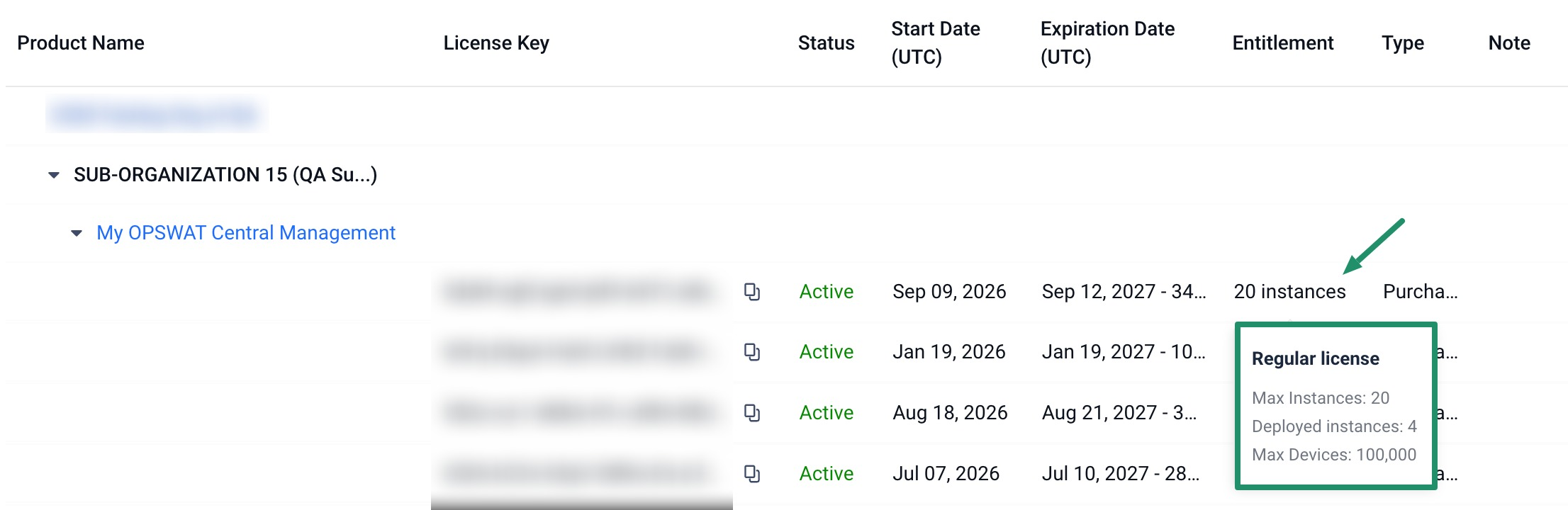
On the license entitlement hover dialog, users with below product licenses now see a Max Devices value in addition to the existing Max Instances and Deployed Instances figures.
OPSWAT Central Management (CM7)
My OPSWAT On-premises (CM8)
My OPSWAT Central Management (CM10)
MetaDefender Kiosk Linux
MetaDefender Endpoint
Bug Fixes
Bug fixes License Near-Capacity Calculation Fix
Fixed an issue where the near-capacity indicator for licenses with 5 or fewer slots could flag near-capacity even when no slots were actually deployed. It now only flags near-capacity when at least one slot is deployed.
Bug fixes My Information Preferences Save Failure Fix
Fixed an issue where, after selecting Custom products under Product Releases, saving any other subscription preference would fail with an error even though Custom products had not been cleared.