
Customer Hardware gives partners visibility into OPSWAT hardware orders and inventory associated with the customers they serve.
Use this page to track customer hardware from order and shipment through delivery, and quickly find logistics information when supporting a customer.
User type: Organization user
Organization type: Partner Organization having assigned customer’s organizations.
Role: View Only on Hardware Inventory - Customer Hardware
To access:
Select Hardware Inventory in the left navigation.
Click the Customer Hardware tab.
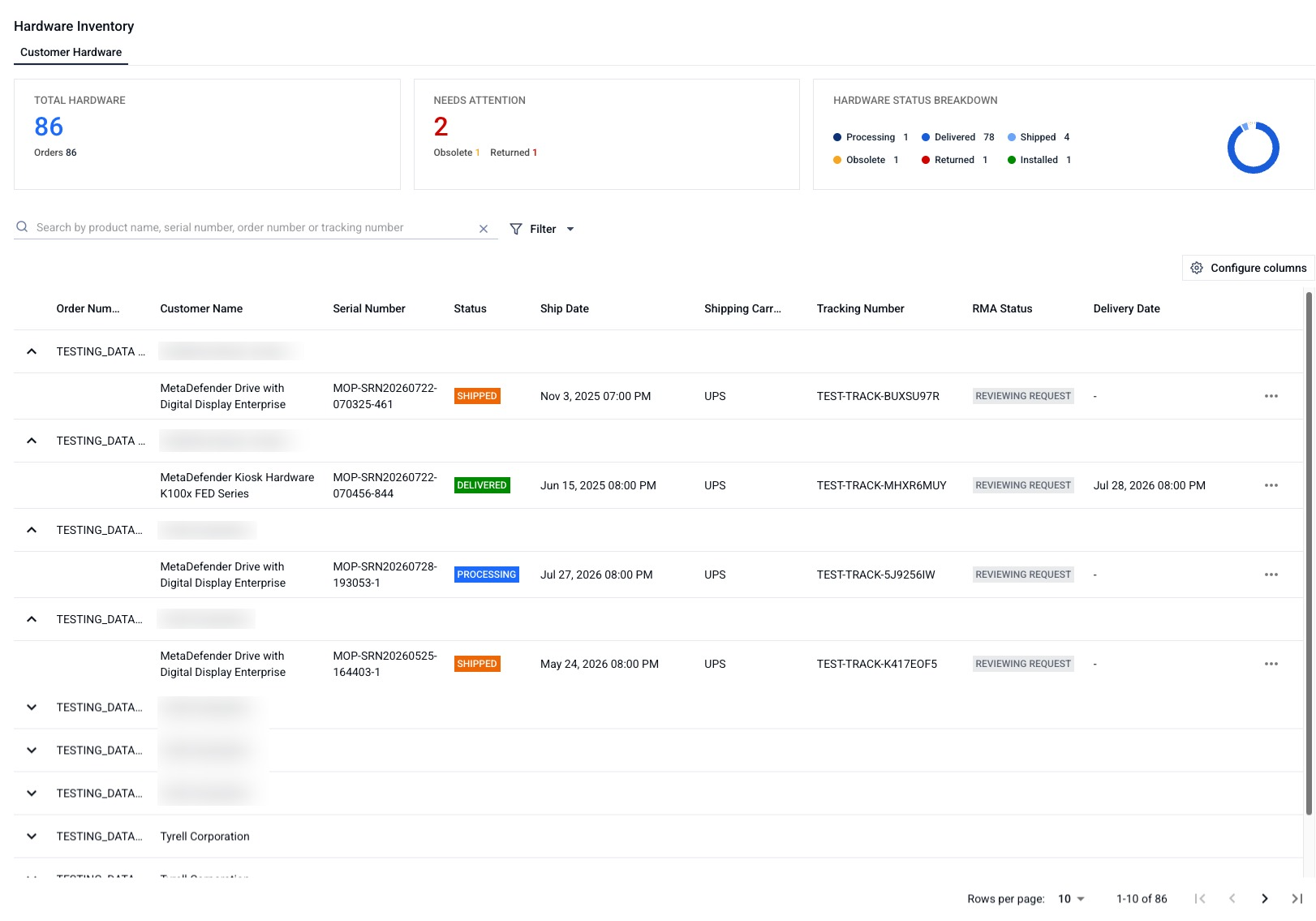
Get an overview of customer hardware
The top of the tab summarizes your customers' hardware at a glance. Select any figure to filter the list below to the matching items.
Total Orders: the number of hardware orders your customers have purchased.
Total hardware: the number of hardware assets your customers have purchased.
Needs Attention: the number of hardware assets that are Obsolete or Returned.
Status summary: a chart showing a count of your customers' hardware assets by status.
View and manage the customer hardware list
The list shows each asset with its customer name, order number, product name, serial number, status, ship date, shipping carrier, tracking number, shipping information, and delivery date. You can:
Sort by Customer, Status, Ship Date, or Delivery Date. The default sort is by Customer, then Status.
Filter by Customer, Status, RMA Status, Ship Date, Delivery Date, or Shipping Carrier.
Search by Product Name, Serial Number, Order Number, or Tracking Number.
Submit an RMA on behalf of a customer
If you are an OPSWAT partner, you can submit an RMA request for hardware you manage on a customer's behalf.
Go to Hardware Inventory, then open the Customer Hardware tab.
Find the affected device and click Submit RMA Request in the three-dot menu.
The form opens with an I am logging a ticket on behalf of field showing the customer, and the device details filled in. Complete the remaining fields and submit.
Submitting an RMA on a customer's behalf requires the Support Service - RMA Cases permission (Full Access), in addition to your Customer Hardware access.