
The Access page of the Administration section is where administrators govern who can sign in to MetaDefender NDR, which assets they can see, and which actions they can take. This chapter documents the user and group lifecycle and the seven predefined roles. It documents the permission matrix that maps each role to each product page. It also documents asset-ownership rules and the audit trail. It closes with a quick-start checklist for provisioning a new user.
This chapter is for system administrators who own identity and access management for a MetaDefender NDR deployment. It assumes an installed Manager, a Super Administrator account, and familiarity with the Administration page layout described in the Administration Page.
First-use acronym expansions in this chapter:
RBAC (role-based access control)
MVP (Minimum Viable Product)
MFA (multi-factor authentication)
SAML (Security Assertion Markup Language), OAuth2 (Open Authorization 2.0)
LDAP (Lightweight Directory Access Protocol)
AD (Active Directory)
SOC (Security Operations Center)
CRUD (Create, Read, Update, Delete)
IP (Internet Protocol)
CIDR (Classless Inter-Domain Routing)
VLAN (virtual local area network)
UI (user interface)
API (application programming interface)
REST (Representational State Transfer)
JWT (JSON Web Token)
UTC (Coordinated Universal Time)
TOTP (time-based one-time password)
SMTP (Simple Mail Transfer Protocol).
Overview
MetaDefender NDR authenticates users at MVP using local username and password accounts backed by the Manager's identity service. The identity service issues each interactive session a short-lived access token and a longer-lived refresh token. The client presents the access token on every API call. A central JSON Web Token (JWT) filter verifies the token before a request reaches any service. The authentication layer is deliberately modular: the token-issuance path and the upstream identity lookup are separable so that enterprise identity providers can plug in without disturbing the authorization model.
At MVP the local authentication path is the only shipping option. The authentication layer supports SAML, OAuth2, LDAP, and AD integration in a subsequent release. This chapter documents roles, groups, and asset-ownership rules against the identity model. Thus, the same access-control rules apply when an external identity provider is wired in.
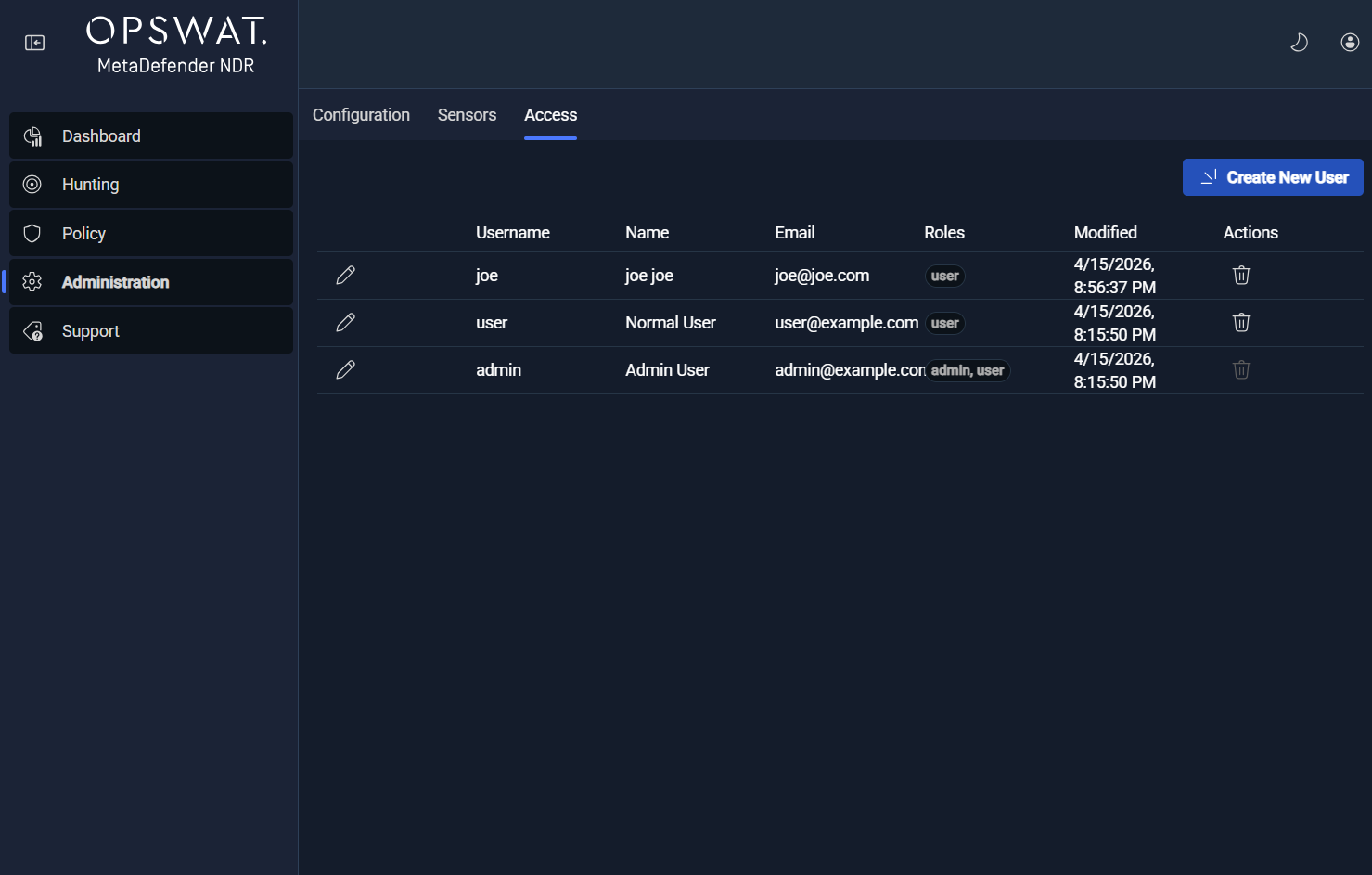
The Access page is reached from the Administration page by selecting the Access tab. The landing view is a user table; a Create User button opens a right-side drawer used for both creation and editing. For the seven-role model below, group management, role assignment to groups, and asset-ownership editing are API-first at MVP. The current UI exposes the Analyst and Administrator role assignment directly. Deployments that need the additional predefined roles assign them through the identity service's REST API. Each workflow identifies its REST surfaces inline.
User management
User management covers the full lifecycle of an account -- creation, editing, password setting, role assignment, and deletion -- along with the policies that constrain passwords, control account lockouts, and govern MFA.
Account fields
Every user account carries the fields below.
Field | Required | Editable after creation | Notes |
|---|---|---|---|
Username | Yes | Yes | Must be unique across the deployment. |
First name | Yes | Yes | Plain text. |
Last name | Yes | Yes | Plain text. |
Email address | Yes | Yes | Used for password reset and notification delivery. |
Password | On creation | Yes (optional on edit) | Validated against the configured password policy. Blank on edit leaves the stored password unchanged. |
Confirm password | On creation | Yes (when password is set) | Must match the password field. |
Role | Yes | Yes | One of the roles described below in [The Seven Predefined Roles](The Seven Predefined Roles). |
Group membership | No | Yes | Membership determines asset ownership. |
Account status | Yes | Yes | Active or inactive; inactive accounts cannot sign in. |
Last login timestamp | Auto | No | Populated on successful sign-in. |
Created at and updated at | Auto | No | Maintained by the identity service. |
The minimum MVP password length enforced on account creation and password change is eight characters; the full password policy -- complexity, expiration, history, and lockout -- is configured from the Manager Configuration section and documented in the Password ComplexityPassword Complexity .
Creating and editing users
Administrators open Administration -> Access and click Create User. The edit drawer opens in create mode.
Enter username, first name, last name, email address, password, and role. Then select the target group and submit the form.
The identity service validates the submission. It checks the password policy, uniqueness constraints, and role whitelist. Then it persists the account and returns the new user record.
The new user appears immediately in the table. The audit log records the create action with the actor, the new user identifier, and the role and group assignment.
Editing an existing user follows the same flow from a drawer opened by clicking the username in the table. Password changes are optional on edit -- leaving the password field blank preserves the stored password hash.
Deleting users
Deleting a user requires an explicit confirmation. Two accounts cannot be deleted:
The built-in
adminaccount, which seeds the deployment with a Super Administrator.The built-in
useraccount, which seeds the deployment with an Analyst account.
An administrator also cannot delete their own currently-signed-in account; the delete control is disabled until another Super Administrator removes the account or the current administrator signs out.
Password policy and self-service reset
The password policy is configured once at the Manager level and applied on every account creation and every password change. Policy controls include minimum length, complexity class (uppercase, lowercase, digit, symbol), maximum age before a change is required, password history depth, and reuse restriction. Administrators configure the policy from the Manager Configuration page.
Self-service password reset is supported end-to-end:
The signed-in user or an administrator on their behalf initiates a reset. An administrator-initiated reset calls
POST /api/user/:userId/password-resetand returns a reset code that is delivered out-of-band (by email where SMTP is configured) to the account holder.The account holder calls
POST /api/auth/reset-passwordwith the reset code and the new password. The identity service validates the code, validates the new password against policy, and, on success, updates the stored hash and invalidates prior refresh tokens.The audit log records both the reset request and the reset completion with the actor and account identifiers.
Reset codes expire after a configurable window (four hours by default). Expired codes are rejected; a new reset must be requested.
Account lockout
Account lockout protects against credential-stuffing and brute-force attempts. After a configurable number of failed sign-in attempts within a configurable rolling window, the account is locked. Lockout thresholds and windows are set from the Account Logon Access Control setting in the Manager Configuration page. An administrator can release a lock from the Access page by opening the user edit drawer and clearing the lock indicator; the action is audit-logged.
Multi-factor authentication
The identity service's user schema carries a TOTP field that backs per-user MFA enrollment. The policy surface allows MFA to be required per user, per group, or per tenant. In MVP, MFA enrollment and the enforcement policy are API-first -- the Access page drawer does not yet expose the MFA enrollment workflow. Deployments that require MFA today coordinate enrollment through the identity service's REST API until the enrollment drawer lands in a subsequent release. MFA is not a required control at MVP; deployments electing to enforce it set the policy at the tenant or group level.
Group management
Groups are the primary organizing unit for users and for asset ownership. A group is a named container that owns a set of users and a set of assets (sensors, IP subnets, VLANs). Roles assigned to a group apply to the users in the group; asset ownership assigned to a group determines which events, alerts, flows, protocol logs, and file records the group's users can see.
Group fields and hierarchy
Each group carries a name, an optional description, a parent-group reference (for nested group structures), a list of member users, a list of role assignments, and a list of owned assets. Groups support hierarchical nesting; a child group inherits asset ownership from its parent unless an explicit override is specified.
Groups are created, edited, and deleted through the identity service's REST surface at MVP. The REST routes are:
GET /api/groups-- list groups.POST /api/groups-- create a group.PUT /api/groups/:id-- rename or reparent a group.DELETE /api/groups/:id-- delete a group. Groups with active members or owned assets return a conflict response until the members are reassigned and the assets are released.
Every group mutation is audit-logged with the actor, the group identifier, the previous and new state, and the timestamp.
Asset ownership
Asset ownership is the mechanism by which groups are granted visibility into the data their users investigate. A group may own any combination of:
Specific sensors -- identified by sensor identifier. Users in the group see events, alerts, flows, protocol logs, and file records produced by these sensors.
IP subnets -- identified as CIDR blocks. Users in the group see records whose source or destination addresses fall in these blocks, regardless of which sensor observed the traffic.
VLAN identifiers -- users in the group see records tagged with these VLAN identifiers.
Ownership can be expressed in any combination of the three dimensions. A group that owns Sensor A, the subnet 10.20.0.0/16, and VLAN 42 grants its users visibility into the union of those three scopes.
Ownership assignments are performed by a Super Administrator or by a Tenant Administrator acting within a tenant's boundary. The Manager enforces ownership at every data-access point -- the UI, the REST API, reports, search, and exports -- so that a direct API call from a group member cannot read data outside the group's owned assets.
The seven predefined roles
The Manager ships with seven predefined roles. Each role defines a coherent set of permissions; roles can be assigned to users directly or to groups where the role applies to every member user.
Role | Scope | What the role can do |
|---|---|---|
Super Administrator | Entire deployment | Full administrative authority across every Manager section, every sensor, every group, every user, and every integration. Creates and deletes other Super Administrators. Created during installation; at least one Super Administrator is required. |
Tenant Administrator | Single tenant | Full administrative authority inside the tenant boundary. Manages users, groups, asset ownership, policies, and integrations that the tenant owns. Cannot configure Manager-global settings that cross tenants. |
Group Administrator | Single group | Full administrative authority inside the group boundary. Manages users and asset ownership inside the group, assigns the group's policy, and reviews audit records for group-scoped actions. |
SOC Analyst | Owned assets | Views the Dashboard and the Hunt page, triages alerts, and performs investigations across the owned assets. Cannot modify policies, users, groups, or integrations. |
Security Engineer | Owned assets plus policy authorship | Creates and edits policies, authors detection rules and suppression logic, and deploys policy changes to sensors in the engineer's scope. Retains the SOC Analyst's view and investigation capabilities. |
Read-Only Analyst | Owned assets (view only) | Views the Dashboard, the Hunt page, alerts, flows, and file records. Cannot modify any Manager state, cannot trigger exports, and cannot change policies. |
Compliance Auditor | Audit and reporting surfaces | Views and exports the audit log, reviews policy-change history, and retrieves compliance reports. Has no access to tactical data (alerts, flows, file records) except through audit exports. |
Administrators assign a role to a user through the Role dropdown in the Access page drawer. The current UI includes the Analyst and Administrator roles. At MVP, administrators assign the remaining roles through the identity service's REST API. The permission model enforces the same rules regardless of which surface performed the assignment.
Permission matrix by page
The table below summarizes the pages of the product and the access each role has to them. "View" means the page is reachable and renders. "Modify" means the role can change state (create, edit, delete) on that page. "None" means the page is not reachable.
Page | Super Admin | Tenant Admin | Group Admin | SOC Analyst | Security Engineer | Read Only Analyst | Compliance Auditor |
|---|---|---|---|---|---|---|---|
Dashboard | View | View | View | View | View | View | None |
Hunt | View and modify (notes, tags) | View and modify (notes, tags) | View and modify (notes, tags) | View and modify (notes, tags) | View and modify (notes, tags) | View | None |
Policy | View and modify | View and modify | View and modify (inside group) | None | View and modify | View | None |
Administration -> Configuration | View and modify | View and modify (tenant scope) | None | None | None | None | None |
Administration -> Sensors | View and modify | View and modify (tenant scope) | View and modify (inside group) | None | None | None | None |
Administration -> Access | View and modify | View and modify (tenant scope) | View and modify (inside group) | None | None | None | None |
Administration -> Updates | View and modify | View and modify (tenant scope) | View (inside group) | None | None | None | None |
Administration -> Integrations | View and modify | View and modify (tenant scope) | None | None | None | None | None |
Administration -> Data Retention | View and modify | View (tenant scope) | None | None | None | None | None |
Audit log viewer | View and export | View and export (tenant scope) | View and export (inside group) | None | None | None | View and export |
Support | View | View | View | View | View | View | View |
Data visible on the Dashboard and Hunt pages is further filtered by the user's asset ownership -- a SOC Analyst with access to the Hunt page still sees only alerts, flows, and records for assets owned by their group. The permission matrix governs page reachability; asset ownership governs the row-level result set rendered on the page.
Asset ownership and data visibility
Asset ownership is enforced at every data-access point. The Manager's query layer rewrites every user-initiated query to include the caller's asset-ownership filter before it reaches the data store, and every exported report carries the same filter baked in. The enforcement applies uniformly to:
Dashboard widgets and real-time event streams.
The Hunt page: alert list, event search, packet-capture downloads, file-record lookups.
Reports and scheduled exports.
Direct REST API queries.
The analytics and search back ends, which accept a tenant-aware filter clause on every query issued on behalf of a user.
Attempts to access data outside a user's ownership scope are denied gracefully with a standard "not found or not accessible" response. The response does not distinguish a record that is hidden from one that does not exist; disclosure of the existence of out-of-scope records is itself considered a data leak.
A Super Administrator or Tenant Administrator can view, in a side-by-side comparison on the Access page, the asset ownership of any group within their authority. Changes to ownership are audit-logged; a reassignment that would hide historical data from an investigator is flagged in the confirmation dialog before it is applied.
Audit logs
Every action performed on the Administration page and every authentication event is recorded in the Manager's audit log. The log is engineered to the modern audit-logging standards set in the functional requirements -- immutable, tamper-proof, time-stamped with millisecond precision, and retained for a configurable period with a one-year minimum.
What is recorded
Authentication events -- sign-in success and failure, account lockouts, password changes, password resets, MFA challenges.
User and group mutations -- create, edit, delete, role change, group membership change, asset-ownership change.
Configuration changes -- every setting change on the Administration page, with the prior value, the new value, and the correlation identifier that links to downstream propagation events.
Sensor lifecycle events -- adoption, disown, policy push, configuration update, bulk operations.
Policy changes -- create, edit, deploy, revert.
Data-access events -- exports, large result-set retrievals, and any attempt to access data outside the caller's ownership scope.
What each entry contains
Each audit entry carries the actor identity (user and group), action, affected object, outcome, UTC timestamp, and correlation identifier. The affected object can be a user identifier, a sensor identifier, or a policy identifier. The outcome can be success, failure, or partial. The correlation identifier ties one administrative intent to each service-level event that it generated.
Immutability and storage
Audit records are append-only. The storage layer enforces that once an entry is written, it cannot be altered -- a subsequent correction is recorded as a new entry that references the earlier one, and both remain visible. Entries are cryptographically bound so that tampering can be detected on read.
Viewing and exporting
The audit log is reachable by users with the Super Administrator, Tenant Administrator, Group Administrator, or Compliance Auditor role. The viewer supports full-text search, filter by actor, action, object, outcome, and time range, and export to common structured formats for delivery to an external audit system or compliance workflow. Exports carry the same integrity binding as the live records.
Retention of the audit log is configured from the Manager Configuration page under Data Management and Retention; the default retention is 365 days and the supported minimum is one year. Deep configuration is covered in the Data Retention chapter.
Multi-tenancy foundation
The MetaDefender NDR identity and access-control model is designed against a true multi-tenant deployment from the ground up. The MVP ships the foundation -- the data model, the enforcement points, and the authorization rules -- so that a single Manager can host multiple tenants with complete logical isolation of data, policies, and Suricata variables. Full multi-tenant deployment tooling (tenant provisioning workflows, tenant-level billing, tenant-scoped observability dashboards) is a PostMVP deliverable.
The foundation that ships in MVP includes:
Tenant-aware identity. Every user and every group resolves to exactly one tenant. Assets (sensors, subnets, VLANs) are owned by groups, and groups belong to a single tenant. A Super Administrator spans tenants; a Tenant Administrator does not.
Tenant-isolated policies. Each tenant maintains its own policies; a policy may only be applied to sensors owned by the tenant. Policy changes in one tenant do not affect another.
Tenant-isolated Suricata variables. Each tenant maintains its own
$HOME_NET,$EXTERNAL_NET, and custom Suricata variables. Variables are isolated and do not leak between tenants.Tenant-aware enforcement. The query-rewriting layer attaches the caller's tenant identifier to every data-store query, reports restrict to the caller's tenant, and exports are tenant-scoped.
A single-tenant deployment runs on the same identity model -- the deployment simply has one tenant, and the Tenant Administrator role collapses operationally into the Super Administrator role. Operators planning a future migration to a multi-tenant deployment benefit from provisioning the single-tenant deployment with explicit group boundaries so that a later tenancy split aligns with existing asset ownership.
Quick-start checklist: create a new user and assign a role
The checklist below runs through the steps to create a user, assign them to a group, grant them a role, and verify that their access matches expectations.
Item | Action | Verification |
|---|---|---|
Group chosen | Identify or create the target group for the user based on the user's function and the asset ownership the user requires. | The group is listed by |
Asset ownership verified | Confirm the target group owns the sensors, subnets, or VLANs the user needs visibility into. | The group record lists the expected assets. |
User account created | Administration -> Access -> Create User; fill in username, first name, last name, email, initial password, and role. | The user appears in the table with the expected role badge and the audit log records the creation. |
Role assigned | Assign the role through the drawer dropdown (Analyst, Administrator) or through | The user's Roles column shows the expected value; the audit log records the role assignment. |
Group membership set | Assign the user to the target group. | The group's member list includes the user; the audit log records the group membership change. |
Password policy met | Confirm the initial password meets the deployment's password policy. | The account creation succeeds without a password-validation error; on first sign-in the user is prompted to change the password if policy requires first-login rotation. |
MFA provisioned (if required) | Initiate MFA enrollment through the identity service's API for the user, or for the tenant or group policy that will apply to them. | The user's TOTP field is populated; the user can complete a test sign-in with an MFA challenge. |
Sign-in tested | The user signs in from a fresh browser session. | Sign-in succeeds; the Dashboard and Hunt pages render the expected asset-scoped data; surfaces the role does not cover are not reachable. |
Audit entry reviewed | Open the audit log viewer and locate the account-creation and role-assignment entries for the new user. | Entries are present with the expected actor, target user, role, and group. |
Self-service reset verified | Initiate an administrator-issued password reset and confirm the user receives the code and can complete the reset. |
|
Deletion path confirmed (test account only) | For a throwaway test account, confirm the delete control works. | Deletion succeeds; the audit log records the deletion with the actor and the target user identifier. |
See also
Administration Page -- the Administration page structure, access control, audit trail, and chapter map.
Manager Configuration -- the Password Complexity and Account Logon Access Control settings whose policy surface is enforced here.
Sensor Management -- how sensor adoption and group assignment interact with the group-based asset ownership model documented in this chapter.
Data Retention -- retention of the audit log and the tenant-scoped data types governed by group ownership.