
Administrators use the Updates section of the Administration page to govern two content streams. These streams keep detection current in MetaDefender NDR. They are the OPSWAT InSights intelligence feeds and the signature packs (sigpacks) for detection engines on every managed sensor. This chapter explains how the Manager acquires, validates, distributes, and tracks updates; documents the difference between automatic and manual update modes; and records the procedures administrators use day to day.
This chapter is for system administrators and Site Reliability Engineers (SREs) who keep detection content current across the managed sensor fleet. It assumes an installed Manager with reachable cloud update endpoints (or an on-premises mirror), at least one adopted sensor, and familiarity with the Administration page layout described in the Administration Overview and with the Policy mechanism introduced in Sensor Management.
First-use acronym expansions in this chapter:
SRE (Site Reliability Engineer)
MVP (Minimum Viable Product)
UI (user interface)
URL (Uniform Resource Locator)
IP (Internet Protocol)
C2 (command-and-control)
TI (threat intelligence)
OSINT (open-source intelligence)
IOC (indicator of compromise)
HTTP (Hypertext Transfer Protocol)
HTTPS (Hypertext Transfer Protocol Secure)
TLS (Transport Layer Security)
REST (Representational State Transfer)
SHA-256 (Secure Hash Algorithm 256-bit).
Overview
The Manager treats detection content as versioned, signed, and auditable cargo. The Manager cryptographically verifies every feed version and every sigpack before distribution. It delivers content to sensors over the mutually authenticated management channel used for policy push. It tracks content end-to-end so administrators can see the content version that runs on every sensor.
The Manager supports two update modes:
Automatic. The Manager polls its upstream source on a configurable interval, downloads any newer feed or sigpack available, verifies it, and distributes it to every sensor whose assigned Policy references the content. Automatic updates are the default mode and are appropriate for every deployment that has reachable cloud update endpoints or an on-premises mirror.
Manual. An administrator uploads a feedpack or sigpack file through the Manager UI. The Manager validates and distributes the uploaded content through the same pipeline as the automatic path. Air-gapped deployments use manual mode. Deployments under a change-management process also use manual mode when they require explicit promotion of every content version. Use manual mode as a break-glass path when the automatic poller cannot reach its source.
Both modes converge at the same distribution pipeline -- once content is in the Manager's content store, its path to the sensor fleet and the status surfaces that report on that path are identical.
InSights intelligence feeds
OPSWAT InSights is the intelligence stream that powers MetaDefender NDR's indicator-based detection surfaces. The Manager distributes three distinct feed types; each feed carries one or more of four indicator types.
Feed types
Feed | Purpose |
|---|---|
C2 Feed | Command-and-control infrastructure indicators used by the C2 detection surface. Indicators identify known adversary C2 domains, IPs, and URL patterns. |
TI Feed | General-purpose Threat Intelligence indicators covering commodity malware, phishing infrastructure, and adversary tooling not categorized under the C2 Feed. |
OSINT Feed | Open-Source Intelligence indicators aggregated from public reporting. OSINT carries lower confidence than the C2 and TI feeds. Policy enables OSINT selectively. |
Indicator types
Every feed contains one or more of the following indicator types: IPs, Domains, URLs, and Hashes. A single feed may mix indicator types -- for example, the C2 Feed typically carries both domain and IP indicators for the same campaign.
Feed update content
A feed update is a delta against the previously installed version. A published update may include:
Addition of new IPs, domains, URLs, or hashes.
Removal of existing IPs, domains, URLs, or hashes (the prior entry is flagged for removal in the update).
A net-new feed version number and a cryptographic signature over the full payload.
The content-store layer retains prior feed versions for rollback and for audit replay. The Manager can reinstate a prior version on demand as long as it remains within the content-store retention window.
Signature updates
The Manager distributes signature updates as sigpacks -- versioned, signed archives that contain network detection signatures consumed by the sensors' detection engines. Sigpacks aggregate signatures from multiple sources, including signatures developed by the OPSWAT Intel team specifically for MetaDefender NDR, and signatures drawn from broader community rule sources that the Intel team curates and validates before publication.
A sigpack update can include any combination of the following:
New signatures being added.
Existing signatures being modified, with a new per-signature revision number that supersedes the previously-installed revision.
Signatures flagged for removal. Flagged signatures are withdrawn from the detection engine on the next application.
Because each signature is versioned independently inside the sigpack, administrators can trace a specific detection back to the signature revision that produced it, and revert a single misbehaving signature without rolling back the entire pack.
Automatic updates
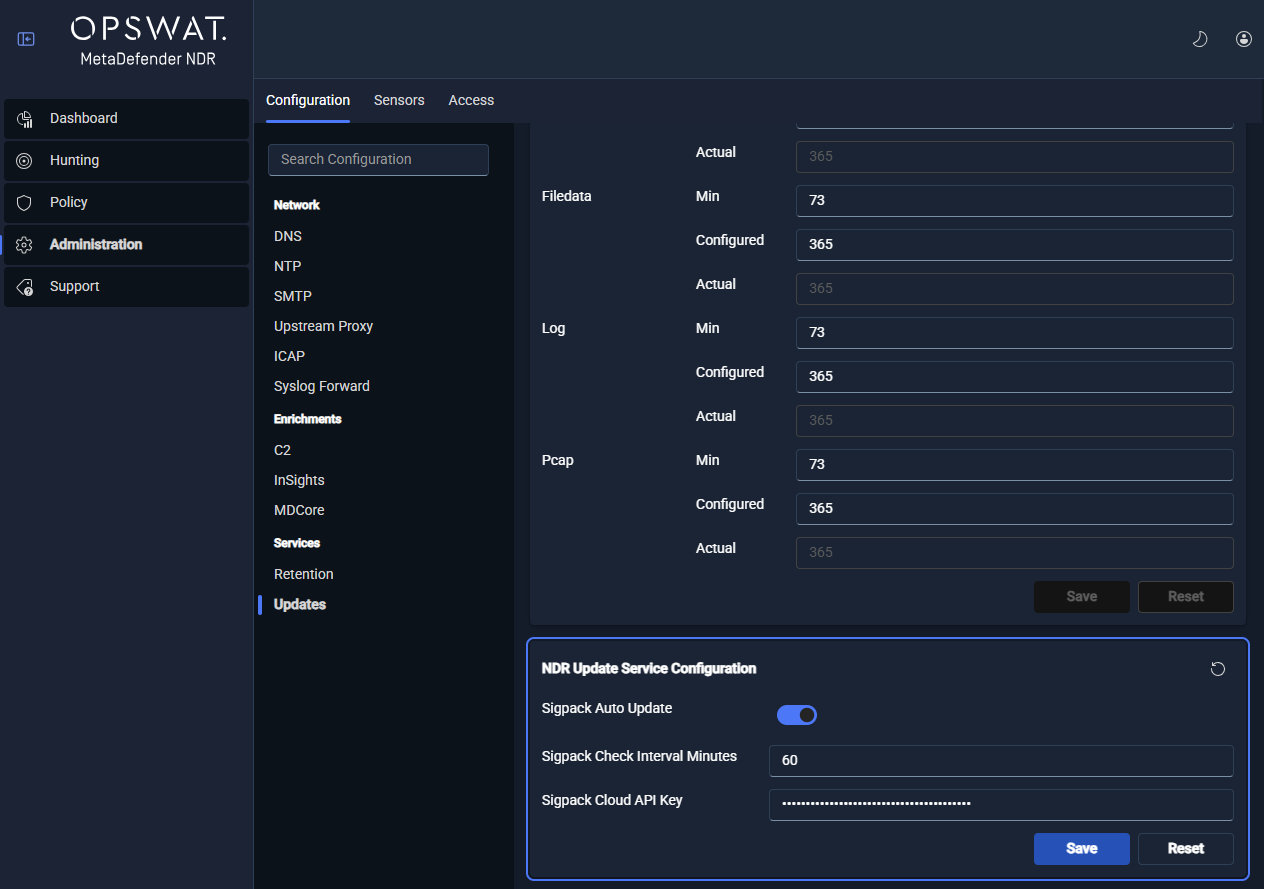
Automatic updates are the default mode. The Manager runs two independent schedulers -- one for InSights feeds and one for sigpacks -- each with its own configurable interval.
Content Stream | Default Interval | Configurable Range |
|---|---|---|
InSights intelligence feeds (C2, TI, OSINT) | Hourly | Tunable from the Manager Configuration page under Automatic Update Settings. |
Signature packs (sigpacks) | Daily | Tunable from the Manager Configuration page under Automatic Update Settings. |
On each tick, the Manager contacts its configured upstream source. It compares the latest available version against the installed version. If a newer version is available, it downloads the version and verifies the signature. Then it gives the payload to the distribution pipeline. If the upstream source is unreachable, the Manager logs the failure, surfaces a banner on the Updates view, and retries on the next scheduled interval; a reachability failure does not reset or disable the scheduler.
Upstream reachability is controlled by the Manager's Upstream HTTP Proxy setting when the deployment reaches its update source through a proxy. Proxy configuration changes broadcast to the update service automatically; no restart is required to pick up a proxy edit.
Ad-hoc update checks are supported at any time. The Check for Updates control on the Updates view triggers an immediate check against the upstream source and short-circuits the scheduler's next tick when a newer version is fetched.
Manual updates
Manual updates cover the cases where automatic updates are unavailable or undesirable. Administrators obtain a feedpack or sigpack file from the MyOPSWAT portal and upload it through the Manager UI.
The manual-upload workflow accepts the same signed payload format as the automatic path -- the Manager performs the same cryptographic validation, version-number ordering check, and delta-apply logic regardless of the origin. A feedpack or sigpack that fails validation is rejected with a user-visible error and an audit log entry; the content store is not altered.
Air-gapped deployments run exclusively in manual mode. For an air-gapped deployment, schedule a standing transfer window. During this window, an administrator downloads the latest published feedpack and sigpack from a connected system. The administrator moves them across the air gap through the approved transfer mechanism. The administrator uploads them through the Updates view.
Distribution and application
Once a validated update is in the Manager's content store -- whether it arrived via the automatic poller or a manual upload -- the distribution pipeline takes over.
Distribution pipeline
Target selection. The Manager identifies every sensor whose assigned Policy references the updated feed or sigpack. Sensors whose Policy does not reference the content are not targeted and do not receive a push.
Push over the management channel. The Manager sends the signed payload to each target sensor over the mutually authenticated management channel documented in Sensor Management. The 60-second distribution target applies from the moment content enters the store to the moment the sensor has received the payload.
Sensor-side validation. The sensor verifies the payload signature and the upstream-version ordering before applying it. A validation failure is reported back to the Manager and does not corrupt the currently running content.
Atomic apply. The sensor applies the update atomically -- either the new content is in service across every detection engine or the prior content remains in service. No partial state is reachable.
Acknowledgment. The sensor acknowledges receipt and successful application back to the Manager, which records the per-sensor status.
Per-sensor distribution status
Every sensor carries three status values on the Updates view, one for each content stream.
Status | Meaning |
|---|---|
Pending | The Manager has the content in its store and the sensor has not yet acknowledged receipt or successful application. Pending is expected transiently during a push; a Pending state that persists beyond a few minutes indicates a distribution problem. |
Applied | The sensor has acknowledged receipt and successful application. The version the sensor is running matches the version the Manager intends for it. |
Failed | The sensor rejected the payload (signature validation, version ordering, or apply-time error). A failure raises a UI alert and triggers the automatic retry policy. |
Automatic retry on failure
The Manager retries a failed push on a configurable backoff schedule. Retries are capped and, on exhaustion, the sensor is flagged in the Updates view for administrator attention. A retry budget is scoped per sensor and per content stream -- a sensor that fails a signature apply does not consume retry capacity for a subsequent feed apply.
Audit logging
Every update acquisition, every push, every application acknowledgment, and every validation failure is recorded in the audit log. Audit entries include the actor (the Manager's scheduler for automatic updates, the administrator identity for manual updates), the content stream and version numbers, the affected sensors, and the outcome. Retention follows the audit-log retention policy documented in Users, Groups, and RBAC.
Policy-based enable/disable
MetaDefender NDR makes content distribution and content enablement two separate concerns.
Distribution is governed by the presence of the content on the sensor. If a sensor's Policy references a feed or sigpack, the Manager distributes the content to it.
Enablement -- which specific indicators in a feed and which specific signatures in a sigpack are active on a given sensor -- is governed exclusively by the Policy assigned to that sensor or to its sensor group.
A Policy carries the allow-list or deny-list of indicators and signatures that are active for its scope. Administrators author Policies once and assign them to sensors or groups; the same feed and sigpack can drive different detection behavior on different sensors because the Policy in scope differs. The Policy mechanism is introduced in Sensor Management.
Per-tenant isolation
Each tenant maintains its own isolated Policy set. A change to a tenant's Policy affects only the sensors owned by that tenant; no policy change ever crosses a tenant boundary. Per-tenant isolation is enforced at the Policy-assignment layer -- the Manager rejects any attempt to assign a Policy owned by one tenant to a sensor owned by another. Tenant ownership of feeds, sigpacks, and Policy is documented in the Users, Groups, and RBAC chapter.
Common procedures
Trigger an ad-hoc update check
An administrator opens Administration -> Updates. The Updates view lists every content stream with its currently installed version, last successful update timestamp, and per-sensor distribution status.
The administrator clicks Check for Updates on the target stream (InSights feeds or signatures).
The Manager contacts the upstream source and compares versions. If a newer version is available, it downloads it. Then it gives it to the distribution pipeline. The view refreshes with the new version number.
The audit log records the ad-hoc check, the outcome, and, on a version change, the new version number.
Upload a sigpack manually
An administrator obtains the latest signed sigpack file from the MyOPSWAT portal.
The administrator opens Administration -> Updates and clicks Upload Signature Pack.
The administrator selects the sigpack file and submits the form. The Manager cryptographically validates the file, checks version ordering against the currently installed sigpack, and -- on success -- accepts the payload into the content store.
Distribution begins automatically; per-sensor status transitions from Pending to Applied as each sensor acknowledges the push.
The audit log records the upload (actor, sigpack version, outcome) and every downstream distribution event.
The feedpack upload procedure is identical in structure -- the Upload Feed Pack control accepts a signed feedpack file and runs the same validation and distribution pipeline.
Review the per-sensor distribution status
Open Administration -> Updates. Scroll to the per-sensor status table, or filter the Sensor Management fleet list by Update Status.
The table renders one row per sensor per content stream. Each row shows the sensor identifier, current version, intended version, and status (Pending, Applied, Failed).
Sensors in Failed state are highlighted. Selecting a failed row expands the failure reason captured from the sensor's acknowledgment (signature-verification failure, version-ordering rejection, apply-time engine error).
Choose one action. Re-trigger the push on the selected sensor. Open the sensor detail view for deeper diagnosis. Or accept the retry schedule and monitor for convergence.
Quick-start checklist: verify updates are flowing
The checklist below confirms that automatic updates are reaching the Manager and the sensor fleet, that per-sensor distribution status is healthy, and that Policy-controlled enablement is doing what the administrator expects.
Item | Action | Verification |
|---|---|---|
Upstream reachable | Confirm the Manager can reach the configured upstream update source (direct or via the Upstream HTTP Proxy). | The Updates view shows a recent successful check timestamp for both InSights feeds and sigpacks; no reachability banner is displayed. |
Scheduler running | Confirm both the feed and signature schedulers are active on their configured intervals. | The Last Successful Update timestamps advance on the feed and sigpack streams at or below the configured intervals. |
Feed version current | Confirm the installed InSights feed version matches the latest published version. | The Check for Updates button returns "up to date" for each of C2, TI, and OSINT feeds after running it. |
Sigpack version current | Confirm the installed sigpack version matches the latest published version. | The Check for Updates button returns "up to date" for the signature stream after running it. |
Per-sensor status clean | Review the per-sensor status table and confirm no sensors are in Failed state and no sensors have persistent Pending state beyond the retry window. | Every sensor row shows Applied for both content streams with a recent acknowledgment timestamp. |
Policy references reviewed | Confirm every sensor's Policy references the feeds and sigpacks the sensor is expected to run. | The Policy detail view shows the expected content-stream references for each assigned Policy; |
Enablement behavior verified | Confirm a known-benign test indicator enabled by Policy triggers the expected detection surface; confirm a known-disabled indicator does not. | The Hunt page shows the expected alert for the enabled indicator and no alert for the disabled indicator. |
Manual upload path exercised | As a one-time drill, upload a known-good feedpack or sigpack through the UI. | The upload validates, the content store accepts it, the sensor fleet transitions to Applied, and the audit log records the upload. |
Retry budget reviewed | Confirm the automatic retry policy for failed pushes matches the deployment's change-management expectations. | Automatic Update Settings on the Manager Configuration page reflects the intended retry count and backoff. |
Audit entries visible | Spot-check the audit log for a recent update cycle and confirm the acquisition, distribution, and application events are present. | The audit viewer shows one acquisition entry per scheduler tick, one distribution entry per targeted sensor, and one application acknowledgment per sensor. |
See also
Administration overview -- the Administration page structure, access control, audit trail, and chapter map.
Manager Configuration -- the Automatic Update Settings and Upstream HTTP Proxy surfaces that govern update retrieval.
Sensor Management -- Policy, sensor group, and fleet-list surfaces that scope update enablement and distribution.
Users, Groups, and RBAC -- per-tenant isolation of Policy-controlled content enablement and audit-log retention.