
The OPSWAT InSights enrichment is the broad-coverage threat-intelligence layer in MetaDefender NDR. The C2 and Threat Intelligence family uses narrow exact-match lookups against the small, high-curation Eyelet C2 feed. InSights uses a much wider scope. It checks every IP address and domain name observed on the wire against two large indicator feeds. These feeds are the Threat Intelligence Database and the Reputation Database. Domain matches walk up the hierarchy. Thus, a query for login.evil.example.com matches an indicator for evil.example.com. Two dedicated alert types distinguish the two intelligence tiers. Analysts can treat confirmed-threat hits and reputation hits on different priority lanes.
First-use acronym expansions in this chapter:
InSights — the OPSWAT-curated actionable-intelligence feed family.
TIDB — Threat Intelligence Database.
REPDB — Reputation Database.
IOC — Indicator of Compromise.
FQDN — Fully Qualified Domain Name.
CNAME — DNS Canonical Name record.
SNI — Transport Layer Security Server Name Indication.
DNS — Domain Name System.
TLS — Transport Layer Security.
HTTP — Hypertext Transfer Protocol.
URL — Uniform Resource Locator.
CIDR — Classless Inter-Domain Routing.
MVP — Minimum Viable Product.
FRD — Functional Requirements Document.
What it is
The InSights family is an enrichment service in the MetaDefender NDR Manager pipeline. It maintains four in-memory indicator sets. The sets are TIDB for high-confidence threats, REPDB for reputation-driven indicators, known-good domains, and known-good Classless Inter-Domain Routing blocks. The service loads all sets from the OPSWAT InSights feed and refreshes them hourly. The sensors emit DNS, Transport Layer Security, Hypertext Transfer Protocol, and flow records. The service scans these records for source and destination Internet Protocol addresses, DNS query names, DNS answer names, TLS Server Name Indication values, and HTTP host and URL fields. The service checks each extracted indicator against the inclusion filters first. These filters are TIDB and REPDB. Then the service checks the whitelists. An indicator in an inclusion filter and not on a whitelist produces an entity-level enrichment. The aggregator stitches the enrichment back onto the originating event. The alert engine promotes the enriched event to a typed InSights alert at the appropriate severity tier.
What it detects
The family covers the full breadth of IP-level and domain-level observables that threat-intelligence vendors publish. Typical hits include:
Malware staging and payload infrastructure. Hosts that deliver loaders, droppers, or second-stage implants. OPSWAT Analyst Network researchers observed them in past campaigns and still track them. They can appear as an IP in an outbound flow or as a name in an HTTP request URL.
Phishing landing pages and credential-harvester domains. Domains set up to mimic a legitimate login surface, observed as a DNS query from an internal host or as a Hypertext Transfer Protocol hostname in an outbound request.
Commodity command-and-control and remote-administration trojan panels. Broad commodity C2 infrastructure that the Reputation Database tracks with more historical coverage than the tight C2 feed.
Trojanized-software update servers, exploit-kit landing hosts, sinkholes, and parked-malware domains. Published reputation data that often correlates with older or widely distributed threats.
DNS-response reachback. A domain that itself is not on the feed but resolves to an IP that is, or whose Canonical Name chain passes through a known-bad name.
Subdomains of flagged domains. Every subdomain of a flagged domain inherits the parent's match -- a query for
auth.payroll.trusted-lookalike.rumatches an indicator fortrusted-lookalike.ruthrough the parent-hierarchy expansion described in the next section.
InSights is an indicator-match family -- it does not try to infer whether a never-seen-before domain is malicious. Domain-generation-algorithm detection and other name-behavior analytics are the job of Behavioral Detections.
How it works
The pipeline moves a candidate observation through five stages.
Indicator load. At startup, the InSights enrichment service loads four filter files from disk. The files are the TIDB inclusion filter, the REPDB inclusion filter, the domain whitelist, and the CIDR whitelist. Filters are compact probabilistic data structures, such as XOR and Binary Fuse variants. They support constant-time membership lookups independent of indicator-list size. An automatic updater refreshes the filters hourly from the latest OPSWAT feed. The service does not require redeployment to adopt a new indicator.
Event consumption. The service consumes DNS, Transport Layer Security, Hypertext Transfer Protocol, and flow events from the raw sensor stream. The service skips other event types at this stage. The three protocol events plus the flow stream cover every IP and every name the sensor observes.
Indicator extraction. The extractor walks the event and pulls every candidate IOC from the relevant fields. Relevant fields include source and destination IP from every event type. They also include DNS query names, DNS answer names, and Canonical Name chain entries from DNS events. Other fields are Server Name Indication from Transport Layer Security events. They also include hostname and Uniform Resource Locator from Hypertext Transfer Protocol events. Every extracted IOC carries its JavaScript Object Notation path. Analysts use the path to trace a match back to its source field.
Parent-domain expansion and filter check. For every extracted domain, the extractor adds every parent name. For example,
auth.shop.evil-vendor.netproducesauth.shop.evil-vendor.net,shop.evil-vendor.net,evil-vendor.net, and so on. The service looks up each candidate in TIDB and REPDB. It checks any domain match against the domain whitelist. It checks any matching IP against the CIDR whitelist. The service retains only indicators that hit an inclusion filter and miss every whitelist.Entity enrichment and alert promotion. For every retained match, the service attaches a per-entity enrichment block to the matched field. Examples include
dest_ip_enrichments.insightson a flow anddns.queries[].rrname_enrichments.insightson a DNS query. Another example istls.sni_enrichments.insightson a Transport Layer Security handshake. Each per-entity block carries the flagsmalicious: true,has_tidb_match, andhas_repdb_match. It also carries the list of feed sources that flagged the indicator, for example,["tidb-malware", "repdb-generic"]. The aggregator stitches the enrichments back onto the event. The alert engine then evaluates two rules. The TIDB rule promotes any event with at least onehas_tidb_match: trueentity to a High-severity InSights alert. That alert carries a TIDB match payload. The REPDB rule promotes any event with at least onehas_repdb_match: trueentity to a Medium-severity InSights alert. That alert carries a REPDB match payload. The REPDB rule fires only when no entity on the event carries a TIDB match.
The mutual-exclusion rule on REPDB is deliberate. If any entity on the event is in the TIDB tier, the analyst only wants to see the High-severity TIDB alert. The concurrent REPDB hit would be redundant noise. This produces a clean severity signal: an event raises at most one of the two InSights alert types.
Trigger conditions
An InSights alert fires when the enrichment service produces at least one match. The alert engine's TIDB or REPDB rule must see the corresponding match flag on any entity in the merged event. The fields below are what analysts read when triaging the alert.
Field | Meaning |
|---|---|
| TIDB match payload. Present on every TIDB-tier alert; absent on REPDB-tier alerts. |
| The IOC value that matched -- the canonical IP, FQDN, or URL as it appears in the feed. For a parent-domain match on a subdomain query, this is the parent name that matched (for example, |
| Feed-source identifiers that flagged the indicator. All TIDB sources carry a |
| JavaScript Object Notation paths on the source event where the indicator was observed (for example, |
| REPDB match payload. Present on every REPDB-tier alert; absent on TIDB-tier alerts. |
| Same semantics as |
| Feed-source identifiers that flagged the indicator. All REPDB sources carry a |
| Same semantics as |
The alert also carries every standard Suricata-shaped field. These fields include timestamp, flow_id, src_ip, src_port, dest_ip, dest_port, proto, alert.signature, alert.signature_id, alert.severity, alert.category, and MITRE Adversarial Tactics, Techniques, and Common Knowledge metadata where applicable. Analysts can pivot into protocol logs and packet capture as they would on any other alert type.
Severity classification
The alert engine raises InSights alerts at two native severity tiers. These tiers reflect the confidence difference between the two feeds. OPSWAT curates TIDB for confirmed-threat use. OPSWAT curates REPDB for broader reputation coverage. REPDB tolerates more historical or low-confidence indicators.
Trigger | Unified Severity |
|---|---|
Any entity on the event has | High |
Any entity on the event has | Medium |
When a TIDB hit and a REPDB hit land on the same event, only the High-severity TIDB alert fires. For example, the destination IP can be on REPDB and the queried domain on TIDB. The mutual-exclusion guard suppresses the REPDB rule. The REPDB payload still exists on the entity enrichment. Thus, analysts can read both hits in the Hunt sidebar although the alert engine emitted only one alert.
The IOC auto-escalation rule described in Detection Overview interacts with this family in one direction only. A behavioral or machine-learning detection that coincides with a TIDB or REPDB hit auto-escalates to Critical / 0.99. For example, a Beaconing detection with a TIDB hit on the destination domain becomes a Critical Beaconing alert. The InSights-native alert retains its own High or Medium severity. Analysts who see a Critical behavioral or ML alert with an InSights Enrichment sidebar block should treat the InSights match as the reason the parent detection was auto-escalated.
Confidence scoring
The alert engine raises InSights alerts at two confidence tiers that track the severity assignment. The underlying match is binary (membership in the inclusion filter), so confidence reflects feed authority rather than a per-entity score.
Trigger | Alert Confidence |
|---|---|
TIDB-tier alert. | 0.90 |
REPDB-tier alert. | 0.70 |
The confidence scale defined in Detection overview reserves the 0.80-0.94 band for strong signals with corroborating evidence and the 0.60-0.79 band for behavioral findings that warrant context. TIDB's 0.90 reflects high-authority indicator curation. REPDB's 0.70 reflects the broader, reputation-weighted nature of the feed. It gives analysts a built-in order cue when a queue of Medium alerts waits for triage.
Where it appears
InSights alerts appear in four places.
Dashboard -- Recent Severities donut. TIDB alerts contribute High slices; REPDB alerts contribute Medium slices. Neither tier contributes Critical slices unless a behavioral or ML detection absorbed the match and then auto-escalated. Top Signature Hits is Suricata-only and does not include InSights alerts.
Dashboard -- Recent Alerts. Newest InSights alerts flow through the cross-family feed, distinguishable by the InSights Alert type label. Clicking a row opens the same sidebar used on the Hunt page.
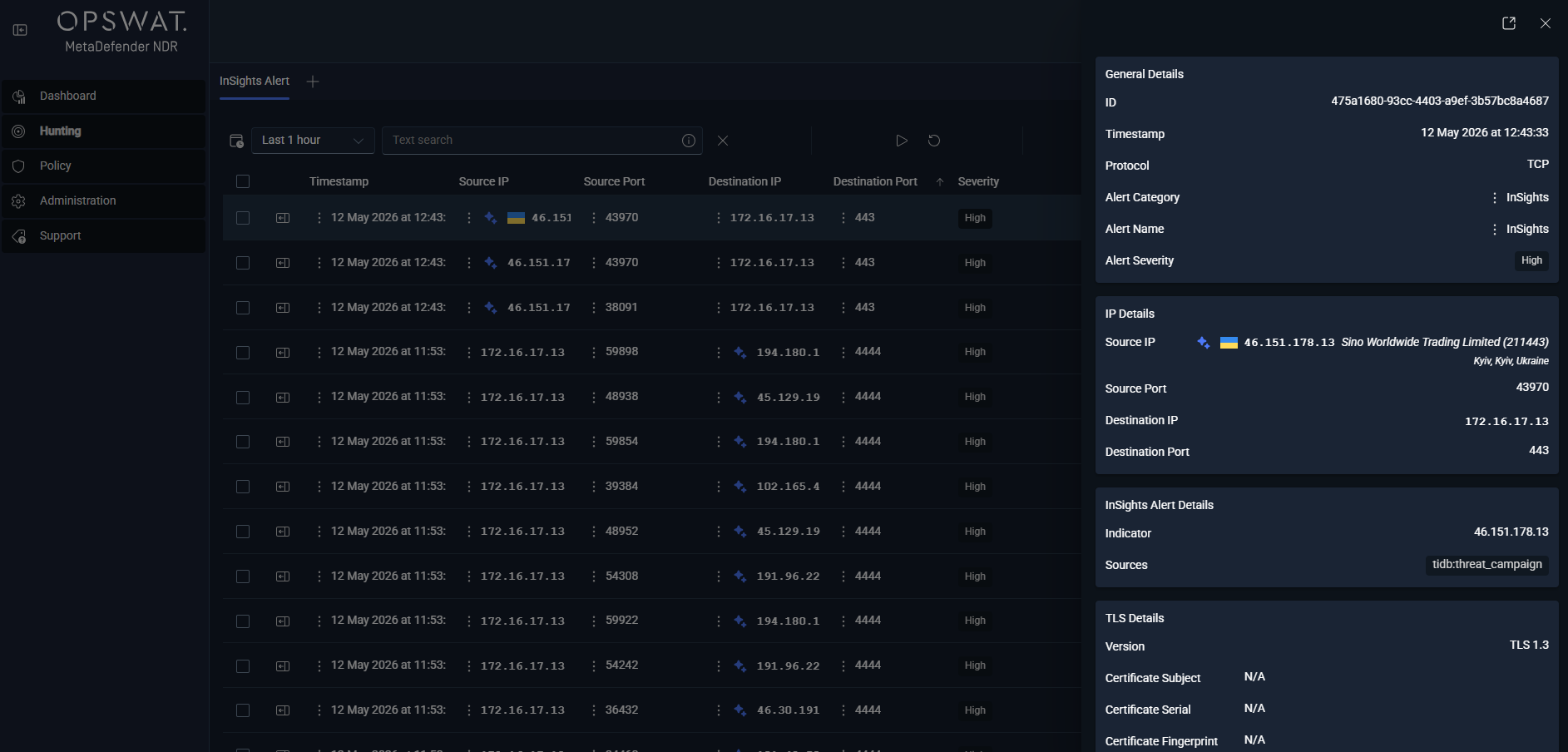
**Hunt page -- ** InSights Alert sub-tab. Under the All Alerts bucket, this per-type sub-tab lists every InSights alert. Columns include
timestamp,alert.signature, source and destination endpoints,event_type, the severity label, and match-level columns. The match-level columns come from theinsights.tidb/insights.repdbpayload: indicator, sources, and paths. This sub-tab lists both tiers. Analysts filter by severity to split TIDB and REPDB queues.**Hunt detail sidebar -- ** InSights Enrichment section. This section renders on any row whose record carries an
*_enrichments.insightsblock -- not just the InSights alert rows. A DNS session row whose queried name matched the REPDB renders the DNS section alongside the InSights Enrichment section. The row itself is a session event rather than an InSights alert. A Transport Layer Security session whose SNI matched the TIDB does the same. The section lists each matched entity with the feed sources that flagged it. It also lists the path on the event where the extractor found the indicator. When the matched entity is also geolocated, the sidebar's ASN and GeoIP enrichment renders alongside so analysts see the destination's country, ASN, and organization without leaving the record.
On the Hunt page's Sessions tab, the insights column injects a small enrichment ribbon. The ribbon appears on every DNS, Hypertext Transfer Protocol, Transport Layer Security, flow, and protocol-log row that carries a match. Analysts do not have to open a record to see that it is InSights-adjacent.
Alert payload example
Abbreviated JavaScript Object Notation for a TIDB-tier InSights alert fired on a DNS query. The underlying event is a standard Suricata DNS query; the alert adds the insights payload and the alert block, and the alert engine sets alert_type: "insights" and severity 2 (High).
A REPDB-tier alert looks the same with three differences. An insights.repdb block of identical shape replaces the insights.tidb block. The sources entries carry a repdb- prefix. The alert.severity drops to 3 (Medium) with rule_name: "InSightsREPDBDetection" and rule_salience: 5. The payload above is a parent-domain match. The query was for pay.trustpad.work, but the indicator was trustpad.work. If analysts see an indicator value shorter than the observed name, they should read it as a hierarchy hit rather than a transcription error.
Tuning considerations
The InSights family is deliberately low-knob at the alert level; curation happens upstream at OPSWAT. The Policy-managed knobs that do exist are scoped to the service and to the feed.
Enable or disable the InSights enrichment service. Operators toggle the enrichment on or off through Policy. Disabling the service leaves the pipeline running -- no crash, no dropped events -- and suppresses all downstream InSights alerts. See Updates Management for the per-policy enrichment toggle.
Enable or disable individual feeds per Policy. The shipped InSights pack contains three feed classes (C2, TI, and Open-Source Intelligence) that contribute indicators to TIDB and REPDB. Operators can toggle each feed independently in the policy that a sensor or sensor group runs under. For example, operators can enable TIDB globally but restrict REPDB to a high-sensitivity subset of groups. The Updates management surface shows the current enable / disable state per policy.
Enable or disable the whitelist. The built-in domain and Classless Inter-Domain Routing whitelists cull well-known benign infrastructure before the match reaches the alert engine. Disabling them surfaces more matches (including hits on infrastructure that has been reclaimed by legitimate tenants) and is only recommended for short tuning windows.
Feed update cadence. The default update interval is one hour. Constrained networks may lengthen it; high-sensitivity environments may shorten it. The feed-update workflow, the manual-trigger procedure, and the distribution-status dashboard all live in Updates management.
False-positive behavior on TIDB is rare; false-positive behavior on REPDB is the family's main source of noise and is the primary reason REPDB lands at Medium rather than High. A reputation indicator can trigger on infrastructure several months ago and later return to a benign tenant. It still produces an alert until the feed removes it. If an analyst confirms the reclaim, flag the indicator for upstream review. Do not add a local suppression. The MetaDefender NDR pattern for this family keeps the alert engine faithful to the feed. Curation happens at the source.
Related runbook
High-severity TIDB alerts and Medium-severity REPDB alerts route through Critical Alert Triage when they coincide with other Critical evidence. They route through C2 Beacon Investigation when the indicator describes command-and-control or malware staging. For an isolated REPDB hit with no other corroborating signal, pivot via Alert, Flow, and PCAP Pivoting. Verify intent before escalation. The runbook identifies the originating host. It inspects the full session capture. It helps decide whether the match reflects an active attempt to reach the indicator or benign residual traffic.