
MetaDefender NDR's File Scanning family examines the content that the network carries. It does not examine only metadata. When a sensor carves an executable, archive, document, or script, OPSWAT MetaDefender scans the file with multi-antivirus (multi-AV). Sources include Hypertext Transfer Protocol (HTTP) downloads, File Transfer Protocol (FTP) transfers, and Server Message Block (SMB) share copies. The aggregator stitches the verdict back onto the originating FileInfo event. If any engine raises a threat, the alert engine promotes the result to one of three severity-tiered MD Core alerts. This chapter describes extraction, submission, and score calculation. It also describes what the operator sees and which knobs govern the family.
First-use acronym expansions in this chapter:
MD Core -- MetaDefender Core, OPSWAT's on-premises multi-AV scanning server.
MD Cloud -- MetaDefender Cloud, the Software-as-a-Service equivalent.
AV -- antivirus.
IOC -- Indicator of Compromise.
MIME -- Multipurpose Internet Mail Extensions.
SHA-256 -- Secure Hash Algorithm 256-bit.
MD5 -- Message Digest algorithm 5.
PDF -- Portable Document Format.
HTTP -- Hypertext Transfer Protocol.
FTP -- File Transfer Protocol.
SMB -- Server Message Block.
API -- Application Programming Interface.
FRD -- Functional Requirements Document.
MVP -- Minimum Viable Product.
What it is
The MetaDefender Core File Scanning family is an enrichment service. It automates the artifact lifecycle from sensor extraction to analysis result delivery. When MetaDefender NDR sensors carve files from observed network traffic, the enrichment service submits them to a MetaDefender backend. The backend is either OPSWAT MetaDefender Cloud Software-as-a-Service or an on-premises MetaDefender Core cluster. The service publishes the scan verdict as an entity-keyed enrichment. The aggregator stitches the enrichment back onto the originating FileInfo event. The alert engine evaluates the verdict against three severity-tiered rules. It emits an MD Core Alert when any engine flags the file.
The service sits between two external subsystems. The sensor file-store writes carved files to a shared location and emits a FileInfo event. That event announces file availability. The MetaDefender backend performs the multi-AV scan. Operators choose one of two deployment modes per environment.
Mode | MetaDefender Backend | When to use |
|---|---|---|
Cloud |
| Default. No on-premises infrastructure to run; engine set and signatures managed by OPSWAT; requires outbound internet access and an API key from the My OPSWAT portal |
Core | On-premises MetaDefender Core cluster | Air-gapped environments, or deployments with regulatory or bandwidth constraints. Requires a licensed MD Core cluster reachable from the Manager; authentication via API key or session credentials |
Policy manages deployment mode, credentials, and every scan parameter. Operators reconfigure the service without redeployment. See Integrations for the MetaDefender integration setup procedure.
What it detects
The family covers every malicious artifact that the network carries. Coverage depends on what the sensor can extract and what the configured MetaDefender backend engine set covers. Typical hits include:
Commodity malware payloads. Executables, Dynamic-Link Libraries, and scripts associated with commodity trojan families. Examples are Emotet, TrickBot, IcedID, RedLine, and AsyncRAT. This also includes loaders, droppers, and remote-administration tools delivered over Hypertext Transfer Protocol or Server Message Block.
Document-borne malware. Weaponized Portable Document Format files, Office documents carrying macros or exploits, Rich Text Format lures, and archive formats (ZIP, RAR, 7-Zip) concealing second-stage payloads.
Known-bad files by hash. The MetaDefender cache can already contain the file SHA-256 hash from a prior platform submission. A zero-latency cache hit returns the prior verdict without content resubmission.
Multi-engine corroboration on borderline artifacts. The alert engine surfaces files with one or two suspicious engine verdicts at the Low tier. It surfaces the same file at the High tier if six or more engines flag it. The positive-engine count carries forward into severity selection.
The family does not do content-aware sandbox detonation, static binary feature extraction, or ML classification inside MetaDefender NDR. The MetaDefender backend engine set supplies those behaviors. YARA rule authoring, Data Loss Prevention classification, Content Disarm and Reconstruction output, and vulnerability assessment are MetaDefender Core features. MetaDefender NDR does not surface those features in the MVP release.
How it works
The pipeline moves a candidate file through seven stages.
Extract the file.
Suricata file-store output runs on the sensor. It watches HTTP bodies, SMB reads and writes, FTP transfers, and other protocols with file content. When a transfer completes, Suricata knows the carved file hash and type. Suricata writes the file to the extraction directory in a
{sha256[0:2]}/{sha256}layout. Suricata emits a FileInfo event with MIME type, size, SHA-256 hash, and MD5 hash. Suricata publishes the FileInfo event to the raw sensor-events stream.Filter events.
The MetaDefender Core enrichment service consumes every FileInfo event. It keeps only events whose
fileinfo.storedfield istrueand whosefileinfo.stateisCLOSED. Suricata sets these flags after it writes the full file and calculates the hash. The service skips events without a SHA-256 or MD5 hash. The service also skips events whose MIME type matches the configured skip-list. Policy exposes exact-match and prefix-match lists. Operators can exclude traffic-heavy benign types, such as images, audio, and video. They do not have to change the carving policy on the sensor.Look up the hash.
If hash-lookup-first is on, the service issues a hash-lookup call before it uploads file data. This setting is on by default. MetaDefender returns a cached verdict when one exists within the rescan window. The default window is three days, configurable via Policy. A cache hit produces the same entity enrichment as a full scan. It uses
cached_result: trueand zero upload cost. This is the primary deduplication mechanism. The same file observed a hundred times across the fleet produces one scan and ninety-nine cache hits.Submit the file.
On a cache miss, the service opens the carved file from its configured file source. The source is either a shared local filesystem path or an S3-compatible bucket. The service uploads the file to the MetaDefender file-submission endpoint. It includes the original filename and configured authentication headers. Uploads run concurrently, capped by a configurable concurrency semaphore. Rate-limit headers from the backend automatically back off submissions when the account quota is near exhaustion. Transient failures retry with exponential backoff and jitter. Examples are network errors and 5xx responses.
Poll for results.
After a successful submission, the service receives a scan identifier. The service polls MetaDefender on a configurable interval. It stops when the scan reaches 100% completion, fails, or exhausts the maximum poll budget. Each outer poll attempt allows a small number of inner retries on transient errors. Thus, one flaky response does not abandon the scan.
Create the result.
On scan completion, the service converts the MetaDefender response into a flat scan-result data map. The map includes threat flag, threat name, multi-AV positive-engine count, total engines, and file metadata. It also includes per-engine details, scan timestamp, and cache status. The service attaches this map to the file hash as an entity enrichment. The aggregator stitches it onto the event at
fileinfo.sha256_enrichments.mdcore. It also adds it under a top-levelmdcoresummary keyed by the file hash. Thus, the alert engine can reason across multiple files on the same event.Evaluate alerts and clean up.
The alert engine evaluates three severity-tiered MD Core rules against the
mdcoresummary. See the next three sections. If a rule matches, the alert engine emits an MD Core Alert at its configured severity. Independently, the service can delete the carved file from the extraction directory after the scan completes. That Policy-managed action is the default. The service can also archive the file to long-term Simple Storage Service storage for later investigation. Archive is off by default.
If the MetaDefender integration has no configuration, the service stays in idle mode. This applies when Cloud mode has no API key or Core mode has no Core base URL. The service consumes FileInfo events and emits a disabled enrichment status. Thus, the aggregator tracker advances cleanly. After Policy broadcasts credentials, the MetaDefender client initializes lazily. Scan operations begin without a restart.
Trigger conditions
An MD Core Alert fires when the enrichment service produces at least one scan result with threat_found: true. The alert engine severity-tiered rule must also see the corresponding positive_engines count. The count can be on any entity under the event top-level mdcore summary. The fields below are what analysts read when triaging the alert.
Field | Meaning |
|---|---|
| Per-entity scan-result block keyed by the file's Secure Hash Algorithm 256-bit hash. Multiple entities appear when the same event carries several carved files. |
| Boolean. |
| The canonical threat name returned by the engine with the highest-confidence verdict (for example, |
| Human-readable result label ( |
| Numeric scan verdict. The code-to-meaning map is |
| Integer count of engines that flagged the file. Drives the severity tier -- the rules compare the maximum value across all entities on the event. |
| Integer count of engines that successfully scanned the file. Present so analysts can read the positive ratio (for example, 12 positive of 30 total). |
| The MetaDefender-assigned scan identifier. Useful for pivoting into the MetaDefender console for per-engine details beyond what the enrichment carries. |
| Boolean. |
| Timestamp of the scan that produced the verdict. It can precede the event timestamp when the result is cached. |
| Object containing the file's Secure Hash Algorithm 256-bit, Secure Hash Algorithm 1, Message Digest 5, size in bytes, file type, and file-type description. |
| Object mapping engine name to per-engine detail (engine version, signature version, threat name, per-engine result code). Used to confirm which engines raised the flag. |
When an event carries multiple files, all files share the same event. This is common with multi-part archive transfers and bulk Server Message Block copies. The alert engine reduces across all files. The highest positive_engines value determines the severity tier. The alert engine emits one MD Core Alert per event at the strongest verdict tier. Each file's full scan-result block remains readable in the sidebar for per-file analysis.
Severity classification
The alert engine raises MD Core alerts at three native severity tiers. These tiers track the positive-engine count. This is the only family whose severity tier is a computed reduction instead of a direct label. The alert engine evaluates the maximum positive_engines across all file entities on the event against these thresholds.
Tigger | Unified Severity |
|---|---|
Any entity has | High |
Any entity has | Medium |
Any entity has | Low |
The High tier corresponds to broad cross-vendor agreement on a malicious verdict. Six or more independent AV engines that flag the same content give strong corroboration. The Medium tier covers the typical early-detection band where three to five engines agree. This is common on variants that have not yet propagated through every vendor signature set. The rule description labels the Low tier "possible false positive". One or two engines that flag a file can indicate a real positive, but not always. Analysts who handle Low-tier MD Core alerts must check for corroboration before escalation. Corroboration can come from affected hosts, destinations, or filenames.
The IOC auto-escalation rule in Detection Overview promotes an M DCore Alert to Critical / 0.99 confidence. The rule applies when the scanned file hash, or its delivery connection, coincides with a C2 feed hit or an InSights Threat Intelligence Database match. A borderline Low-tier file from a C2-feed destination becomes a Critical MD Core Alert. The companion C2 Enrichment or InSights Enrichment sidebar section shows the matched indicator. Thus, analysts can see which feed drove the escalation.
Confidence scoring
Confidence tracks the positive-engine ratio so that analysts can order work inside each severity tier.
Trigger | Alert Confidence |
|---|---|
High-tier alert (6+ positive engines). | 0.90 |
Medium-tier alert (3-5 positive engines). | 0.75 |
Low-tier alert (1-2 positive engines). | 0.55 |
Any tier with an IOC auto-escalation. | 0.99 |
The bands correspond to the confidence scale defined in Detection Overview: 0.80-0.94 for strong signals, 0.60-0.79 for moderate, 0.40-0.59 for low. The 0.99 band applies only to IOC auto-escalation. In that case, an independent indicator match corroborates the file-scan verdict.
Where it surfaces
MDCore alerts and the underlying scan-result enrichments appear in five places.
Dashboard -- Recent Severities donut. High-tier MD Core alerts contribute to the High slice. Medium-tier alerts contribute to the Medium slice. Low-tier alerts contribute to the Low slice. IOC-auto-escalated alerts contribute to the Critical slice. Top Signature Hits is Suricata-only and does not include MD Core alerts.
Dashboard -- Recent Alerts feed. Newest MDCore alerts flow through the cross-family feed, distinguishable by the MDCore Alert type label. Clicking a row opens the same sidebar used on the Hunt page.
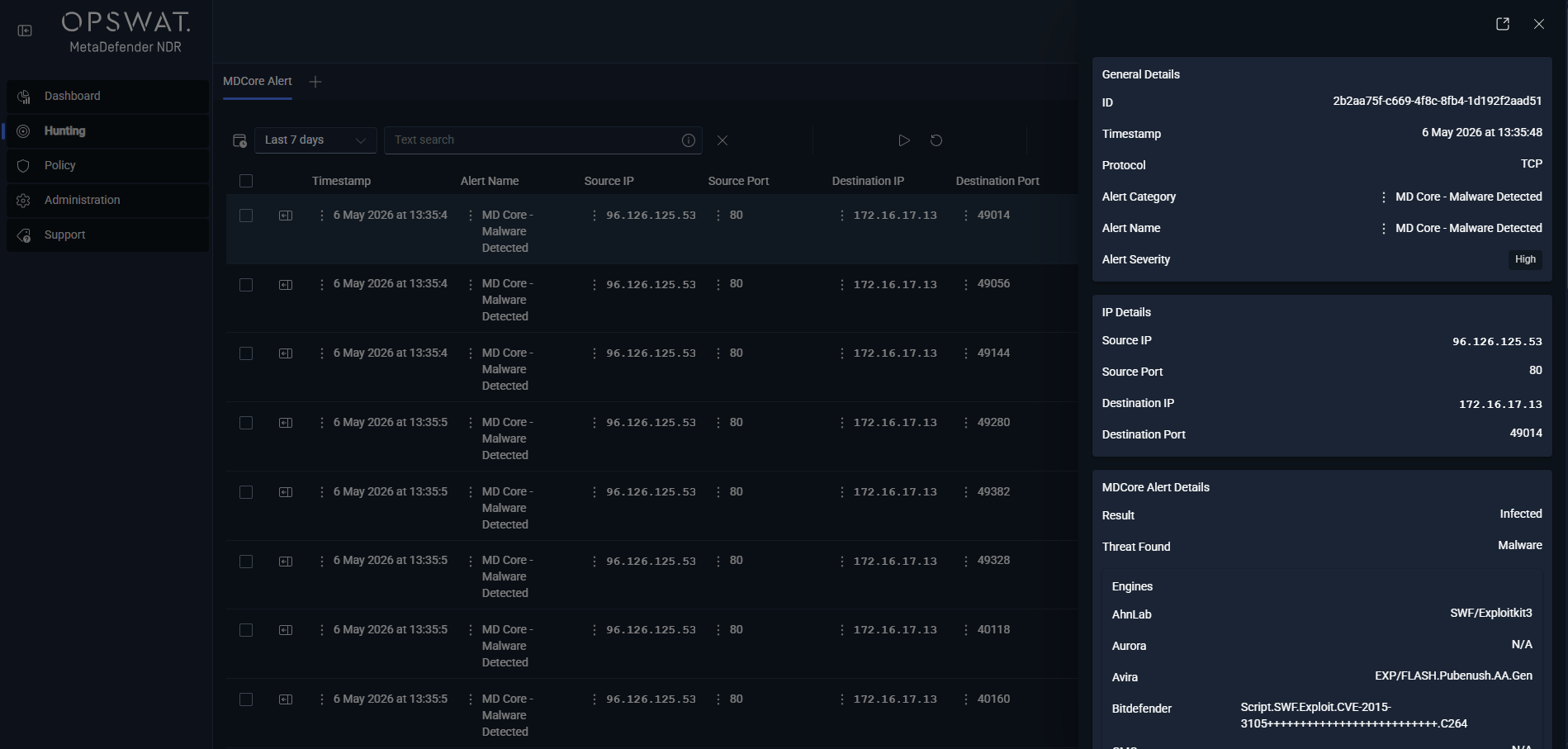
**Hunt page -- ** MD Core Alert sub-tab. Under the All Alerts bucket, this per-type sub-tab lists every MD Core alert. It has columns for
timestamp,alert.signature, source and destination endpoints,event_type, and the severity label. It also has enrichment-specific columnsmdcore.scan_resultandmdcore.threat_name. Analysts filter by severity to split queue load between the High and Medium tiers.Hunt page -- FileInfo sessions sub-tab. Every carved file is visible as a FileInfo session record whether or not MetaDefender produced a verdict. The columns include
fileinfo.filename,fileinfo.magic(the file type),fileinfo.size,fileinfo.sha256, andfileinfo.md5. Rows with a positive verdict render the MDCore Enrichment sidebar section alongside the FileInfo block. Clean rows render the sidebar cleanly to show that MetaDefender examined the file and found it benign.**Hunt detail sidebar -- ** MD Core Enrichment section. This section renders on any record that carries an
mdcoreblock. Examples are MD Core alert rows, underlying FileInfo session rows, and any downstream record that references the same file hash. The section lists the scan verdict and the threat name when present. It also lists the positive-to-total engine ratio, per-engine detail map, file metadata block, and cache status. If the companion traffic for the scanned file also matched a C2 indicator or an InSights indicator, the sidebar renders the related enrichment section. It can render the C2 Enrichment section or the InSights Enrichment section. Analysts see the full intelligence picture without leaving the record.
Alert payload example
Abbreviated JavaScript Object Notation for a High-tier MD Core Alert fired on a Portable Document Format download flagged by twelve MetaDefender engines. The underlying event is a standard Suricata FileInfo record. The alert adds the mdcore entity-keyed payload and the alert block. The alert engine sets alert_type: "mdcore" and severity 2 (High).
A Medium-tier alert carries rule_name: "MetaDefenderMediumAVDetection", rule_salience: 6, alert.severity: 3, and a positive_engines value between 3 and 5. A Low-tier alert carries rule_name: "MetaDefenderLowAVDetection", rule_salience: 4, alert.severity: 4, and a positive_engines value of 1 or 2. When the same event carries multiple file hashes, the mdcore object contains one entry per hash. The sidebar lets analysts browse each scan result independently. The top-level alert severity reflects the maximum positive-engine count across entities.
Tuning considerations
Every MetaDefender Core parameter is Policy-managed and changes propagate live without a service restart. The knobs divide into four groups.
Integration and credentials.
Enable or disable the MetaDefender Core enrichment. Operators toggle the enrichment on or off through Policy. Disabling the service leaves the pipeline running -- no crash, no dropped events -- and suppresses all downstream MD Core alerts. The service continues to consume events. FileInfo records continue to appear in the Hunt page. Only the scan verdict is absent.
Deployment mode and credentials. Operators choose Cloud or Core. They set the API key for Cloud. For Core, they set the Core base URL plus API key or session credentials. They can optionally specify a scan rule or workflow. See Integrations for the full setup procedure including My OPSWAT portal sign-up for a Cloud API key and credential rotation guidance.
Event filtering.
Multipurpose Internet Mail Extensions skip-list. The service accepts both an exact-match list and a prefix-match list so operators can exclude whole families of traffic from scanning. Common defaults for high-volume benign content:
image/,audio/,video/, andtext/plainortext/htmlon exact match.Maximum file size. The service skips and logs files larger than the configured limit. The default limit is 100 megabytes. This limit keeps the scan pipeline responsive under high-volume extraction bursts.
Scanning behavior.
Hash-lookup-first deduplication. On by default. When enabled, the service checks the MetaDefender hash cache before file content upload. Cache hits return the prior verdict at zero upload cost. They use
cached_result: truein the enrichment payload. Disabling this setting forces every file to be re-uploaded, which multiplies API and bandwidth consumption and is rarely useful outside controlled testing.Rescan window. The service treats a cached result as fresh for a configurable number of days (three by default). Files seen after the window are re-uploaded so the verdict reflects current signatures.
Concurrency and rate limiting. The service caps concurrent scan workflows at a Policy-managed maximum (five by default) and backs off automatically against MetaDefender's rate-limit headers. Environments with a generous MetaDefender Core deployment may raise the concurrency cap. Environments constrained to MetaDefender Cloud per-tier quota should leave the default and trust automatic backoff.
Poll interval and budget. The service polls MetaDefender for scan completion on a configurable interval. The default interval is 30 seconds. The maximum poll budget is 120 attempts by default, for a 60-minute total scan timeout. Slow scans usually complete inside the default budget. Examples are archives with deep nesting and large binaries submitted to a busy Core cluster. Environments that routinely scan very large files may lengthen either setting.
Post-scan file handling.
Delete after scan. On by default. The service deletes the carved file from the extraction directory after the scan completes. This keeps the sensor disk footprint low. Operators who need the raw file for manual review should turn this off. They must also configure long-term archive storage below. If operators leave delete-after-scan off without archive, the sensor disk will fill.
Long-term archive storage. Off by default. When archive is on, the service copies scanned files to a Simple Storage Service bucket. Supported buckets include MinIO, Amazon Web Services, or any S3-compatible backend. The service uses a configurable sharding strategy. Operators can restrict archive to files that contain threats. Useful when downstream forensic or reverse-engineering workflows require the original bytes beyond the Hunt-page retention window.
Policy exposes all four groups. The Updates management surface in Updates Management shows per-policy enable / disable state. It also shows integration connectivity status. Integrations gives the MetaDefender integration setup.
The Low tier is the main false-positive surface for this family. The threshold is deliberately permissive so analysts can see borderline verdicts. Thus, one or two vendors can flag legitimate installers, patched binaries from obscure publishers, or signed content that still matches a heuristic. If a Low-tier alert companion traffic shows no other anomaly, usually leave the verdict as-is. Examples include no C2 hit, no InSights indicator, and no behavioral signal on the host that downloaded the file. The Low tier is already a "possible false positive" lane by design. Operators who must filter file scan work should lower the Policy scan scope. They should not suppress alerts at the engine.
Related runbook
MD Core alerts at High and Medium tiers route through Malicious File Investigation. Any tier that IOC auto-escalates to Critical also uses that runbook. The runbook explains how to read the multi-AV verdict. It explains how to correlate the download session with its initiating host and user. It also explains how to retrieve the archived file when storage is on. Finally, it explains how to determine whether the file reached a host that executed it. Low-tier alerts with corroborating context also enter that runbook. Examples include an unusual source host, a rare destination, or a companion Beaconing or Long Duration Flow detection. Analysts triage isolated Low-tier alerts with no corroborating signal through Alert, Flow, and PCAP Pivoting. Use that runbook to verify the delivery context before escalation.