
This article applies to MetaDefender Kiosk of all versions.
In MetaDefender Kiosk, there are two independent file size settings users can configure based on each use case. While they may seem similar, each serves a different function. Users can use them separately or combine them to meet workflow and security needs.
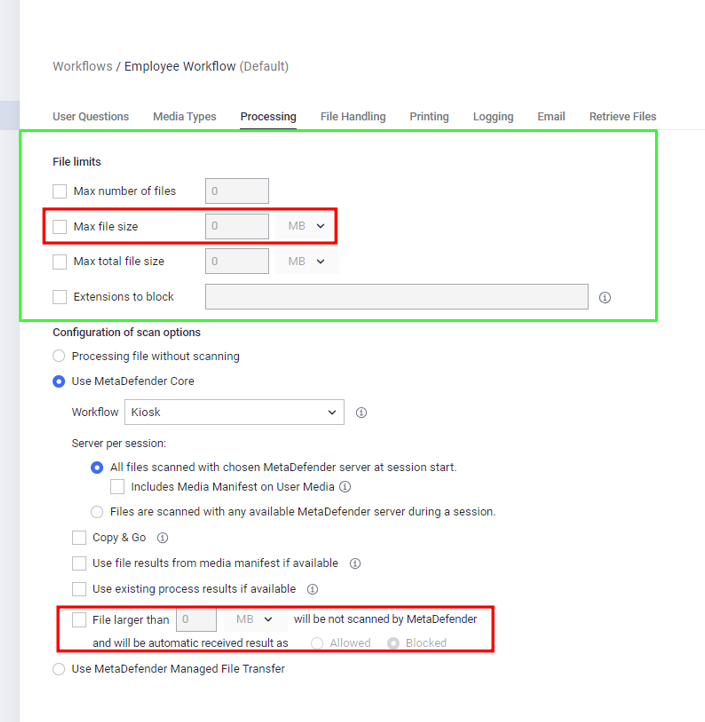
"File Larger Than" Rule
This setting defines what happens to files above a certain size.
Purpose: Automatically allow or block files larger than a specified size (e.g., 500MB), without waiting for a scan result.
Effect: The rule applies after the file is selected in the Kiosk UI. It does not restrict file selection.
"Max File Size Limit"
This setting restricts what files users can choose in the Kiosk UI.
Purpose: Prevent users from selecting files larger than the defined size (e.g., 1GB).
Effect: Files that exceed this size cannot be selected. A warning will be displayed on the Kiosk screen.
Using Both Rules Together – Examples:
Scenario 1
Max Limit: 1GB
File Larger Than: 500MB → Allowed
Outcome: Files smaller than 1GB can be selected. Files larger than 500MB are automatically allowed. Files smaller than 500MB are scanned by MD Core.
Scenario 2
Max Limit: 500MB
File Larger Than: 1GB → Blocked/Allowed
Outcome: Only files smaller than 500MB can be selected. The "File Larger Than" rule has no effect because larger files cannot be chosen.
Scenario 3
Max Limit: 1GB
File Larger Than: 500MB → Blocked
Outcome: Files smaller than 1GB can be selected. Files larger than 500MB are automatically blocked. Smaller files proceed to scanning. This allows admins to distinguish between files blocked due to policy vs. scanning.
Summary
"File Larger Than" = Post-selection rule that auto-allows/blocks based on file size.
"Max File Size Limit" = Pre-selection restriction in the Kiosk UI.
If Further Assistance is required, please proceed to log a support case or chatting with our support engineer.