
This article applies to all MetaDefender ICAP Server releases deployed on Windows and Linux systems.
Issue:
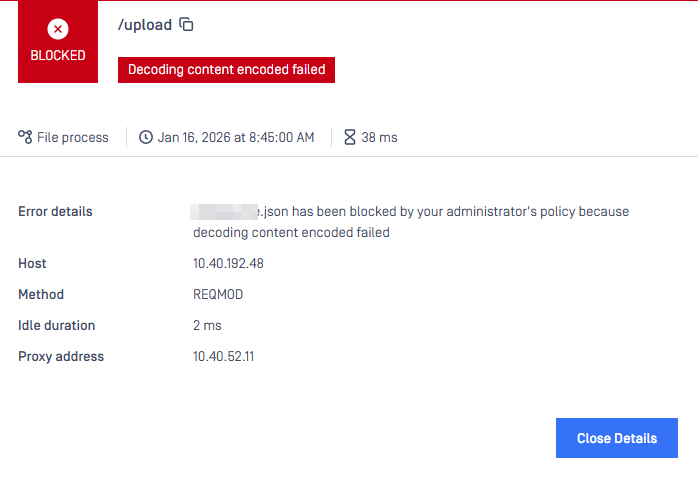
Files are being blocked by the MetaDefender ICAP Server with the error message “Decoding content encoded failed.”
This occurs when the ICAP Server is unable to decode the Base64-encoded payload contained in the HTTP request body. This is often due to a misconfiguration in the Node Selector in the ICAP workflow, preventing the correct extraction of Base64 data from the JSON payload, specifically from the intended key.
Prevention:
To prevent this issue, consider the following:
Double-check the Node Selector configuration to ensure it correctly decodes Base64 data from the JSON payload.
Verify that the Node Selector's value actually contains Base64 data.
Check for conflicts if multiple Node Selectors are configured in one workflow.
Example:
Consider the following JSON payloads:
Payload 1:
Payload 2:
{ "Name": "<base64 data>" }
The correct Node Selector for extracting the Base64 encoded file content in Payload 1 is /Content, with the node for the file name being /Name. However, if another Node Selector is also configured to specify /Name as the Base64 content to scan for the Payload 2 within the same ICAP workflow, a conflict arises.
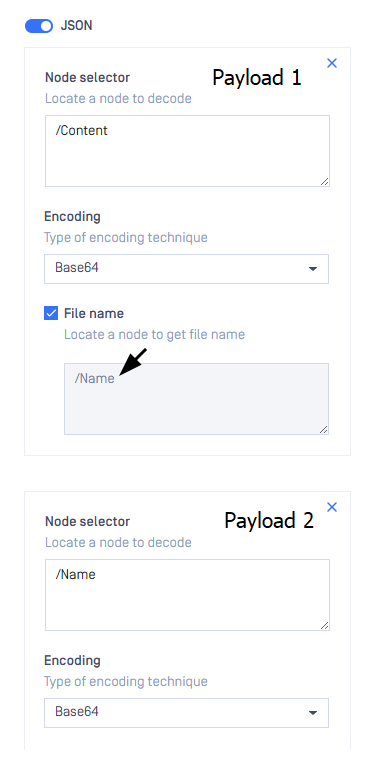
In this case, the Name key in Payload 1 does not contain Base64 encoded data, resulting in a decoding error because the system attempts to perform Base64 decoding on non-Base64 encoded content (the Payload 2 Node Selector).
Resolution:
In the above example, if a conflict exists with Node Selector configurations, it is best to split the workflow into two separate workflows.
Use request filters to match the corresponding Node Selector and requests containing JSON payloads for each workflow.
If Further Assistance is required, please proceed to log a support case or chat with our support engineer.