
Understanding JSON object format
In a nutshell, JSON object is a collection of key/value pairs enclosed in curly braces {}, with keys as strings and values can be strings, numbers, booleans, array, null, objects.
Consider the following JSON object
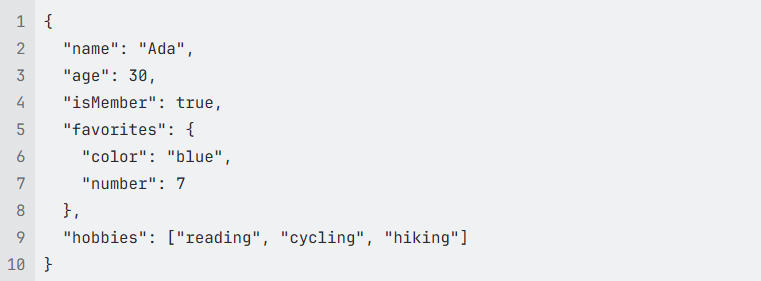
In this example, the JSON object represents a person named Ada, including
Value for the key “name” is a string:

Value for the key “favorites” is an JSON object is written inside curly braces

We can consider “favorites” is the parent key for the keys “color” and “number”
Value for the key “hobbies” is an array of strings is written inside square brackets

The keys “name”, “age”, “isMember”, “favorites”, and “hobbies” are siblings and have the same level
You can learn more about JSON syntax at JSON
Rules to create a node path
Identify the leaf node where Base64-encoded data is stored. This could be within a specific value or in an element of a nested object or an element of an array.
It is easier to start building the path from the leaf node and go backward to find the immediate parent nodes until reaching the root node which is represented by /
Use "/" to separate the nodes.
Use the index to access an element of an array. The index for an array is started from 1
Despite the syntax looks like XPath, it doesn’t support all XPath syntax.
Examples
Base64-encoded data is stored in a specific key
Take the same JSON object above as an example and encode the value of the key “color” in Base64:
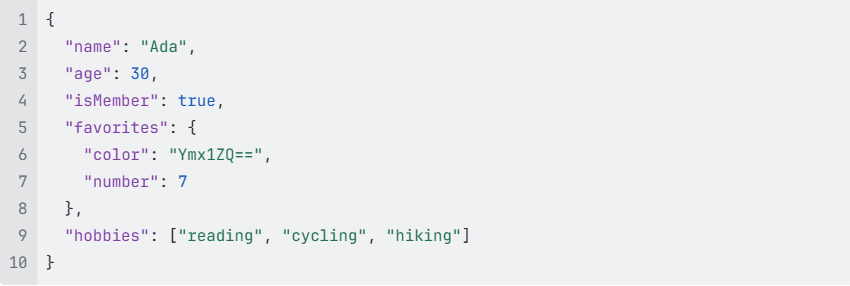
Now, the leaf node contains the Base64 encoded data is the key “color”. Its immediate parent key is “favorites”, so we have favorites/color. Then the immediate parent of “favorites” is root, so we have the node path is /favorites/color.
Base64-encoded data is stored in an element of an array
Consider the following JSON object:
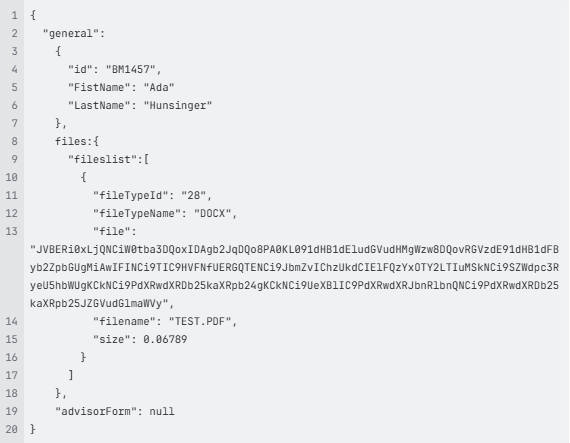
In this example, the leaf node contains the Base64 encoded data is the key “file”.
Its immediate parent key is an array “fileslist”. The “fileslist” has only one element which is a JSON object and the key “file” is included in the first element of the array. Thus, we have fileslist[1]/file.
The immediate parent of “fileslist” is “files”, so we have files/fileslist[1]/file.
Finally, the immediate parent of files is root, so the full node path to the Base64-encoded data in the node “file” is

If Further Assistance is required, please proceed to log a support case or chatting with our support engineer.