
Why is my file rejected even though it appears to be under the configured size limit?
This article applies to MetaDefender Core v4.x and 5.x.
You may encounter a situation where a file upload is rejected by MDCore even though the file appears to be within the allowed size limit. This commonly stems from differences in how operating systems and applications report file sizes.
Root Cause
MDCore enforces file size limits using decimal units (base-10), which is standard for most web applications and cloud services. However, many operating systems—particularly Windows—use binary units (base-2) when reporting file sizes. This discrepancy can lead to misunderstandings.
Comparison of Unit Systems
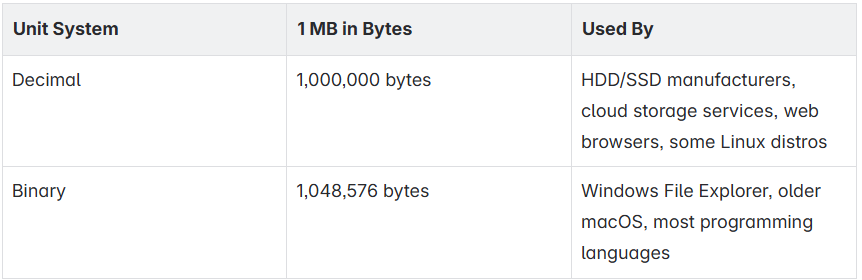
Example
Suppose your MDCore upload limit is configured as 2000 MB (decimal):
2000 MB (decimal) = 2,000,000,000 bytes
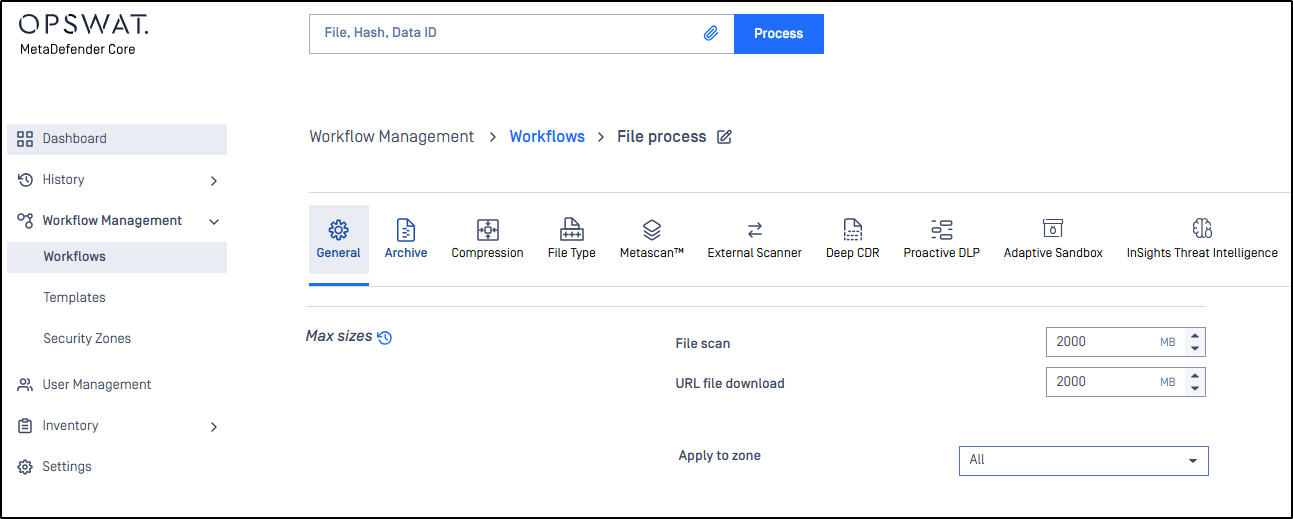
If a file appears in Windows Explorer as 1.87 GB, you might assume it's under the limit.
However, when measured in bytes, the actual size is 2,010,468,352 bytes
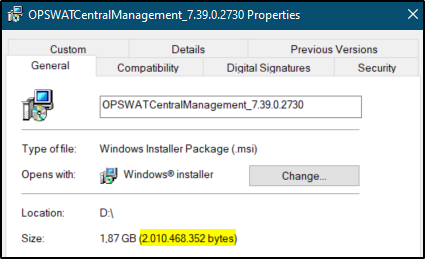
This exceeds the 2,000,000,000-byte limit set in MDCore, causing the file to be rejected.
Resolution
To prevent this issue:
Always verify the actual byte size of files before uploading.
If using Windows, right-click the file → Properties → Check the Size in bytes, not just the "Size" shown in MB/GB.
Consider increasing the configured upload limit slightly to account for rounding inconsistencies, if appropriate.
If you still have questions regarding the details in this KB, please create a support case or chat with one of our support engineers.