
How much free disk space needed to run the ometascan-db-vacuum tool successfully?
This article applies to all MetaDefender Core releases deployed on Windows and Linux systems.
Issue
The ometascan-db-vacuum tool can fail if there is insufficient free disk space on the MetaDefender Core server. In vacuum_running.log, you may see an error similar to:
Troubleshooting steps
Check the free disk space
Verify the available space on the drive where MD Core is installed.
Check the biggest table size
Generate a MetaDefender Core support package: How to Create Support Package With Bundle Tools? - MetaDefender Core
Unzip the support package and navigate to the database folder
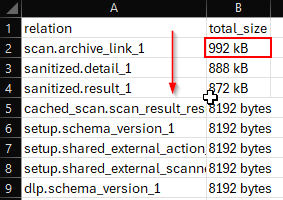
Open biggest_tables.csv, sort by the total_size column in descending order to find the largest table
Resolution
The ometascan-db-vacuum tool requires at least 1.5 times the size of the largest table in free disk space to run successfully.
Example: If the largest table is 20GB, ensure at least 30GB of free disk space
This requirement exists because the vacuum process creates a temporary copy of the table during optimization.
If Further Assistance is required, please proceed to log a support case or chatting with our support engineer.