
How can I change MetaDefender Core Deep CDR's timeout settings?
This article applies to all MetaDefender Core V4 and V5 releases deployed on Windows or Linux systems.
When processing complex files with MetaDefender Core’s Deep CDR engine, it’s not uncommon for the sanitization to fail due to exceeded timeout settings, particularly in the case of larger, encrypted archive files that take time to extract, process and sanitize.
However, Deep CDR’s timeout setting can be easily configured to allow time for processing your anticipated datasets, so that no such failures occur.
To access these settings, please go to your MetaDefender Core Management Console>Workflow Management>{Your Chosen Workflow)>Deep CDR, as illustrated in the screenshot below.

Here you will find numerous options, including the option to block files if the Deep CDR process fails or times out, as highlighted in the screenshot below.

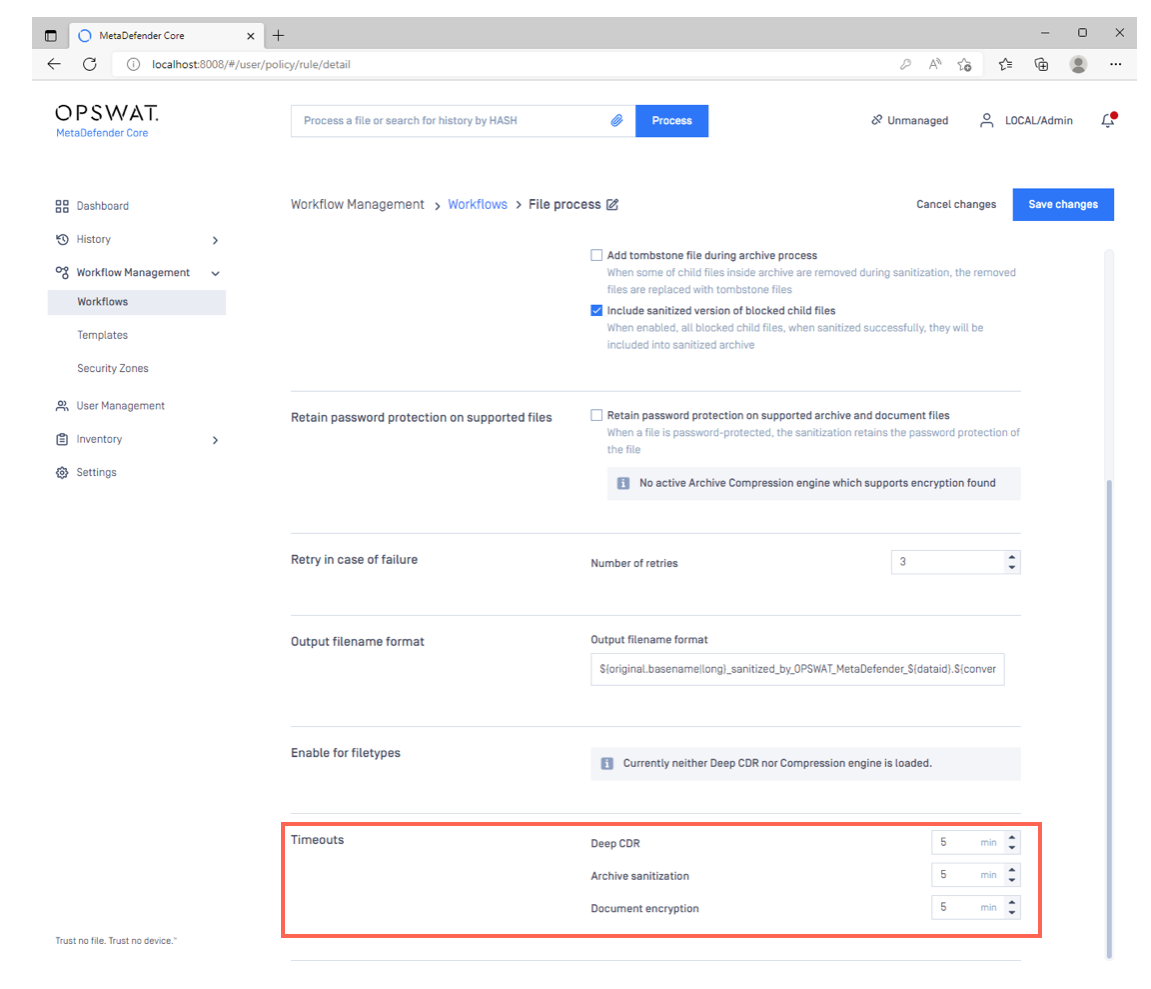
To alter timeout settings, scroll down to the bottom of the page (illustrated below), where you can configure maximum times for all aspects of file processing, including Deep CDR, archive sanitization and document encryption.
If you have followed the instructions above but are still Seeing Deep CDR Timeouts, please follow these instructions on How to Create Support Package With Bundle Tools?, before creating a support case or chatting with our support engineer.