
Version | 5.14.0 |
|---|---|
Release date | 31 March 2025 |
Scope | This major version introduces new features and capabilities to enhance security and usability. |
Making sure to check out the Known Limitations
OPSWAT has discontinued support for CentOS 7 and RHEL 7 since December 2024 in MetaDefender Core and its associated engines.
If you need some more time to transition from legacy OS, refer to this instruction Lock Your Engine and Plan for Migration.
New Features, Improvements and Enhancements
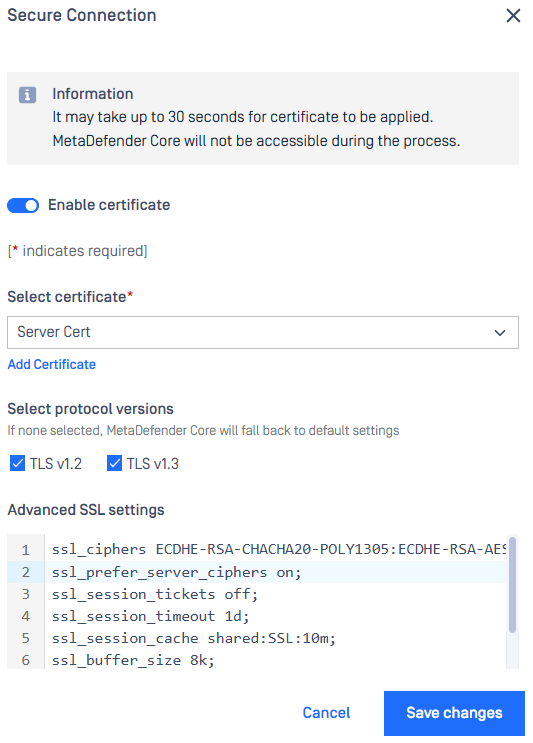
Advanced SSL Settings Support
Configure and manage advanced SSL settings directly through the web console for a seamless user experience and flexibility.
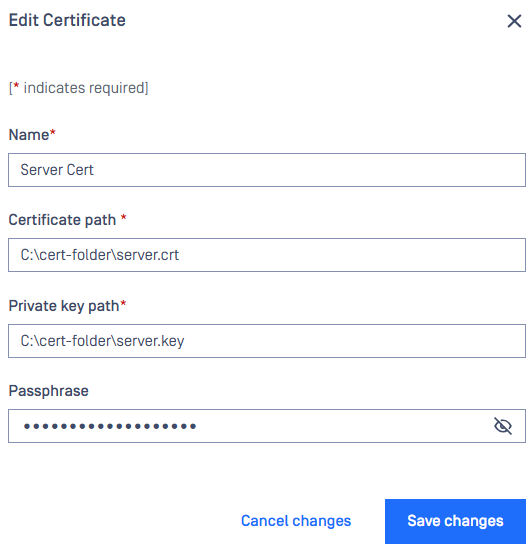
Passphrase Support for Encrypted Private Keys in Certificates
An ability to add encrypted private keys to Certificates with the option to include a passphrase, providing an additional layer of security for sensitive data.
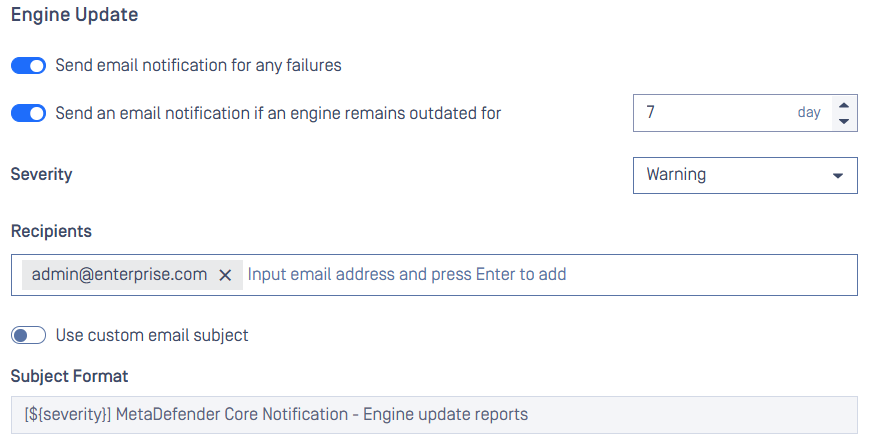
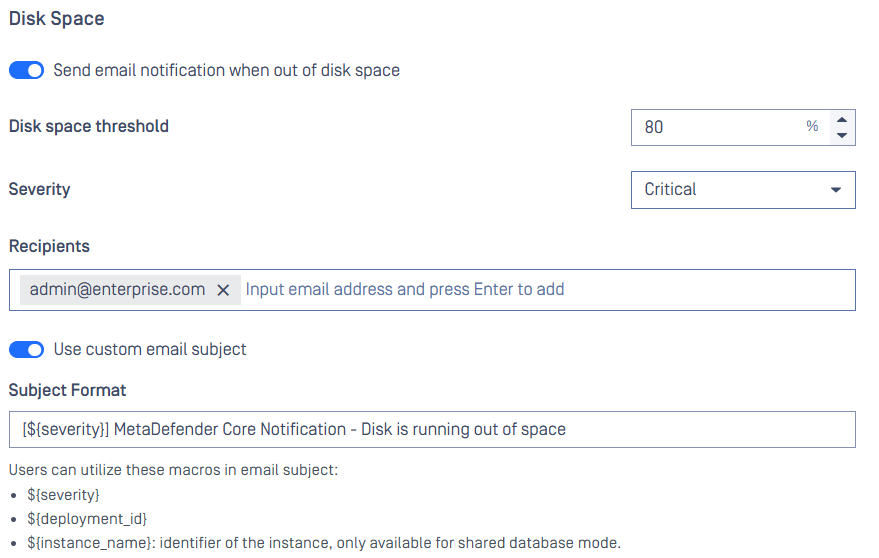
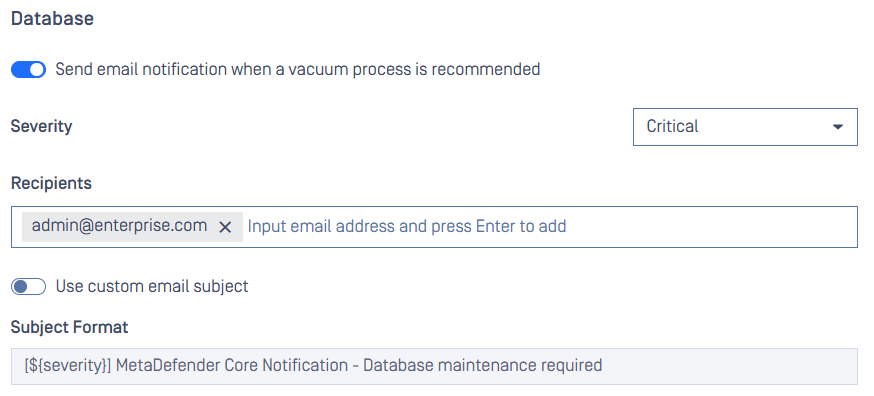
Email Notification Feature Enhancements
Customizable Email Subjects: Tailor email notification subjects to suit your preferences or organizational needs.
Outdated-Definition Engine Alerts: Receive email notifications when engine definition becomes outdated, ensuring timely updates.
Disk Space Warnings: Get notified via email when your system is running low on disk space, helping you avoid disruptions.
Database Maintenance Reminders: Stay on top of database maintenance with periodic reminders displayed on the web console and sent via email.
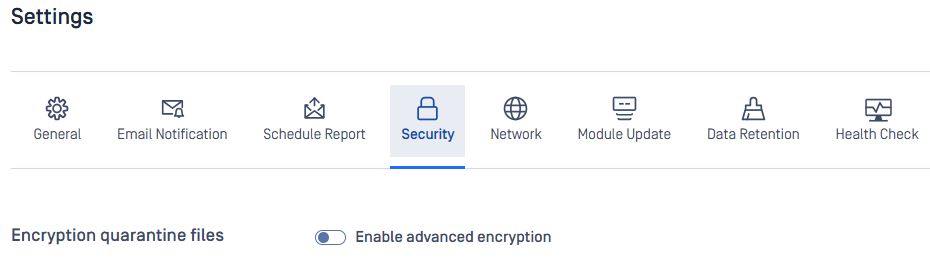
Quarantine Feature Enhancements
Stronger Encryption Algorithm: The Quarantine feature now supports a more robust encryption algorithm, ensuring greater protection for quarantined items. This protection is off by default to avoid affecting existing integration performance.
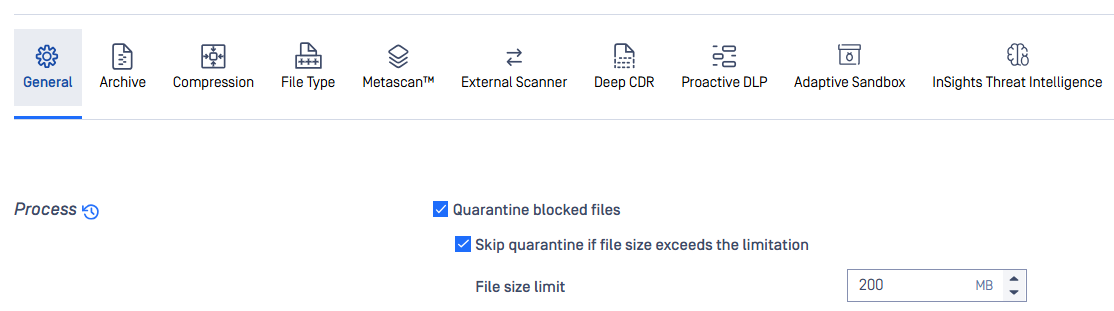
Configurable Quarantine Conditions: Define file size limit for files that should not be quarantined, giving you control over resource allocation and quarantine behavior. You can find this setting under Workflow Rule.
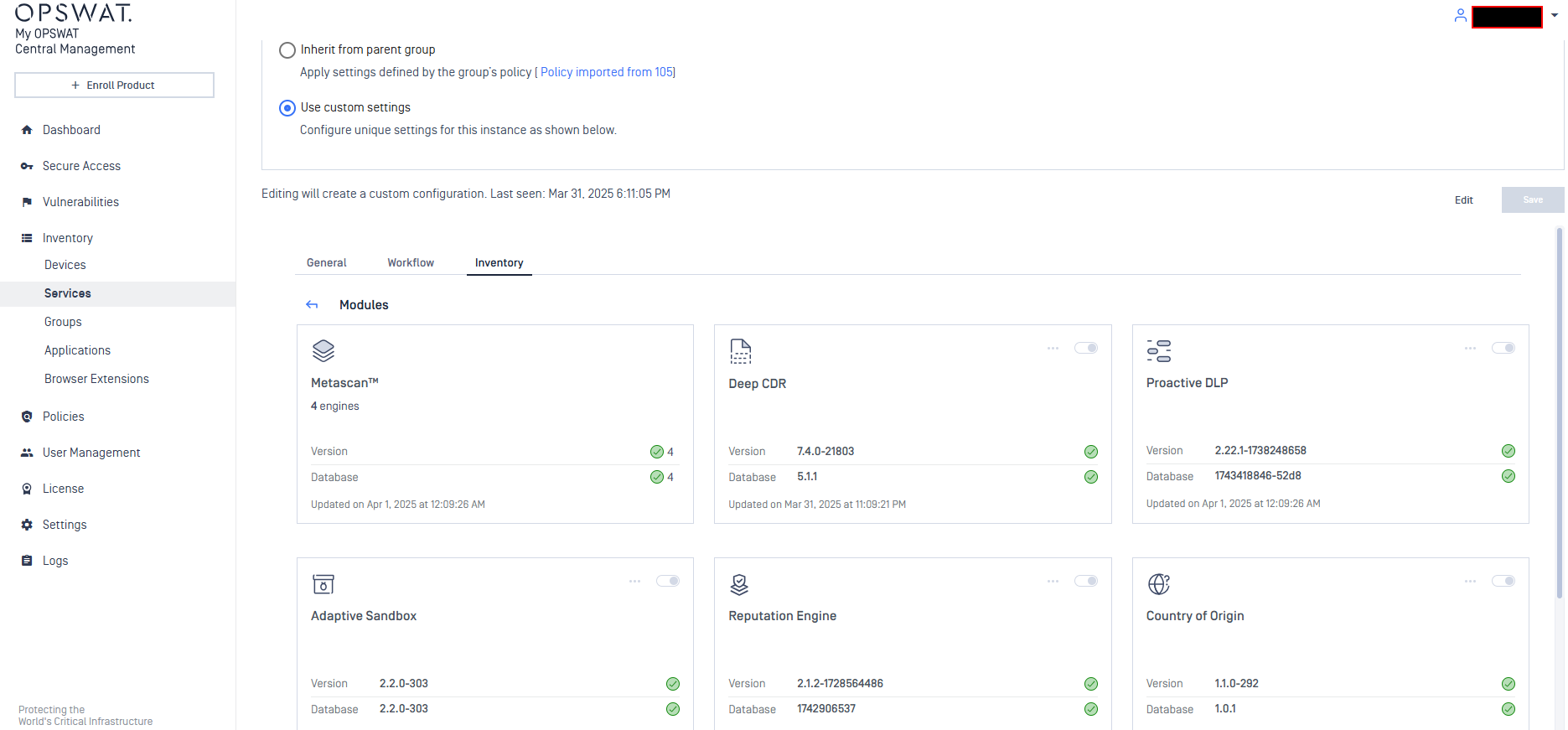
Integration with My OPSWAT Central Management
Introduce first integration with My OPSWAT Central Management v10. Most of available features on v8 are migrated and retained on the v10 integration.
In addition, Administrator can manage and control Modules and advanced module settings seamlessly through My OPSWAT Central Management, streamlining administration and oversight from a single interface.
Usability Enhancements & Changes
Support login with format
<domain>\<username>for AD/LDAP user accounts.An ability to export offline activation license for backup and restore. The exported license is safely stored in password-protected ZIP file.
Introduce a new child setting under 'Block files that exceed the file size threshold' to exclude good verdicts from specific technologies, preventing those files from being blocked due to exceeding the file size threshold.
Support nomination for hot-backup instance with OLMS activation.
Add more accurate load factors such as CPU load and Avg. duration time in the health check API. For more details, refer to Get health check status.
New API for AD-bound password rotation automation. For more details, refer to Change Password for AD/LDAP User Directory.
Reason details for blocklisted and allowlisted results.
An ability to search for users of user groups in Processing History.
New audit logs for JSON and PDF result export from Processing History.
Technology Integration Enhancements
Provide YARA results to Sandbox engine for further analyzing.
Provide MIME type for sanitized and DLP-redacted files.
Support workflow settings for Archive Extraction and Archive Compression engines.
Security Enhancements
Upgrade libraries for vulnerability fixes:
OpenSSL v3.4.1
quazip v1.4.0
libxml2 v2.12.10
Remove unnecessary .NET 6 from Windows Azure image.
Make Password Recovery feature more robust: Users now only receive an expirable token in password-reset email and use that token to set a new password. For more details, refer to Forgot Password.
Enhance error response to not return raw messages and HTML source code.
UI updates
Display password strength meter.
Save "X items per page" as user preference.
Rebrand "My OPSWAT" to "My OPSWAT Central Management".
Display tooltip for items in workflow dropdown list.
Minor cosmetic UI changes.
Bug Fixes
Fixes on product stability issues
Addressed an issue that caused update failure to a version of FileType engine which supports result preference.
Resolved a limitation that made compression failed while handling more than 300K file entries.
Addressed an issue that caused JSON config import failure with message
an unexpected property: "dlp.filescan.certainty_threshold": "Low".Addressed an issue that displayed "mismatch db_api" while upgrading from a quite old Proactive DLP.
Addressed an issue that omitted blocked reasons when a file is blocked by COO engine due to "Unsupported file type".
Addressed an issue that caused Proactive DLP to return "Unsupported File Type" when processing .docx, .xlsx, .txt files in a random manner.
Addressed an issue that caused a crash when stopping engine process during big archive file scanning.
Addressed an issue that caused HTTP 500 Internal Server Error when filtering Processing History with null parameters.
Addressed an issue that caused product upgrade failure when upgrading from v5.11.1 to 5.12.x or 5.13.x with activated SSO. The error message is "Failed to init AES cipher".
Addressed an issue that caused high CPU consumption on PostgreSQL process after product upgrade.
Addressed an issue that caused a considerable delay in fetching results of a large batch scan.
Addressed an issue that caused an incorrect proxy settings retrieval.
Addressed an issue that caused Deep CDR unable to sanitize file after upgrading from product v4 to the latest.
Known Limitations
Details | |
|---|---|
Database connection failure occurred in a specific circumstance after upgrading to version 5.11.0 | This issue has been resolved in version 5.11.1. This issue does not affect all cases when upgrading to version 5.11.0. After applying the authentication method
We prepare a Knowledge Base (KB) for troubleshooting the issue and bringing the system back online: How to Troubleshoot an Error related to Connection to Database Failing after an Upgrade to v5.11.0? The issue will not occur in the following scenarios:
|
Archive compression may fail with very large archive files that contain a large number of subfiles | This issue has been addressed in MetaDefender Core v5.14.0. MetaDefender Core has a limitation when compressing very large archive files that contain a high number of subfiles. In our test scenario, it failed when processing an archive with 300,000 or more subfiles. |
Reuse processing result by hash might be slow in high-load situations | This issue has been resolved in version 5.10.1. Since its introduction in version 5.8.0, this feature has helped improve overall performance and reduce significant load when processing similar files. However, we have realized this feature might run slowly in high-load scenarios against large database sizes. |
Temporary files in the resource folder may not be properly cleaned up if the Archive Extraction engine crashes | Starting from MetaDefender Core version 5.10.1, if the Archive Extraction engine crashes, temporary files from specific extraction transactions may not be properly cleaned up. However, this issue is relatively rare. |
Reject importing non-empty required_engines setting in containerized environments | This issue occurs only in containerized environments. If the config zip file includes non-empty required_engines setting, MetaDefender Core will reject the import. Workaround:
|
The Engine Update feature may not work as expected in certain environments | We have observed that the Engine Update feature may not work properly in an environment protected by a [Palo Alto firewall](Palo Alto firewall). In the log file, you might find the error message ' If upgrading to the latest version of MetaDefender Core does not solve the issue, please consider setting up MetaDefender Update Downloader product. This product is responsible for downloading engines, and MetaDefender Core will retrieve and update its engines from there. |
Performance degradation when processing large archive files | This issue has been resolved in MetaDefender Core version 5.5.0 and the Archive Extraction engine version 6.2.1.
|
Stability issues on Red Hat / CentOS systems with kernel version 372.13 | MetaDefender Core version 5.2.1 or later may not function correctly with Red Hat or CentOS operating systems that use kernel 372.13. Red Hat is addressing the kernel issues. Please try upgrading to kernel version 372.26. |
PostgreSQL and MetaDefender Core services cannot initialize in certain containerized environments | This issue was addressed in MetaDefender Core v5.11.1 In a containerized environment, MetaDefender Core version 5.2.0 or newer may work properly when:
Workarounds for older versions:
|
MetaDefender Core's NGINX web server will not start if weak cipher suites are used for HTTPS | On MetaDefender Core version 5.2.0 and later, OpenSSL 1.x has been replaced by OpenSSL 3.x within the product and its dependencies, including PostgreSQL and NGINX, to enhance security and address known vulnerabilities in OpenSSL 1.x. However, NGINX's implementation of OpenSSL 3.x in MetaDefender Core enforces strong encryption by rejecting all weak cipher suites. It only accepts "HIGH" encryption cipher suites as defined by OpenSSL https://www.openssl.org/docs/man1.1.1/man1/ciphers.html. This means ciphers based on MD5 and SHA1 hashing are no longer supported. Consequently, if you previously configured MetaDefender Core for HTTPS connections using a weak SSL cipher with your certificate, the service will not start due to NGINX's OpenSSL 3.x security enforcement. To prevent and remediate the issue before upgrading MetaDefender Core, please refer to the following resources: HTTPS Failure on MetaDefender Core 5.2.0 (or newer) |