
This article applies to MetaDefender Endpoint Security SDK 4.3.6139.0 and later on Windows, for CrowdStrike Falcon (signature 2866).
Overview
The GetLastScanTime method (method 1004) returns the time of the most recent on-demand scan for CrowdStrike Falcon. Falcon keeps on-demand scan history in the CrowdStrike cloud rather than on the endpoint, so the SDK reads it from the CrowdStrike Falcon API using API client credentials that you pass in json_in.
The general GetLastScanTime reference lists api_url and credentials as optional input. For CrowdStrike Falcon they are required. If either is missing, the SDK cannot query the Falcon API and the call fails.
Prerequisites
Before you call GetLastScanTime, make sure that:
The CrowdStrike Falcon sensor is installed on the endpoint.
Your CrowdStrike Falcon subscription includes on-demand scanning.
You have a Falcon console role that can create API clients.
Then set up an API client:
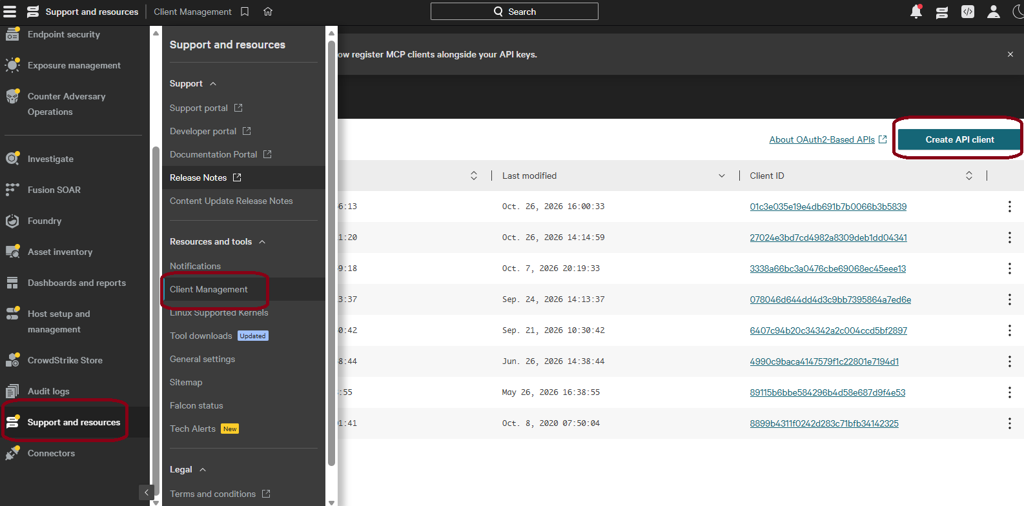
In the CrowdStrike Falcon console, open API clients and keys and create a new API client.
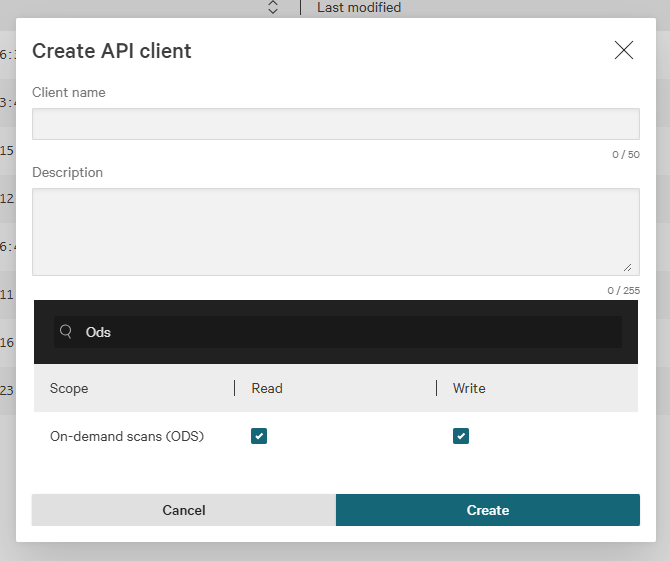
Grant the API client the On-demand scans (ODS) scope with Read access.
Save the generated Client ID and Client Secret. The secret is shown only once.
Note the CrowdStrike Falcon API base URL for your cloud region, for example:
https://api.crowdstrike.com(US-1)https://api.us-2.crowdstrike.com(US-2)https://api.eu-1.crowdstrike.com(EU-1)
The method does not require administrator privileges on the endpoint.
Input format
Pass the parameters through the json_in argument. The highlighted lines are specific to CrowdStrike Falcon.
Field | Type | Required | Description |
|---|---|---|---|
| Integer | Yes | Method ID of |
| Integer | Yes | Signature ID of CrowdStrike Falcon. Use |
| String | No | Scan type to query ( |
| String | Yes | CrowdStrike Falcon API base URL for your cloud region. |
| String | Yes | Client ID of the Falcon API client created in Prerequisites. |
| String | Yes | Client secret of the Falcon API client created in Prerequisites. |
Expected behavior
When the request is configured correctly, the SDK:
Authenticates to the CrowdStrike Falcon API with the supplied credentials.
Reads the on-demand scan history for the endpoint.
Returns the time of the most recent completed on-demand scan.
If a scan is still running when you call the method, the SDK checks the five most recent scans and returns the time of the latest one that has completed. If no completed on-demand scan exists, no scan time is returned.
Scan type
The scan type in the result is always unspecified. CrowdStrike Falcon records every on-demand scan as a scan of a location, such as a drive (C:\) or a folder (C:\Users\), including scans started with the Scan System Drive option. A Falcon scan record therefore cannot be mapped reliably to an SDK scan type such as full, default, or path.
Troubleshooting
Error code or symptom | Possible cause | Recommended resolution |
|---|---|---|
| The JSON is malformed, | Check the JSON syntax and confirm that |
Connection or authentication error, such as | The SDK could not get scan data from the Falcon API. Common causes are no network access to | Check network access to |
No scan time returned | No completed on-demand scan exists for the endpoint, or the only recent scans are still running. | Run an on-demand scan from the Falcon console, wait for it to complete, then call the method again. |
If Further Assistance is required, please proceed to log a support case or chatting with our support engineer.