
Overview
This article provides the support charts for the OPSWAT OESIS Framework Compliance module and explains how to use them when validating product support, tested versions, and available compliance-related API capabilities.
OPSWAT provides support charts in two formats:
Format | Best for Compliance module use cases |
|---|---|
Online Support Charts | Quick lookups, general browsing, and high-level product support verification |
Built-in (In-Package) Support Charts | Integration, automation, build-specific precision, and custom UI mapping |
Use the Online Support Charts for a high-level overview of supported products.
Use the Built-in Support Charts whenever you need exact, build-specific certainty for a Compliance SDK integration.
Online Support Charts
Online charts are published per platform:
Each chart shows the supported products, tested versions, available API methods, product category, and extended capabilities exposed for each API.
After you open the Online Support Charts and search for a product, such as Cortex, the results page is organized into sections that describe the product support details. Key areas include Tested Points, API details, Signature name, Product category, labels, and extended API capabilities, including whether administrator rights are required. The sections below explain how to read each part of the chart.
Tested Points
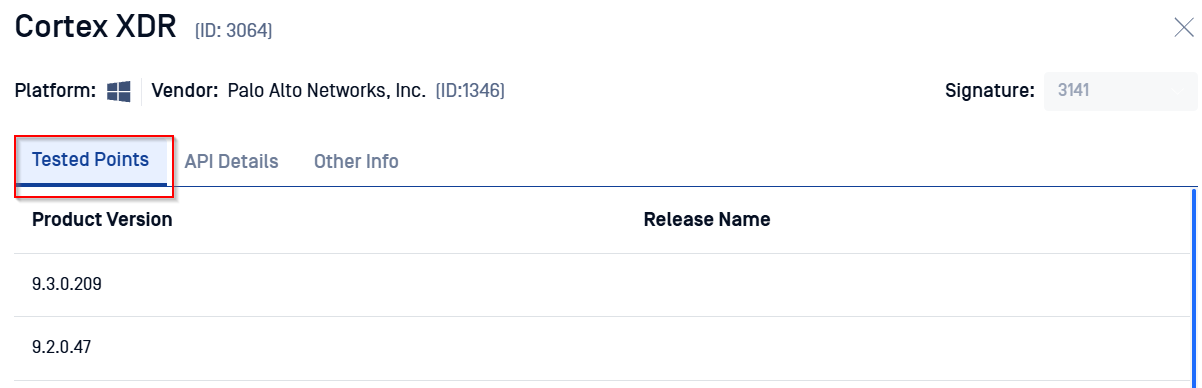
A tested point is a specific product version that OPSWAT has installed, validated, and tested internally. For Compliance module products, validation focuses on detection, posture assessment, remediation, and other compliance-related APIs.
Read as: "This is a version OPSWAT has directly validated."
Do not read as: "This is the only version OPSWAT supports."
Support generally extends to adjacent versions in the same product branch. See the FAQ below for details and examples.
API Details, Color Coding, and Extended Capabilities
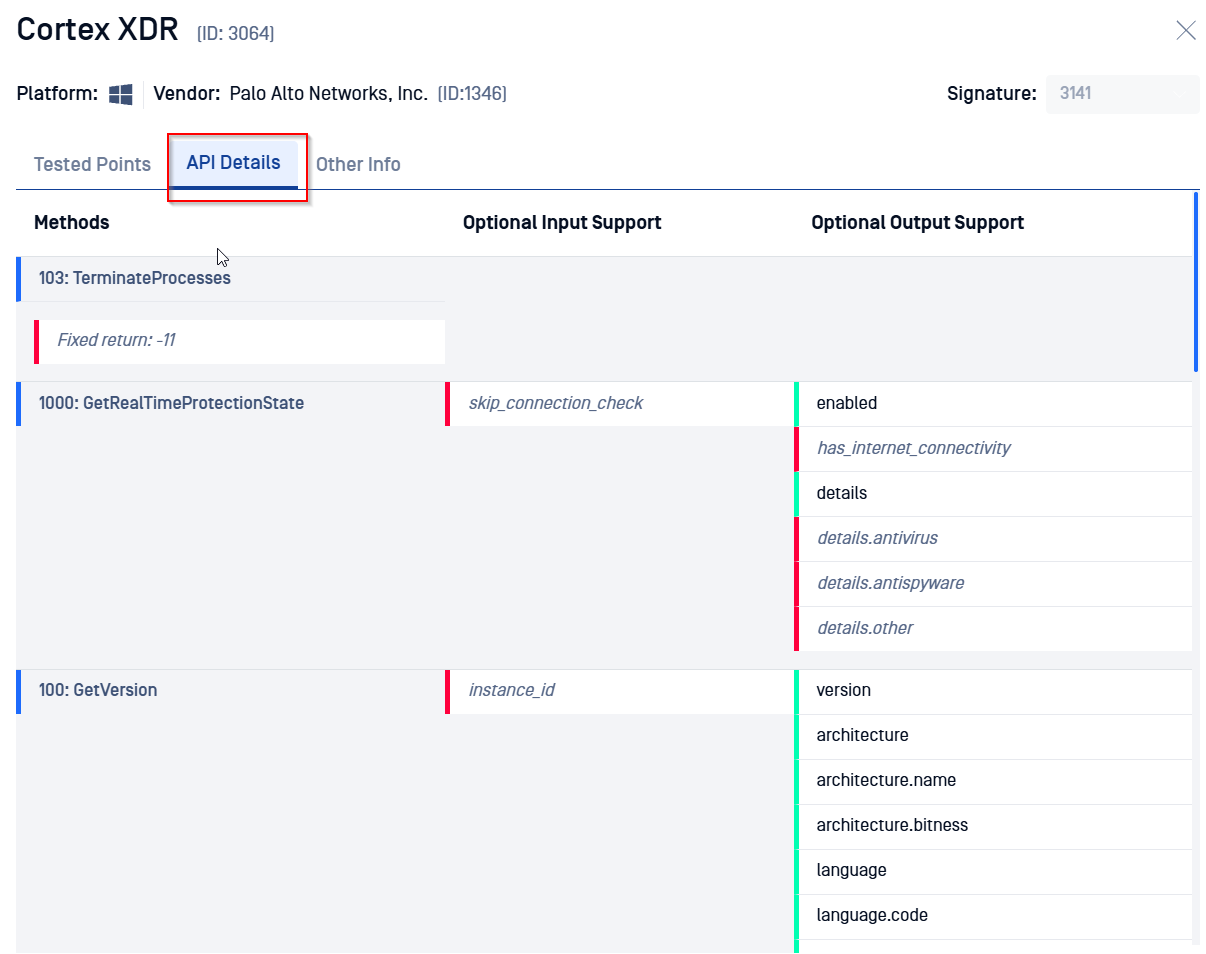
The API details section shows the supported methods for each product, expected behavior, and any per-API capabilities. The table below explains the color coding used in these columns:
Column | Color | Meaning | Example |
|---|---|---|---|
Method | Red | The method returns a fixed error code rather than a dynamic result. | Fixed return |
Optional Input Support | Green | Parameter is required — you must supply it. | Signature ID |
Optional Input Support | Red | Parameter is optional — OESIS accepts it, but applies a default if omitted. |
|
Optional Output Support | Green | Field is always returned in the response. |
|
Optional Output Support | Red | Field is returned only when obtainable by OESIS and may be omitted. |
|
“Optional input/output support” is the feature capability name. It indicates OESIS's capability to handle optional fields. The color clarifies whether a specific field within that method is required (Green) or optional (Red).
Online charts describe APIs at the signature level across the latest definitions. API behavior may differ based on your SDK build version. For exact build-level capabilities, refer to the built-in charts shipped inside your SDK package.
Additional Metadata
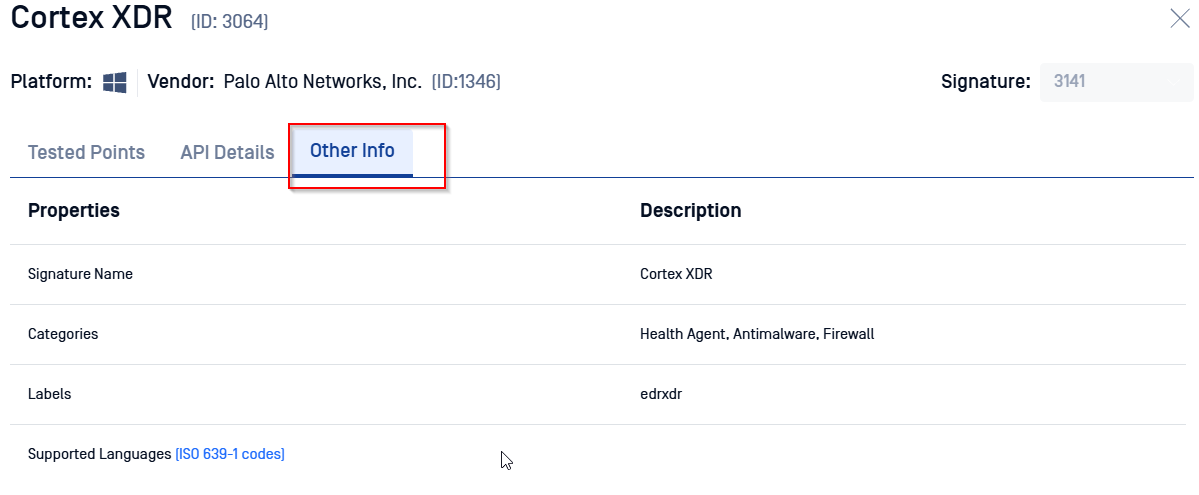
The chart also displays:
Signature Name: The internal identifier used for detection.
Product Category: Functional classification, such as Antimalware or Firewall.
Labels: Specific operational flags, such as
edrxdr.
Built-in Support Charts
Every OESIS SDK package includes build-specific support charts representing the exact capabilities of that binary. These charts are organized by category so integrators can parse them for custom UI visibility, policy validation, or automated support checks.
For a complete list of supported classifications, refer to OESIS Product Categories.
File Location
Built-in charts are located inside the SDK release package:
Chart Versions and Extended API Capabilities
The built-in charts ship in three versions. All three cover the same Compliance products and versions; the difference is not only the legend wording. Each version exposes a different level of per-API capability detail, including implementation state, admin-rights requirements and RTM compatibility.
Original Support Chart: Baseline format showing supported Compliance products, validated versions, and API methods.
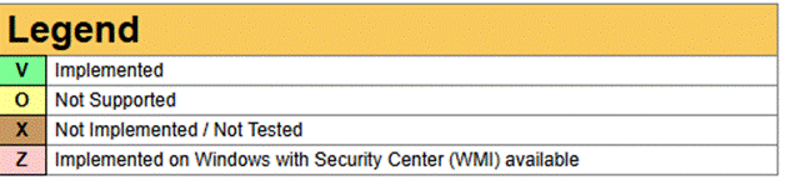
Support Chart v2: Adds extended capability visibility for each API, including whether a method is implemented and whether elevated administrative privileges are required. This helps integrators decide which Compliance APIs can run in standard user context and which require admin rights.
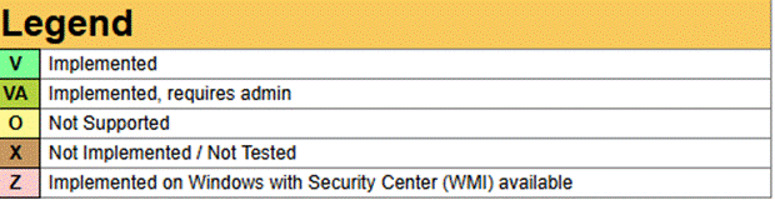
Support Chart v3: Extends the per-API capability view further by streamlining status terminology and adding RTM support indicators:
Renames Not Implemented/Not Tested to Untested.
Simplifies Implemented, requires admin to Requires admin.
Adds Realtime monitoring supported for Compliance methods compatible with real-time change detection.
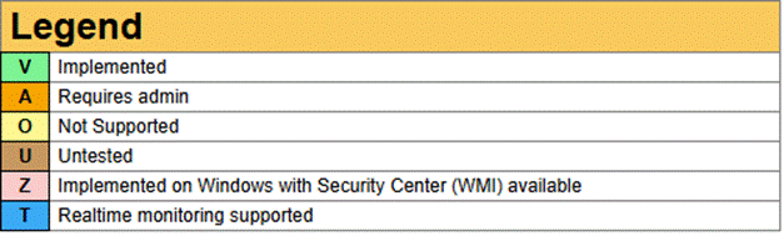
If you are not utilizing or planning to integrate the Real-Time Monitoring (RTM) feature, Support Chart v2 is recommended.
To learn more about RTM, see How to monitor compliance data changes in real time.
Frequently Asked Questions
Does OESIS support only the exact tested version?
No. Support extends to adjacent versions within the same release branch unless the vendor introduced breaking architectural changes.
Tested Point | Typical Interpretation |
|---|---|
| Earlier versions in the same branch, such as |
| Versions within the |
| Adjacent maintenance releases, such as |
The support chart demonstrates validation evidence, not a strict compatibility boundary. Contact OPSWAT Support if you require formal validation of an unlisted version.
Why aren't all vendor versions listed?
Demand-driven validation: Versions are added automatically or via customer requests; not every interim minor patch is validated individually.
Vendor rollback restrictions: Many vendors only distribute the latest installer, such as Norton, Bitdefender, and Windows Update Agent, making legacy version testing impractical.
What are "Untested Points"?
In earlier support charts, Untested Points were product versions OPSWAT had identified but had not yet fully validated. They were shown to indicate that testing or investigation was still in progress, not to confirm full support for that exact version.
OPSWAT no longer publishes new untested support points to avoid confusion. Previously published untested points may still appear for historical reference, and they should be treated as informational only until validated as tested points.
If Further Assistance is required, please proceed to log a support case or chatting with our support engineer.