
This article applies to MetaDefender Endpoint Security SDK 4.3.6788.0 and later on Windows, and 4.3.6181.0 and later on macOS.
Overview
detect_affected_instances makes GetProductVulnerability (method 50505) check every installed copy of a product, not only one. Each CVE in the result then lists the copies it affects.
Property | Value |
|---|---|
Type | Boolean |
Default |
|
Optional | Yes |
Platforms | Windows, macOS |
true: the SDK finds every copy of the product on the endpoint, reads each copy's version, and addsaffected_app_instancesto each CVE. The copies include the machine-wide copy and each user's copy, also for users who are not logged in.falseor omitted: the call behaves as before. It checks one copy, picked from the logged-on user's view.
The flag needs administrator (Windows) or root (macOS) rights, and each call scans every user on the machine. Integrations that keep one version per product gain nothing from it and would only pay the extra time.
Before you use it
The flag is for integrations that manage data per copy (per instance). Such an integration:
calls
DetectProductswithdetect_all_users_products: true,keeps the instance IDs from
detected_products[].instances,passes
instance_idto every per-copy call, such asGetVersion.
If your integration reads one version per product without instance_id, do not enable the flag. On macOS, a flagged call also changes which copy later calls without instance_id read (see Effect on later calls without instance_id).
Required workflow
Detect every copy of each product. Each detected product carries an
instancesobject whose keys are the instance IDs.
Read each copy's version, one call per instance ID.
Request the vulnerabilities of every copy.
Join each
cves[].affected_app_instances[].idto the instance IDs from step 1.
A successful result looks like this (other CVE fields omitted):
A CVE is listed when at least one copy is in its affected range, and it lists only the copies it affects. When a product has one copy, each CVE lists that one copy.
The id is the same instance ID that DetectProducts returns and GetVersion accepts, so no extra lookup is needed.
What the path value means
path is the value that DetectProducts with detect_all_users_products: true returns for that instance ID. Its meaning differs by platform:
Windows: the copy's owner, not a folder. It is
DOMAIN\userfor a per-user copy, orSystem Wide Instancefor the machine-wide copy.macOS: the copy's install location. This is usually a
.appbundle path, such as/Applications/zoom.us.appor/Users/user1/Applications/zoom.us.app, but not always.
Use id, not path, to join results. path is for display.
What to expect when detect_affected_instances is true
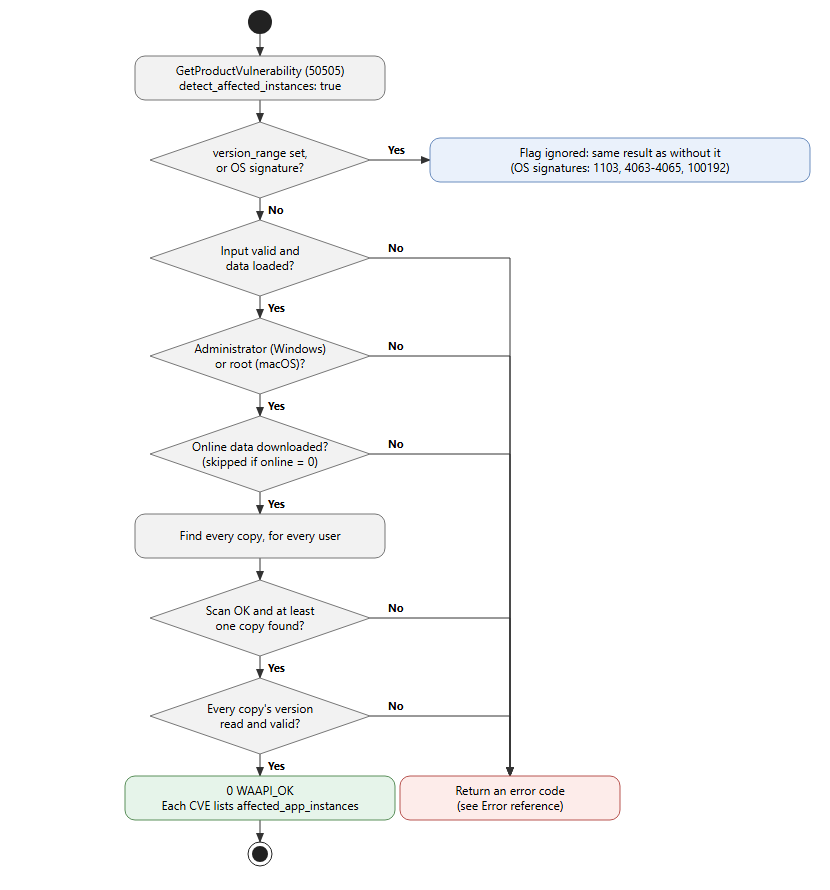
The per-copy check runs when detect_affected_instances is true, version_range is not set (or is empty), and the signature is a third-party product (see When the flag is ignored).
The call checks its input first. An
onlinevalue other than0,1or2returnsWAAPI_ERROR_INVALID_INPUT_ARGS(-20). Withonlineset to0, if the offline vulnerability database has not been loaded, the call returnsWA_VMOD_ERROR_OFFLINEVMOD_NOT_INITIALIZED(-1019). It then checks rights: without administrator (Windows) or root (macOS) rights, it returnsWAAPI_ERROR_ACCESS_DENIED(-22) and does nothing else.Every installed copy is checked, including copies of users who are not logged in. No logged-on user is needed, so the check works when the SDK runs as a service or LaunchDaemon.
If any copy cannot be checked, the call returns an error and no result, because a missing copy can hide a CVE.
With
onlineset to1or2, the online data is fetched first, so a download error can be returned before any "not found" error.
When the flag is ignored
In these cases the call returns the same JSON and code as the same call without the flag. There is no affected_app_instances, no rights check, and no warning in json_out (the SDK debug log records that the flag was ignored):
version_range is set. The range takes precedence and CVEs are matched against it only. An empty
version_range("") counts as not set, so the flag still applies.OS signatures, once the vulnerability database has been loaded with
ConsumeOfflineVmodDatabase: Windows Update Agent (1103), Microsoft SharePoint Server (4063,4064,4065) and macOS Software Update (100192). These use the OS update flow, which checks the machine, not per-user copies.
Effect on later calls without instance_id
macOS: after a flagged call, a later call that does not pass instance_id returns the result for one of the installed copies, and which copy is not defined. It can be another user's copy.
This affects GetVersion and other per-product methods called without instance_id, and GetProductVulnerability called without the flag.
It lasts until the next DetectProducts call without detect_all_users_products (or with it set to false), which resets the SDK to the current user's view. A DetectProducts call with detect_all_users_products: true leaves the same state, with or without this flag.
If your integration mixes per-copy and per-product calls on macOS, pass instance_id everywhere, or call DetectProducts without detect_all_users_products before the per-product calls.
Windows: later calls are not affected.
Error reference
These codes apply only when the per-copy check runs. Every error comes with a readable error.error_message that names the signature, and the copy when one copy caused it.
Return code | When |
|---|---|
| The SDK is not running as administrator (Windows) or root (macOS). |
| With |
| No copy of the signature was found for any user. On Windows, also when a per-user signature is passed instead of the system signature that |
| The version of one copy could not be read, or is empty, |
| The scan or one copy's version read hit a temporary condition. On Windows this happens while a user profile is still being prepared or is briefly busy. Retry the call. |
| The loaded engine is older than the vulnerability module and has no per-copy detection. Update the engine, or call without the flag. |
| With |
Other codes | The all-users scan failed. The scan's own code is returned, and the message carries the scan's reason. |
With online set to 1 or 2, the online data is downloaded before the scan. A product that is not installed can therefore return a download error instead of WAAPI_ERROR_NOT_FOUND (-28) with the "not found for any user" message.
Troubleshooting with error_message
Read the return code first, then error.error_message. The message tells you which signature and which copy failed, and why. Some examples:
WAAPI_ERROR_ACCESS_DENIED(-22): "detect_affected_instances needs administrator (Windows) or root (macOS) rights to read every user's installed copies." Run the SDK elevated, or as a service or LaunchDaemon.WAAPI_ERROR_NOT_FOUND(-28): "No installation of signature 708 was found for any user." Check that you pass the signature that all-usersDetectProductsreports.WA_VMOD_ERROR_CANNOT_GET_VERSION(-1020): "Cannot get the version of instance 8ca1b949… (signature 708): GetVersion returned …" CallGetVersionwith thatinstance_idto see the same failure on its own.WAAPI_ERROR_RESOURCE_BUSY(-70): "… user profile(s) were still being prepared by Windows and could not be scanned; retry the call." Retry after a short wait.
Messages for a failure that would make the result incomplete end with "The vulnerability result would be incomplete, so no result is returned."
If you open a case with OPSWAT support, include:
the full
json_inandjson_outof the failing call (return code anderror.error_message),the
DetectProductsoutput withdetect_all_users_products: true, and theGetVersionoutput for the instance ID named in the message,the account the SDK runs as, and whether a user was logged in,
SDK debug logs from the failing run.
Performance
Each flagged call scans the installed products of every user on the machine, so it is slower than the same call without the flag. On Windows this includes reading the profile data of each user who is not logged in.
The cost is per call: checking many signatures with the flag runs that many scans. Schedule large per-copy checks for idle times, and enable the flag only for the products you report per copy.
If Further Assistance is required, please proceed to log a support case or chatting with our support engineer.