
How do I send specific log entries to syslog integration?
This article applies to all MetaDefender Core version 5.0 and newer releases deployed on Windows and Linux systems.
Introduction:
This knowledge base article provides a way to choose specific MSGID’s and their urgency level so that based on the Syslog configured level, to filter them against all other log entries.
Details:
There are situations where the syslog integration needs to be configured to filter the log entries shared and to leverage only specific log entries that the customer is interested in. This allows the customer to avoid sending unwanted logs to the syslog integration.
For example, if we want to only view the errors in the syslog integration but at the same time we are interested in the scan results to see if there are any infections or issues with scanning, we can configure the syslog integration using the error log level but how do we add log entries that have information log level?
By configuring the override function, we can configure specific msgid’s log level from information to error.
[INFO ] 2025.04.28 05:58:30.407: (core.workflow) Processing finished … [msgid: 82]
After the change is implemented:
[ERROR ] 2025.04.28 06:00:02.032: (core.workflow) Processing finished … [msgid: 82]
To make the above change please follow the instructions below for each OS:
Windows:
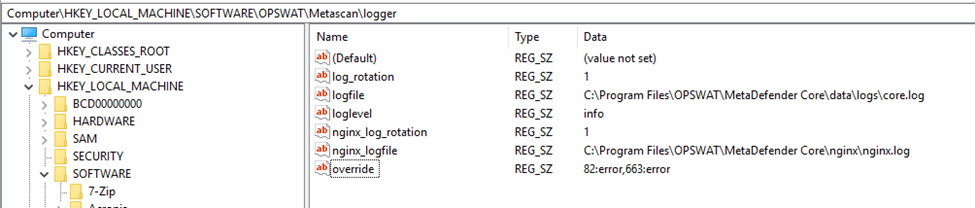
Please open the regedit and navigate to:
HKEY_LOCAL___MACHINE\SOFTWARE\OPSWAT\Metascan\logger
Create a new string value (REG_SZ) named “override” and enter all the msgid’s followed by the new log level and then add a comma to add a new value. Please see example below:
Linux:
Please edit the configuration file /etc/ometascan/ometascan.conf in the logger section as follows: ** Please navigate to the [logger] section and add the “override” entry and enter all the msgid’s followed by the new log level and then add a comma to add a new value. Please see example below:
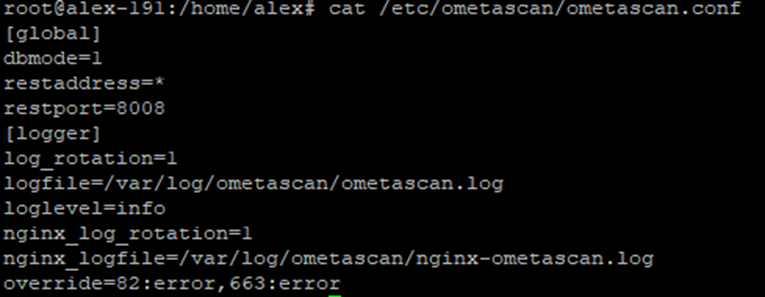
The override option changes the log level for both syslog integration and the log information.
After the changes are made, please restart the services to implement the changes.
If Further Assistance is required, please proceed to log a support case or chatting with our support engineer.